Monitors / Compare
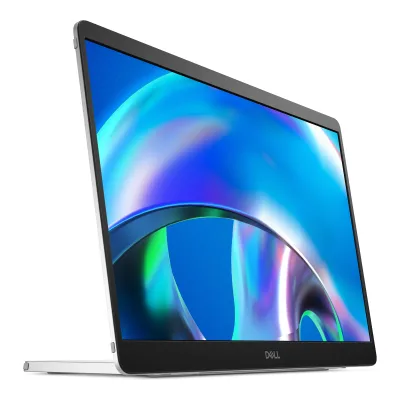
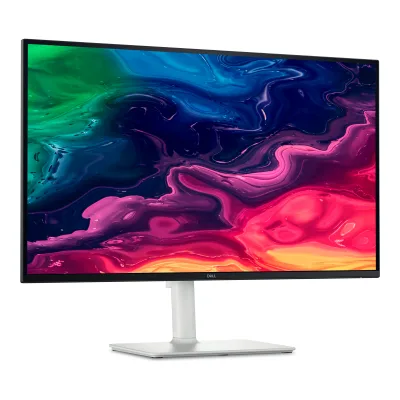
Dell Pro 14 Plus Portable Monitor P1425 vs Dell 27 Plus 4K USB-C Monitor S2725QC
Product A: Dell
Pro 14 Plus Portable Monitor P1425
78 of 172 known Dell UltraSharp U2725QE
 Lenovo ThinkVision P27Q-40
 Dell S2725QS
 Samsung Essential Monitor S3 S32GF 27"
 LG 27U411A-B
 Dell UltraSharp U3225QE
 Dell Pro 27 Plus 4K USB-C Hub Monitor P2725QE
 Dell Pro 27 Plus QHD USB-C Hub Monitor P2725DE
 LG 24U411A-B
 Acer KB272 G0bi
 Acer KB242Y G0bi
 Dell 27 Plus QHD Monitor S2725DSM
Change Dell Pro 14 Plus Portable Monitor P1425
Compare the Dell 27 Plus 4K USB-C Monitor S2725QC with
Dell UltraSharp U2725QELenovo ThinkVision P27Q-40Dell S2725QSSamsung Essential Monitor S3 S32GF 27"LG 27U411A-BDell UltraSharp U3225QEDell Pro 27 Plus 4K USB-C Hub Monitor P2725QEDell Pro 27 Plus QHD USB-C Hub Monitor P2725DELG 24U411A-BAcer KB272 G0biAcer KB242Y G0biDell 27 Plus QHD Monitor S2725DSMProduct B: Dell
27 Plus 4K USB-C Monitor S2725QC
96 of 172 known Lenovo ThinkVision M14t Gen 2
 Arzopa Z1FC
 LG UltraFine 27UP650K-W
 LG UltraFine 27US500-WDell Pro 27 Plus 4K USB-C Hub Monitor P2725QEDell Pro 27 Plus QHD USB-C Hub Monitor P2725DEDell UltraSharp U2725QELenovo ThinkVision P27Q-40Dell S2725QS
 Samsung Essential Monitor S3 S30GD 24"
 Samsung Essential Monitor S3 S30GD 27"LG 24U411A-B
Change Dell 27 Plus 4K USB-C Monitor S2725QC
Compare the Dell Pro 14 Plus Portable Monitor P1425 with
Lenovo ThinkVision M14t Gen 2Arzopa Z1FCLG UltraFine 27UP650K-WLG UltraFine 27US500-WDell Pro 27 Plus 4K USB-C Hub Monitor P2725QEDell Pro 27 Plus QHD USB-C Hub Monitor P2725DEDell UltraSharp U2725QELenovo ThinkVision P27Q-40Dell S2725QSSamsung Essential Monitor S3 S30GD 24"Samsung Essential Monitor S3 S30GD 27"LG 24U411A-B74 of 164 fields differ
- 40 different values
- 34 known for one only
- 25 the same
- 65 missing for both
Biggest differences
Each bar uses the scale of all 179 monitors.
- Power use (max)Lower is betterA: 7WB: 180WPro 14 Plus Portable Monitor P1425 is 173 W lower.
- Power use SDR (EU label)Lower is betterA: 5.4WB: 25.2WPro 14 Plus Portable Monitor P1425 is 19.8 W lower.
- Refresh rateA: 60HzB: 120Hz27 Plus 4K USB-C Monitor S2725QC is 60 Hz higher.
- Response timeLower is betterA: 7msB: 4ms27 Plus 4K USB-C Monitor S2725QC is 3 ms lower.
- Standby powerLower is betterA: 0.3WB: 0.4WPro 14 Plus Portable Monitor P1425 is 0.1 W lower.
- Brightness (typical, SDR)A: 400nitsB: 350nitsPro 14 Plus Portable Monitor P1425 is 50 nits higher.
Refresh rate per resolution
The best rate over any port. Bars run from 0 to 1200 Hz.
3840 × 2160Native for B
ANot listed
B120Hz
1920 × 1200Native for A
A60Hz
BNot listed
Size, drawn to scale
Front and side. Solid lines show the stand at its lowest. Dashed lines show it at its highest.
- APro 14 Plus Portable Monitor P1425: 315.2 × 223.5 mm
- B27 Plus 4K USB-C Monitor S2725QC: 611.5 × 356 mm
We have no stand height for Pro 14 Plus Portable Monitor P1425, so it is drawn without its stand.
Weight
0 to 15 kg
Weight with stand
A0.62kg
B6.71kg
Weight without stand
A0.35kg
B4.85kg
Box weight
A1.24kg
B8.9kg
All 172 fields
Every value links to where we found it.
General
4 of 8 differ
Series
Model numbers
GTIN / EAN
Not available
Announced
Not available
Not available
Status
Predecessor
Not available
Not available
Successor
Not available
Not available
Launch price (EU)
Not available
Not available
Markets
Colours
Not available
Segment
Display
8 of 12 differ
Screen size
Viewable screen diagonal
Native resolution
Aspect ratio
Pixel density
161.7ppi
163.2ppi
Pixel pitch
Active display area
Width301.59Height188.5mm(11.9 × 7.4 in)2Owner's manualdl.dell.com/content/manual84017616-dell-pro-p-14-portable-monitor-p1425-user-s-guide.pdfRead 10 October 2026Table 5 explicitly names horizontal active image width 301.59 mm and vertical height 188.50 mm. Glass and chassis dimensions are separate.
Curved
Curvature radius
Not available
Not available
Screen surface
Anti-reflection coating
Anti-glare with hard-coating 3H2Owner's manualdl.dell.com/content/manual84017616-dell-pro-p-14-portable-monitor-p1425-user-s-guide.pdfRead 10 October 2026
Anti-glare with hard-coating 3H2Owner's manualdl.dell.com/content/manual22980564-dell-s-27-4k-usb-c-monitor-s2725qc-user-s-guide.pdfRead 8 October 2026
Panel
6 of 31 differ
Panel type
Panel type (as published)
In-plane Switching (IPS) Technology1Maker product pagedell.com/en-us/shop/monitors/apd/dell-pro-14-plus-portable-monitor-p1425/p1425/-Read 10 October 2026
In-plane Switching (IPS) Technology1Maker product pagedell.com/en-us/shop/dell-27-plus-4k-usb-c-monitor-s2725qc/apd/210-brnc/monitors-monitor-accessoriesRead 8 October 2026
Backlight
Dimming zones
Not available
Not available
Panel maker
Not available
Not available
Panel part number
Not available
Not available
Panel generation
Not available
Not available
Subpixel layout
Not available
Not available
Colour depth
Not available
Not available
Colour depth method
Not available
Not available
Displayable colours
sRGB coverage
DCI-P3 coverage
Not available
Not available
Adobe RGB coverage
Not available
Not available
Rec. 2020 coverage
Not available
Not available
NTSC coverage
Not available
Not available
Factory calibrated
Not available
Not available
Claimed Delta E
Not available
Not available
Paper calibration report in box
Not available
Not available
Hardware calibration support
Not available
Not available
Static contrast ratio
Brightness (typical, SDR)
Brightness (maker minimum)
Not available
Not available
Peak brightness (HDR)
Not available
Not available
HDR peak test window
Not available
Not available
Full-screen brightness
Not available
Not available
HDR formats
Not available
HDR certification
Not available
Viewing angle (horizontal)
Viewing angle (vertical)
Refresh rate and motion
10 of 22 differ
Refresh rate per resolution and port
ADell Pro 14 Plus Portable Monitor P1425
| Resolution | USB-C DisplayPort 1.2 |
|---|---|
| 1920 × 1200Native | 60Hz |
BDell 27 Plus 4K USB-C Monitor S2725QC
| Resolution | HDMI 2.1 | USB-C DisplayPort 1.4 |
|---|---|---|
| 3840 × 2160Native | 120Hz | 120Hz |
Source2Owner's manualdl.dell.com/content/manual22980564-dell-s-27-4k-usb-c-monitor-s2725qc-user-s-guide.pdfRead 8 October 2026Tables 6/7 explicitly state USB-C DP 1.4 Alt Mode maximum 3840x2160 at 120 Hz and both HDMI inputs support up to UHD 3840x2160 at 120 Hz with FRL/HDR/VRR as specified in HDMI 2.1. These maxima do not rely on preset timings alone. USB-C HBR3/DP 1.4 host: High Data Speed enables full video performance and USB data. HBR2/DP 1.2-or-lower hosts can require High Resolution with reduced USB speed. Bit depth, chroma and DSC requirements are not named and remain omitted. Lower-resolution preset rows and the Xbox 1440p 120 incompatibility reported by RTINGS do not establish lower-resolution maxima.9Owner's manualcdn.cs.1worldsync.com/b5/41/b5418c91-9e2c-4b21-9864-cde076c018a3.pdfRead 8 October 2026Original Tables 6/7 also explicitly name USB-C maximum 4K 120 and both HDMI 4K 120 FRL, corroborating current guide. No unproved transport subfields are added.
Max refresh rate
60Hz
120Hz
Max refresh rate at native resolution
60Hz
120Hz
Max refresh rate over DisplayPort
Not available
Not available
Max refresh rate over HDMI
Not available
120Hz
Max refresh rate over USB-C
60Hz
120Hz
Max refresh rate at 10-bit
Not available
Not available
Native refresh rate
Overclocked refresh rate
Not available
Not available
Dual mode
Not available
Not available
Minimum fixed refresh rate
Not available
Not available
Adaptive sync technologies
Not available
VRR range per port
Not available
Not available
Response time (maker GtG claim)
Response time (maker MPRT claim)
Not available
Not available
Overdrive settings
Not available
Motion blur reduction
Not available
Not available
Blur-reduction technology
Not available
Not available
Blur reduction works with VRR
Not available
Not available
Flicker-free (claimed)
Black frame insertion
Not available
Not available
Measured
4 of 12 differ
Input lag at maximum refresh rate
Not available
Average response time (measured)
Not available
Not available
Overshoot (measured)
Not available
Not available
HDR brightness in a real scene (measured)
Not available
Not available
PWM flicker frequency (measured)
Not available
Not available
VRR range (measured)
Not available
Not available
Colour accuracy (measured Delta E)
Not available
Not available
Gray uniformity (measured)
Not available
Not available
Reflections (measured)
Not available
Not available
Connectivity
9 of 19 differ
Video inputs
ADell Pro 14 Plus Portable Monitor P1425
| Type | Version | Count | HDCP |
|---|---|---|---|
| USB-C | DisplayPort 1.2 | 2 | 1.4 |
Source1Maker product pagedell.com/en-us/shop/monitors/apd/dell-pro-14-plus-portable-monitor-p1425/p1425/-Read 10 October 2026Two physical USB-C ports support DP 1.2 Alt Mode and HDCP 1.4. Actual guide explicitly states USB data is not supported, so no USB hub upstream/downstream data ports or data-speed claim is invented.7Owner's manualdoi-product-assets.s3.amazonaws.com/pub/User-Manual/1085392674.pdfRead 8 October 2026Original February 2025 Rev. A00 confirms two DP 1.2/HDCP 1.4 USB-C inputs and explicitly says USB data not supported. Current A03 retains these core hardware specifications.
BDell 27 Plus 4K USB-C Monitor S2725QC
| Type | Version | Count | HDCP |
|---|---|---|---|
| HDMI | 2.1 | 2 | 2.3 |
| USB-C | DisplayPort 1.4 | 1 | Not available |
Source2Owner's manualdl.dell.com/content/manual22980564-dell-s-27-4k-usb-c-monitor-s2725qc-user-s-guide.pdfRead 8 October 2026Complete Tables 6/7: two HDMI 2.1 inputs with HDCP 1.4 and 2.3, plus one USB-C host-facing DP 1.4 video input. The USB-C downstream charging/data port is not a video input. Electrical Table 12 separately describes HDMI 2.0 TMDS signal voltages, while port specifications explicitly publish HDMI 2.1 FRL support. No raw 48 Gbps bandwidth or DSC setting is inferred.9Owner's manualcdn.cs.1worldsync.com/b5/41/b5418c91-9e2c-4b21-9864-cde076c018a3.pdfRead 8 October 2026Original guide confirms two HDMI 2.1 FRL/HDCP 1.4 and 2.3 inputs plus host USB-C DP 1.4. Hardware specification is stable across the later guide accessory update.
HDMI ports
0
2
DisplayPort ports
0
0
Highest HDMI version
Not available
2.1
Highest DisplayPort version
Not available
Not available
HDMI features
Not available
USB-C video (DP Alt Mode)
USB-C power delivered
65W1Maker product pagedell.com/en-us/shop/monitors/apd/dell-pro-14-plus-portable-monitor-p1425/p1425/-Read 10 October 2026Maximum 65 W power passthrough with a separately supplied USB-C PD adapter rated at least 90 W. Guide specifies up to 45 W passthrough with 65 W input adapter, 30 W with 45 W adapter, and 7.5 W with an adapter below 30 W. These are source conditions, not a bundled adapter rating. Generic selected Power Delivery None does not replace the exact technical-table and guide passthrough capability.7Owner's manualdoi-product-assets.s3.amazonaws.com/pub/User-Manual/1085392674.pdfRead 8 October 2026Original guide also explicitly qualifies maximum 65 W passthrough with an input adapter of at least 90 W. No data hub is inferred from the two USB-C connectors.
Thunderbolt
Not available
Not available
USB upstream ports
ADell Pro 14 Plus Portable Monitor P1425
Not availableBDell 27 Plus 4K USB-C Monitor S2725QC
| Connector | USB version | Count |
|---|---|---|
| USB-C | USB 5Gbps | 1 |
USB downstream hub ports
ADell Pro 14 Plus Portable Monitor P1425
Not availableBDell 27 Plus 4K USB-C Monitor S2725QC
| Connector | USB version | Count |
|---|---|---|
| USB-A | USB 5Gbps | 2 |
| USB-C | USB 5Gbps | 1 |
Daisy chain (MST)
Not available
Not available
Ethernet
Not available
3.5 mm headphone output
Not available
3.5 mm microphone input
Not available
Not available
Optical out
Not available
Not available
Picture in picture
Not available
Not available
Picture by picture
Not available
Not available
Smart features
None of 4 known
Smart platform
Not available
Not available
Wi-Fi
Not available
Not available
Bluetooth
Not available
Not available
Remote control
Not available
Not available
Audio and camera
3 of 5 differ
Speakers
Number of speakers
Not available
Speaker power per channel
Not available
Webcam
Microphone
Ergonomics and controls
9 of 15 differ
Stand height adjustment
Tilt
Not available
Swivel
Not available
Pivot
Not available
Removable stand
Not available
VESA mount
VESA adapter needed
Security lock slot
No1Maker product pagedell.com/en-us/shop/monitors/apd/dell-pro-14-plus-portable-monitor-p1425/p1425/-Read 10 October 2026The Features list on the maker page has no cable lock entry. The same page format lists Cable Lock Slot and Security Lock for the Dell SE2426HGS. The manual component Tables 3 and 4 list no security lock slot.2Owner's manualdl.dell.com/content/manual84017616-dell-pro-p-14-portable-monitor-p1425-user-s-guide.pdfRead 10 October 2026Component Tables 3 and 4 list the power button, two USB-C ports, function buttons, label and VESA screw cover. They list no security lock slot.
On-screen menu controls
Desktop software
Dell Display and Peripheral Manager2Owner's manualdl.dell.com/content/manual22980564-dell-s-27-4k-usb-c-monitor-s2725qc-user-s-guide.pdfRead 8 October 2026Exact guide explicitly names Dell Display and Peripheral Manager for Windows, with supported macOS version subject to compatibility. This is external computer software, not a smart-monitor OS.
User firmware updates
Not available
Not available
Presence sensor
RGB lighting
Not available
Not available
OLED care
None of 3 known
OLED care
Not available
Not available
Burn-in covered by warranty
Not available
Not available
Burn-in warranty length
Not available
Not available
Dimensions and weight
5 of 7 differ
Dimensions with stand
Width611.54Height (lowest)388.63Height (highest)518.63Depth200.4mm(24.1 × 15.3 to 20.4 × 7.9 in)2Owner's manualdl.dell.com/content/manual22980564-dell-s-27-4k-usb-c-monitor-s2725qc-user-s-guide.pdfRead 8 October 2026Table 13 explicitly identifies width 611.54 mm, height 388.63 mm compressed/518.63 mm extended, and depth 200.40 mm with supplied stand. Stand-component heights are not whole monitor heights.
Dimensions without stand
Width315.15Height223.54Depth4.6mm(12.4 × 8.8 × 0.2 in)2Owner's manualdl.dell.com/content/manual84017616-dell-pro-p-14-portable-monitor-p1425-user-s-guide.pdfRead 10 October 2026Table 10 explicitly names without-stand width 315.15 mm, height 223.54 mm, depth 4.60 mm. This housing dimension claim does not establish user-removable stand hardware.
Width611.54Height355.98Depth60mm(24.1 × 14 × 2.4 in)2Owner's manualdl.dell.com/content/manual22980564-dell-s-27-4k-usb-c-monitor-s2725qc-user-s-guide.pdfRead 8 October 2026Table 13: body width 611.54 mm, height 355.98 mm, depth 60 mm after stand removal.
Stand footprint
Not available
Not available
Weight with stand
Weight without stand
Box dimensions
Not available
Not available
Box weight
Power
10 of 13 differ
Power supply
Adapter rating
Not available
Not available
Input voltage
USB-C PD. Normal host use: 5 V DC / 1.4 A. Dell also lists 20 V DC input.2Owner's manualdl.dell.com/content/manual84017616-dell-pro-p-14-portable-monitor-p1425-user-s-guide.pdfRead 10 October 2026Normal-use guide requires a host supporting 7 W output at 5 V/1.4 A, DP 1.2 Alt Mode and PD 2.0 or above. USB-C PD adapter operation is separately supported. Exact US maker table also lists 20 V input. No unsupported full voltage range or bundled adapter rating is invented.
Power use (typical)
Not available
Not available
Power use (max)
Power use SDR (EU label)
Power use HDR (EU label)
Not available
Standby power
Off-mode power
EU energy class SDR
F5EU energy label (EPREL)eprel.ec.europa.eu/screen/product/electronicdisplays/2186109Read 8 October 2026Exact public EPREL label 2186109 for DELL/S2725QC shows SDR class F. Published label image was read, separate from the ambiguous SVG-letter scale in the web UI.6Maker product pagedell.com/en-us/shop/dell-27-plus-4k-usb-c-monitor-s2725qc/apd/210-brnc/monitors-monitor-accessoriesRead 8 October 2026Exact Dell technical table names energy class SDR F under the EU label system effective March 2021. This describes the EU model label, not a US regulatory class.
EU energy class HDR
Not available
G5EU energy label (EPREL)eprel.ec.europa.eu/screen/product/electronicdisplays/2186109Read 8 October 2026Exact public EPREL label 2186109 shows HDR class G.6Maker product pagedell.com/en-us/shop/dell-27-plus-4k-usb-c-monitor-s2725qc/apd/210-brnc/monitors-monitor-accessoriesRead 8 October 2026Exact Dell technical table names energy class HDR G under the current EU label system.
Energy per 1000 h SDR
25kWh5EU energy label (EPREL)eprel.ec.europa.eu/screen/product/electronicdisplays/2186109Read 8 October 2026Exact publicly linked EPREL SVG label explicitly states 25 kWh/1000h. This corroborates the number in Dell's store table and resolves its incorrect displayed kW unit. Registry declared On-mode 25.2 W is a separate unrounded quantity.6Maker product pagedell.com/en-us/shop/dell-27-plus-4k-usb-c-monitor-s2725qc/apd/210-brnc/monitors-monitor-accessoriesRead 8 October 2026Exact Dell energy table states 25 per 1000 hours. Its displayed unit kW is a formatting error. The energy-label quantity is kWh per 1000h, separate from registry 25.2 W On-mode power.
Energy per 1000 h HDR
Not available
37kWh5EU energy label (EPREL)eprel.ec.europa.eu/screen/product/electronicdisplays/2186109Read 8 October 2026Exact publicly linked EPREL SVG label explicitly states 37 kWh/1000h. Registry 36.9 W is a separate unrounded On-mode quantity.6Maker product pagedell.com/en-us/shop/dell-27-plus-4k-usb-c-monitor-s2725qc/apd/210-brnc/monitors-monitor-accessoriesRead 8 October 2026Exact Dell energy table states 37 per 1000 hours. Its displayed unit kW is a formatting error. Energy-label rounding is separate from registry 36.9 W On-mode power.
Certifications
2 of 9 differ
VESA ClearMR
Not available
Not available
VESA AdaptiveSync Display
Not available
Not available
TÜV certifications
TÜV Rheinland hardware low blue light, Category 3, TÜV Rheinland Flicker Free2Owner's manualdl.dell.com/content/manual84017616-dell-pro-p-14-portable-monitor-p1425-user-s-guide.pdfRead 10 October 2026Guide names TÜV hardware low blue light Category 3. Maker exact-model footnote separately names Flicker Free certification. Generic category-table thresholds are not stored as measured panel emission results.
TÜV Rheinland Eye Comfort 3.0, 4-star, TÜV Rheinland hardware low blue light, Category 22Owner's manualdl.dell.com/content/manual22980564-dell-s-27-4k-usb-c-monitor-s2725qc-user-s-guide.pdfRead 8 October 2026Product features explicitly state Eye Comfort 3.0 four-star and hardware low-blue-light Category 2. Generic certification-rubric rows do not establish additional gamut, calibration or ambient-sensor hardware facts.
Low blue light
ENERGY STAR
TCO Certified
Not available
Not available
Colour certifications
Not available
Not available
In the box
2 of 2 differ
In the box
Monitor with integrated stand, Sleeve, USB-C to USB-C cable, QR card, Safety, Environmental, and Regulatory Information2Owner's manualdl.dell.com/content/manual84017616-dell-pro-p-14-portable-monitor-p1425-user-s-guide.pdfRead 10 October 2026Actual guide includes complete monitor, sleeve, USB-C cable, QR card and safety information. No USB-C PD adapter is bundled. Stand is integrated with the supplied monitor.
Display, VESA cover, Stand riser, Stand base, Side I/O-cover, Power cable, USB-C to USB-C cable, QR Card, Safety, Environmental, and Regulatory Information2Owner's manualdl.dell.com/content/manual22980564-dell-s-27-4k-usb-c-monitor-s2725qc-user-s-guide.pdfRead 8 October 2026
Cables included
ADell Pro 14 Plus Portable Monitor P1425
| Type | Count |
|---|---|
| USB-C to USB-C cable | 1 |
BDell 27 Plus 4K USB-C Monitor S2725QC
| Type | Count |
|---|---|
| Power cable | 1 |
| USB-C to USB-C cable | 1 |
Source2Owner's manualdl.dell.com/content/manual22980564-dell-s-27-4k-usb-c-monitor-s2725qc-user-s-guide.pdfRead 8 October 2026One power cable and one USB-C-to-C cable are confirmed by both original/current guides and US listing. Cable length/rating are not unified: original guide/current US store give 1 m/10Gbps/100 W, while Rev. A01 specifies 1.8 m/5Gbps/100 W only for units manufactured on or after June 2026. Those accessory revisions are not treated as a change to the monitor's65 W delivery rating.9Owner's manualcdn.cs.1worldsync.com/b5/41/b5418c91-9e2c-4b21-9864-cde076c018a3.pdfRead 8 October 2026March 2025 Rev. A00 original exact guide: USB-C to C 10Gbps 100 W cable. Current Rev. A01 gives a 5Gbps 1.8 m replacement bundle for units made June 2026 onward. Length/rating are omitted from the stored common cable rows.
Warranty
2 of 2 differ
Manufacturer warranty (source market)
Dead pixel policy
Not available
Premium Panel Exchange: panel replacement during the limited hardware warranty even if only one bright pixel is found.1Maker product pagedell.com/en-us/shop/dell-27-plus-4k-usb-c-monitor-s2725qc/apd/210-brnc/monitors-monitor-accessoriesRead 8 October 2026Exact US product page Premium Panel Exchange statement allows replacement during the limited hardware warranty even if one bright pixel is found. Dark-pixel thresholds are not stated here.
Links
Not compared
Product page
Spec sheet
www.delltechnologies.com/asset/en-us/products/electronics-and-accessories/technical-support/dell-pro-14-plus-portable-monitor-p1425-datasheet.pdf8Maker spec sheet (PDF)delltechnologies.com/asset/en-us/products/electronics-and-accessories/technical-support/dell-pro-14-plus-portable-monitor-p1425-datasheet.pdfRead 10 October 2026Maker datasheet for the Dell Pro 14 Plus Portable Monitor, model P1425. It has a technical specification table.
Not available
Manual
dl.dell.com/content/manual84017616-dell-pro-p-14-portable-monitor-p1425-user-s-guide.pdf2Owner's manualdl.dell.com/content/manual84017616-dell-pro-p-14-portable-monitor-p1425-user-s-guide.pdfRead 10 October 2026Actual current P1425/P1425f User Guide, May 2026 Rev. A03. Title now says Dell Pro P 14 Portable Monitor. Core specifications match original February 2025 Rev. A00, which was also read. No hardware revision is inferred solely from the naming change.
dl.dell.com/content/manual22980564-dell-s-27-4k-usb-c-monitor-s2725qc-user-s-guide.pdf2Owner's manualdl.dell.com/content/manual22980564-dell-s-27-4k-usb-c-monitor-s2725qc-user-s-guide.pdfRead 8 October 2026Exact current S2725QC/S2725QCb User Guide, May 2026 Rev. A01. Opened actual product features and technical tables, port explanations, menu settings, geometry and power information.
EPREL registration number
Both are also in the API. Back to all monitors.