Gaming / Keyboards
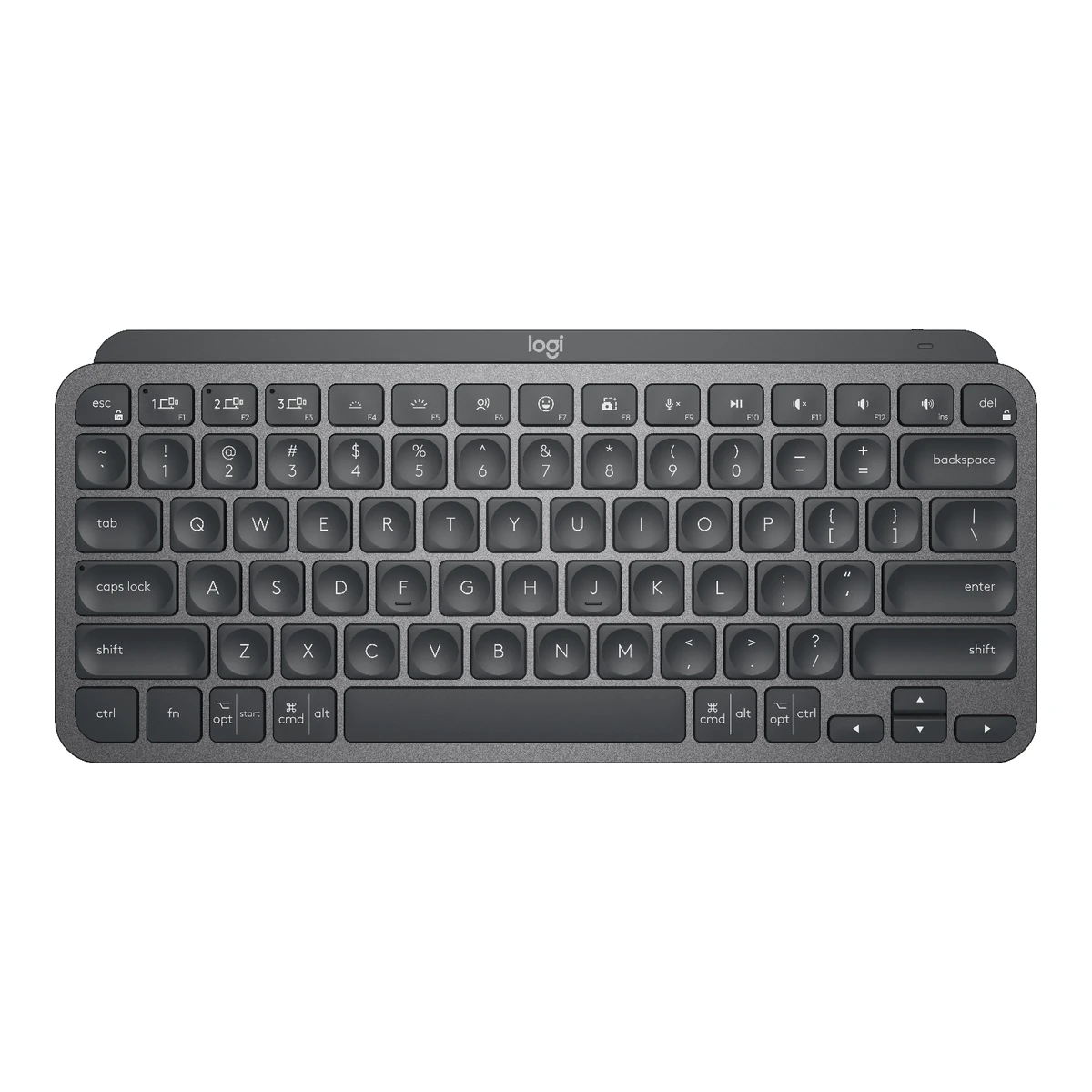
LogitechOffice keyboard
MX Keys Mini
Released September 2021.4Press releasenews.logitech.com/press-releases/news-details/2021/Maximize-Creative-Potential-with-Logitech-MX-Keys-Mini-a-New-Minimalist-Wireless-Keyboard/default.aspxRead 6 October 2026Pricing and Availability: MX Keys Mini will be available starting today at Logitech.com and many global retailers. MX Keys Mini for Business followed in late October and is a separate product. Last checked 16 October 2026.
- Form factor
- 75 %
- Switch sensing technology
- Scissor
- Connections
- 2.4 GHz, Bluetooth
- Max polling rate
- Not available
81 of 164 fields known.
At a glance
Weight
Lower than 85% of other keyboards. Lower is better.
General
- Model numbers
- 920-010388, 920-010473, 920-010474, 920-010475, 920-010495, 920-010496, 920-0104971Maker product pagelogitech.com/en-us/shop/p/mx-keys-miniRead 8 October 2026US page payload maps 920-010388 Graphite, 920-010473 Pale Gray, 920-010474 Rose and 920-010475 Black, all English US (QWERTY). The en-gb page payload maps 920-010495 Graphite, 920-010496 Pale Gray and 920-010497 Rose to English UK (QWERTY). MX Keys Mini for Mac (920-010389, 920-012644) and MX Keys Mini for Business (920-010594) are separately named products and are excluded.2Maker product pagelogitech.com/en-gb/shop/p/mx-keys-miniRead 7 October 2026en-gb store payload: 920-010495 Graphite, 920-010496 Pale Gray and 920-010497 Rose, all English UK (QWERTY).
- Predecessor
- Not available
- Successor
- Not available
- Launch price (EU)
- Not available
- Markets
- US, CA, GB1Maker product pagelogitech.com/en-us/shop/p/mx-keys-miniRead 8 October 2026US and GB from the maker's en-us and en-gb stores. The fr-ca store lists the same four US SKUs, so CA is added to the US rows. Other regional stores (JP, KR, TW, MX, AU, HK) sell their own SKUs, which are not stored as variants.2Maker product pagelogitech.com/en-gb/shop/p/mx-keys-miniRead 7 October 2026UK SKUs sold on the maker's en-gb store.
- Colours
- Graphite, Pale Gray, Rose, Black1Maker product pagelogitech.com/en-us/shop/p/mx-keys-miniRead 8 October 2026Maker colour names from the SKU names. Black is a US and Canada SKU only. The en-gb store lists Graphite, Pale Gray and Rose.2Maker product pagelogitech.com/en-gb/shop/p/mx-keys-miniRead 7 October 2026en-gb store offers Graphite, Pale Gray and Rose. No Black.
Layout
- Layout standard
- ANSI, ISO, JIS1Maker product pagelogitech.com/en-us/shop/p/mx-keys-miniRead 8 October 2026Maker top-view images: US is ANSI (horizontal Enter, long left Shift). UK and English International are ISO (tall Enter, short left Shift). The Japanese image shows the JIS layout with kana keys. The Korean image is ANSI shaped and is not stored as a separate standard.2Maker product pagelogitech.com/en-gb/shop/p/mx-keys-miniRead 7 October 2026UK and English International top-view images on this page show the ISO Enter and the extra key left of Z.
- Regional layouts
- English US (QWERTY), English UK (QWERTY), English International (QWERTY), German (QWERTZ), French (AZERTY), Swiss (QWERTZ), Danish / Norwegian / Swedish / Finnish (QWERTY), Italian (QWERTY), Spanish (QWERTY)1Maker product pagelogitech.com/en-us/shop/p/mx-keys-miniRead 8 October 2026Maker layout names from the en-us and en-gb SKU names. The ja-jp, ko-kr, zh-tw and es-mx stores also sell Japanese, Korean, Zhuyin and Spanish SKUs, whose English layout names were not read and are not listed.2Maker product pagelogitech.com/en-gb/shop/p/mx-keys-miniRead 7 October 2026en-gb store SKU names list English UK, English International, German, French, Swiss, Danish / Norwegian / Swedish / Finnish, Italian and Spanish layouts.
- Keys in regional layout
- 791Maker product pagelogitech.com/en-us/shop/p/mx-keys-miniRead 8 October 2026Counted on the maker's US top-view image: 15 top-row keys (Esc, F1 to F12, Ins/volume up, Del), 14 number-row keys, 14 Tab-row keys, 13 Caps-row keys, 12 Shift-row keys and 11 bottom-row keys including four arrows. Total 79. The UK image adds the ISO key left of Z and moves one key into the Enter cluster, total 80. The Business edition page states 79 keys for its US layout, which matches.2Maker product pagelogitech.com/en-gb/shop/p/mx-keys-miniRead 7 October 2026UK top-view image counted at 80 keys: the US 79 plus the ISO key left of Z.
- Key legends for
- Windows, macOS1Maker product pagelogitech.com/en-us/shop/p/mx-keys-miniRead 8 October 2026Dual legends on the modifier keys (opt/start, cmd/alt). The setup guide shows the PC layout and the Mac layout on the same keyboard. MX Keys Mini for Mac has Mac-only legends and is a separate product.3Owner's manualhub.sync.logitech.com/mx-keys-mini/post/mx-keys-mini---setup-guide-Kv045sbpYX9gMaVRead 6 October 2026Guide: Windows, Linux and Android characters on the right side of the key, macOS and iOS on the left.
- Function row
- Yes1Maker product pagelogitech.com/en-us/shop/p/mx-keys-miniRead 8 October 2026Maker top view shows a full F1 to F12 row with Esc and Del.
- Dedicated arrow keys
- Yes1Maker product pagelogitech.com/en-us/shop/p/mx-keys-miniRead 8 October 2026Maker top view shows four arrow keys in an inverted T at the bottom right.
- Key stagger
- Row-staggered1Maker product pagelogitech.com/en-us/shop/p/mx-keys-miniRead 8 October 2026Maker top view shows standard row-staggered rows.
- Bottom row
- Not available
Switches
- Switch sensing technology
- Scissor6Reviewrtings.com/keyboard/reviews/logitech/mx-keys-miniRead 6 October 2026Public verdicts: scissor switches, not mechanical. The maker's sustainability data also names the scissor plate.
- Switch feel
- Tactile5Reviewtechradar.com/reviews/logitech-mx-keys-miniRead 6 October 2026Review: no mechanical switches, it feels tactile rather than squishy.
- Switch maker
- Not available
- Switch models
- Not available
- Switch stem
- Not available
- Actuation force
- Not available
- Bottom-out force
- Not available
- Tactile bump force
- Not available
- Actuation point
- Not available
- Factory-lubed switches
- Not available
- Adjustable actuation
- Not available
- Actuation range
- Not available
- Actuation step
- Not available
- Per-key actuation
- Not available
- Rapid trigger
- Not available
- Minimum rapid trigger movement
- Not available
- Multi-action keys
- Not available
- SOCD handling
- Not available
- Analog input
- Not available
- Compatible switches
- Not available
- Stabilizers
- Not available
- Factory-lubed stabilizers
- Not available
Keycaps
- Legend method
- Not available
- Keycap thickness
- Not available
- Shine-through legends
- Not available
Performance
We could not find any of these 11 fields. Show them
- Polling rate per connection
- Not available
- Max polling rate
- Not available
- Polling rate (wired)
- Not available
- Polling rate (2.4 GHz)
- Not available
- Polling rate (Bluetooth)
- Not available
- Scan rate
- Not available
- Input latency (claimed)
- Not available
- Key rollover per connection
- Not available
- Anti-ghosting
- Not available
- Adjustable debounce
- Not available
- Minimum debounce
- Not available
Measured
We could not find any of these 7 fields. Show them
- Latency per connection (measured)
- Not available
- Actuation point (measured)
- Not available
- Total travel (measured)
- Not available
- Operating force (measured)
- Not available
- Typing noise (measured)
- Not available
- Battery life (measured)
- Not available
- Weight (measured)
- Not available
Connectivity
- Wireless technology
- Bluetooth Low Energy1Maker product pagelogitech.com/en-us/shop/p/mx-keys-miniRead 8 October 2026Spec tab names Bluetooth Low Energy. Logi Bolt is supported only with a receiver that is not included.
- Devices it can switch between
- 31Maker product pagelogitech.com/en-us/shop/p/mx-keys-miniRead 8 October 2026Spec tab: Easy-switch, connect up to 3 devices and switch between them. Three channels in total across Bluetooth and Bolt.
- Receiver connector
- None1Maker product pagelogitech.com/en-us/shop/p/mx-keys-miniRead 8 October 2026In the Box lists no receiver. A compatible Logi Bolt USB receiver is sold separately.
- Receiver storage in keyboard
- No14Reviewlttlabs.com/products/keyboards/logitech-mx-keys-miniRead 7 October 2026Connectivity Receiver Storing row explicitly No. Maker complete bottom/front/side gallery shows no receiver compartment. Optional receiver not included.16Owner's manualhub.sync.logitech.com/mx-keys-mini/post/mx-keys-mini---setup-guide-Kv045sbpYX9gMaVRead 7 October 2026Complete maker bottom/exterior views have no receiver compartment. Optional Bolt receiver is separately bought. Exact LTT row No independently confirms.
- Detachable cable
- Yes1Maker product pagelogitech.com/en-us/shop/p/mx-keys-miniRead 8 October 2026In the Box lists a separate USB-C charging cable (USB-A to USB-C).
- Port on keyboard
- USB-C1Maker product pagelogitech.com/en-us/shop/p/mx-keys-miniRead 8 October 2026Spec tab: USB-C rechargeable. Cable is USB-A to USB-C, with USB-C at the keyboard.
- Cable
- Not available
- Cable length
- Not available
- USB passthrough
- No14Reviewlttlabs.com/products/keyboards/logitech-mx-keys-miniRead 7 October 2026Connectivity USB Passthrough row explicitly No. Maker complete external-port views and setup guide show only charging USB-C, not a USB hub output.16Owner's manualhub.sync.logitech.com/mx-keys-mini/post/mx-keys-mini---setup-guide-Kv045sbpYX9gMaVRead 7 October 2026Setup charging text and complete exterior views show charging USB-C only, no USB hub output. Exact LTT no-passthrough row independently confirms.
- Works with
- Windows, macOS, Linux, ChromeOS, iOS, iPadOS, Android1Maker product pagelogitech.com/en-us/shop/p/mx-keys-miniRead 8 October 2026Spec tab: Windows 10, 11 or later, macOS 10.15 or later, iOS 14 or later, iPadOS 14 or later, Linux, ChromeOS and Googlebook, Android 8.0 or later. Systems other than Windows and macOS get basic functions without software.
- Consoles
- Not available
Battery
- Battery type
- Li-Po1Maker product pagelogitech.com/en-us/shop/p/mx-keys-miniRead 8 October 2026Spec tab: Rechargeable Li-Po (1500 mAh) battery.
- Number of batteries
- Not available
- Battery capacity
- 1,500mAh1Maker product pagelogitech.com/en-us/shop/p/mx-keys-miniRead 8 October 2026Spec tab: Rechargeable Li-Po (1500 mAh) battery. No voltage or Wh published.
- Battery life per mode (claimed)
Lighting Days Months On 10 Not available Off Not available 5 - Longest battery life (claimed)
- Not available
- Battery life, lighting off
- Not available
- Battery life, lighting on
- Not available
- Battery life, backlight on (claimed)
- 10days
- Battery life, backlight off (claimed)
- 5months
- Charging port
- USB-C1Maker product pagelogitech.com/en-us/shop/p/mx-keys-miniRead 8 October 2026Spec tab: USB-C rechargeable: Yes.
- Full charge time
- Not available
- Quick charge
- Not available
- Use while charging
- Yes3Owner's manualhub.sync.logitech.com/mx-keys-mini/post/mx-keys-mini---setup-guide-Kv045sbpYX9gMaVRead 6 October 2026Guide: You can continue typing while it is charging.
- Solar charging
- Not available
Build
- Case material
- Not available
- Plate material
- Aluminium1Maker product pagelogitech.com/en-us/shop/p/mx-keys-miniRead 8 October 2026Sustainability data lists low-carbon aluminium in the scissor plate. This is the metal plate that holds the scissor mechanisms.
- Mount style
- Not available
- Flex cuts in PCB
- Not available
- Sound dampening
- Not available
- Typing angles
- Not available
- Spill resistant
- Not available
- IP rating
- Not available
Lighting
- Backlight
- Single colour5Reviewtechradar.com/reviews/logitech-mx-keys-miniRead 6 October 2026Review: the backlighting is only in solid white.
- LED position
- Not available
- Lighting zones
- Not available
- Side or underglow lighting
- Not available
- Lighting sensors
- Ambient light, Proximity1Maker product pagelogitech.com/en-us/shop/p/mx-keys-miniRead 8 October 2026Spec tab: Hand proximity sensor activated backlighting, and Auto-adjust ambient light sensor.
- Lighting sync
- Not available
Controls
- Separate media buttons
- 01Maker product pagelogitech.com/en-us/shop/p/mx-keys-miniRead 8 October 2026Maker top view shows no separate media buttons. Media functions sit on the F-row keys.
- Volume control
- Keys1Maker product pagelogitech.com/en-us/shop/p/mx-keys-miniRead 8 October 2026Maker top view: mute on F11, volume down on F12 and volume up on the Ins key.
- Knobs
- 01Maker product pagelogitech.com/en-us/shop/p/mx-keys-miniRead 8 October 2026Complete official US top/front gallery and setup-guide Product Overview list all controls. Zero rotary knobs. Function keys are not knobs.16Owner's manualhub.sync.logitech.com/mx-keys-mini/post/mx-keys-mini---setup-guide-Kv045sbpYX9gMaVRead 7 October 2026Complete original control overview identifies all controls and no knob. Top/bottom maker gallery independently viewed.
- Programmable knob
- Not available
- Knob press
- Not available
- Separate macro keys
- 01Maker product pagelogitech.com/en-us/shop/p/mx-keys-miniRead 8 October 2026Complete official 79-key US top view shows only ordinary typing/F-row/Easy-Switch keys, no separate macro keys. Software Smart Actions assigned to ordinary keys excluded. UK layout adds an ISO typing key, no macro key.16Owner's manualhub.sync.logitech.com/mx-keys-mini/post/mx-keys-mini---setup-guide-Kv045sbpYX9gMaVRead 7 October 2026Complete original overview and top view identify ordinary typing/F-row/Easy-Switch keys, no separate macro buttons. Software assignments to ordinary keys are separate.
- Built-in screen
- None1Maker product pagelogitech.com/en-us/shop/p/mx-keys-miniRead 8 October 2026Complete official top/front/side product views show no built-in screen. Product Overview names status LED, not a display.16Owner's manualhub.sync.logitech.com/mx-keys-mini/post/mx-keys-mini---setup-guide-Kv045sbpYX9gMaVRead 7 October 2026Complete control overview identifies status LED/sensor, no screen. Exact maker views corroborate.
- Fingerprint reader
- No1Maker product pagelogitech.com/en-us/shop/p/mx-keys-miniRead 8 October 2026Complete official product-control overview and top view list all physical controls. No fingerprint reader or biometric control. Ordinary keys and the proximity sensor are not fingerprint readers.16Owner's manualhub.sync.logitech.com/mx-keys-mini/post/mx-keys-mini---setup-guide-Kv045sbpYX9gMaVRead 7 October 2026Complete control overview and maker views contain no biometric control. Proximity sensor is not fingerprint reader.
- OS mode switch
- Not available
- Windows key lock
- Not available
Software
- Software
- Logi Options+1Maker product pagelogitech.com/en-us/shop/p/mx-keys-miniRead 8 October 2026Spec tab: Supported by Logi Options+ App. Basic support in Logi Tune.
- Software runs on
- Windows, macOS1Maker product pagelogitech.com/en-us/shop/p/mx-keys-miniRead 8 October 2026Spec tab: Logi Options+ for recent versions of Windows and macOS. Basic Options+ support on Googlebook laptops, which this enum cannot represent.
- Open firmware
- Not available
- Onboard memory
- No14Reviewlttlabs.com/products/keyboards/logitech-mx-keys-miniRead 7 October 2026Features & Software Onboard Memory row explicitly No. Exact Mini retailer technical table https://www.rubbermonkey.co.nz/Logitech-MX-Keys-Mini-Wireless-Keyboard-Pale-Grey states Onboard Memory None and corroborates. App-specific profiles are software storage. Several unrelated LTT dimensions and feature cells contain errors, so uncorroborated facts and measurements are omitted.17Retailer pagerubbermonkey.co.nz/Logitech-MX-Keys-Mini-Wireless-Keyboard-Pale-GreyRead 7 October 2026Exact consumer MX Keys Mini Pale Grey technical table publicly indexed Onboard Memory None, independently reproduced after direct 403/web timeout. Corroborates LTT no-onboard-memory row. Device pairing/firmware flash are not custom onboard profiles.
- Onboard profiles
- Not available
- Macros stored onboard
- Not available
- Layers
- Not available
Ergonomics
- Wrist rest material
- Not available
- Tenting
- Not available
- Tenting angles
- Not available
Dimensions and weight
Front and side, drawn to scale.
- Dimensions
- Width295.99Depth131.95Height20.97mm(11.7 × 5.2 × 0.8 in)1Maker product pagelogitech.com/en-us/shop/p/mx-keys-miniRead 8 October 2026Maker labels Height 131.95 mm, Width 295.99 mm and Depth 20.97 mm in upright front-view axes. Stored as desktop width 295.99, front-to-back depth 131.95 and height 20.97. The keyboard has a fixed incline with no feet (TechRadar).
- Dimensions with wrist rest
- Not available
- Keyboard weight
- 506.4g(1.1 lb)1Maker product pagelogitech.com/en-us/shop/p/mx-keys-miniRead 8 October 2026Spec tab: Weight 17.86 oz (506.4 g). Not a reviewer scale measurement.
- Weight including wrist rest
- Not available
- Box dimensions
- Not available
- Box weight
- Not available
Certifications
- Platform certifications
- Engineered for Intel Evo Laptops1Maker product pagelogitech.com/en-us/shop/p/mx-keys-miniRead 8 October 2026System requirements text: Engineered for Intel Evo Laptops.
- Other certifications
- Not available
In the box
- In the box
- Keyboard, USB-C charging cable (USB-A to USB-C), User documentation1Maker product pagelogitech.com/en-us/shop/p/mx-keys-miniRead 8 October 2026In the Box: Keyboard, USB-C charging cable (USB-A to USB-C), User documentation. The en-gb page lists the same three items. No receiver.2Maker product pagelogitech.com/en-gb/shop/p/mx-keys-miniRead 7 October 2026In the Box lists the same three items as the US page.
- Cables included
Type Count USB-A to USB-C charging cable 1
Links
- Product page
- www.logitech.com/en-us/shop/p/mx-keys-mini1Maker product pagelogitech.com/en-us/shop/p/mx-keys-miniRead 8 October 2026
- Spec sheet
- support.logi.com/hc/en-150/articles/4409094334231-Specification-MX-Keys-Mini7Maker product pagesupport.logi.com/hc/en-150/articles/4409094334231-Specification-MX-Keys-MiniRead 7 October 2026Exact maker Specification - MX Keys Mini page, M/N Y-R0084, full keyboard specification table. Some dimensions and mass cells contain obvious errors and are not used.
- Manual
- hub.sync.logitech.com/mx-keys-mini/post/mx-keys-mini---setup-guide-Kv045sbpYX9gMaV3Owner's manualhub.sync.logitech.com/mx-keys-mini/post/mx-keys-mini---setup-guide-Kv045sbpYX9gMaVRead 6 October 2026Maker setup guide on the Logitech hub: pairing, product overview, Multi-OS keyboard, F-row keys, battery notification, smart backlighting and F-key switch sections read.
- EPREL registration number
- Not available
Warranty
- Manufacturer warranty (source market)
- 1year1Maker product pagelogitech.com/en-us/shop/p/mx-keys-miniRead 8 October 2026The current US maker product payload states 1-Year Limited Hardware Warranty for consumer MX Keys Mini. This value is scoped to the proved US SKU 920-010388. The GB maker store gives two years for its GB SKUs. This is not a worldwide warranty promise. Statutory consumer rights are excluded.
Compare with
Pick a keyboard to see both side by side. Differences are marked yellow.
Variants
Each variant lists only what differs from the specs above.
| Model number | GTIN | Launch price (US) | Markets | Colours | Layout standard | Regional layouts | Keys in regional layout | Key legends for | In the box |
|---|---|---|---|---|---|---|---|---|---|
| 920-010388 | Not available | $99.99 | US, CA | Graphite | ANSI | English US (QWERTY) | 79 | Windows, macOS | Keyboard, USB-C charging cable (USB-A to USB-C), User documentation |
| 920-010473 | Not available | $99.99 | US, CA | Pale Gray | ANSI | English US (QWERTY) | 79 | Windows, macOS | Keyboard, USB-C charging cable (USB-A to USB-C), User documentation |
| 920-010474 | Not available | $99.99 | US, CA | Rose | ANSI | English US (QWERTY) | 79 | Windows, macOS | Keyboard, USB-C charging cable (USB-A to USB-C), User documentation |
| 920-010475 | 097855169617 | Not available | US, CA | Black | ANSI | English US (QWERTY) | 79 | Windows, macOS | Keyboard, USB-C charging cable (USB-A to USB-C), User documentation |
| 920-010495 | Not available | Not available | GB | Graphite | ISO | English UK (QWERTY) | 80 | Windows, macOS | Keyboard, USB-C charging cable (USB-A to USB-C), User documentation |
| 920-010496 | Not available | Not available | GB | Pale Gray | ISO | English UK (QWERTY) | 80 | Windows, macOS | Keyboard, USB-C charging cable (USB-A to USB-C), User documentation |
| 920-010497 | Not available | Not available | GB | Rose | ISO | English UK (QWERTY) | 80 | Windows, macOS | Keyboard, USB-C charging cable (USB-A to USB-C), User documentation |
Sources
We read 17 sources for this keyboard. The numbers match the markers in the sheet.
- Maker product pagelogitech.com/en-us/shop/p/mx-keys-mini
- Maker product pagelogitech.com/en-gb/shop/p/mx-keys-mini
- Maker product pagelogitech.com/en-us/shop/p/logi-bolt-usb-receiver
See a wrong value? Tell us and name the field.