Gaming / Mice
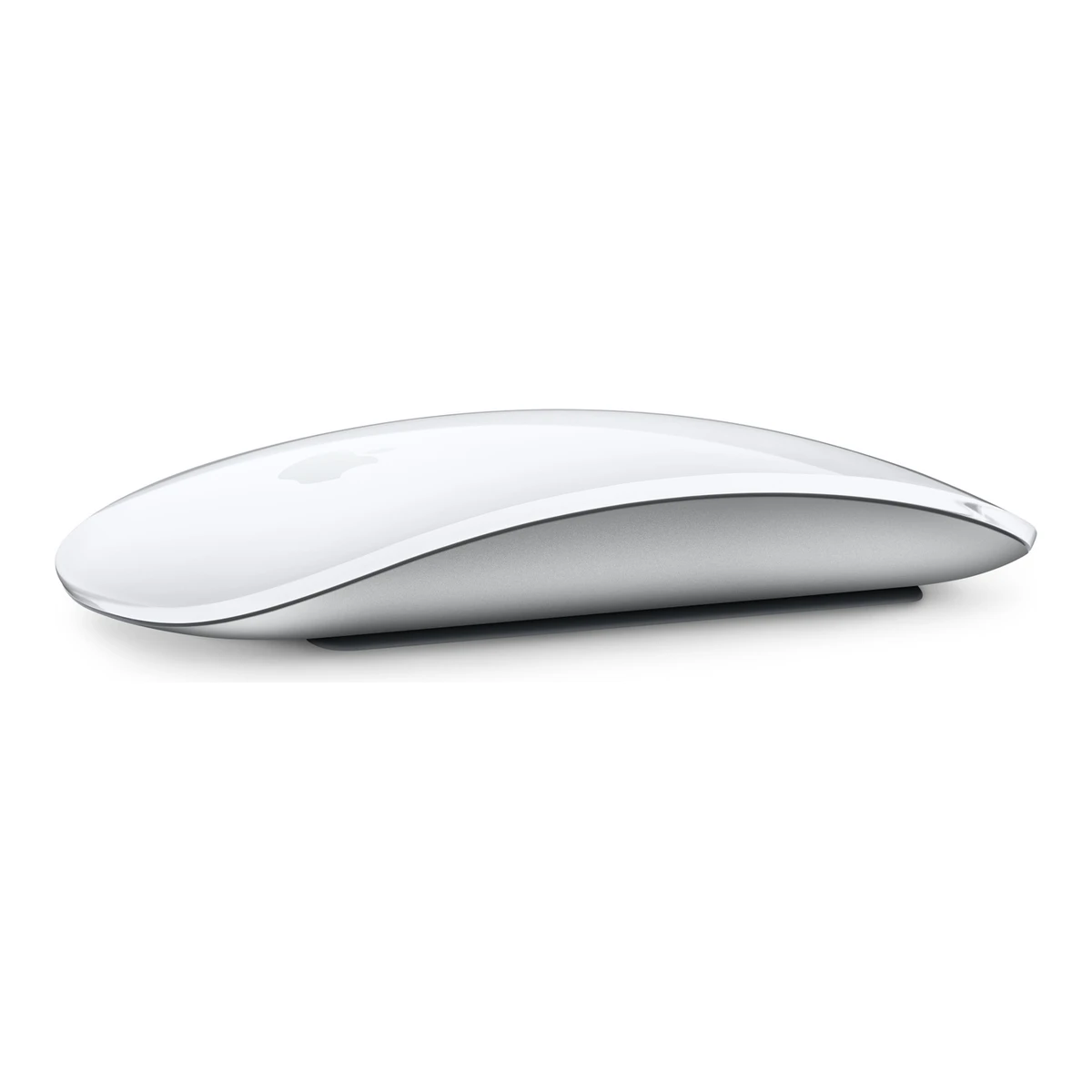
AppleOffice mouse
Magic Mouse (USB-C)
Released October 2024.9Press article9to5mac.com/2024/10/31/update-mac-magic-mouse-keyboardRead 6 October 2026Dated Oct 31, 2024: customers can already buy the new Magic accessories in stores, and customers who have just got them report pairing issues. A 9to5Mac article of Oct 28, 2024 says the standalone accessories ship right away. Apple's own release of Oct 29 says they are available at apple.com/store. Last checked 21 October 2026.
- Mouse weight (claimed)
- 99g
- Marketed sensor name
- Not available
- Maximum configurable DPI
- Not available
- Max polling rate
- Not available
56 of 154 fields known.
General
- Model numbers
- A3204, MXK53AM/A, MXK63AM/A, MXK53Z/A, MXK63Z/A2Maker product pageapple.com/shop/product/MXK53AM/A/magic-mouse-white-multi-touch-surfaceRead 6 October 2026US Apple Store part number MXK53AM/A for Magic Mouse (USB-C) - White Multi-Touch Surface.3Maker product pageapple.com/shop/product/MXK63AM/A/magic-mouse-black-multi-touch-surfaceRead 6 October 2026US Apple Store part number MXK63AM/A for Magic Mouse (USB-C) - Black Multi-Touch Surface.10Spec databaseifixit.com/Device/Magic_Mouse_2Read 10 October 2026iFixit device page: Lightning port (A1657), USB-C port (A3204). Apple's own pages read here do not print the A number.17Spec databasegeizhals.at/apple-magic-mouse-usb-c-v181917.htmlRead 21 October 2026Geizhals lists MXK53Z/A for the white and MXK63Z/A for the black Magic Mouse (USB-C).18Retailer pagewebshop.itm8.com/apple-magic-mouse-wh-int/cat-p/c/p1005062122Read 21 October 2026Distributor listing prints part number MXK53Z/A.
- GTIN / EAN
- 0195949655883, 019594965596815Retailer pagebarcodesinc.com/apple/part-mxk53am-a.htmRead 7 October 2026Exact part MXK53AM/A, white USB-C mouse. Retailer lists GTIN 0195949655883. This GTIN belongs only to the white US row.18Retailer pagewebshop.itm8.com/apple-magic-mouse-wh-int/cat-p/c/p1005062122Read 21 October 2026Distributor listing for MXK53Z/A (white, international) gives EAN 0195949655968. A Sports Direct listing shows the same number. The US white part has 0195949655883.
- Predecessor
- Not available
- Successor
- Not available
- Markets
- US, DE2Maker product pageapple.com/shop/product/MXK53AM/A/magic-mouse-white-multi-touch-surfaceRead 6 October 2026US Apple Store offers the product with Add to Bag on 2026-10-06.8Press releaseapple.com/de/newsroom/2024/10/apples-new-mac-mini-is-more-mighty-more-mini-and-built-for-apple-intelligenceRead 6 October 2026German press release says the new USB-C accessories are available on apple.com/de/store.
- Colours
- White Multi-Touch Surface, Black Multi-Touch Surface1Maker product pagesupport.apple.com/en-us/121931Read 21 October 20262Maker product pageapple.com/shop/product/MXK53AM/A/magic-mouse-white-multi-touch-surfaceRead 6 October 20263Maker product pageapple.com/shop/product/MXK63AM/A/magic-mouse-black-multi-touch-surfaceRead 6 October 2026
Shape
- Body shape
- Symmetrical body2Maker product pageapple.com/shop/product/MXK53AM/A/magic-mouse-white-multi-touch-surfaceRead 6 October 2026Top-view product photo shows a symmetrical body with no side buttons.
- Maker size class
- Not available
- Recommended grips
- Not available
- Recommended hand size
- Not available
- Thumb rest
- Not available
- Ring or pinky finger rest
- Not available
- Upper shell
- Not available
- Swappable parts
- Not available
- Adjustable weight
- Not available
- Maximum added weight
- Not available
- Vertical angle
- Not available
- Trackball diameter
- Not available
- Trackball position
- Not available
Dimensions and weight
Front and side, drawn to scale.
- Mouse body dimensions
- Length113.5Maximum width57.1Maximum height21.6mm(4.5 × 2.2 × 0.9 in)1Maker product pagesupport.apple.com/en-us/121931Read 21 October 2026Size and Weight: Height 2.16 cm, Width 5.71 cm, Depth 11.35 cm. Depth is stored as front-to-rear length. Metric values are copied, rounded inch values are not converted.
- Grip width
- Not available
- Mouse weight (claimed)
- 99g(3.5 oz)1Maker product pagesupport.apple.com/en-us/121931Read 21 October 2026Size and Weight: 0.099 kg. Footnote says weight varies by configuration and manufacturing process. One weight for both colours.
- Box dimensions
- Not available
- Packed weight
- Not available
Sensor
- Marketed sensor name
- Not available
- Published sensor brand
- Not available
- Physical sensor part number
- Not available
- Maximum configurable DPI
- Not available
- Minimum configurable DPI
- Not available
- DPI adjustment step
- Not available
- Maximum DPI stages
- Not available
- Default DPI presets
- Not available
- Separate X and Y DPI
- Not available
- Tracking speed (claimed)
- Not available
- Tracking acceleration (claimed)
- Not available
- Lift-off distance settings
- Not available
- Separate lift and landing distance
- Not available
- Surface calibration
- Not available
- Motion Sync
- Not available
- Angle snapping
- Not available
- Ripple control
- Not available
- Tracks on glass
- Not available
Performance
We could not find any of these 8 fields. Show them
- Documented polling rates by connection
- Not available
- Max polling rate
- Not available
- Polling rate (wired)
- Not available
- Polling rate (2.4 GHz)
- Not available
- Polling rate (Bluetooth)
- Not available
- Claimed click latency
- Not available
- Adjustable debounce
- Not available
- Minimum debounce
- Not available
Measured
We could not find any of these 7 fields. Show them
- Latency per connection (measured)
- Not available
- DPI deviation (measured)
- Not available
- Lift-off distance (measured)
- Not available
- Main click force (measured)
- Not available
- Weight (measured)
- Not available
- Battery life (measured)
- Not available
- Hand size fit
- Not available
Switches
We could not find any of these 11 fields. Show them
- Main switch type
- Not available
- Published main-switch brand
- Not available
- Main switch model
- Not available
- Main switch rated life
- Not available
- Hot-swap main switches
- Not available
- Adjustable click actuation
- Not available
- Separate main buttons
- Not available
- Side switch model
- Not available
- Middle click switch
- Not available
- Scroll encoder type
- Not available
- Scroll encoder
- Not available
Buttons and scroll wheel
- Physical button inputs
- Not available
- Programmable buttons
- Not available
- Side buttons on
- Not available
- DPI button position
- Not available
- Dedicated DPI-shift button
- No13Reviewtech.yahoo.com/computing/articles/apple-magic-mouse-usb-c-140000357.htmlRead 21 October 2026Review: a mouse without any physical buttons. No dedicated DPI-shift button.
- Dedicated gesture button
- No13Reviewtech.yahoo.com/computing/articles/apple-magic-mouse-usb-c-140000357.htmlRead 21 October 2026Gestures are made on the touch surface. The review names no separate gesture button.
- Scroll wheel
- Not available
- Scroll mode switch
- None12Reviewcultofmac.com/reviews/apple-magic-mouse-reviewRead 21 October 2026States there is no scroll wheel or scroll ball. Scrolling uses the capacitive multi-touch surface, so there is no wheel mode switch.16Owner's manualcdsassets.apple.com/live/6GJYWVAV/user/locale/en-gb/magic-mouse-usb-c-ug.pdfRead 21 October 2026Page 2: the Multi-Touch surface is used to click, tap, slide or swipe. The guide lists no scroll wheel and no wheel mode.
- Separate thumb wheel
- No12Reviewcultofmac.com/reviews/apple-magic-mouse-reviewRead 21 October 2026Mouse + Trackpad in one section explicitly states no scroll wheel or scroll ball. Scrolling uses the capacitive surface.
- Scroll wheel material
- Not available
Build
- Surface finish
- Glossy12Reviewcultofmac.com/reviews/apple-magic-mouse-reviewRead 21 October 2026Design section: black USB-C review unit has a glossy mirror-like finish. White finish is corroborated by the exact USB-C PCMag review.13Reviewtech.yahoo.com/computing/articles/apple-magic-mouse-usb-c-140000357.htmlRead 21 October 2026Exact USB-C PCMag review independently checked for both white and black glossy exteriors. Public indexed text was readable. Direct article fetch returned 403.
- Installed feet material
- Other12Reviewcultofmac.com/reviews/apple-magic-mouse-reviewRead 21 October 2026Design section explicitly calls the bottom feet plastic. Polymer is not specified, so other is used.
- Feet thickness
- Not available
Cable
- Cable length
- Not available
- Detachable cable
- Yes1Maker product pagesupport.apple.com/en-us/121931Read 21 October 2026Overview: the mouse has a USB-C port and comes with a separate USB-C Charge Cable.
Connectivity
- Connections
- Bluetooth1Maker product pagesupport.apple.com/en-us/121931Read 21 October 2026Connections and Expansion lists Bluetooth and Wireless. The USB-C cable is for pairing and charging, see the setup and charging articles.5Maker product pagesupport.apple.com/en-us/119917Read 6 October 2026Set up article: Magic Mouse works wirelessly via Bluetooth. The USB connection recharges the battery and pairs with the Mac. Unplug the device for wireless use.
- Wireless technology
- Bluetooth1Maker product pagesupport.apple.com/en-us/121931Read 21 October 2026Connections and Expansion: Bluetooth. No version number is given.16Owner's manualcdsassets.apple.com/live/6GJYWVAV/user/locale/en-gb/magic-mouse-usb-c-ug.pdfRead 21 October 2026Page 1: uses Bluetooth technology to connect wirelessly to your Mac.
- Bluetooth
- Not available
- Saved Bluetooth pairing slots
- Not available
- Device switching
- Not available
- Receiver host connector
- None2Maker product pageapple.com/shop/product/MXK53AM/A/magic-mouse-white-multi-touch-surfaceRead 6 October 2026Box contents are Magic Mouse and USB-C Charge Cable only. The mouse connects over Bluetooth with no USB receiver.
- Receiver storage in mouse
- Not available
- Receiver extender included
- Not available
- Receiver pairing shared
- Not available
- Wireless range
- Not available
- Basic mouse OS support
- macOS, iPadOS1Maker product pagesupport.apple.com/en-us/121931Read 21 October 2026System Requirements: Mac with macOS 15.1 or later, iPad with iPadOS 18.1 or later. The compatibility list also names Apple Vision Pro, which has no option in the schema.
- Consoles
- Not available
Battery
- Battery type
- Li-ion10Spec databaseifixit.com/Device/Magic_Mouse_2Read 10 October 2026Background: Magic Mouse 2 is Apple's first mouse with an internal lithium-ion battery. The page covers both A1657 (Lightning) and A3204 (USB-C) and says the October 2024 update replaces the Lightning port with USB-C. It gives no capacity for A3204, so none is stored.16Owner's manualcdsassets.apple.com/live/6GJYWVAV/user/locale/en-gb/magic-mouse-usb-c-ug.pdfRead 21 October 2026Page 4: the lithium-ion battery in your Magic Mouse should be serviced or recycled by Apple or an authorized service provider.
- Disposable battery count
- Not available
- Battery capacity
- Not available
- User-replaceable battery
- No4Maker product pagesupport.apple.com/en-us/102292Read 6 October 2026Apple calls it the built-in battery and contrasts it with earlier models with removable batteries. No user replacement procedure is documented.16Owner's manualcdsassets.apple.com/live/6GJYWVAV/user/locale/en-gb/magic-mouse-usb-c-ug.pdfRead 21 October 2026Page 4: contains no user-serviceable parts, and the battery should be serviced by Apple or an authorized provider.
- Battery life by mode (claimed)
- Not available
- Battery life (up to)
- Not available
- Longest battery life
- Not available
- Battery life at 1000 Hz
- Not available
- Battery life on Bluetooth
- Not available
- Full charge time
- Not available
- Quick charge
- Not available
- Use while charging
- No4Maker product pagesupport.apple.com/en-us/102292Read 6 October 2026Magic Mouse is unavailable for use while charging.
- Charging system compatibility
- Not available
Lighting
We could not find any of these 4 fields. Show them
- Decorative RGB lighting
- Not available
- Decorative lighting zones
- Not available
- Lighting sync
- Not available
- DPI indicator
- Not available
Software
- Configuration software platforms
- macOS14Maker product pagesupport.apple.com/en-ie/guide/mac-mini/apd292c14df0/2026/mac/27Read 7 October 2026Mac mini maker guide describes Mouse settings in macOS System Settings. Basic iPad input support is stored separately.
- Onboard memory
- Not available
- Onboard profiles
- Not available
- Macros
- Not available
- Macros stored onboard
- Not available
- Per-app profiles
- Not available
- User firmware updates
- Not available
In the box
- In the box
- Magic Mouse, USB-C Charge Cable1Maker product pagesupport.apple.com/en-us/121931Read 21 October 2026What's in the Box: Magic Mouse, USB-C Charge Cable.
- Cables included
Type Cable count USB-C Charge Cable 1
Links
- Product page
- www.apple.com/shop/product/MXK53AM/A/magic-mouse-white-multi-touch-surface2Maker product pageapple.com/shop/product/MXK53AM/A/magic-mouse-white-multi-touch-surfaceRead 6 October 2026
- Spec sheet
- support.apple.com/en-us/1219311Maker product pagesupport.apple.com/en-us/121931Read 21 October 2026Apple Support page Magic Mouse (USB-C) - Tech Specs. Year introduced 2024.
- Manual
- cdsassets.apple.com/live/6GJYWVAV/user/locale/en-gb/magic-mouse-usb-c-ug.pdf16Owner's manualcdsassets.apple.com/live/6GJYWVAV/user/locale/en-gb/magic-mouse-usb-c-ug.pdfRead 21 October 2026Magic Mouse (USB-C) User Guide, English (UK), linked from Apple Support page support.apple.com/en-gb/docs/accessories/pp195.
- EPREL registration number
- Not available
Warranty
- Manufacturer warranty (source market)
- 1year11Maker product pageapple.com/legal/warranty/products/accessory-warranty-english.htmlRead 6 October 2026Apple One (1) Year Limited Warranty for Accessories, Worldwide English version from November 09, 2023. Covers Apple-branded hardware for one year from original retail purchase. Statutory rights are separate.
Compare with
Pick a mouse to see both side by side. Differences are marked yellow.
Variants
Each variant lists only what differs from the specs above.
| Model number | GTIN | Launch price (US) | Markets | Colours |
|---|---|---|---|---|
| MXK53AM/A | 0195949655883 | $79 | US | White Multi-Touch Surface |
| MXK63AM/A | Not available | Not available | US | Black Multi-Touch Surface |
| MXK53Z/A | 0195949655968 | Not available | Not available | White Multi-Touch Surface |
| MXK63Z/A | Not available | Not available | Not available | Black Multi-Touch Surface |
Sources
We read 19 sources for this mouse. The numbers match the markers in the sheet.
- Maker product pagesupport.apple.com/en-us/121931
- Maker product pageapple.com/shop/product/MXK53AM/A/magic-mouse-white-multi-touch-surface
- Maker product pageapple.com/shop/product/MXK63AM/A/magic-mouse-black-multi-touch-surface
- Maker product pagesupport.apple.com/en-us/102292
- Maker product pagesupport.apple.com/en-us/119917
- Spec databaseifixit.com/Device/Magic_Mouse_2
- Maker product pageapple.com/legal/warranty/products/accessory-warranty-english.html
- Maker product pagesupport.apple.com/en-ie/guide/mac-mini/apd292c14df0/2026/mac/27
- Retailer pagebarcodesinc.com/apple/part-mxk53am-a.htm
- Spec databasegeizhals.at/apple-magic-mouse-usb-c-v181917.html
See a wrong value? Tell us and name the field.