Gaming / Mice
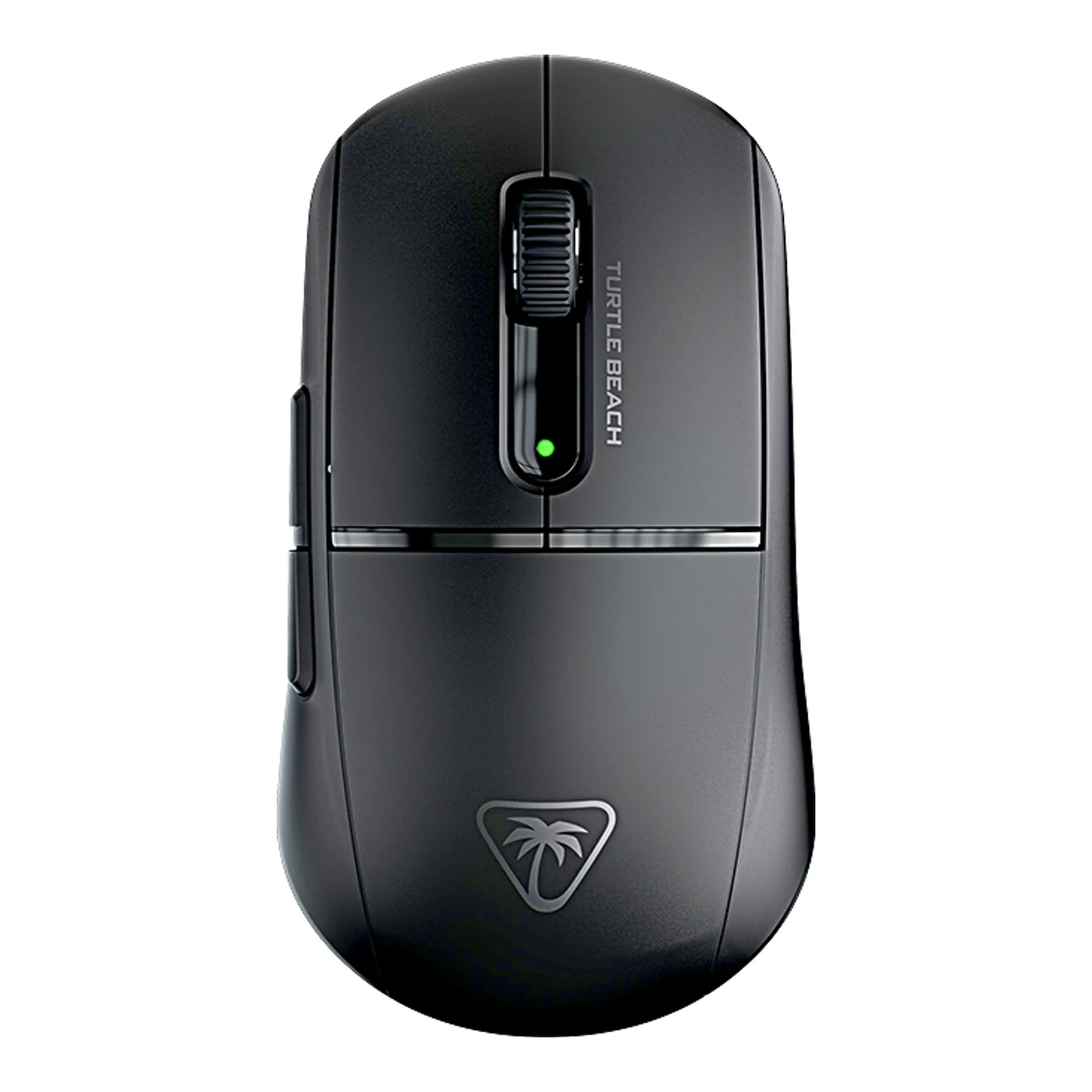
Turtle BeachGaming mouse
Burst II Air
Released 19 May 2024.3Press releasemarkets.financialcontent.com/stocks/article/bizwire-2024-4-18-best-selling-gaming-accessory-brand-turtle-beach-unveils-new-gaming-headsets-keyboards-and-mice-launching-may-2024Read 23 October 2026Maker Business Wire launch release states worldwide launch on May 19, 2024. Last checked 23 October 2026.
- Mouse weight (claimed)
- 47g
- Marketed sensor name
- Owl-Eye 26K
- Maximum configurable DPI
- 26,000DPI
- Max polling rate
- 1,000Hz
101 of 154 fields known.
General
- Series
- Not available
- Model numbers
- TBM-2101-05, MWBB00031Maker product pageturtlebeach.com/products/burst-ii-air-mouseRead 23 October 2026Black retail SKU TBM-2101-05 in maker product structured data. Certification mouse model MWBB0003 is printed in the quick start guide. MWAA0003 is the receiver and is excluded. Only the Black reference configuration is represented.2Owner's manualcdn.turtlebeach.com/device/qig/burst-ii-air/burst-ii-air_330-7158-v1.pdfRead 23 October 2026Cover and regulatory pages identify mouse model MWBB0003. Retail SKU has separate maker-page evidence.
- GTIN / EAN
- 73185572100911Retailer pagephotopoint.ee/en/peripherals/4870000-turtle-beach-wireless-mouse-burst-ii-air-blackRead 23 October 2026Exact Black SKU TBM-2101-05.
- Status
- Available1Maker product pageturtlebeach.com/products/burst-ii-air-mouseRead 23 October 2026Exact product page offers Add To Cart.
- Predecessor
- Not available
- Successor
- Not available
- Markets
- Not available
Shape
- Body shape
- Symmetrical body1Maker product pageturtlebeach.com/products/burst-ii-air-mouseRead 23 October 2026
- Maker size class
- Not available
- Recommended grips
- Not available
- Recommended hand size
- Not available
- Hump position
- Back4Reviewtechpowerup.com/review/turtle-beach-burst-ii-air/3.htmlRead 23 October 2026Shape section explicitly describes the rear-positioned hump.
- Swappable parts
- Not available
- Adjustable weight
- Not available
- Maximum added weight
- Not available
- Vertical angle
- Not available
- Trackball diameter
- Not available
- Trackball position
- Not available
Dimensions and weight
Front and side, drawn to scale.
- Mouse body dimensions
- Length122.2Maximum width67.3Maximum height39.2mm(4.8 × 2.6 × 1.5 in)1Maker product pageturtlebeach.com/products/burst-ii-air-mouseRead 23 October 2026Maker product specification dimensions agree with the exact-model review. Support article dimensions have inconsistent inch and centimetre widths and are not used.
- Mouse weight (claimed)
- 47g(1.7 oz)1Maker product pageturtlebeach.com/products/burst-ii-air-mouseRead 23 October 2026Claimed whole wireless mouse weight with internal battery.
- Box dimensions
- Not available
- Packed weight
- Not available
Sensor
- Marketed sensor name
- Owl-Eye 26K1Maker product pageturtlebeach.com/products/burst-ii-air-mouseRead 23 October 2026
- Published sensor brand
- Turtle Beach1Maker product pageturtlebeach.com/products/burst-ii-air-mouseRead 23 October 2026
- Physical sensor part number
- PAW33955Maker product pagesupport.turtlebeach.com/s/article/burst-ii-air-technical-specificationsRead 23 October 2026Maker calls this 26k Owl-Eye, 3371 (based on 3395). The field accepts the underlying physical sensor family. Exact-model TechPowerUp teardown independently identifies PixArt PAW3395. The maker custom 3371 wording is retained here, not invented as a hardware revision.12Reviewtechpowerup.com/review/turtle-beach-burst-ii-airRead 23 October 2026Exact-model introduction and specification table explicitly identify PixArt PAW3395. Maker support describes custom 3371 based on 3395, so this records the documented base family. It does not assert that every custom designation is an identical sensor package.
- Sensor type
- Optical1Maker product pageturtlebeach.com/products/burst-ii-air-mouseRead 23 October 2026
- Maximum configurable DPI
- 26,000DPI1Maker product pageturtlebeach.com/products/burst-ii-air-mouseRead 23 October 2026
- Minimum configurable DPI
- 50DPI1Maker product pageturtlebeach.com/products/burst-ii-air-mouseRead 23 October 2026
- DPI adjustment step
- 50DPI5Maker product pagesupport.turtlebeach.com/s/article/burst-ii-air-technical-specificationsRead 23 October 2026
- Default DPI presets
- 400, 800, 1,200, 1,600, 3,200DPI5Maker product pagesupport.turtlebeach.com/s/article/burst-ii-air-technical-specificationsRead 23 October 2026800 DPI is the default active step.
- Separate X and Y DPI
- Not available
- Tracking speed (claimed)
- 650IPS1Maker product pageturtlebeach.com/products/burst-ii-air-mouseRead 23 October 2026
- Tracking acceleration (claimed)
- 50G1Maker product pageturtlebeach.com/products/burst-ii-air-mouseRead 23 October 2026
- Lift-off distance settings
- 1, 2mm2Owner's manualcdn.turtlebeach.com/device/qig/burst-ii-air/burst-ii-air_330-7158-v1.pdfRead 23 October 2026Driverless Setup explicitly switches between 1 mm and 2 mm. The 1 mm setting is default. These are selectable claims, not reviewer measurements.
- Separate lift and landing distance
- Not available
- Surface calibration
- Not available
- Angle snapping
- Toggleable6Reviewtechpowerup.com/review/turtle-beach-burst-ii-air/6.htmlRead 23 October 2026
- Ripple control
- Not available
- Tracks on glass
- Not available
- Sensor position
- Not available
Performance
- Documented polling rates by connection
Data connection Polling rate (Hz) Receiver requirement USB (wired) 125 Not available USB (wired) 250 Not available USB (wired) 500 Not available USB (wired) 1,000 Not available 2.4 GHz 125 Included USB-A wireless transmitter 2.4 GHz 250 Included USB-A wireless transmitter 2.4 GHz 500 Included USB-A wireless transmitter 2.4 GHz 1,000 Included USB-A wireless transmitter - Max polling rate
- 1,000Hz
- Polling rate (wired)
- 1,000Hz
- Polling rate (2.4 GHz)
- 1,000Hz
- Polling rate (Bluetooth)
- Not available
- Claimed click latency
- Not available
Measured
- Latency per connection (measured)
Connection Test settings Click latency (ms) USB (wired) Firmware V1.10. Lowest available click latency. No sensor motion. 1.4 2.4 GHz Firmware V1.10. Lowest available click latency. No sensor motion. 2 - DPI deviation (measured)
- Not available
- Lift-off distance (measured)
- Not available
- Main click force (measured)
- Not available
- Battery life (measured)
- Not available
- Hand size fit
- Not available
Switches
- Main switch type
- Optical1Maker product pageturtlebeach.com/products/burst-ii-air-mouseRead 23 October 2026
- Published main-switch brand
- Turtle Beach1Maker product pageturtlebeach.com/products/burst-ii-air-mouseRead 23 October 2026Turtle Beach proprietary TITAN branding. Exact-model teardown identifies ROCCAT-branded Kailh yellow-plunger switches, which is distinct from the older TTC hardware.
- Main switch model
- TITAN Switch Optical1Maker product pageturtlebeach.com/products/burst-ii-air-mouseRead 23 October 2026
- Main switch rated life
- 100million1Maker product pageturtlebeach.com/products/burst-ii-air-mouseRead 23 October 2026
- Hot-swap main switches
- Not available
- Adjustable click actuation
- Not available
- Separate main buttons
- Yes9Reviewtechpowerup.com/review/turtle-beach-burst-ii-air/4.htmlRead 23 October 2026
- Side switch model
- ChangFeng low-profile 2-pin, white plunger9Reviewtechpowerup.com/review/turtle-beach-burst-ii-air/4.htmlRead 23 October 2026
- Middle click switch
- Unbranded tactile switch9Reviewtechpowerup.com/review/turtle-beach-burst-ii-air/4.htmlRead 23 October 2026
- Scroll encoder type
- Not available
- Scroll encoder
- ALPS black, 11 mm9Reviewtechpowerup.com/review/turtle-beach-burst-ii-air/4.htmlRead 23 October 2026
Buttons and scroll wheel
- Side buttons on
- Left2Owner's manualcdn.turtlebeach.com/device/qig/burst-ii-air/burst-ii-air_330-7158-v1.pdfRead 23 October 2026
- DPI button position
- Not available
- Dedicated DPI-shift button
- No2Owner's manualcdn.turtlebeach.com/device/qig/burst-ii-air/burst-ii-air_330-7158-v1.pdfRead 23 October 2026Complete exact-model body drawing and control assignment show no dedicated control or support ledge of this type. Software remapping is excluded.
- Scroll wheel
- Notched9Reviewtechpowerup.com/review/turtle-beach-burst-ii-air/4.htmlRead 23 October 2026
- Scroll mode switch
- Not available
Build
- Shell material
- Plastic, polymer unspecified10Reviewpcgamer.com/hardware/gaming-mice/turtle-beach-burst-ii-air-reviewRead 23 October 2026
- Surface finish
- Matte9Reviewtechpowerup.com/review/turtle-beach-burst-ii-air/4.htmlRead 23 October 2026
- Installed feet material
- Virgin PTFE1Maker product pageturtlebeach.com/products/burst-ii-air-mouseRead 23 October 2026Maker explicitly calls the heat-treated skates pure PTFE.
- Installed skate pieces
- Not available
- Feet thickness
- Not available
Cable
Connectivity
- Connections
- USB (wired), 2.4 GHz, Bluetooth1Maker product pageturtlebeach.com/products/burst-ii-air-mouseRead 23 October 2026
- Wireless technology
- Not available
- Saved Bluetooth pairing slots
- Not available
- Switchable host devices
- Not available
- Device switching
- Switch2Owner's manualcdn.turtlebeach.com/device/qig/burst-ii-air/burst-ii-air_330-7158-v1.pdfRead 23 October 2026Underside slider selects 2.4 GHz, Bluetooth or off.
- Receiver host connector
- USB-A1Maker product pageturtlebeach.com/products/burst-ii-air-mouseRead 23 October 2026
- Receiver storage in mouse
- Yes8Measurementtechpowerup.com/review/turtle-beach-burst-ii-air/2.htmlRead 23 October 2026
- Receiver extender included
- Yes1Maker product pageturtlebeach.com/products/burst-ii-air-mouseRead 23 October 2026Included USB-A to USB-C transmitter adapter works with the charging/data cable to extend the receiver.
- Receiver pairing shared
- Not available
- Basic mouse OS support
- Windows, macOS5Maker product pagesupport.turtlebeach.com/s/article/burst-ii-air-technical-specificationsRead 23 October 2026Windows full support with Swarm II from Windows 10. macOS basic input without software. Bluetooth-enabled smartphones are unnamed, so no individual mobile OS is inferred.
Battery
- Disposable battery count
- Not available
- Battery capacity
- 250mAh6Reviewtechpowerup.com/review/turtle-beach-burst-ii-air/6.htmlRead 23 October 2026Reviewer identifies a 250 mAh, 3.7 V pack with 3-pin JST connector. Chemistry is not named in this text.
- User-replaceable battery
- Not available
- Battery life by mode (claimed)
Connection Polling rate (Hz) Claimed runtime (h) 2.4 GHz 1,000 40 Bluetooth Not available 120 - Battery life (up to)
- Not available
- Battery life (normal use)
- Not available
- Longest battery life
- 120h
- Battery life at 1000 Hz
- 40h
- Battery life on Bluetooth
- 120h
- Charging port
- USB-C1Maker product pageturtlebeach.com/products/burst-ii-air-mouseRead 23 October 2026
- Quick charge
- Not available
- Use while charging
- Yes1Maker product pageturtlebeach.com/products/burst-ii-air-mouseRead 23 October 2026
- Charging system compatibility
- Not available
- Charging dock included
- Not available
- Battery indicator
- LED, Software2Owner's manualcdn.turtlebeach.com/device/qig/burst-ii-air/burst-ii-air_330-7158-v1.pdfRead 23 October 2026Guide indicator section documents LED colours for charge level, charging and low battery. Software percentage indicator has separate review evidence.6Reviewtechpowerup.com/review/turtle-beach-burst-ii-air/6.htmlRead 23 October 2026
Lighting
- Decorative RGB lighting
- No10Reviewpcgamer.com/hardware/gaming-mice/turtle-beach-burst-ii-air-reviewRead 23 October 2026
- Decorative lighting zones
- Not available
- Lighting sync
- Not available
Software
- Software
- Swarm II5Maker product pagesupport.turtlebeach.com/s/article/burst-ii-air-technical-specificationsRead 23 October 2026
- Configuration software platforms
- Windows5Maker product pagesupport.turtlebeach.com/s/article/burst-ii-air-technical-specificationsRead 23 October 2026
- Onboard profiles
- Not available
- Macros
- Yes10Reviewpcgamer.com/hardware/gaming-mice/turtle-beach-burst-ii-air-reviewRead 23 October 2026
- Macros stored onboard
- Not available
- Button remapping
- Yes6Reviewtechpowerup.com/review/turtle-beach-burst-ii-air/6.htmlRead 23 October 2026
- Per-app profiles
- Not available
In the box
- In the box
- Turtle Beach Burst II Air, Wireless USB-A Transmitter, PhantomFlex USB-C to USB-A Charging Cable, USB-A to USB-C Transmitter Adapter, Extra Skates & Grip Tape, Quick Start Guide1Maker product pageturtlebeach.com/products/burst-ii-air-mouseRead 23 October 2026
- Cables included
Type Cable count PhantomFlex USB-C to USB-A charging/data cable 1 - Extra skates included
- Yes1Maker product pageturtlebeach.com/products/burst-ii-air-mouseRead 23 October 2026
Links
- Product page
- www.turtlebeach.com/products/burst-ii-air-mouse1Maker product pageturtlebeach.com/products/burst-ii-air-mouseRead 23 October 2026
- Spec sheet
- support.turtlebeach.com/s/article/burst-ii-air-technical-specifications5Maker product pagesupport.turtlebeach.com/s/article/burst-ii-air-technical-specificationsRead 23 October 2026
- Manual
- cdn.turtlebeach.com/device/qig/burst-ii-air/burst-ii-air_330-7158-v1.pdf1Maker product pageturtlebeach.com/products/burst-ii-air-mouseRead 23 October 20262Owner's manualcdn.turtlebeach.com/device/qig/burst-ii-air/burst-ii-air_330-7158-v1.pdfRead 23 October 2026
- EPREL registration number
- Not available
Warranty
We could not find any of these 1 fields. Show them
- Manufacturer warranty (source market)
- Not available
Compare with
Pick a mouse to see both side by side. Differences are marked yellow.
Sources
We read 14 sources for this mouse. The numbers match the markers in the sheet.
- Maker product pageturtlebeach.com/products/burst-ii-air-mouse
- Maker product pagesupport.turtlebeach.com/s/article/burst-ii-air-technical-specifications
See a wrong value? Tell us and name the field.