Gaming / Monitors
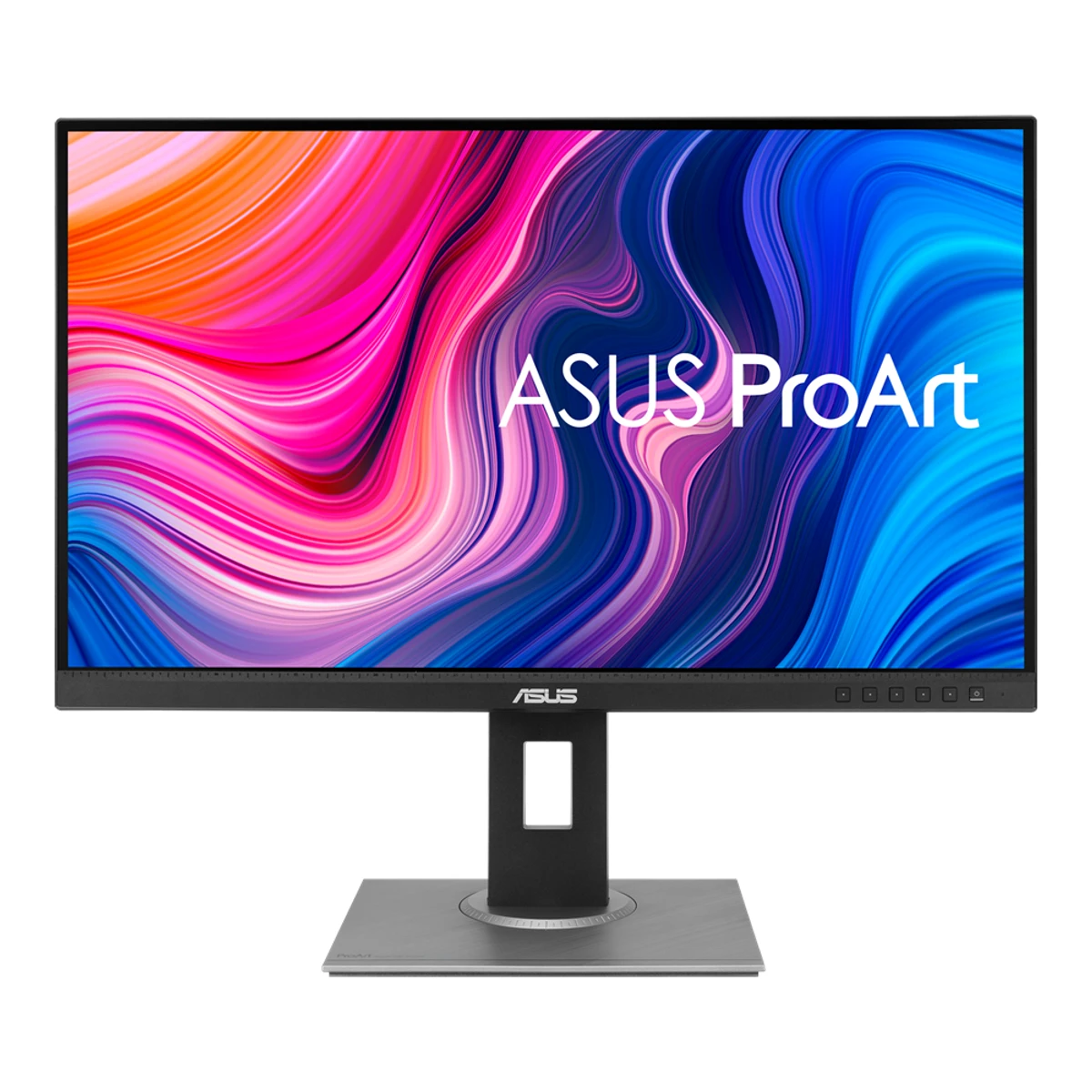
ASUSCreator monitor
ProArt Display PA278QV
Released May 2020.8Press articleprofesionalreview.com/2020/05/27/asus-anuncia-los-monitores-proart-pa248qv-y-pa278qvRead 15 October 2026The same article says both monitors are available from that week in Spain. ComputerBase (2020-06-04) says availability is immediate in Germany. The US launch followed on 2020-06-11. EPREL gives an EU market start of 2020-03-30, which is regulatory and not proof of sale. The month is for the first public sale. Last checked 15 October 2026.
- Screen size
- 27in
- Resolution
- 2560 × 1440
- Refresh rate
- 75Hz
- Panel
- IPS
105 of 172 fields known.
At a glance
Power use (typical)
Lower than 81% of other monitors. Lower is better.
Power use SDR (EU label)
Lower than 76% of other monitors. Lower is better.
Ports
- DisplayPort 1.2
- Mini DisplayPort
- HDMI 1.4
- DVI
- USB-B 3.2 Gen 1
- 4 USB-A 3.2 Gen 1
- Headphone3.5 mm out
General
- Series
- ProArt Display2Maker product pageasus.com/us/displays-desktops/monitors/proart/proart-display-pa278qvRead 15 October 2026Listed under ProArt in the Displays / Desktops, Monitors menu.
- Model numbers
- PA278QV, 90LM05L1-B033703Owner's manualdlcdnets.asus.com/pub/ASUS/LCD%20Monitors/PA278QV/PA278QV_English.pdfRead 15 October 2026The guide covers PA278QV and PA278QEV. Only PA278QV is stored.
- Predecessor
- Not available
- Successor
- Not available
Display
- Screen size
- 27in(68.6 cm)1Maker product pageasus.com/us/displays-desktops/monitors/proart/proart-display-pa278qv/techspecRead 15 October 2026Panel Size (inch) 27.
- Viewable screen diagonal
- Not available
- Native resolution
- 2560 × 1440px1Maker product pageasus.com/us/displays-desktops/monitors/proart/proart-display-pa278qv/techspecRead 15 October 2026Resolution 2560x1440.
- Aspect ratio
- 16:91Maker product pageasus.com/us/displays-desktops/monitors/proart/proart-display-pa278qv/techspecRead 15 October 2026Aspect Ratio 16:9.
- Pixel density
- 108.8ppi
- Pixel pitch
- 0.2331mm3Owner's manualdlcdnets.asus.com/pub/ASUS/LCD%20Monitors/PA278QV/PA278QV_English.pdfRead 15 October 2026p 3-10: 0.2331 mm x 0.2331 mm. The page rounds it to 0.233 mm.
- Active display area
- Width596.74Height335.66mm(23.5 × 13.2 in)1Maker product pageasus.com/us/displays-desktops/monitors/proart/proart-display-pa278qv/techspecRead 15 October 2026Display Viewing Area (H x V) 596.74 x 335.66 mm.
- Curvature radius
- Not available
Panel
- Panel type (as published)
- IPS1Maker product pageasus.com/us/displays-desktops/monitors/proart/proart-display-pa278qv/techspecRead 15 October 2026Panel Type, verbatim.
- Backlight
- Not available
- Local dimming
- Not available
- Dimming zones
- Not available
- Panel part number
- M270KCJ-L5B7Measurementpcmonitors.info/reviews/asus-pa278qvRead 15 October 2026Innolux M270KCJ-L5B, as above.
- Panel generation
- Not available
- Subpixel layout
- RGB stripe7Measurementpcmonitors.info/reviews/asus-pa278qvRead 15 October 2026Review: standard RGB stripe, with no text fringing concerns.
- Colour depth method
- Native7Measurementpcmonitors.info/reviews/asus-pa278qvRead 15 October 2026Review spec list: 16.7 million colours, 8 bits per subpixel without dithering (true 8-bit).
- Displayable colours
- 16.7 million1Maker product pageasus.com/us/displays-desktops/monitors/proart/proart-display-pa278qv/techspecRead 15 October 2026Display Colors 16.7M.
- DCI-P3 coverage
- Not available
- Adobe RGB coverage
- Not available
- Rec. 2020 coverage
- Not available
- NTSC coverage
- Not available
- Factory calibrated
- Yes2Maker product pageasus.com/us/displays-desktops/monitors/proart/proart-display-pa278qvRead 15 October 2026Factory calibrated and Calman Verified.
- Paper calibration report in box
- Yes1Maker product pageasus.com/us/displays-desktops/monitors/proart/proart-display-pa278qv/techspecRead 15 October 2026Accessories (varies by region) list a Color pre-calibration report. The manual says Color calibration testing report.
- Hardware calibration support
- Not available
- Static contrast ratio
- 1,000:11Maker product pageasus.com/us/displays-desktops/monitors/proart/proart-display-pa278qv/techspecRead 15 October 2026Contrast Ratio (Typ.) 1000:1. The manual's 100,000,000:1 with ASCR on is dynamic and not stored.
- Brightness (typical, SDR)
- 350nits1Maker product pageasus.com/us/displays-desktops/monitors/proart/proart-display-pa278qv/techspecRead 15 October 2026Brightness (Typ.) 350 cd/m2. Window and mode are not stated. The manual says the same.
- Brightness (maker minimum)
- Not available
- Peak brightness (HDR)
- Not available
- HDR peak test window
- Not available
- Full-screen brightness
- Not available
- HDR formats
- Not available
Refresh rate and motion
- Refresh rate per resolution and port
Refresh rate per resolution and port. The top rate is in bold. Resolution Port not listed 2560 × 1440Native 75Hz Show as source table
Width (px) Height (px) Maximum accepted rate (Hz) 2560 1440 75 - Max refresh rate
- 75Hz
- Max refresh rate at native resolution
- 75Hz
- Max refresh rate over DisplayPort
- Not available
- Max refresh rate over HDMI
- Not available
- Max refresh rate over USB-C
- Not available
- Max refresh rate at 10-bit
- Not available
- Native refresh rate
- 75Hz1Maker product pageasus.com/us/displays-desktops/monitors/proart/proart-display-pa278qv/techspecRead 15 October 2026Refresh Rate (Max) 75Hz, with a digital signal frequency of 46~75 Hz (V).
- Overclocked refresh rate
- Not available
- Dual mode
- Not available
- Minimum fixed refresh rate
- Not available
- Adaptive sync technologies
- Adaptive-Sync1Maker product pageasus.com/us/displays-desktops/monitors/proart/proart-display-pa278qv/techspecRead 15 October 2026VRR Technology: Yes (Adaptive-Sync). ASUS does not claim FreeSync or G-SYNC Compatible. The reviewer found FreeSync and G-SYNC Compatible working, but Nvidia had not validated it.
- VRR range per port
Input Min (Hz) Max (Hz) DisplayPort 48 75 HDMI 48 75 - Low framerate compensation
- No7Measurementpcmonitors.info/reviews/asus-pa278qvRead 15 October 2026Review: FreeSync range 48-75 Hz, FreeSync deactivates below 48 FPS, and LFC is not supported.
- Response time (maker GtG claim)
- 5ms1Maker product pageasus.com/us/displays-desktops/monitors/proart/proart-display-pa278qv/techspecRead 15 October 2026Response Time 5ms (GTG). The manual says < 5 ms (grey to grey). The bound is kept as 5. Overdrive (Trace Free) level is not stated.
- Response time (maker MPRT claim)
- Not available
- Overdrive settings
- Not available
- Blur-reduction technology
- Rapid Rendering3Owner's manualdlcdnets.asus.com/pub/ASUS/LCD%20Monitors/PA278QV/PA278QV_English.pdfRead 15 October 2026OSD p 3-2: Rapid Rendering Mode.
- Blur reduction works with VRR
- No3Owner's manualdlcdnets.asus.com/pub/ASUS/LCD%20Monitors/PA278QV/PA278QV_English.pdfRead 15 October 2026OSD p 3-2: to activate Rapid Rendering, turn off Adaptive-Sync.
- Flicker-free (claimed)
- Yes1Maker product pageasus.com/us/displays-desktops/monitors/proart/proart-display-pa278qv/techspecRead 15 October 2026Flicker-free: Yes. Certificate list names TUV Flicker-free.
- Black frame insertion
- Not available
Measured
- Input lag at maximum refresh rate
- 5.12ms7Measurementpcmonitors.info/reviews/asus-pa278qvRead 15 October 20265.12 ms at 75 Hz (the highest rate), SMTT 2.0 with a camera and over 30 repeat readings, Windows 10, GTX 1080 Ti over DisplayPort. Adaptive-Sync was off, since the reviewer could not measure with it on. MonitorNerds says 8 ms with no method, which is not used.
- Input lag at 60 Hz
- 6.73ms7Measurementpcmonitors.info/reviews/asus-pa278qvRead 15 October 20266.73 ms at 60 Hz, same method.
- Average response time (measured)
- Not available
- Overshoot (measured)
- Not available
- SDR brightness (measured)
- 431nits7Measurementpcmonitors.info/reviews/asus-pa278qvRead 15 October 2026431 cd/m2 white at 100% brightness, X-Rite i1Display Pro, Rapid Rendering off. Minimum 57 cd/m2 at 0%. Window size is not stated. MonitorNerds gives 435 cd/m2 without conditions.
- HDR brightness in a real scene (measured)
- Not available
- PWM flicker frequency (measured)
- 20kHz7Measurementpcmonitors.info/reviews/asus-pa278qvRead 15 October 2026Review: the PA278QV uses PWM with a cycling frequency of about 20 kHz to reduce backlight brightness, which TUV Rheinland counts as flicker free. The review does not say how the figure was found.
- VRR range (measured)
- Not available
- Colour accuracy (measured Delta E)
- Not available
- Gray uniformity (measured)
- Not available
- Reflections (measured)
- Not available
Connectivity
- Video inputs
Type Version Count DisplayPort 1.2 1 Mini DisplayPort Not available 1 HDMI 1.4 1 DVI Not available 1 - HDMI ports
- 1
- DisplayPort ports
- 2
- Highest HDMI version
- 1.4
- Highest DisplayPort version
- 1.2
- HDMI features
- Not available
- USB-C power delivered
- Not available
- Thunderbolt
- Not available
- USB upstream ports
Connector USB version Count USB-B 3.2 Gen 1 1 - USB downstream hub ports
Connector USB version Count USB-A 3.2 Gen 1 4 - KVM switch
- Not available
- Daisy chain (MST)
- No3Owner's manualdlcdnets.asus.com/pub/ASUS/LCD%20Monitors/PA278QV/PA278QV_English.pdfRead 15 October 2026Specifications p 3-10: Digital Output No.
Smart features
We could not find any of these 4 fields. Show them
- Smart platform
- Not available
- Wi-Fi
- Not available
- Bluetooth
- Not available
- Remote control
- Not available
Audio and camera
- Number of speakers
- 21Maker product pageasus.com/us/displays-desktops/monitors/proart/proart-display-pa278qv/techspecRead 15 October 2026Speaker: Yes (2Wx2).
- Speaker power per channel
- 2W1Maker product pageasus.com/us/displays-desktops/monitors/proart/proart-display-pa278qv/techspecRead 15 October 20262W x 2, so 2 W per speaker. The manual says 2 W x 2 Stereo, RMS.
- Webcam
- Not available
- Microphone
- Not available
Ergonomics and controls
- Stand height adjustment
- 150mm1Maker product pageasus.com/us/displays-desktops/monitors/proart/proart-display-pa278qv/techspecRead 15 October 2026Height Adjustment: 0~150mm.
- Tilt
- Forward5°Backward35°1Maker product pageasus.com/us/displays-desktops/monitors/proart/proart-display-pa278qv/techspecRead 15 October 2026Tilt: Yes (+35 to -5 degrees). 5 degrees forward, 35 backward, as the manual shows.
- Swivel
- Left90°Right90°1Maker product pageasus.com/us/displays-desktops/monitors/proart/proart-display-pa278qv/techspecRead 15 October 2026Swivel: Yes (+90 to -90 degrees).
- Pivot
- Counterclockwise90°Clockwise90°1Maker product pageasus.com/us/displays-desktops/monitors/proart/proart-display-pa278qv/techspecRead 15 October 2026Pivot: Yes (+90 to -90 degrees).
- VESA mount
- 100 x 1001Maker product pageasus.com/us/displays-desktops/monitors/proart/proart-display-pa278qv/techspecRead 15 October 2026VESA Wall Mounting: 100x100mm.
- VESA adapter needed
- Not available
- Security lock slot
- Yes1Maker product pageasus.com/us/displays-desktops/monitors/proart/proart-display-pa278qv/techspecRead 15 October 2026Kensington Lock: Yes.
- On-screen menu controls
- Buttons3Owner's manualdlcdnets.asus.com/pub/ASUS/LCD%20Monitors/PA278QV/PA278QV_English.pdfRead 15 October 2026Front view p 1-2: power, Menu, Close, QuickFit and two Shortcut buttons. No joystick.
- Desktop software
- Not available
- User firmware updates
- Not available
- Ambient light sensor
- Not available
- Presence sensor
- Not available
- RGB lighting
- Not available
- Gaming menu features
- Not available
OLED care
We could not find any of these 3 fields. Show them
- OLED care
- Not available
- Burn-in covered by warranty
- Not available
- Burn-in warranty length
- Not available
Dimensions and weight
Front and side, drawn to scale. The dashed outline is the screen at its highest.
- Dimensions with stand
- Width615Height (lowest)382Height (highest)532Depth226mm(24.2 × 15 to 20.9 × 8.9 in)1Maker product pageasus.com/us/displays-desktops/monitors/proart/proart-display-pa278qv/techspecRead 15 October 202661.50 x 53.20 x 22.60 cm at the highest position, and 615 x (382~532) x 226 mm. The manual gives the same in mm with highest and lowest positions.
- Dimensions without stand
- Width615Height372Depth51mm(24.2 × 14.6 × 2 in)1Maker product pageasus.com/us/displays-desktops/monitors/proart/proart-display-pa278qv/techspecRead 15 October 2026Phys. Dimension without Stand 615 x 372 x 51 mm. The manual agrees.
- Stand footprint
- Not available
- Weight without stand
- 4.7kg(10.4 lb)3Owner's manualdlcdnets.asus.com/pub/ASUS/LCD%20Monitors/PA278QV/PA278QV_English.pdfRead 15 October 2026p 3-10: 4.7 kg without stand. See the weight_with_stand_kg note for the conflicting figures.
- Box dimensions
- Not available
- Box weight
- Not available
Power
- EU energy class SDRE4EU energy label (EPREL)eprel.ec.europa.eu/fiches/electronicdisplays/Fiche_384209_EN.pdfRead 15 October 2026Energy Efficiency Class for SDR: E.
- Adapter rating
- Not available
- Input voltage
- 100-240 V AC, 50/60 Hz1Maker product pageasus.com/us/displays-desktops/monitors/proart/proart-display-pa278qv/techspecRead 15 October 2026Voltage 100-240V, 50/60Hz.
- Power use (max)
- Not available
- Power use SDR (EU label)
- 21.6W4EU energy label (EPREL)eprel.ec.europa.eu/fiches/electronicdisplays/Fiche_384209_EN.pdfRead 15 October 2026On mode power demand in SDR 21.6 W. A distributor datasheet shows 32.1 W and class G, which conflicts with the EPREL record and is not used.
- Power use HDR (EU label)
- Not available
- EU energy class HDR
- Not available
- Energy per 1000 h SDR
- 22kWh5EU energy label (EPREL)eprel.ec.europa.eu/labels/electronicdisplays/Label_384209.svgRead 15 October 2026Energy label SDR 22 kWh/1000h, rounded from 21.6 W.
- Energy per 1000 h HDR
- Not available
Certifications
- VESA ClearMR
- Not available
- VESA AdaptiveSync Display
- Not available
- TÜV certifications
- TÜV Low Blue Light, TÜV Flicker-free1Maker product pageasus.com/us/displays-desktops/monitors/proart/proart-display-pa278qv/techspecRead 15 October 2026Certificate list: TUV Low Blue Light and TUV Flicker-free.
- TCO Certified
- Not available
- EPEAT
- Not available
In the box
- In the box
- LCD monitor, Monitor base, Quick start guide, Warranty card, Power cord, HDMI cable, DisplayPort cable, DisplayPort cable (mini DP to DP), USB B to A cable, Audio cable, Color calibration testing report, ProArt welcome card3Owner's manualdlcdnets.asus.com/pub/ASUS/LCD%20Monitors/PA278QV/PA278QV_English.pdfRead 15 October 2026Package contents p 1-1. HDMI, DisplayPort, mini DP to DP, USB B to A and audio cables are marked optional in the manual and are stored without the marker. The ASUS page says accessories vary by region.
- Cables included
Type Power cord HDMI cable DisplayPort cable DisplayPort-to-miniDP cable USB Type-B to A cable Audio cable
Warranty
- Manufacturer warranty (source market)
- 3years1Maker product pageasus.com/us/displays-desktops/monitors/proart/proart-display-pa278qv/techspecRead 15 October 2026LCD ZBD Warranty: Yes (3 yr). EPREL gives a minimum general guarantee of 3 years. Amazon US names 5 years with online registration, which is not the base term.
- Dead pixel policy
- LCD zero bright dot (ZBD) warranty, 3 years1Maker product pageasus.com/us/displays-desktops/monitors/proart/proart-display-pa278qv/techspecRead 15 October 2026LCD ZBD Warranty: Yes (3 yr). Market scope is not stated.
Links
- Product page
- www.asus.com/us/displays-desktops/monitors/proart/proart-display-pa278qv2Maker product pageasus.com/us/displays-desktops/monitors/proart/proart-display-pa278qvRead 15 October 2026
- Spec sheet
- www.asus.com/us/displays-desktops/monitors/proart/proart-display-pa278qv/techspec1Maker product pageasus.com/us/displays-desktops/monitors/proart/proart-display-pa278qv/techspecRead 15 October 2026ASUS US Tech Specs tab. The UK and German tabs carry the same values. The page marks dimensions and weights as estimates that vary by region.
- Manual
- dlcdnets.asus.com/pub/ASUS/LCD%20Monitors/PA278QV/PA278QV_English.pdf3Owner's manualdlcdnets.asus.com/pub/ASUS/LCD%20Monitors/PA278QV/PA278QV_English.pdfRead 15 October 2026ASUS PA278QV/PA278QEV Series User Guide, First Edition March 2020, linked from the ASUS support page. PA278QEV is a variant without speakers.
Compare with
Pick a monitor to see both side by side. Differences are marked yellow.
Sources
We read 11 sources for this monitor. The numbers match the markers in the sheet.
- Maker product pageasus.com/us/displays-desktops/monitors/proart/proart-display-pa278qv
- EU energy label (EPREL)eprel.ec.europa.eu/fiches/electronicdisplays/Fiche_384209_EN.pdf
- EU energy label (EPREL)eprel.ec.europa.eu/labels/electronicdisplays/Label_384209.svg
- Measurementpcmonitors.info/reviews/asus-pa278qv
- Retailer pageamazon.com/dp/B088BC5HMM
See a wrong value? Tell us and name the field.