Gaming / Monitors
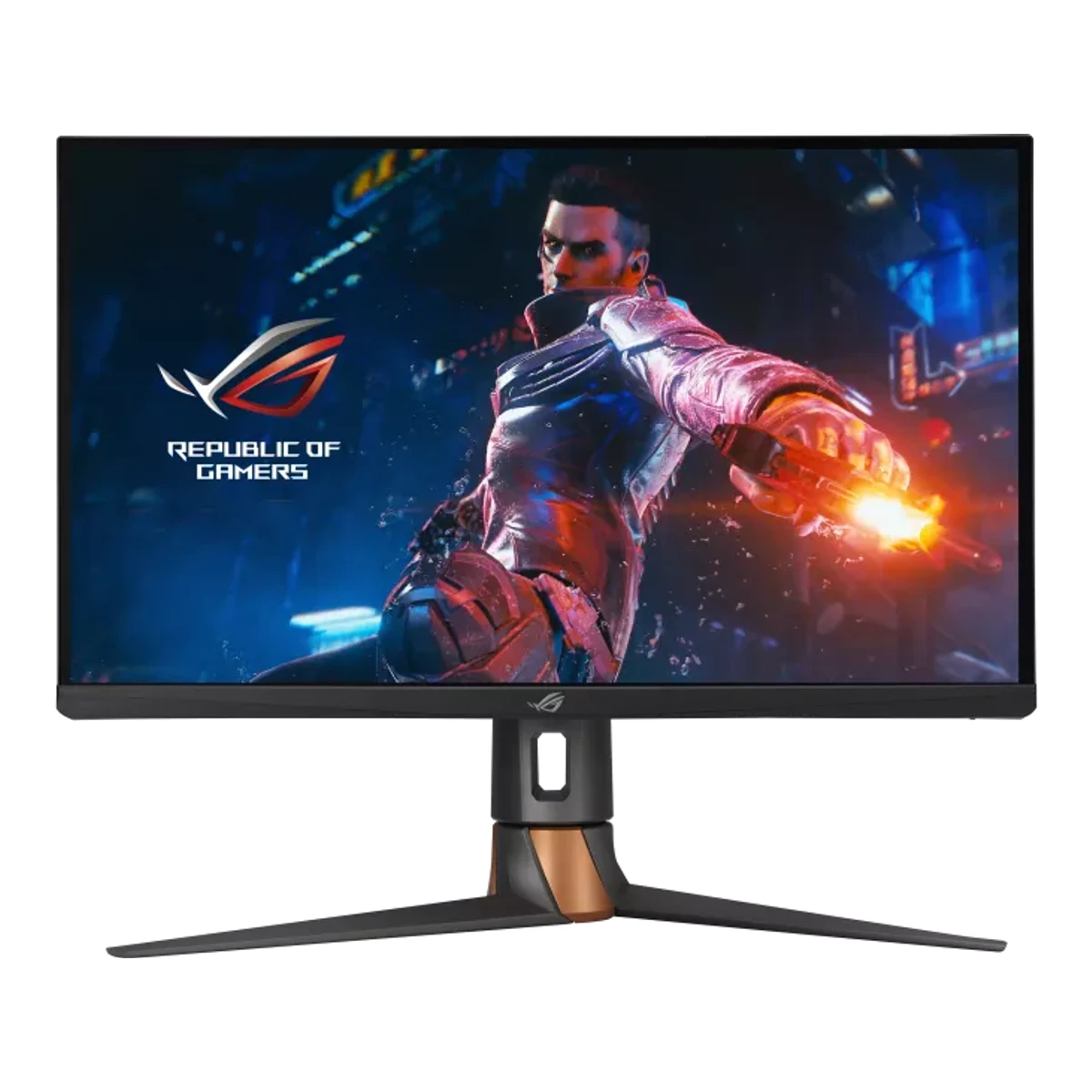
ASUSGaming monitor
ROG Swift 360Hz PG27AQN
Released October 2022.6Press articlereddit.com/r/Monitors/comments/yactx5Read 5 October 2026October 22, 2022 thread reports actual Newegg stock and orders, then October 23 received-unit use. Month precision retained. This corroborates the maker October 20 availability announcement without treating a planned date as completed retail. Last checked 16 October 2026.
- Screen size
- 27in
- Resolution
- 2560 × 1440
- Refresh rate
- 360Hz
- Panel
- Fast IPS
91 of 172 fields known.
At a glance
Brightness (typical, SDR)
Higher than 78% of other monitors.
Ports
- DisplayPort 1.4
- 3 HDMI 2.0
- USB-B 3.2 Gen 1
- 2 USB-A 3.2 Gen 1
- Headphone3.5 mm out
General
- Series
- ROG Swift1Maker product pagerog.asus.com/monitors/27-to-31-5-inches/rog-swift-360hz-pg27aqn-model/specRead 5 October 2026
- Model numbers
- PG27AQN1Maker product pagerog.asus.com/monitors/27-to-31-5-inches/rog-swift-360hz-pg27aqn-model/specRead 5 October 2026
- GTIN / EAN
- Not available
- Announced
- Not available
- Status
- Not available
- Predecessor
- Not available
- Successor
- Not available
- Launch price (US)
- Not available
- Launch price (EU)
- Not available
- Markets
- Not available
Display
- Screen size
- 27in(68.6 cm)1Maker product pagerog.asus.com/monitors/27-to-31-5-inches/rog-swift-360hz-pg27aqn-model/specRead 5 October 2026
- Viewable screen diagonal
- Not available
- Native resolution
- 2560 × 1440px1Maker product pagerog.asus.com/monitors/27-to-31-5-inches/rog-swift-360hz-pg27aqn-model/specRead 5 October 2026
- Aspect ratio
- 16:91Maker product pagerog.asus.com/monitors/27-to-31-5-inches/rog-swift-360hz-pg27aqn-model/specRead 5 October 2026
- Pixel density
- 108.8ppi
- Active display area
- Width595.968Height335.232mm(23.5 × 13.2 in)1Maker product pagerog.asus.com/monitors/27-to-31-5-inches/rog-swift-360hz-pg27aqn-model/specRead 5 October 2026Maker Display Viewing Area 595.968 x 335.232 mm. Published 0.233 mm pixel pitch is rounded and remains separately qualified.
- Curvature radius
- Not available
- Screen surface
- Matte3Reviewtftcentral.co.uk/reviews/asus-rog-swift-pg27aqnRead 5 October 2026
- Anti-reflection coating
- Not available
- Touchscreen
- Not available
Panel
- Panel type
- Fast IPS1Maker product pagerog.asus.com/monitors/27-to-31-5-inches/rog-swift-360hz-pg27aqn-model/specRead 5 October 2026
- Panel type (as published)
- UltraFast IPS8Maker product pagerog.asus.com/monitors/27-to-31-5-inches/rog-swift-360hz-pg27aqn-modelRead 5 October 2026Exact product feature page calls the panel UltraFast IPS.
- Backlight
- Edge-lit LED3Reviewtftcentral.co.uk/reviews/asus-rog-swift-pg27aqnRead 5 October 2026HDR technical capabilities section explicitly identifies simple edge-lit local dimming.
- Panel maker
- AU Optronics3Reviewtftcentral.co.uk/reviews/asus-rog-swift-pg27aqnRead 5 October 2026
- Panel part number
- M270DAN10.03Reviewtftcentral.co.uk/reviews/asus-rog-swift-pg27aqnRead 5 October 2026Exact panel identification M270DAN10.0 from AU Optronics.
- Panel generation
- Not available
- Subpixel layout
- Not available
- Displayable colours
- 16.7 million1Maker product pagerog.asus.com/monitors/27-to-31-5-inches/rog-swift-360hz-pg27aqn-model/specRead 5 October 2026
- sRGB coverage
- Not available
- Adobe RGB coverage
- Not available
- Rec. 2020 coverage
- Not available
- NTSC coverage
- Not available
- Paper calibration report in box
- Not available
- Hardware calibration support
- Not available
- Static contrast ratio
- 1,000:11Maker product pagerog.asus.com/monitors/27-to-31-5-inches/rog-swift-360hz-pg27aqn-model/specRead 5 October 2026
- Brightness (typical, SDR)
- 400nits1Maker product pagerog.asus.com/monitors/27-to-31-5-inches/rog-swift-360hz-pg27aqn-model/specRead 5 October 2026
- Brightness (maker minimum)
- Not available
- Peak brightness (HDR)
- 600nits1Maker product pagerog.asus.com/monitors/27-to-31-5-inches/rog-swift-360hz-pg27aqn-model/specRead 5 October 2026Maker HDR peak 600 nits. Stimulus, mode and duration not stated.
- HDR peak test window
- Not available
- Full-screen brightness
- Not available
- HDR formats
- HDR101Maker product pagerog.asus.com/monitors/27-to-31-5-inches/rog-swift-360hz-pg27aqn-model/specRead 5 October 2026
- HDR certification
- DisplayHDR 6001Maker product pagerog.asus.com/monitors/27-to-31-5-inches/rog-swift-360hz-pg27aqn-model/specRead 5 October 2026
- Viewing angle (horizontal)
- 178°1Maker product pagerog.asus.com/monitors/27-to-31-5-inches/rog-swift-360hz-pg27aqn-model/specRead 5 October 2026
- Viewing angle (vertical)
- 178°1Maker product pagerog.asus.com/monitors/27-to-31-5-inches/rog-swift-360hz-pg27aqn-model/specRead 5 October 2026
Refresh rate and motion
- Refresh rate per resolution and port
Refresh rate per resolution and port. The top rate is in bold. Resolution HDMI 2.0 DisplayPort 1.4 2560 × 1440Native 144Hz8-bit 360Hz8-bit, 4:4:4, DSC Source3Reviewtftcentral.co.uk/reviews/asus-rog-swift-pg27aqnRead 5 October 2026Gaming capabilities table explicitly gives native DP 360 Hz and HDMI 144 Hz at 8-bit. Manual 3-16 explicitly says native DP 360 Hz requires DSC, 8-bit RGB/YUV444 and a compatible Turing-generation GPU. HDMI chroma/DSC and 12-bit maxima remain unproved. Lower-resolution preset maxima are not inferred.4Owner's manualdlcdnets.asus.com/pub/ASUS/LCD%20Monitors/PG27AQN/PG27AQN_English.pdfRead 5 October 2026Supported operating modes 3-16 expressly confirms native DP 360 with DSC at 8-bit RGB/YUV444, compatible GPU requirement. This supplements independently explicit review native maxima.Show as source table
Width (px) Height (px) Input Input version Maximum accepted rate (Hz) Bit depth (bits) Chroma DSC 2560 1440 DisplayPort 1.4 360 8 4:4:4 Yes 2560 1440 HDMI 2.0 144 8 Not available Not available - Max refresh rate
- 360Hz
- Max refresh rate at native resolution
- 360Hz
- Max refresh rate over DisplayPort
- 360Hz
- Max refresh rate over HDMI
- 144Hz
- Max refresh rate over USB-C
- Not available
- Max refresh rate at 10-bit
- Not available
- Native refresh rate
- 360Hz1Maker product pagerog.asus.com/monitors/27-to-31-5-inches/rog-swift-360hz-pg27aqn-model/specRead 5 October 2026
- Overclocked refresh rate
- Not available
- Dual mode
- Not available
- Minimum fixed refresh rate
- Not available
- Adaptive sync technologies
- G-SYNC, Adaptive-Sync, HDMI VRR3Reviewtftcentral.co.uk/reviews/asus-rog-swift-pg27aqnRead 5 October 2026Native G-SYNC module, AMD-compatible DP Adaptive-Sync and console HDMI VRR are explicitly tested. FreeSync Premium certification is not inferred.
- VRR range per port
Input Min (Hz) Max (Hz) DisplayPort 1 360 - Low framerate compensation
- Not available
- Response time (maker GtG claim)
- 1ms1Maker product pagerog.asus.com/monitors/27-to-31-5-inches/rog-swift-360hz-pg27aqn-model/specRead 5 October 2026
- Response time (maker MPRT claim)
- Not available
- Overdrive settings
- Off, Normal, Esports, Extreme3Reviewtftcentral.co.uk/reviews/asus-rog-swift-pg27aqnRead 5 October 2026
- Motion blur reduction
- Yes3Reviewtftcentral.co.uk/reviews/asus-rog-swift-pg27aqnRead 5 October 2026ULMB 2 was added by firmware in late May 2023. It operates at 360 Hz with a compatible NVIDIA GPU and was not part of original launch firmware.
- Blur-reduction technology
- NVIDIA ULMB 23Reviewtftcentral.co.uk/reviews/asus-rog-swift-pg27aqnRead 5 October 2026
- Blur reduction works with VRR
- No3Reviewtftcentral.co.uk/reviews/asus-rog-swift-pg27aqnRead 5 October 2026ULMB 2 section explicitly requires disabling G-SYNC. Tested AMD hardware does not support the feature.
- Flicker-free (claimed)
- Yes1Maker product pagerog.asus.com/monitors/27-to-31-5-inches/rog-swift-360hz-pg27aqn-model/specRead 5 October 2026
- Black frame insertion
- Not available
Measured
- Input lag at 60 Hz
- Not available
- Average response time (measured)
- Not available
- Overshoot (measured)
- Not available
- Contrast ratio (measured)
- Not available
- SDR brightness (measured)
- Not available
- HDR brightness in a real scene (measured)
- Not available
- PWM flicker frequency (measured)
- Not available
- VRR range (measured)
- Not available
- Colour accuracy (measured Delta E)
- Not available
- Gray uniformity (measured)
- Not available
- Reflections (measured)
- Not available
Connectivity
- Video inputs
Type Version Count DSC DisplayPort 1.4 1 Yes HDMI 2.0 3 Not available - HDMI ports
- 3
- DisplayPort ports
- 1
- Highest HDMI version
- 2.0
- Highest DisplayPort version
- 1.4
- HDMI features
- Not available
- USB-C video (DP Alt Mode)
- No3Reviewtftcentral.co.uk/reviews/asus-rog-swift-pg27aqnRead 5 October 2026Connectivity explicitly says no USB Type-C connector.
- USB-C power delivered
- Not available
- Thunderbolt
- Not available
- USB upstream ports
Connector USB version Count USB-B 3.2 Gen 1 1 - USB downstream hub ports
Connector USB version Count USB-A 3.2 Gen 1 2 - KVM switch
- Not available
- Daisy chain (MST)
- Not available
- Ethernet
- Not available
- 3.5 mm headphone output
- Yes1Maker product pagerog.asus.com/monitors/27-to-31-5-inches/rog-swift-360hz-pg27aqn-model/specRead 5 October 2026
- 3.5 mm microphone input
- Not available
- Optical out
- Not available
- Picture in picture
- Not available
- Picture by picture
- Not available
Smart features
We could not find any of these 4 fields. Show them
- Smart platform
- Not available
- Wi-Fi
- Not available
- Bluetooth
- Not available
- Remote control
- Not available
Audio and camera
- Number of speakers
- Not available
- Speaker power per channel
- Not available
- Webcam
- Not available
- Microphone
- Not available
Ergonomics and controls
- Stand height adjustment
- 100mm2Owner's manualdlcdnets.asus.com/pub/ASUS/LCD%20Monitors/PG27AQN/PG27AQN_English.pdfRead 5 October 2026
- Tilt
- Forward5°Backward20°2Owner's manualdlcdnets.asus.com/pub/ASUS/LCD%20Monitors/PG27AQN/PG27AQN_English.pdfRead 5 October 2026
- Swivel
- Left25°Right25°2Owner's manualdlcdnets.asus.com/pub/ASUS/LCD%20Monitors/PG27AQN/PG27AQN_English.pdfRead 5 October 2026
- Pivot
- Clockwise90°1Maker product pagerog.asus.com/monitors/27-to-31-5-inches/rog-swift-360hz-pg27aqn-model/specRead 5 October 2026
- Removable stand
- Yes2Owner's manualdlcdnets.asus.com/pub/ASUS/LCD%20Monitors/PG27AQN/PG27AQN_English.pdfRead 5 October 2026
- VESA mount
- 100 x 1002Owner's manualdlcdnets.asus.com/pub/ASUS/LCD%20Monitors/PG27AQN/PG27AQN_English.pdfRead 5 October 2026
- VESA adapter needed
- Not available
- Security lock slot
- Yes2Owner's manualdlcdnets.asus.com/pub/ASUS/LCD%20Monitors/PG27AQN/PG27AQN_English.pdfRead 5 October 2026
- On-screen menu controls
- Joystick, Buttons2Owner's manualdlcdnets.asus.com/pub/ASUS/LCD%20Monitors/PG27AQN/PG27AQN_English.pdfRead 5 October 2026
- Desktop software
- Not available
- User firmware updates
- Yes3Reviewtftcentral.co.uk/reviews/asus-rog-swift-pg27aqnRead 5 October 2026Owner-applied firmware update adds ULMB 2 and improves overdrive.
- Ambient light sensor
- Not available
- Presence sensor
- Not available
- Gaming menu features
- GamePlus, GameVisual, Dark Boost, NVIDIA Reflex Latency Analyzer, Esports Dual Format2Owner's manualdlcdnets.asus.com/pub/ASUS/LCD%20Monitors/PG27AQN/PG27AQN_English.pdfRead 5 October 2026Gaming and G-SYNC Processor menu sections. Esports Dual Format changes active image size/resolution without exceeding native 360 Hz, so no faster dual_mode is inferred.
OLED care
We could not find any of these 3 fields. Show them
- OLED care
- Not available
- Burn-in covered by warranty
- Not available
- Burn-in warranty length
- Not available
Dimensions and weight
Front and side, drawn to scale. The dashed outline is the screen at its highest.
- Dimensions with stand
- Width614Height (lowest)408Height (highest)508Depth255mm(24.2 × 16.1 to 20 × 10 in)2Owner's manualdlcdnets.asus.com/pub/ASUS/LCD%20Monitors/PG27AQN/PG27AQN_English.pdfRead 5 October 2026Specifications summary 3-11 explicitly labels lowest 408 mm and highest 508 mm.
- Dimensions without stand
- Width614Height367Depth90mm(24.2 × 14.4 × 3.5 in)2Owner's manualdlcdnets.asus.com/pub/ASUS/LCD%20Monitors/PG27AQN/PG27AQN_English.pdfRead 5 October 2026
- Stand footprint
- Not available
- Weight with stand
- 8.4kg(18.5 lb)2Owner's manualdlcdnets.asus.com/pub/ASUS/LCD%20Monitors/PG27AQN/PG27AQN_English.pdfRead 5 October 2026Specifications summary 3-11 estimated Net 8.4 kg.
- Weight without stand
- 4.8kg(10.6 lb)2Owner's manualdlcdnets.asus.com/pub/ASUS/LCD%20Monitors/PG27AQN/PG27AQN_English.pdfRead 5 October 2026Specifications summary 3-11 estimated body 4.8 kg.
- Box dimensions
- Width719Height512Depth267mm(28.3 × 20.2 × 10.5 in)2Owner's manualdlcdnets.asus.com/pub/ASUS/LCD%20Monitors/PG27AQN/PG27AQN_English.pdfRead 5 October 2026
Power
- EU energy class SDRF7EU energy label (EPREL)eprel.ec.europa.eu/api/products/electronicdisplays/1338403Read 5 October 2026
- EU energy class HDRG7EU energy label (EPREL)eprel.ec.europa.eu/api/products/electronicdisplays/1338403Read 5 October 2026
- Power supply
- External adapter2Owner's manualdlcdnets.asus.com/pub/ASUS/LCD%20Monitors/PG27AQN/PG27AQN_English.pdfRead 5 October 2026
- Input voltage
- 100-240 V AC, 50/60 Hz2Owner's manualdlcdnets.asus.com/pub/ASUS/LCD%20Monitors/PG27AQN/PG27AQN_English.pdfRead 5 October 2026Manual AC100-240V, maker tech specs separately supplies 50/60Hz.
- Power use (typical)
- Not available
- Power use (max)
- Not available
- Power use SDR (EU label)
- 26.1W7EU energy label (EPREL)eprel.ec.europa.eu/api/products/electronicdisplays/1338403Read 5 October 2026Current exact PG27AQN EU on-mode SDR watts. Unlabelled manual PowerOn<42W is not stored as typical power.
- Power use HDR (EU label)
- 49.1W7EU energy label (EPREL)eprel.ec.europa.eu/api/products/electronicdisplays/1338403Read 5 October 2026Current exact PG27AQN EU on-mode HDR watts, separate from rounded label energy.
- Standby power
- 0.5W2Owner's manualdlcdnets.asus.com/pub/ASUS/LCD%20Monitors/PG27AQN/PG27AQN_English.pdfRead 5 October 2026Specifications summary 3-11 standby < 0.5 W.
- Off-mode power
- 0.3W2Owner's manualdlcdnets.asus.com/pub/ASUS/LCD%20Monitors/PG27AQN/PG27AQN_English.pdfRead 5 October 2026Specifications summary 3-11 off < 0.3 W.
- Energy per 1000 h SDR
- Not available
- Energy per 1000 h HDR
- Not available
Certifications
- VESA ClearMR
- Not available
- VESA AdaptiveSync Display
- Not available
- TÜV certifications
- Flicker-free, Low Blue Light1Maker product pagerog.asus.com/monitors/27-to-31-5-inches/rog-swift-360hz-pg27aqn-model/specRead 5 October 2026
- ENERGY STAR
- Not available
- TCO Certified
- Not available
- EPEAT
- Not available
- Colour certifications
- Not available
- Other certifications
- Not available
In the box
- In the box
- Quick start guide, Warranty card, Power adapter, Power cord, DisplayPort cable, HDMI cable, USB cable, Input/output port cover, Color calibration testing report, ROG welcome card with envelope, ROG sticker2Owner's manualdlcdnets.asus.com/pub/ASUS/LCD%20Monitors/PG27AQN/PG27AQN_English.pdfRead 5 October 2026Specifications summary 3-12 accessories. The report is listed, but paper format is not independently proved.
- Cables included
Type Power cord DisplayPort cable HDMI cable USB cable
Warranty
We could not find any of these 2 fields. Show them
- Manufacturer warranty (source market)
- Not available
- Dead pixel policy
- Not available
Links
- Product page
- rog.asus.com/monitors/27-to-31-5-inches/rog-swift-360hz-pg27aqn-model1Maker product pagerog.asus.com/monitors/27-to-31-5-inches/rog-swift-360hz-pg27aqn-model/specRead 5 October 2026
- Spec sheet
- rog.asus.com/monitors/27-to-31-5-inches/rog-swift-360hz-pg27aqn-model/spec1Maker product pagerog.asus.com/monitors/27-to-31-5-inches/rog-swift-360hz-pg27aqn-model/specRead 5 October 2026
- Manual
- dlcdnets.asus.com/pub/ASUS/LCD%20Monitors/PG27AQN/PG27AQN_English.pdf2Owner's manualdlcdnets.asus.com/pub/ASUS/LCD%20Monitors/PG27AQN/PG27AQN_English.pdfRead 5 October 2026
- EPREL registration number
- 13384037EU energy label (EPREL)eprel.ec.europa.eu/api/products/electronicdisplays/1338403Read 5 October 2026
Compare with
Pick a monitor to see both side by side. Differences are marked yellow.
Sources
We read 9 sources for this monitor. The numbers match the markers in the sheet.
- Press articlereddit.com/r/Monitors/comments/yactx5
- EU energy label (EPREL)eprel.ec.europa.eu/api/products/electronicdisplays/1338403
- Maker product pagerog.asus.com/monitors/27-to-31-5-inches/rog-swift-360hz-pg27aqn-model
- Press articlereddit.com/r/Monitors/comments/ye3d2c
See a wrong value? Tell us and name the field.