Gaming / Monitors
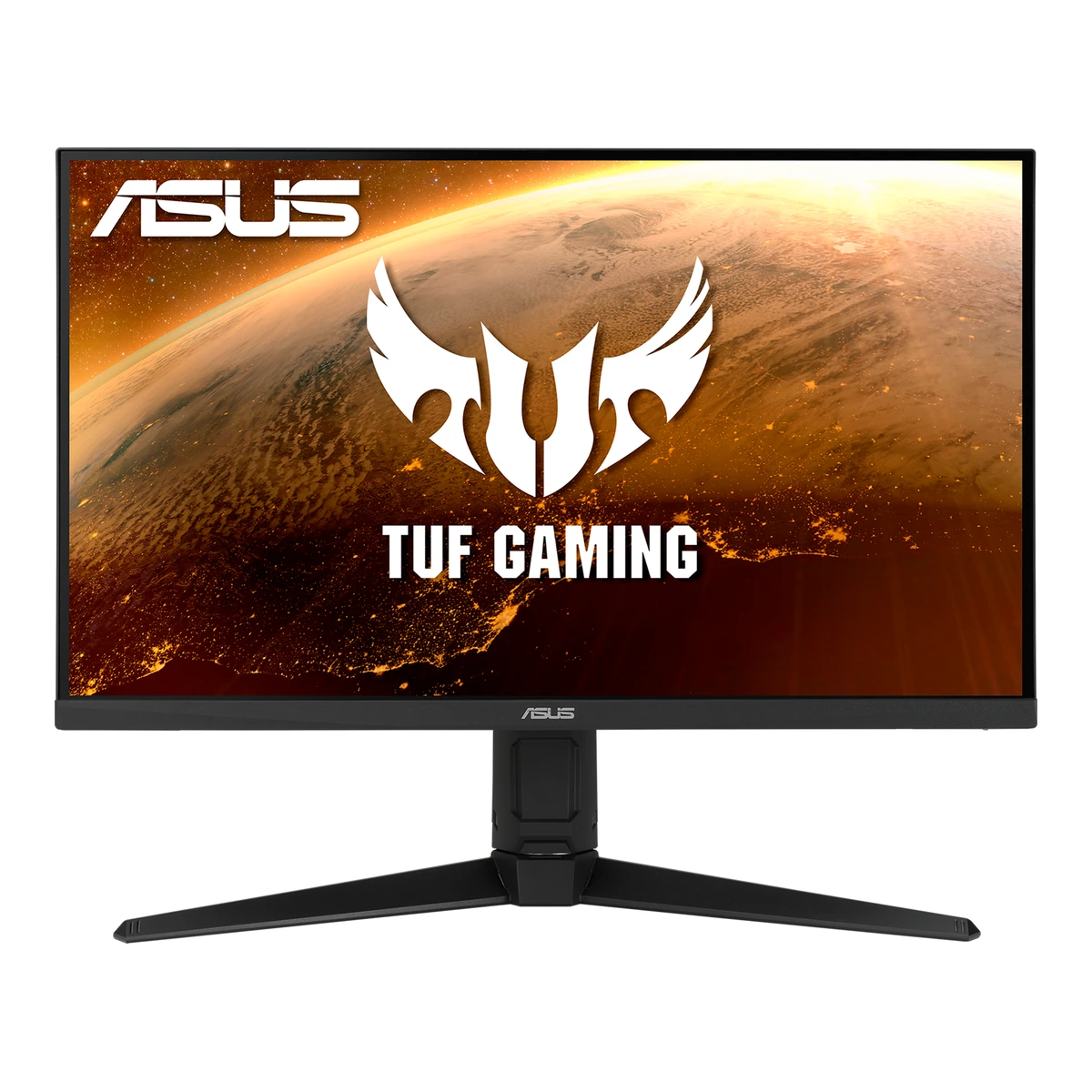
ASUSGaming monitor
TUF Gaming VG27AQL1A
Released June 2020.4EU energy label (EPREL)eprel.ec.europa.eu/fiches/electronicdisplays/Fiche_407124_EN.pdfRead 10 October 2026Model identifier VG27AQL1A is declared as placed on the Union market from 15/05/2020. The HEXUS review dated 29 July 2020 says retail availability was only starting, so June 2020 is used. This replaces the earlier 2021-06, which came from the date of a manual revision. Last checked 11 October 2026.
- Screen size
- 27in
- Resolution
- 2560 × 1440
- Refresh rate
- 170Hz
- Panel
- IPS
102 of 172 fields known.
At a glance
Ports
- DisplayPort 1.2
- 2 HDMI 2.0
- USB-B 3.2 Gen 1
- 2 USB-A 3.2 Gen 1
- Headphone3.5 mm out
General
- Series
- TUF Gaming1Maker product pageasus.com/displays-desktops/monitors/tuf-gaming/tuf-gaming-vg27aql1aRead 10 October 2026Page breadcrumb and title: TUF Gaming.
- GTIN / EAN
- Not available
- Predecessor
- Not available
- Successor
- Not available
- Launch price (US)
- Not available
- Launch price (EU)
- Not available
- Markets
- Not available
Display
- Screen size
- 27in(68.6 cm)2Maker product pageasus.com/displays-desktops/monitors/tuf-gaming/tuf-gaming-vg27aql1a/techspecRead 10 October 2026Display, Panel Size 27 inch.
- Viewable screen diagonal
- Not available
- Native resolution
- 2560 × 1440px3Owner's manualdlcdnets.asus.com/pub/ASUS/LCD%20Monitors/VG27AQ1A/VG27AQL1A_VG27AQ1A_English.pdfRead 10 October 2026Section 3.2 Max. Resolution 2560 x 1440.
- Aspect ratio
- 16:92Maker product pageasus.com/displays-desktops/monitors/tuf-gaming/tuf-gaming-vg27aql1a/techspecRead 10 October 2026
- Pixel density
- 108.8ppi
- Pixel pitch
- 0.2331mm3Owner's manualdlcdnets.asus.com/pub/ASUS/LCD%20Monitors/VG27AQ1A/VG27AQL1A_VG27AQ1A_English.pdfRead 10 October 2026Section 3.2 Pixel pitch 0.2331 mm x 0.2331 mm.
- Active display area
- Width596.74Height335.66mm(23.5 × 13.2 in)2Maker product pageasus.com/displays-desktops/monitors/tuf-gaming/tuf-gaming-vg27aql1a/techspecRead 10 October 2026Display, Display Viewing Area (H x V) 596.74 x 335.66 mm, stored as width by height.
- Curved
- Not available
- Curvature radius
- Not available
- Screen surface
- Matte2Maker product pageasus.com/displays-desktops/monitors/tuf-gaming/tuf-gaming-vg27aql1a/techspecRead 10 October 2026Display, Display Surface: Anti-Glare. Stored as matte.
- Anti-reflection coating
- Not available
- Touchscreen
- Not available
Panel
- Panel type (as published)
- IPS2Maker product pageasus.com/displays-desktops/monitors/tuf-gaming/tuf-gaming-vg27aql1a/techspecRead 10 October 2026Display, Panel Type: IPS, verbatim.
- Backlight
- Not available
- Dimming zones
- Not available
- Panel maker
- Not available
- Panel part number
- Not available
- Panel generation
- Not available
- Subpixel layout
- Not available
- Displayable colours
- 1.07 billion2Maker product pageasus.com/displays-desktops/monitors/tuf-gaming/tuf-gaming-vg27aql1a/techspecRead 10 October 2026Display, Display Colors 1073.7M, written as 1.07 billion. The manual says 1.073G.
- sRGB coverage
- Not available
- DCI-P3 coverage
- Not available
- Adobe RGB coverage
- Not available
- Rec. 2020 coverage
- Not available
- NTSC coverage
- Not available
- Factory calibrated
- Not available
- Claimed Delta E
- Not available
- Paper calibration report in box
- Not available
- Hardware calibration support
- Not available
- Static contrast ratio
- 1,000:13Owner's manualdlcdnets.asus.com/pub/ASUS/LCD%20Monitors/VG27AQ1A/VG27AQL1A_VG27AQ1A_English.pdfRead 10 October 2026Section 3.2 Contrast Ratio (Typ.) 1000:1. The 100,000,000:1 max is a dynamic claim with ASCR on and is not stored.
- Brightness (typical, SDR)
- 350nits3Owner's manualdlcdnets.asus.com/pub/ASUS/LCD%20Monitors/VG27AQ1A/VG27AQL1A_VG27AQ1A_English.pdfRead 10 October 2026Section 3.2 Brightness (Typ.) 350 cd/m2, and 400 cd/m2 with HDR on.
- Brightness (maker minimum)
- Not available
- Peak brightness (HDR)
- 400nits2Maker product pageasus.com/displays-desktops/monitors/tuf-gaming/tuf-gaming-vg27aql1a/techspecRead 10 October 2026Display, Brightness (HDR, Peak): 400 cd/m2. Window size is not published. The manual says 400 cd/m2 with HDR on.
- HDR peak test window
- Not available
- Full-screen brightness
- Not available
- HDR formats
- HDR102Maker product pageasus.com/displays-desktops/monitors/tuf-gaming/tuf-gaming-vg27aql1a/techspecRead 10 October 2026Display, HDR Support: HDR10.
- HDR certification
- DisplayHDR 4002Maker product pageasus.com/displays-desktops/monitors/tuf-gaming/tuf-gaming-vg27aql1a/techspecRead 10 October 2026Certificate list: VESA DisplayHDR 400.
Refresh rate and motion
- Refresh rate per resolution and port
Refresh rate per resolution and port. The top rate is in bold. Resolution HDMI 2.0 DisplayPort 1.2 2560 × 1440Native 144Hz 170Hz Show as source table
Width (px) Height (px) Input Input version Maximum accepted rate (Hz) 2560 1440 DisplayPort 1.2 170 2560 1440 HDMI 2.0 144 - Max refresh rate
- 170Hz
- Max refresh rate at native resolution
- 170Hz
- Max refresh rate over DisplayPort
- 170Hz
- Max refresh rate over HDMI
- 144Hz
- Max refresh rate over USB-C
- Not available
- Max refresh rate at 10-bit
- Not available
- Overclocked refresh rate
- 170Hz3Owner's manualdlcdnets.asus.com/pub/ASUS/LCD%20Monitors/VG27AQ1A/VG27AQL1A_VG27AQ1A_English.pdfRead 10 October 2026Section 3.1.2 Overclocking: Max Refresh Rate lets the user select 170 Hz, DisplayPort only.
- Dual mode
- Not available
- Minimum fixed refresh rate
- Not available
- Adaptive sync technologies
- G-SYNC Compatible, FreeSync Premium2Maker product pageasus.com/displays-desktops/monitors/tuf-gaming/tuf-gaming-vg27aql1a/techspecRead 10 October 2026Certificate list: G-SYNC Compatible. The overview page also names FreeSync Premium. No VESA AdaptiveSync Display certificate is listed.
- VRR range per port
Input Min (Hz) Max (Hz) DisplayPort 48 170 HDMI 48 144 - Response time (maker GtG claim)
- 3ms3Owner's manualdlcdnets.asus.com/pub/ASUS/LCD%20Monitors/VG27AQ1A/VG27AQL1A_VG27AQ1A_English.pdfRead 10 October 2026Section 3.2 Response time 3 ms (Gray to gray), 1ms MPRT.
- Response time (maker MPRT claim)
- 1ms2Maker product pageasus.com/displays-desktops/monitors/tuf-gaming/tuf-gaming-vg27aql1a/techspecRead 10 October 2026Display, Response Time: 1ms MPRT. The overview says the figure is from internal tests.
- Overdrive settings
- Not available
- Motion blur reduction
- Yes1Maker product pageasus.com/displays-desktops/monitors/tuf-gaming/tuf-gaming-vg27aql1aRead 10 October 2026Overview: ELMB (Extreme Low Motion Blur) gives a 1 ms MPRT. This is backlight-based blur reduction.
- Blur-reduction technology
- ELMB Sync1Maker product pageasus.com/displays-desktops/monitors/tuf-gaming/tuf-gaming-vg27aql1aRead 10 October 2026Overview and manual OSD menu name ELMB SYNC for the VG27AQL1A. Stored as ELMB Sync.
- Blur reduction works with VRR
- Yes1Maker product pageasus.com/displays-desktops/monitors/tuf-gaming/tuf-gaming-vg27aql1aRead 10 October 2026Overview: ELMB SYNC lets ELMB run at the same time as adaptive sync. The manual says plain ELMB needs Adaptive-Sync off.
- Flicker-free (claimed)
- Yes2Maker product pageasus.com/displays-desktops/monitors/tuf-gaming/tuf-gaming-vg27aql1a/techspecRead 10 October 2026Display, Flicker-free: Yes. Certificate list: TUV Flicker-free.
- Black frame insertion
- Not available
Measured
- Input lag at maximum refresh rate
- Not available
- Input lag at 60 Hz
- Not available
- Overshoot (measured)
- Not available
- SDR brightness (measured)
- 409.1nits8Measurementpcgameshardware.de/Monitor-Display-Hardware-154105/Tests/TUF-VG27AQL1A-Test-1380799/2Read 10 October 2026Data table: max. brightness 409.1 cd/m2 with deviations up to 12 percent, measured with an X-Rite i1Display Pro and Calman in SDR mode. Monitornerds measured 405 cd/m2.
- HDR brightness in a real scene (measured)
- Not available
- PWM flicker frequency (measured)
- Not available
- VRR range (measured)
- Not available
- Colour accuracy (measured Delta E)
- Not available
- Gray uniformity (measured)
- Not available
- Reflections (measured)
- Not available
Connectivity
- Video inputs
Type Version Count DisplayPort 1.2 1 HDMI 2.0 2 - HDMI ports
- 2
- DisplayPort ports
- 1
- Highest HDMI version
- 2.0
- Highest DisplayPort version
- 1.2
- HDMI features
- Not available
- USB-C video (DP Alt Mode)
- No2Maker product pageasus.com/displays-desktops/monitors/tuf-gaming/tuf-gaming-vg27aql1a/techspecRead 10 October 2026I/O Ports list DisplayPort, two HDMI, a USB hub and an earphone jack. No USB-C.
- USB-C power delivered
- Not available
- Thunderbolt
- Not available
- USB upstream ports
Connector USB version Count USB-B 3.2 Gen 1 1 - USB downstream hub ports
Connector USB version Count USB-A 3.2 Gen 1 2 - KVM switch
- Not available
- 3.5 mm headphone output
- Yes3Owner's manualdlcdnets.asus.com/pub/ASUS/LCD%20Monitors/VG27AQ1A/VG27AQL1A_VG27AQ1A_English.pdfRead 10 October 2026Section 3.2 Earphone jack: Yes. It works only while an HDMI or DisplayPort signal is present.
- 3.5 mm microphone input
- No3Owner's manualdlcdnets.asus.com/pub/ASUS/LCD%20Monitors/VG27AQ1A/VG27AQL1A_VG27AQ1A_English.pdfRead 10 October 2026Section 3.2 Audio input: No.
- Picture in picture
- Not available
- Picture by picture
- Not available
Smart features
We could not find any of these 4 fields. Show them
- Smart platform
- Not available
- Wi-Fi
- Not available
- Bluetooth
- Not available
- Remote control
- Not available
Audio and camera
- Number of speakers
- 23Owner's manualdlcdnets.asus.com/pub/ASUS/LCD%20Monitors/VG27AQ1A/VG27AQL1A_VG27AQ1A_English.pdfRead 10 October 2026Section 3.2 Speaker 2 W x 2 Stereo.
- Speaker power per channel
- 2W3Owner's manualdlcdnets.asus.com/pub/ASUS/LCD%20Monitors/VG27AQ1A/VG27AQL1A_VG27AQ1A_English.pdfRead 10 October 2026Section 3.2 Speaker 2 W x 2 Stereo, RMS. This is per speaker.
- Webcam
- Not available
- Microphone
- Not available
Ergonomics and controls
- Stand height adjustment
- 130mm3Owner's manualdlcdnets.asus.com/pub/ASUS/LCD%20Monitors/VG27AQ1A/VG27AQL1A_VG27AQ1A_English.pdfRead 10 October 2026Section 3.2 Height adjustment 130 mm.
- Tilt
- Forward5°Backward20°3Owner's manualdlcdnets.asus.com/pub/ASUS/LCD%20Monitors/VG27AQ1A/VG27AQL1A_VG27AQ1A_English.pdfRead 10 October 2026Section 3.2 Tilt +20 to -5 degrees. Stored as 20 backward and 5 forward.
- Swivel
- Left20°Right20°3Owner's manualdlcdnets.asus.com/pub/ASUS/LCD%20Monitors/VG27AQ1A/VG27AQL1A_VG27AQ1A_English.pdfRead 10 October 2026Section 3.2 Swivel +20 to -20 degrees.
- Pivot
- Counterclockwise90°Clockwise90°3Owner's manualdlcdnets.asus.com/pub/ASUS/LCD%20Monitors/VG27AQ1A/VG27AQL1A_VG27AQ1A_English.pdfRead 10 October 2026Section 3.2 Pivot +90 to -90 degrees. Section 2.2 says pivoting is for the VG27AQL1A only.
- Security lock slot
- Yes3Owner's manualdlcdnets.asus.com/pub/ASUS/LCD%20Monitors/VG27AQ1A/VG27AQL1A_VG27AQ1A_English.pdfRead 10 October 2026Section 3.2 Kensington lock: Yes. Back view item 9.
- On-screen menu controls
- Joystick, Buttons, Software3Owner's manualdlcdnets.asus.com/pub/ASUS/LCD%20Monitors/VG27AQ1A/VG27AQL1A_VG27AQ1A_English.pdfRead 10 October 2026Section 1.3.1 5-way button, back button and two shortcut buttons. DisplayWidget Lite controls monitor settings per the maker tech spec features list.
- Desktop software
- DisplayWidget Lite2Maker product pageasus.com/displays-desktops/monitors/tuf-gaming/tuf-gaming-vg27aql1a/techspecRead 10 October 2026Features, DisplayWidget: Yes, DisplayWidget Lite.
- User firmware updates
- Not available
- Ambient light sensor
- No4EU energy label (EPREL)eprel.ec.europa.eu/fiches/electronicdisplays/Fiche_407124_EN.pdfRead 10 October 2026Row 17 Automatic Brightness Control (ABC) available: No.
- Presence sensor
- No4EU energy label (EPREL)eprel.ec.europa.eu/fiches/electronicdisplays/Fiche_407124_EN.pdfRead 10 October 2026Row 19 Room presence sensor available: No.
- RGB lighting
- No7Reviewhexus.net/tech/reviews/monitors/144382-asus-tuf-vg27aql1aRead 10 October 2026Review: note the lack of RGB lights.
- Gaming menu features
- GamePlus, Crosshair, Timer, FPS Counter, Display Alignment, Sniper, GameVisual, Shadow Boost, Dynamic Dimming3Owner's manualdlcdnets.asus.com/pub/ASUS/LCD%20Monitors/VG27AQ1A/VG27AQL1A_VG27AQ1A_English.pdfRead 10 October 2026Section 1.3.3 GamePlus: crosshair, timer, FPS counter, display alignment, sniper. Section 1.3.4 GameVisual. Section 3.1.2 Shadow Boost and Dynamic Dimming (for VG27AQL1A).
OLED care
We could not find any of these 3 fields. Show them
- OLED care
- Not available
- Burn-in covered by warranty
- Not available
- Burn-in warranty length
- Not available
Dimensions and weight
Front and side, drawn to scale. The dashed outline is the screen at its highest.
- Dimensions with stand
- Width615Height (lowest)404Height (highest)534Depth215mm(24.2 × 15.9 to 21 × 8.5 in)3Owner's manualdlcdnets.asus.com/pub/ASUS/LCD%20Monitors/VG27AQ1A/VG27AQL1A_VG27AQ1A_English.pdfRead 10 October 2026Section 3.2 with stand 615 x 534 x 215 mm at the highest position and 615 x 404 x 215 mm at the lowest.
- Dimensions without stand
- Width615Height367Depth51mm(24.2 × 14.4 × 2 in)3Owner's manualdlcdnets.asus.com/pub/ASUS/LCD%20Monitors/VG27AQ1A/VG27AQL1A_VG27AQ1A_English.pdfRead 10 October 2026Section 3.2 without stand 615 x 367 x 51 mm.
- Stand footprint
- Not available
- Weight with stand
- 6.6kg(14.6 lb)3Owner's manualdlcdnets.asus.com/pub/ASUS/LCD%20Monitors/VG27AQ1A/VG27AQL1A_VG27AQ1A_English.pdfRead 10 October 2026Section 3.2 Weight (Esti.) 6.6 kg (Net).
- Weight without stand
- 4.3kg(9.5 lb)3Owner's manualdlcdnets.asus.com/pub/ASUS/LCD%20Monitors/VG27AQ1A/VG27AQL1A_VG27AQ1A_English.pdfRead 10 October 2026Section 3.2 Weight (Esti.) 4.3 kg without stand.
- Box dimensions
- Width712Height234Depth455mm(28 × 9.2 × 17.9 in)3Owner's manualdlcdnets.asus.com/pub/ASUS/LCD%20Monitors/VG27AQ1A/VG27AQL1A_VG27AQ1A_English.pdfRead 10 October 2026Section 3.2 VG27AQL1A table: 712 x 234 x 455 mm (package) in the W x H x D row. The ASUS tech spec page repeats 71.20 x 23.40 x 45.50 cm but also lists a different box of 81.50 x 47.70 x 17.00 cm, which is not stored. The labelled order is kept as published.
Power
- EU energy class SDRF4EU energy label (EPREL)eprel.ec.europa.eu/fiches/electronicdisplays/Fiche_407124_EN.pdfRead 10 October 2026Row 3 class F.
- EU energy class HDRG4EU energy label (EPREL)eprel.ec.europa.eu/fiches/electronicdisplays/Fiche_407124_EN.pdfRead 10 October 2026Row 5 class G.
- Power supply
- External adapter3Owner's manualdlcdnets.asus.com/pub/ASUS/LCD%20Monitors/VG27AQ1A/VG27AQL1A_VG27AQ1A_English.pdfRead 10 October 2026Section 3.2 Voltage rating: DC 19V, 4.74A (AC adapter).
- Input voltage
- 100-240 V AC, 50/60 Hz3Owner's manualdlcdnets.asus.com/pub/ASUS/LCD%20Monitors/VG27AQ1A/VG27AQL1A_VG27AQ1A_English.pdfRead 10 October 2026Section 3.2 Voltage rating AC 100 to 240V. The maker tech spec adds 50/60 Hz.
- Power use (max)
- Not available
- Power use SDR (EU label)
- 26W4EU energy label (EPREL)eprel.ec.europa.eu/fiches/electronicdisplays/Fiche_407124_EN.pdfRead 10 October 2026Row 4 on-mode power demand in SDR 26,0 W.
- Power use HDR (EU label)
- 50W4EU energy label (EPREL)eprel.ec.europa.eu/fiches/electronicdisplays/Fiche_407124_EN.pdfRead 10 October 2026Row 6 on-mode power demand in HDR 50,0 W.
- Standby power
- 0.5W3Owner's manualdlcdnets.asus.com/pub/ASUS/LCD%20Monitors/VG27AQ1A/VG27AQL1A_VG27AQ1A_English.pdfRead 10 October 2026Section 3.2 Standby: < 0.5 W.
- Off-mode power
- 0.3W3Owner's manualdlcdnets.asus.com/pub/ASUS/LCD%20Monitors/VG27AQ1A/VG27AQL1A_VG27AQ1A_English.pdfRead 10 October 2026Section 3.2 Power Off: < 0.3 W.
Certifications
- VESA ClearMR
- Not available
- VESA AdaptiveSync Display
- Not available
- TÜV certifications
- Flicker Free, Low Blue Light2Maker product pageasus.com/displays-desktops/monitors/tuf-gaming/tuf-gaming-vg27aql1a/techspecRead 10 October 2026Certificate list: TUV Low Blue Light and TUV Flicker-free.
- ENERGY STAR
- Not available
- TCO Certified
- Not available
- EPEAT
- Not available
- Colour certifications
- Not available
- Other certifications
- Not available
In the box
- In the box
- LCD monitor, Monitor base, Quick start guide, Warranty card, Power adapter, Power cord, DisplayPort cable, HDMI cable, USB cable3Owner's manualdlcdnets.asus.com/pub/ASUS/LCD%20Monitors/VG27AQ1A/VG27AQL1A_VG27AQ1A_English.pdfRead 10 October 2026Section 1.2 Package contents. The DisplayPort, HDMI and USB cables are marked optional.
- Cables included
Type Power cord DisplayPort cable HDMI cable USB cable
Warranty
- Manufacturer warranty (source market)
- 3years8Measurementpcgameshardware.de/Monitor-Display-Hardware-154105/Tests/TUF-VG27AQL1A-Test-1380799/2Read 10 October 2026PC Games Hardware data table: Garantie 3 Jahre (German market). ASUS publishes no warranty term on the product pages and the EU sheet states none.
- Dead pixel policy
- Not available
Links
- Product page
- www.asus.com/displays-desktops/monitors/tuf-gaming/tuf-gaming-vg27aql1a1Maker product pageasus.com/displays-desktops/monitors/tuf-gaming/tuf-gaming-vg27aql1aRead 10 October 2026
- Spec sheet
- www.asus.com/displays-desktops/monitors/tuf-gaming/tuf-gaming-vg27aql1a/techspec2Maker product pageasus.com/displays-desktops/monitors/tuf-gaming/tuf-gaming-vg27aql1a/techspecRead 10 October 2026
Compare with
Pick a monitor to see both side by side. Differences are marked yellow.
Sources
We read 9 sources for this monitor. The numbers match the markers in the sheet.
- Maker product pageasus.com/displays-desktops/monitors/tuf-gaming/tuf-gaming-vg27aql1a
- EU energy label (EPREL)eprel.ec.europa.eu/fiches/electronicdisplays/Fiche_407124_EN.pdf
- EU energy label (EPREL)eprel.ec.europa.eu/labels/electronicdisplays/Label_407124.pdf
- Maker product pageamd.com/en/resources/support-articles/faqs/DH3-013.html
See a wrong value? Tell us and name the field.