Gaming / Monitors
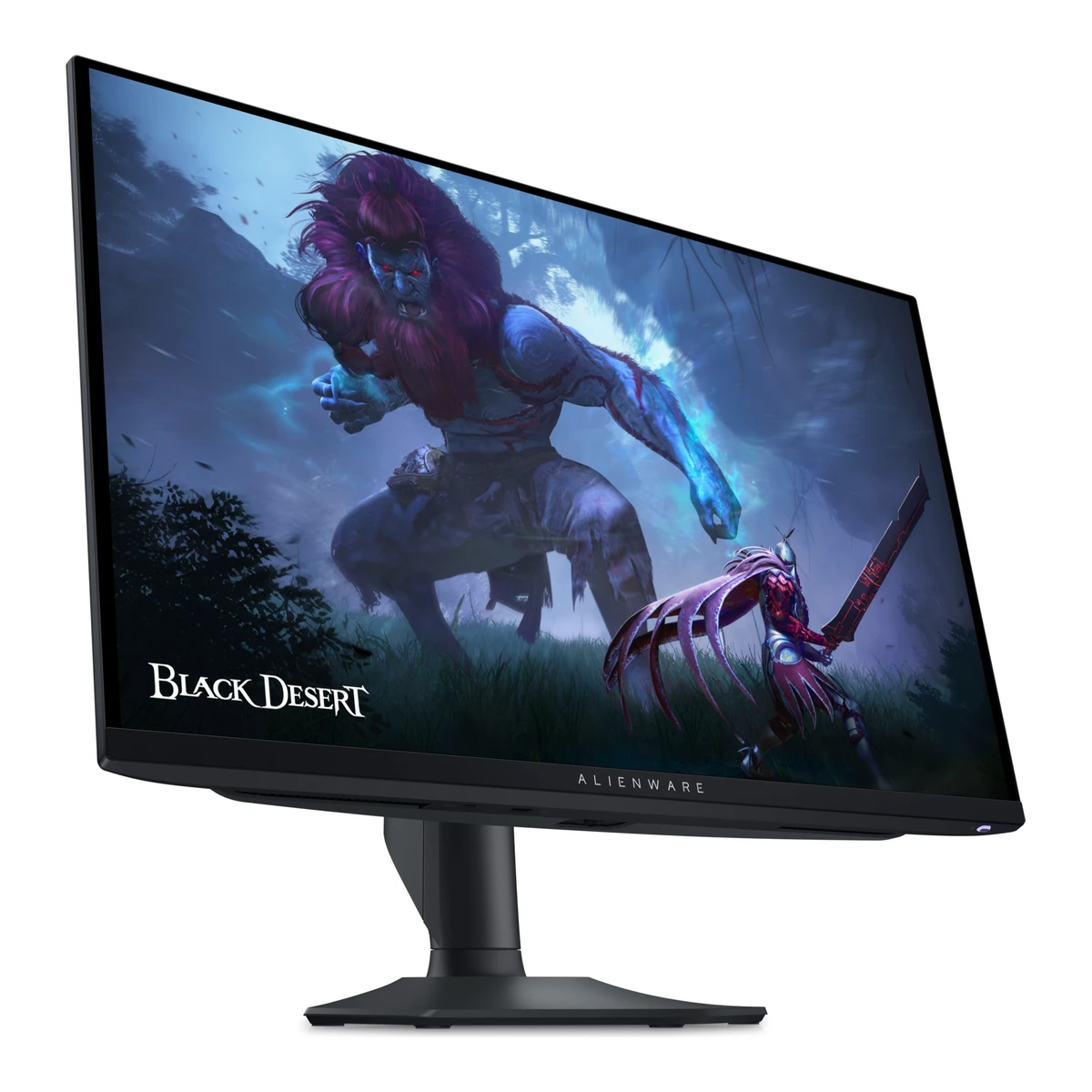
DellGaming monitor
Alienware AW2725DF
Released January 2024.5Press articlesammobile.com/news/alienware-aw3225qf-aw2725df-qd-oled-gaming-monitors-availableRead 5 October 2026January 16 retrospective actual U.S. purchase availability since January 11, separate from planned launch date. Last checked 16 October 2026.
- Screen size
- 26.7in
- Resolution
- 2560 × 1440
- Refresh rate
- 360Hz
- Panel
- QD-OLED
111 of 172 fields known.
At a glance
Power use HDR (EU label)
Lower than 83% of other monitors. Lower is better.
Ports
- 2 DisplayPort 1.4
- HDMI 2.1
- USB-B 3.2 Gen 1
- 3 USB-A 3.2 Gen 1
- USB-C 3.2 Gen 1
General
- Model numbers
- AW2725DF1Maker product pagedell.com/en-us/shop/monitors/apd/monitor-gamer-alienware-27-qdoled-aw2725df/aw2725df/-Read 5 October 2026Exact Product Model. Regional ordering codes not variants.
- GTIN / EAN
- Not available
- Announced
- 8 January 20244Press releaseprnewswire.com/news-releases/alienware-doubles-qd-oled-family-with-two-worlds-first-gaming-monitors-302029006.htmlRead 5 October 2026Dell CES launch announcement.
- Predecessor
- Not available
- Successor
- Not available
- Launch price (EU)
- Not available
- Colours
- Not available
Display
- Screen size
- 26.7in(67.8 cm)1Maker product pagedell.com/en-us/shop/monitors/apd/monitor-gamer-alienware-27-qdoled-aw2725df/aw2725df/-Read 5 October 2026Viewable Screen Size. Advertised 27-inch class.
- Viewable screen diagonal
- 26.7in(67.8 cm)2Owner's manualgzhls.at/blob/ldb/d/a/7/3/2def61645154b5769dfef165728519d39ce2.pdfRead 5 October 2026p15 exact diagonal.
- Native resolution
- 2560 × 1440px2Owner's manualgzhls.at/blob/ldb/d/a/7/3/2def61645154b5769dfef165728519d39ce2.pdfRead 5 October 2026p16 connectivity explicit supported maximum, not inferred from preset timing tables.
- Aspect ratio
- 16:92Owner's manualgzhls.at/blob/ldb/d/a/7/3/2def61645154b5769dfef165728519d39ce2.pdfRead 5 October 2026p15.
- Pixel density
- 110ppi
- Pixel pitch
- Not available
- Active display area
- Width590.42Height333.72mm(23.2 × 13.1 in)2Owner's manualgzhls.at/blob/ldb/d/a/7/3/2def61645154b5769dfef165728519d39ce2.pdfRead 5 October 2026p15 literal active area 590.42 x 333.72 mm. Published pitch 0.2292 mm disagrees beyond printed precision with declared 1440p resolution and this active area. Pitch omitted because pixel raster versus physical area scope is unresolved.
- Curvature radius
- Not available
- Screen surface
- Semi-glossy8Measurementtftcentral.co.uk/reviews/dell-alienware-aw2725dfRead 5 October 2026General/Office Use exact QD-OLED coating description.
- Anti-reflection coating
- Anti-reflection2Owner's manualgzhls.at/blob/ldb/d/a/7/3/2def61645154b5769dfef165728519d39ce2.pdfRead 5 October 2026p15 faceplate coating.
- Touchscreen
- Not available
Panel
- Panel type
- QD-OLED2Owner's manualgzhls.at/blob/ldb/d/a/7/3/2def61645154b5769dfef165728519d39ce2.pdfRead 5 October 2026p15 panel technology.
- Panel type (as published)
- Quantum Dot OLED1Maker product pagedell.com/en-us/shop/monitors/apd/monitor-gamer-alienware-27-qdoled-aw2725df/aw2725df/-Read 5 October 2026Panel Technology.
- Backlight
- None (self-emissive)2Owner's manualgzhls.at/blob/ldb/d/a/7/3/2def61645154b5769dfef165728519d39ce2.pdfRead 5 October 2026p9 QD-OLED definition and p15 OLED luminous substance.
- Local dimming
- Not available
- Dimming zones
- Not available
- Panel maker
- Samsung Display8Measurementtftcentral.co.uk/reviews/dell-alienware-aw2725dfRead 5 October 2026Introduction and Key Specs exact tested model.
- Panel part number
- Not available
- Panel generation
- 3rd generation8Measurementtftcentral.co.uk/reviews/dell-alienware-aw2725dfRead 5 October 2026Key Specs exact model.
- Subpixel layout
- Triangular RGB8Measurementtftcentral.co.uk/reviews/dell-alienware-aw2725dfRead 5 October 2026Sub-pixel Layout microscopy.
- Colour depth
- Not available
- Colour depth method
- Not available
- Displayable colours
- 1.07 billion2Owner's manualgzhls.at/blob/ldb/d/a/7/3/2def61645154b5769dfef165728519d39ce2.pdfRead 5 October 2026p15 published color-depth count. Native panel bit depth/FRC not inferred.
- sRGB coverage
- Not available
- DCI-P3 coverage
- 99.3%2Owner's manualgzhls.at/blob/ldb/d/a/7/3/2def61645154b5769dfef165728519d39ce2.pdfRead 5 October 2026p15 typical CIE1976.
- Adobe RGB coverage
- Not available
- Rec. 2020 coverage
- Not available
- NTSC coverage
- Not available
- Factory calibrated
- Yes2Owner's manualgzhls.at/blob/ldb/d/a/7/3/2def61645154b5769dfef165728519d39ce2.pdfRead 5 October 2026p8 factory calibration report and p15 preset calibration accuracy.
- Paper calibration report in box
- Yes2Owner's manualgzhls.at/blob/ldb/d/a/7/3/2def61645154b5769dfef165728519d39ce2.pdfRead 5 October 2026p8 physical Package contents includes Factory calibration report, pictured with documents. Some package components can vary by country.
- Hardware calibration support
- No8Measurementtftcentral.co.uk/reviews/dell-alienware-aw2725dfRead 5 October 2026Calibration section explicitly no hardware calibration.
- Static contrast ratio
- 1,500,000:12Owner's manualgzhls.at/blob/ldb/d/a/7/3/2def61645154b5769dfef165728519d39ce2.pdfRead 5 October 2026p15 SDR and HDR contrast ratio. Current page labels its number dynamic, manual priority.
- Brightness (typical, SDR)
- 250nits2Owner's manualgzhls.at/blob/ldb/d/a/7/3/2def61645154b5769dfef165728519d39ce2.pdfRead 5 October 2026p15 typical SDR full white pattern.
- Brightness (maker minimum)
- Not available
- Peak brightness (HDR)
- 1,000nits2Owner's manualgzhls.at/blob/ldb/d/a/7/3/2def61645154b5769dfef165728519d39ce2.pdfRead 5 October 2026p15 typical HDR peak. Window size unstated.
- HDR peak test window
- Not available
- Full-screen brightness
- 250nits2Owner's manualgzhls.at/blob/ldb/d/a/7/3/2def61645154b5769dfef165728519d39ce2.pdfRead 5 October 2026p15 SDR full white pattern. Not HDR full-screen.
- HDR formats
- HDR108Measurementtftcentral.co.uk/reviews/dell-alienware-aw2725dfRead 5 October 2026Console Gaming HDR10 support. No Dolby Vision/HLG inferred.
- HDR certification
- DisplayHDR True Black 4002Owner's manualgzhls.at/blob/ldb/d/a/7/3/2def61645154b5769dfef165728519d39ce2.pdfRead 5 October 2026p15 HDR support.
Refresh rate and motion
- Refresh rate per resolution and port
Refresh rate per resolution and port. The top rate is in bold. Resolution HDMI 2.1 DisplayPort 1.4 3840 × 2160 60Hz Not available 2560 × 1440Native 144Hz 360HzDSC Source2Owner's manualgzhls.at/blob/ldb/d/a/7/3/2def61645154b5769dfef165728519d39ce2.pdfRead 5 October 2026pp16-17 explicit per-input accepted maximum, DP DSC enabled. Exact timing 359.98/143.97 rounds to nominal 360/144 as maker itself labels. HDMI is TMDS, not FRL. Depth/chroma not tied to maxima. Lower-resolution preset timings pp18-19 are not proven maxima and omitted.8Measurementtftcentral.co.uk/reviews/dell-alienware-aw2725dfRead 5 October 2026Console Gaming explicit accepted maximum virtual 4K60 via HDMI with Console Mode on. No 4K120 support. Input is downscaled to native 1440p. Bit depth/chroma not specified. 1080p120 console timing is not established as monitor-wide maximum and omitted.Show as source table
Width (px) Height (px) Input Input version Maximum accepted rate (Hz) DSC 2560 1440 DisplayPort 1.4 360 Yes 2560 1440 HDMI 2.1 144 Not available 3840 2160 HDMI 2.1 60 Not available - Max refresh rate
- 360Hz
- Max refresh rate at native resolution
- 360Hz
- Max refresh rate over DisplayPort
- 360Hz
- Max refresh rate over HDMI
- 144Hz
- Max refresh rate over USB-C
- Not available
- Max refresh rate at 10-bit
- Not available
- Native refresh rate
- 360Hz2Owner's manualgzhls.at/blob/ldb/d/a/7/3/2def61645154b5769dfef165728519d39ce2.pdfRead 5 October 2026p16 explicit native DisplayPort maximum.
- Overclocked refresh rate
- Not available
- Dual mode
- Not available
- Minimum fixed refresh rate
- Not available
- Adaptive sync technologies
- FreeSync Premium Pro, VESA AdaptiveSync Display, HDMI VRR2Owner's manualgzhls.at/blob/ldb/d/a/7/3/2def61645154b5769dfef165728519d39ce2.pdfRead 5 October 2026p9 FreeSync Premium Pro and VESA AdaptiveSync Display, p19 certifications DisplayPort only. p16 explicit HDMI VRR.
- VRR range per port
Input Min (Hz) Max (Hz) DisplayPort 48 360 HDMI 48 144 - Low framerate compensation
- Not available
- Response time (maker GtG claim)
- 0.03ms2Owner's manualgzhls.at/blob/ldb/d/a/7/3/2def61645154b5769dfef165728519d39ce2.pdfRead 5 October 2026p15 gray-to-gray. Maker launch footnote specifies minimum, not mean.
- Response time (maker MPRT claim)
- Not available
- Overdrive settings
- Not available
- Motion blur reduction
- Not available
- Blur-reduction technology
- Not available
- Blur reduction works with VRR
- Not available
- Flicker-free (claimed)
- Yes2Owner's manualgzhls.at/blob/ldb/d/a/7/3/2def61645154b5769dfef165728519d39ce2.pdfRead 5 October 2026p10 product features.
- Black frame insertion
- Not available
Measured
- Input lag at maximum refresh rate
- 0.71ms8Measurementtftcentral.co.uk/reviews/dell-alienware-aw2725dfRead 5 October 2026Lag section total display lag at 360 Hz, includes pixel-response component. Estimated processing 0.59 not substituted. Firmware caveat as response note.
- Input lag at 60 Hz
- 5.83ms8Measurementtftcentral.co.uk/reviews/dell-alienware-aw2725dfRead 5 October 2026Lag section total display lag at 60 Hz. Firmware caveat as response note.
- Overshoot (measured)
- Not available
- Contrast ratio (measured)
- Not available
- SDR brightness (measured)
- 268nits8Measurementtftcentral.co.uk/reviews/dell-alienware-aw2725dfRead 5 October 2026Brightness/Contrast Standard preset at 100% brightness, SDR uniform without ABL. Approximate 268 is the source-reported measured peak. Firmware caveat as response note.
- HDR brightness in a real scene (measured)
- Not available
- PWM flicker frequency (measured)
- Not available
- VRR range (measured)
- Not available
- Colour accuracy (measured Delta E)
- Not available
- Gray uniformity (measured)
- Not available
- Reflections (measured)
- Not available
Connectivity
- Video inputs
Type Version Count Max bandwidth (Gbps) DSC HDCP DisplayPort 1.4 2 Not available Yes 1.4, 2.3 HDMI 2.1 1 18 Not available 1.4, 2.3 Source2Owner's manualgzhls.at/blob/ldb/d/a/7/3/2def61645154b5769dfef165728519d39ce2.pdfRead 5 October 2026pp16-17 complete inventory. HDMI 2.1 as published is TMDS-only, 144 Hz at native QHD. DP maximum requires DSC. USB-C included video cable ends at DP socket, not a USB-C video input.8Measurementtftcentral.co.uk/reviews/dell-alienware-aw2725dfRead 5 October 2026Console Gaming explicitly reports 18 Gbps HDMI TMDS bandwidth. Published HDMI 2.1 version lacks FRL, not inferred 48 Gbps.- HDMI ports
- 1
- DisplayPort ports
- 2
- Highest HDMI version
- 2.1
- Highest DisplayPort version
- 1.4
- USB-C video (DP Alt Mode)
- No8Measurementtftcentral.co.uk/reviews/dell-alienware-aw2725dfRead 5 October 2026Design/Features USB-C is data and BC1.2 charging only.
- USB-C power delivered
- Not available
- Thunderbolt
- Not available
- USB upstream ports
Connector USB version Count USB-B 3.2 Gen 1 1 - USB downstream hub ports
Connector USB version Count USB-A 3.2 Gen 1 3 USB-C 3.2 Gen 1 1 - Daisy chain (MST)
- Not available
- 3.5 mm headphone output
- No1Maker product pagedell.com/en-us/shop/monitors/apd/monitor-gamer-alienware-27-qdoled-aw2725df/aw2725df/-Read 5 October 2026Audio Line Out: No. Complete manual connector inventory also has no audio connector.
- 3.5 mm microphone input
- No2Owner's manualgzhls.at/blob/ldb/d/a/7/3/2def61645154b5769dfef165728519d39ce2.pdfRead 5 October 2026pp13-16 complete physical connector inventory, no matching connector. Not an incomplete retailer summary.
Smart features
We could not find any of these 4 fields. Show them
- Smart platform
- Not available
- Wi-Fi
- Not available
- Bluetooth
- Not available
- Remote control
- Not available
Audio and camera
- Number of speakers
- Not available
- Speaker power per channel
- Not available
- Webcam
- Not available
- Microphone
- Not available
Ergonomics and controls
- Stand height adjustment
- 110mm2Owner's manualgzhls.at/blob/ldb/d/a/7/3/2def61645154b5769dfef165728519d39ce2.pdfRead 5 October 2026p16.
- Tilt
- Forward5°Backward21°2Owner's manualgzhls.at/blob/ldb/d/a/7/3/2def61645154b5769dfef165728519d39ce2.pdfRead 5 October 2026p16.
- Swivel
- Left20°Right20°2Owner's manualgzhls.at/blob/ldb/d/a/7/3/2def61645154b5769dfef165728519d39ce2.pdfRead 5 October 2026p16.
- Pivot
- Counterclockwise90°Clockwise90°2Owner's manualgzhls.at/blob/ldb/d/a/7/3/2def61645154b5769dfef165728519d39ce2.pdfRead 5 October 2026p16 both directions 90 degrees.
- Removable stand
- Yes2Owner's manualgzhls.at/blob/ldb/d/a/7/3/2def61645154b5769dfef165728519d39ce2.pdfRead 5 October 2026p9 removable stand and pp39-40 procedure.
- VESA mount
- 100 x 1002Owner's manualgzhls.at/blob/ldb/d/a/7/3/2def61645154b5769dfef165728519d39ce2.pdfRead 5 October 2026p12 mount holes.
- VESA adapter needed
- No2Owner's manualgzhls.at/blob/ldb/d/a/7/3/2def61645154b5769dfef165728519d39ce2.pdfRead 5 October 2026p41 direct standard 100x100 bracket screwed into monitor holes.
- Security lock slot
- Yes2Owner's manualgzhls.at/blob/ldb/d/a/7/3/2def61645154b5769dfef165728519d39ce2.pdfRead 5 October 2026p14 security-lock slot explicitly Kensington.
- On-screen menu controls
- Joystick, Software2Owner's manualgzhls.at/blob/ldb/d/a/7/3/2def61645154b5769dfef165728519d39ce2.pdfRead 5 October 2026p14 joystick, pp79-86 AWCC Game/Display/PIP settings.
- Desktop software
- Dell Display Manager and Alienware Command Center (AWCC)2Owner's manualgzhls.at/blob/ldb/d/a/7/3/2def61645154b5769dfef165728519d39ce2.pdfRead 5 October 2026p16 compatibility and AWCC.
- Ambient light sensor
- No8Measurementtftcentral.co.uk/reviews/dell-alienware-aw2725dfRead 5 October 2026General/Office Features explicitly absent.
- Gaming menu features
- Timer, Frame Rate, Display Alignment, Dark Stabilizer, Console Mode, AlienVision2Owner's manualgzhls.at/blob/ldb/d/a/7/3/2def61645154b5769dfef165728519d39ce2.pdfRead 5 October 2026pp47-49 named OSD functions.
OLED care
Dimensions and weight
Front and side, drawn to scale. The dashed outline is the screen at its highest.
- Dimensions with stand
- Width609.11Height (lowest)406.2Height (highest)516.2Depth243.69mm(24 × 16 to 20.3 × 9.6 in)2Owner's manualgzhls.at/blob/ldb/d/a/7/3/2def61645154b5769dfef165728519d39ce2.pdfRead 5 October 2026p21 stand compressed/extended heights.
- Dimensions without stand
- Width609.11Height359Depth67.6mm(24 × 14.1 × 2.7 in)2Owner's manualgzhls.at/blob/ldb/d/a/7/3/2def61645154b5769dfef165728519d39ce2.pdfRead 5 October 2026p21 body dimensions.
- Stand footprint
- Not available
- Weight with stand
- 6.7kg(14.8 lb)2Owner's manualgzhls.at/blob/ldb/d/a/7/3/2def61645154b5769dfef165728519d39ce2.pdfRead 5 October 2026p21 A00 manual 6.70 kg includes stand assembly and cables. Current maker page lists 6.30 kg. Manual prioritized with its explicit cable-included scope, no silent substitution.
- Weight without stand
- 4.3kg(9.5 lb)2Owner's manualgzhls.at/blob/ldb/d/a/7/3/2def61645154b5769dfef165728519d39ce2.pdfRead 5 October 2026p22 without stand and cables for VESA consideration.
- Box dimensions
- Not available
Power
- EU energy class SDRG6EU energy label (EPREL)eprel.ec.europa.eu/fiches/electronicdisplays/Fiche_1833147_EN.pdfRead 5 October 2026p1 row 3.
- EU energy class HDRG6EU energy label (EPREL)eprel.ec.europa.eu/fiches/electronicdisplays/Fiche_1833147_EN.pdfRead 5 October 2026p1 row 5.
- Power supply
- Internal6EU energy label (EPREL)eprel.ec.europa.eu/fiches/electronicdisplays/Fiche_1833147_EN.pdfRead 5 October 2026p1 row 24.
- Adapter rating
- Not available
- Input voltage
- 100-240 V AC, 50/60 Hz2Owner's manualgzhls.at/blob/ldb/d/a/7/3/2def61645154b5769dfef165728519d39ce2.pdfRead 5 October 2026p20 frequency tolerance ±3 Hz.
- Power use (typical)
- Not available
- Power use (max)
- 130W2Owner's manualgzhls.at/blob/ldb/d/a/7/3/2def61645154b5769dfef165728519d39ce2.pdfRead 5 October 2026p20 maximum brightness/contrast and all USB ports maximum load.
- Power use SDR (EU label)
- 27.6W6EU energy label (EPREL)eprel.ec.europa.eu/fiches/electronicdisplays/Fiche_1833147_EN.pdfRead 5 October 2026p1 row 4 EU On mode SDR, not generic typical power.
- Power use HDR (EU label)
- 27.6W6EU energy label (EPREL)eprel.ec.europa.eu/fiches/electronicdisplays/Fiche_1833147_EN.pdfRead 5 October 2026p1 row 6 EU On mode HDR.
- Standby power
- 0.5W2Owner's manualgzhls.at/blob/ldb/d/a/7/3/2def61645154b5769dfef165728519d39ce2.pdfRead 5 October 2026p20 EU 2019/2021 and 2019/2013 standby.
- Off-mode power
- 0.3W2Owner's manualgzhls.at/blob/ldb/d/a/7/3/2def61645154b5769dfef165728519d39ce2.pdfRead 5 October 2026p20 EU 2019/2021 and 2019/2013 off.
Certifications
- VESA ClearMR
- Not available
- VESA AdaptiveSync Display
- Not available
- TÜV certifications
- Low Blue Light (Hardware Solution)2Owner's manualgzhls.at/blob/ldb/d/a/7/3/2def61645154b5769dfef165728519d39ce2.pdfRead 5 October 2026p10 exact certification wording.
- ENERGY STAR
- Not available
- TCO Certified
- Not available
- EPEAT
- Not available
- Colour certifications
- Not available
- Other certifications
- Not available
In the box
- In the box
- Display, Stand riser, Stand base, I/O cover, Power cable (varies by country), DisplayPort to DisplayPort 1.4 cable (1.80 m), USB-C to DisplayPort 1.4 cable (1 m), USB 3.2 Gen 1 upstream cable (1.80 m), Microfiber cloth, Quick Start Guide, Safety, Environmental, and Regulatory Information, Factory calibration report, Alienware Sticker2Owner's manualgzhls.at/blob/ldb/d/a/7/3/2def61645154b5769dfef165728519d39ce2.pdfRead 5 October 2026pp7-8 package contents. HDMI cable excluded, explicitly sold separately p14.
- Cables included
Type Count Power cable 1 DisplayPort to DisplayPort 1.4 cable (1.80 m) 1 USB-C to DisplayPort 1.4 cable (1 m) 1 USB 3.2 Gen 1 upstream cable (1.80 m) 1
Warranty
- Manufacturer warranty (source market)
- 3years1Maker product pagedell.com/en-us/shop/monitors/apd/monitor-gamer-alienware-27-qdoled-aw2725df/aw2725df/-Read 5 October 2026U.S. limited warranty.
- Dead pixel policy
- Free panel replacement during the Limited Hardware Warranty if one bright pixel is found1Maker product pagedell.com/en-us/shop/monitors/apd/monitor-gamer-alienware-27-qdoled-aw2725df/aw2725df/-Read 5 October 2026U.S. Premium Panel Exchange policy.
Links
- Product page
- www.dell.com/en-us/shop/monitors/apd/monitor-gamer-alienware-27-qdoled-aw2725df/aw2725df/-1Maker product pagedell.com/en-us/shop/monitors/apd/monitor-gamer-alienware-27-qdoled-aw2725df/aw2725df/-Read 5 October 2026Exact-model product page.
- Spec sheet
- resource.ewe.rs/media/documents/2024/03/2024-03-12367075.pdf3Maker spec sheet (PDF)resource.ewe.rs/media/documents/2024/03/2024-03-12367075.pdfRead 5 October 2026Public retailer-hosted two-page Dell datasheet, fully opened. Footer says Internal Use - Confidential despite public publication. All substantive specs independently supported in manual/PDP.
- Manual
- gzhls.at/blob/ldb/d/a/7/3/2def61645154b5769dfef165728519d39ce2.pdf2Owner's manualgzhls.at/blob/ldb/d/a/7/3/2def61645154b5769dfef165728519d39ce2.pdfRead 5 October 2026Dell January 2024 Rev A00 public mirror. Official dl.dell.com/manual84043186 returned 403. April 2024 manual is listed by Dell but its accessible public mirror PDF also returned 403. No access restriction bypass.
- EPREL registration number
- 18331476EU energy label (EPREL)eprel.ec.europa.eu/fiches/electronicdisplays/Fiche_1833147_EN.pdfRead 5 October 2026p2 exact AW2725DF.
Compare with
Pick a monitor to see both side by side. Differences are marked yellow.
Sources
We read 9 sources for this monitor. The numbers match the markers in the sheet.
- Maker spec sheet (PDF)resource.ewe.rs/media/documents/2024/03/2024-03-12367075.pdf
- EU energy label (EPREL)eprel.ec.europa.eu/fiches/electronicdisplays/Fiche_1833147_EN.pdf
- EU energy label (EPREL)eprel.ec.europa.eu/labels/electronicdisplays/Label_1833147.pdf
- Maker product pagedell.com/support/home/en-uk/drivers/driversdetails
See a wrong value? Tell us and name the field.