Gaming / Monitors
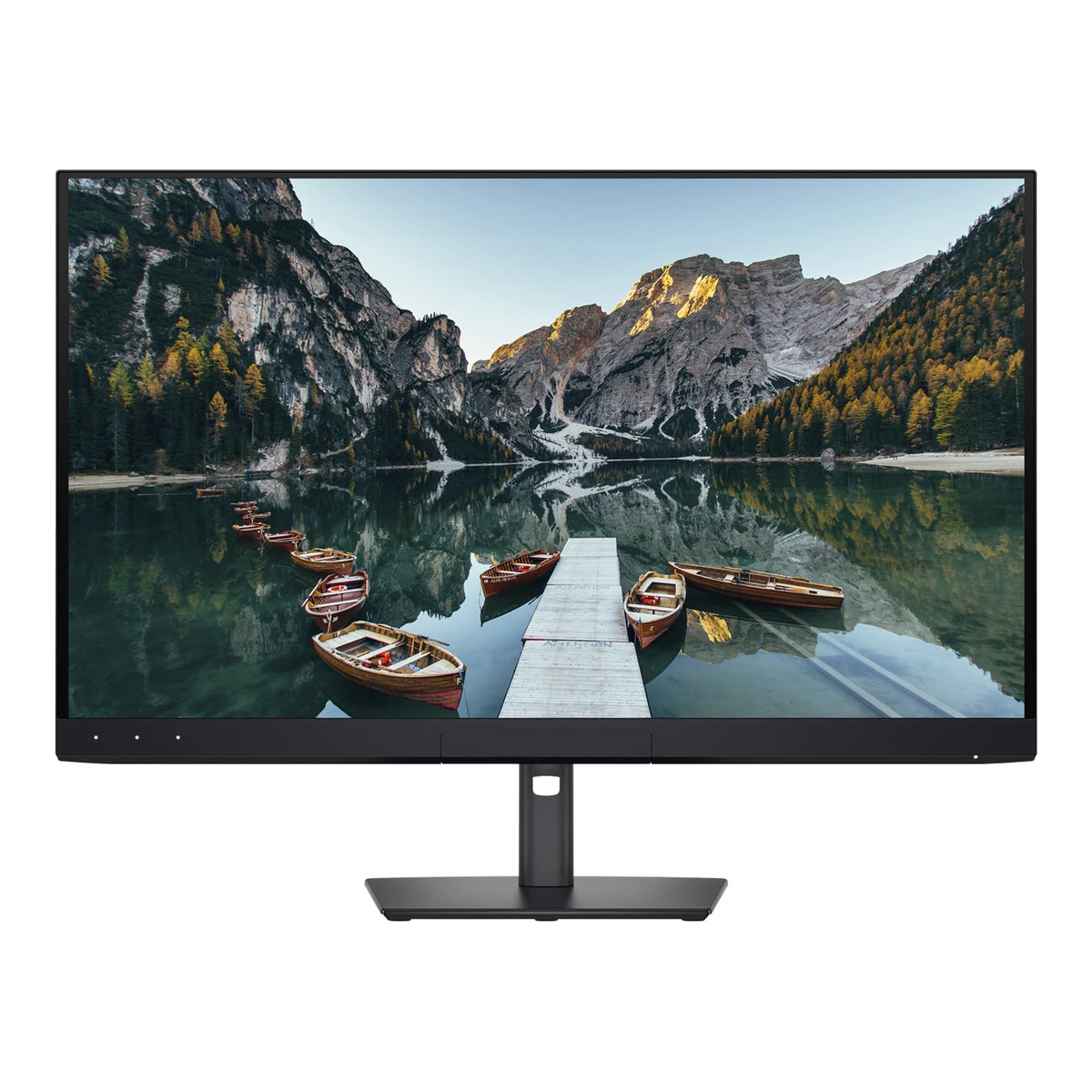
DellCreator monitor
UltraSharp U3226Q
Released February 2026.3EU energy label (EPREL)eprel.ec.europa.eu/api/products/electronicdisplays/2515827Read 14 October 2026EPREL on-market start 2026-02-16. TFTCentral says the monitor was available to order on 2026-02-25. Last checked 16 October 2026.
- Screen size
- 31.5in
- Resolution
- 3840 × 2160
- Refresh rate
- 120Hz
- Panel
- QD-OLED
113 of 172 fields known.
At a glance
Standby power
Lower than 80% of other monitors. Lower is better.
Ports
- 2 HDMI 2.1
- DisplayPort 1.4
- Thunderbolt 4
- USB-C Thunderbolt 4To your computer
- USB-C 10 GbpsTo your computer
- 3 USB-A 10 Gbps
- 2 USB-C 10 GbpsUSB downstream hub ports
- USB-C Thunderbolt 4USB downstream hub ports
- EthernetNetwork
General
- Status
- Not available
- Predecessor
- Not available
- Successor
- Not available
- Launch price (EU)
- Not available
- Markets
- Not available
- Colours
- Not available
Display
- Screen size
- 31.5in(80 cm)1Owner's manualmediaexpert.pl/products/files/97/9727508/Instrukcja-obslugi-DELL-UltraSharp-U3226Q.pdfRead 14 October 2026Table 7: visible image diagonal 799.2 mm (31.5 inch).
- Viewable screen diagonal
- Not available
- Native resolution
- 3840 × 2160px1Owner's manualmediaexpert.pl/products/files/97/9727508/Instrukcja-obslugi-DELL-UltraSharp-U3226Q.pdfRead 14 October 2026
- Aspect ratio
- 16:91Owner's manualmediaexpert.pl/products/files/97/9727508/Instrukcja-obslugi-DELL-UltraSharp-U3226Q.pdfRead 14 October 2026
- Pixel density
- 139.9ppi
- Pixel pitch
- 0.1814mm1Owner's manualmediaexpert.pl/products/files/97/9727508/Instrukcja-obslugi-DELL-UltraSharp-U3226Q.pdfRead 14 October 2026Table 7: 0.1814 mm horizontal and vertical.
- Active display area
- Width696.58Height391.83mm(27.4 × 15.4 in)1Owner's manualmediaexpert.pl/products/files/97/9727508/Instrukcja-obslugi-DELL-UltraSharp-U3226Q.pdfRead 14 October 2026Table 7: 696.58 mm horizontal and 391.83 mm vertical.
- Curvature radius
- Not available
- Anti-reflection coating
- AGLR1Owner's manualmediaexpert.pl/products/files/97/9727508/Instrukcja-obslugi-DELL-UltraSharp-U3226Q.pdfRead 14 October 2026Table 7: anti-reflective low-reflectivity coating (AGLR) with 3H hard coating.
- Touchscreen
- Not available
Panel
- Panel type
- QD-OLED1Owner's manualmediaexpert.pl/products/files/97/9727508/Instrukcja-obslugi-DELL-UltraSharp-U3226Q.pdfRead 14 October 2026
- Panel type (as published)
- QD-OLED1Owner's manualmediaexpert.pl/products/files/97/9727508/Instrukcja-obslugi-DELL-UltraSharp-U3226Q.pdfRead 14 October 2026
- Backlight
- None (self-emissive)1Owner's manualmediaexpert.pl/products/files/97/9727508/Instrukcja-obslugi-DELL-UltraSharp-U3226Q.pdfRead 14 October 2026Product features p8: QD-OLED display with an Oxide TFT active element. OLED is self-emissive.
- Local dimming
- Not available
- Dimming zones
- Not available
- Panel maker
- Samsung Display5Press articletftcentral.co.uk/news/dell-announce-the-ultrasharp-u3226q-a-32-4k-qd-oled-monitor-aimed-at-creative-professionalsRead 14 October 2026Article names a 4th Gen Samsung Display QD-OLED panel with EL 3.0 material.
- Panel part number
- Not available
- Panel generation
- 4th gen5Press articletftcentral.co.uk/news/dell-announce-the-ultrasharp-u3226q-a-32-4k-qd-oled-monitor-aimed-at-creative-professionalsRead 14 October 2026Article: 4th Gen Samsung Display QD-OLED.
- Subpixel layout
- Not available
- Colour depth method
- Native6Reviewtomshardware.com/monitors/dell-ultrasharp-u3226q-4k-32-inch-qd-oled-monitor-reviewRead 14 October 2026Spec table: native color depth 10-bit.
- Displayable colours
- 1.07 billion1Owner's manualmediaexpert.pl/products/files/97/9727508/Instrukcja-obslugi-DELL-UltraSharp-U3226Q.pdfRead 14 October 2026Table 7: 1.07 billion colours.
- Adobe RGB coverage
- 94%1Owner's manualmediaexpert.pl/products/files/97/9727508/Instrukcja-obslugi-DELL-UltraSharp-U3226Q.pdfRead 14 October 2026Table 7: Adobe RGB 94% (CIE 1931) typical.
- Rec. 2020 coverage
- 80%1Owner's manualmediaexpert.pl/products/files/97/9727508/Instrukcja-obslugi-DELL-UltraSharp-U3226Q.pdfRead 14 October 2026Table 7: BT.2020 80% (CIE 1976) typical.
- NTSC coverage
- Not available
- Paper calibration report in box
- Not available
- Static contrast ratio
- 1,500,000:11Owner's manualmediaexpert.pl/products/files/97/9727508/Instrukcja-obslugi-DELL-UltraSharp-U3226Q.pdfRead 14 October 2026Table 7: contrast ratio 1.5 million:1. OLED, no dynamic contrast stated.
- Brightness (typical, SDR)
- 300nits1Owner's manualmediaexpert.pl/products/files/97/9727508/Instrukcja-obslugi-DELL-UltraSharp-U3226Q.pdfRead 14 October 2026Table 7: 300 cd/m2 typical.
- Brightness (maker minimum)
- Not available
- Peak brightness (HDR)
- 1,000nits1Owner's manualmediaexpert.pl/products/files/97/9727508/Instrukcja-obslugi-DELL-UltraSharp-U3226Q.pdfRead 14 October 2026Table 7: 1000 cd/m2 peak in HDR mode at 3% APL.
- Full-screen brightness
- Not available
- HDR formats
- HDR10, HLG, Dolby Vision1Owner's manualmediaexpert.pl/products/files/97/9727508/Instrukcja-obslugi-DELL-UltraSharp-U3226Q.pdfRead 14 October 2026Product features p8: HDR modes ST2084 (PQ) 1000 nits, DisplayHDR True Black 500, HLG 1000 nits and Dolby Vision (Bright and Dark). HDR10 is named by Tom's Hardware.6Reviewtomshardware.com/monitors/dell-ultrasharp-u3226q-4k-32-inch-qd-oled-monitor-reviewRead 14 October 2026Spec table: HDR10, HLG, Dolby Vision. No HDR10+.
- HDR certification
- DisplayHDR True Black 5001Owner's manualmediaexpert.pl/products/files/97/9727508/Instrukcja-obslugi-DELL-UltraSharp-U3226Q.pdfRead 14 October 2026Table 7: VESA DisplayHDR True Black 500.
Refresh rate and motion
- Refresh rate per resolution and port
Refresh rate per resolution and port. The top rate is in bold. Resolution HDMI 2.1 DisplayPort 1.4 USB-C DP Alt Mode 1.4 Thunderbolt 4 3840 × 2160Native 120Hz10-bit 120Hz10-bit, DSC 120Hz10-bit, DSC 120Hz10-bit, DSC Show as source table
Width (px) Height (px) Input Input version Maximum accepted rate (Hz) Bit depth (bits) DSC 3840 2160 HDMI 2.1 120 10 Not available 3840 2160 DisplayPort 1.4 120 10 Yes 3840 2160 Thunderbolt 4 120 10 Yes 3840 2160 USB-C DP Alt Mode 1.4 120 10 Yes - Max refresh rate
- 120Hz
- Max refresh rate at native resolution
- 120Hz
- Max refresh rate over DisplayPort
- 120Hz
- Max refresh rate over HDMI
- 120Hz
- Max refresh rate over USB-C
- 120Hz
- Max refresh rate at 10-bit
- 120Hz
- Native refresh rate
- 120Hz1Owner's manualmediaexpert.pl/products/files/97/9727508/Instrukcja-obslugi-DELL-UltraSharp-U3226Q.pdfRead 14 October 2026Table 8: vertical scan 48 Hz to 120 Hz and highest resolution 3840 x 2160 at 120 Hz.
- Overclocked refresh rate
- Not available
- Minimum fixed refresh rate
- Not available
- Adaptive sync technologies
- Adaptive-Sync, HDMI VRR1Owner's manualmediaexpert.pl/products/files/97/9727508/Instrukcja-obslugi-DELL-UltraSharp-U3226Q.pdfRead 14 October 2026Product features p8 says VRR is supported. The ports list says HDMI 2.1 VRR. Tom's Hardware calls it Adaptive-Sync. No FreeSync or G-SYNC certification is named by Dell.6Reviewtomshardware.com/monitors/dell-ultrasharp-u3226q-4k-32-inch-qd-oled-monitor-reviewRead 14 October 2026Text: Adaptive-Sync works without issues. The spec table also says FreeSync and G-Sync Compatible, but no certification is named by Dell, so only Adaptive-Sync and HDMI VRR are stored.
- VRR range per port
- Not available
- Low framerate compensation
- Not available
- Response time (maker GtG claim)
- 0.03ms1Owner's manualmediaexpert.pl/products/files/97/9727508/Instrukcja-obslugi-DELL-UltraSharp-U3226Q.pdfRead 14 October 2026Table 7: 0.03 ms grey to grey.
- Response time (maker MPRT claim)
- Not available
- Overdrive settings
- Not available
- Blur-reduction technology
- Not available
- Blur reduction works with VRR
- Not available
Measured
- Input lag at maximum refresh rate
- 16.6ms7Measurementtomshardware.com/monitors/dell-ultrasharp-u3226q-4k-32-inch-qd-oled-monitor-review/2Read 14 October 2026Absolute input lag, full black to white transition, 16.6 ms, average of 25 mouse clicks with the Nvidia LDAT sensor. The review does not name the refresh rate or input used. The monitor maximum is 120 Hz at 3840 x 2160.
- Input lag at 60 Hz
- Not available
- Average response time (measured)
- Not available
- Overshoot (measured)
- Not available
- Contrast ratio (measured)
- Not available
- SDR brightness (measured)
- 290.1nits8Measurementtomshardware.com/monitors/dell-ultrasharp-u3226q-4k-32-inch-qd-oled-monitor-review/3Read 14 October 2026Maximum white luminance 290.1133 nits in Native mode at the highest brightness setting. SDR brightness is constant, so window and full-field results match.
- HDR brightness in a real scene (measured)
- Not available
- PWM flicker frequency (measured)
- Not available
- VRR range (measured)
- Not available
- Colour accuracy (measured Delta E)
- 0.919Measurementtomshardware.com/monitors/dell-ultrasharp-u3226q-4k-32-inch-qd-oled-monitor-review/4Read 14 October 2026Calman gamut error in the factory sRGB mode before any calibration: 0.91 dE. Other modes: DCI-P3 0.92, Display P3 0.90, BT.709 0.87, Native 1.59, Adobe RGB 1.39 and BT.2020 2.88. The Delta E formula is not named.
- Gray uniformity (measured)
- Not available
- Reflections (measured)
- Not available
Connectivity
- Video inputs
Type Version Count DSC HDCP HDMI 2.1 2 Yes 1.4 and 2.2 DisplayPort 1.4 1 Yes 1.4 and 2.2 Thunderbolt 4 1 Yes Not available - HDMI ports
- 2
- DisplayPort ports
- 1
- Highest HDMI version
- 2.1
- Highest DisplayPort version
- 1.4
- USB-C video (DP Alt Mode)
- Yes1Owner's manualmediaexpert.pl/products/files/97/9727508/Instrukcja-obslugi-DELL-UltraSharp-U3226Q.pdfRead 14 October 2026Thunderbolt 4 upload port: DisplayPort 1.4 Alt Mode, 3840 x 2160 at 120 Hz.
- USB upstream ports
Connector USB version Count USB-C Thunderbolt 4 1 USB-C 10 Gbps 1 - USB downstream hub ports
Connector USB version Count USB-A 10 Gbps 3 USB-C 10 Gbps 2 USB-C Thunderbolt 4 1
Smart features
We could not find any of these 4 fields. Show them
- Smart platform
- Not available
- Wi-Fi
- Not available
- Bluetooth
- Not available
- Remote control
- Not available
Audio and camera
- Number of speakers
- Not available
- Speaker power per channel
- Not available
- Webcam
- Not available
- Microphone
- Not available
Ergonomics and controls
- Stand height adjustment
- 150mm1Owner's manualmediaexpert.pl/products/files/97/9727508/Instrukcja-obslugi-DELL-UltraSharp-U3226Q.pdfRead 14 October 2026Table 7: stand height adjustment 150 mm.
- Tilt
- Forward5°Backward21°1Owner's manualmediaexpert.pl/products/files/97/9727508/Instrukcja-obslugi-DELL-UltraSharp-U3226Q.pdfRead 14 October 2026Table 7: -5 to 21 degrees.
- Swivel
- Left30°Right30°1Owner's manualmediaexpert.pl/products/files/97/9727508/Instrukcja-obslugi-DELL-UltraSharp-U3226Q.pdfRead 14 October 2026Table 7: -30 to 30 degrees.
- Pivot
- Counterclockwise90°Clockwise90°1Owner's manualmediaexpert.pl/products/files/97/9727508/Instrukcja-obslugi-DELL-UltraSharp-U3226Q.pdfRead 14 October 2026Table 7: -90 to 90 degrees. Do not use inverted by 180 degrees.
- VESA adapter needed
- Not available
- Security lock slot
- Yes1Owner's manualmediaexpert.pl/products/files/97/9727508/Instrukcja-obslugi-DELL-UltraSharp-U3226Q.pdfRead 14 October 2026Bottom view: security lock slot (Kensington compatible).
- On-screen menu controls
- Joystick, Touch keys, Software1Owner's manualmediaexpert.pl/products/files/97/9727508/Instrukcja-obslugi-DELL-UltraSharp-U3226Q.pdfRead 14 October 2026Rear view: joystick for the OSD. Front: three touch LED keys for preset functions. DDPM changes OSD settings from the PC.
- Desktop software
- Dell Display and Peripheral Manager (DDPM)1Owner's manualmediaexpert.pl/products/files/97/9727508/Instrukcja-obslugi-DELL-UltraSharp-U3226Q.pdfRead 14 October 2026DDPM section, Dell Display and Peripheral Manager.
- User firmware updates
- Yes1Owner's manualmediaexpert.pl/products/files/97/9727508/Instrukcja-obslugi-DELL-UltraSharp-U3226Q.pdfRead 14 October 2026DDPM section: receive notifications and update firmware.
- Ambient light sensor
- Not available
- Presence sensor
- Not available
- RGB lighting
- Not available
- Gaming menu features
- Not available
OLED care
- OLED care
- Pixel Refresh, Dimming Static Screen, Dimming Static Area1Owner's manualmediaexpert.pl/products/files/97/9727508/Instrukcja-obslugi-DELL-UltraSharp-U3226Q.pdfRead 14 October 2026OSD Display menu: Pixel Refresh (6 to 8 minutes, schedulable every 12 or 24 hours), Dimming Static Screen and Dimming Static Area.
- Burn-in covered by warranty
- Not available
- Burn-in warranty length
- Not available
Dimensions and weight
Front and side, drawn to scale. The dashed outline is the screen at its highest.
- Dimensions with stand
- Width718.28Height (lowest)473.77Height (highest)623.77Depth217.16mm(28.3 × 18.7 to 24.6 × 8.5 in)1Owner's manualmediaexpert.pl/products/files/97/9727508/Instrukcja-obslugi-DELL-UltraSharp-U3226Q.pdfRead 14 October 2026Table 14: height 623.77 mm extended and 473.77 mm compressed, width 718.28 mm, depth 217.16 mm.
- Dimensions without stand
- Width718.28Height436Depth65.48mm(28.3 × 17.2 × 2.6 in)1Owner's manualmediaexpert.pl/products/files/97/9727508/Instrukcja-obslugi-DELL-UltraSharp-U3226Q.pdfRead 14 October 2026Table 14: height 436.00 mm, width 718.28 mm, depth 65.48 mm.
- Stand footprint
- Width287.34Depth217.16mm(11.3 × 8.5 in)1Owner's manualmediaexpert.pl/products/files/97/9727508/Instrukcja-obslugi-DELL-UltraSharp-U3226Q.pdfRead 14 October 2026Table 14 stand dimensions: width 287.34 mm and depth 217.16 mm. The same table also lists a base of 287.34 x 214.99 mm.
- Weight with stand
- 9.84kg(21.7 lb)1Owner's manualmediaexpert.pl/products/files/97/9727508/Instrukcja-obslugi-DELL-UltraSharp-U3226Q.pdfRead 14 October 2026Table 14: 9.84 kg with stand and cables.
- Weight without stand
- 6.43kg(14.2 lb)1Owner's manualmediaexpert.pl/products/files/97/9727508/Instrukcja-obslugi-DELL-UltraSharp-U3226Q.pdfRead 14 October 2026Table 14: 6.43 kg without stand, for wall or VESA mounting, without cables. Stand alone is 2.92 kg.
- Box dimensions
- Not available
Power
- EU energy class SDRG3EU energy label (EPREL)eprel.ec.europa.eu/api/products/electronicdisplays/2515827Read 14 October 2026Registry value, energy class SDR: G.
- EU energy class HDRG3EU energy label (EPREL)eprel.ec.europa.eu/api/products/electronicdisplays/2515827Read 14 October 2026Registry value, energy class HDR: G.
- Power supply
- Internal1Owner's manualmediaexpert.pl/products/files/97/9727508/Instrukcja-obslugi-DELL-UltraSharp-U3226Q.pdfRead 14 October 2026Internal supply, only a power cable is supplied.
- Adapter rating
- Not available
- Input voltage
- 100-240 V AC, 50/60 Hz1Owner's manualmediaexpert.pl/products/files/97/9727508/Instrukcja-obslugi-DELL-UltraSharp-U3226Q.pdfRead 14 October 2026Table 13: 100 VAC to 240 VAC, 50 Hz or 60 Hz +-3 Hz, 5.3 A typical.
- Power use (typical)
- 30.2W1Owner's manualmediaexpert.pl/products/files/97/9727508/Instrukcja-obslugi-DELL-UltraSharp-U3226Q.pdfRead 14 October 2026Table 13: Pon 30.2 W, on-mode power by ENERGY STAR 8.0. This is the default factory setting.
- Power use SDR (EU label)
- 33.7W3EU energy label (EPREL)eprel.ec.europa.eu/api/products/electronicdisplays/2515827Read 14 October 2026Registry value, power on mode SDR: 33.7 W.
- Power use HDR (EU label)
- 33.7W3EU energy label (EPREL)eprel.ec.europa.eu/api/products/electronicdisplays/2515827Read 14 October 2026Registry value, power on mode HDR: 33.7 W.
Certifications
- VESA ClearMR
- Not available
- VESA AdaptiveSync Display
- Not available
- TÜV certifications
- Eye Comfort 3.0 (4-star), Hardware Low Blue Light (Category II)1Owner's manualmediaexpert.pl/products/files/97/9727508/Instrukcja-obslugi-DELL-UltraSharp-U3226Q.pdfRead 14 October 2026Product features pp8-9: TUV Rheinland Eye Comfort 3.0 with a 4-star rating and TUV hardware low blue light Category II (35% or less).
- TCO Certified
- Not available
- EPEAT
- Not available
- Colour certifications
- Not available
- Other certifications
- Not available
In the box
- In the box
- Monitor, Stand riser, Stand base, Monitor hood, HDMI 2.1 cable (1.80 m), DisplayPort 1.4 cable (1.80 m), Active Thunderbolt 4 40 Gbps 240 W cable (2.00 m), USB-C to USB Type-A 10 Gbps cable (1.00 m), Power cable (varies by country or region), Microfiber cloth, QR card, Safety, Environmental and Regulatory Information1Owner's manualmediaexpert.pl/products/files/97/9727508/Instrukcja-obslugi-DELL-UltraSharp-U3226Q.pdfRead 14 October 2026Table 1 and p7. Dell lists the monitor hood as an included item.
- Cables included
Type Count HDMI 2.1 cable (1.80 m) 1 DisplayPort 1.4 cable (1.80 m) 1 Active Thunderbolt 4 40 Gbps 240 W cable (2.00 m) 1 USB-C to USB Type-A 10 Gbps cable (1.00 m) 1 Power cable 1
Warranty
- Manufacturer warranty (source market)
- 3years3EU energy label (EPREL)eprel.ec.europa.eu/api/products/electronicdisplays/2515827Read 14 October 2026Registry value, minimum guaranteed guarantee: 3 years in the EU registry. Tom's Hardware also gives 3 years.
- Dead pixel policy
- Not available
Links
- Product page
- www.dell.com/en-us/shop/dell-ultrasharp-32-4k-qd-oled-monitor-u3226q/apd/210-bvkd/monitors-monitor-accessories2Maker product pagedell.com/en-us/shop/dell-ultrasharp-32-4k-qd-oled-monitor-u3226q/apd/210-bvkd/monitors-monitor-accessoriesRead 14 October 2026Dell US product page for the exact model. Dell pages block automated fetches, so it is stored as a link only. The search result title is Dell UltraSharp 32 4K QD-OLED Monitor - U3226Q.
- Spec sheet
- Not available
- Manual
- www.mediaexpert.pl/products/files/97/9727508/Instrukcja-obslugi-DELL-UltraSharp-U3226Q.pdf1Owner's manualmediaexpert.pl/products/files/97/9727508/Instrukcja-obslugi-DELL-UltraSharp-U3226Q.pdfRead 14 October 2026Dell U3226Q User's Guide, Rev. A00, February 2026, 103 pages, Polish edition hosted by Mediaexpert. The English guide on dell.com cannot be fetched. Tables and numbers are the same in every language. Regulatory model U3226Qb.
Compare with
Pick a monitor to see both side by side. Differences are marked yellow.
Sources
We read 10 sources for this monitor. The numbers match the markers in the sheet.
- EU energy label (EPREL)eprel.ec.europa.eu/api/products/electronicdisplays/2515827
- EU energy label (EPREL)eprel.ec.europa.eu/labels/electronicdisplays/Label_2515827.svg
See a wrong value? Tell us and name the field.