Computers / Webcams
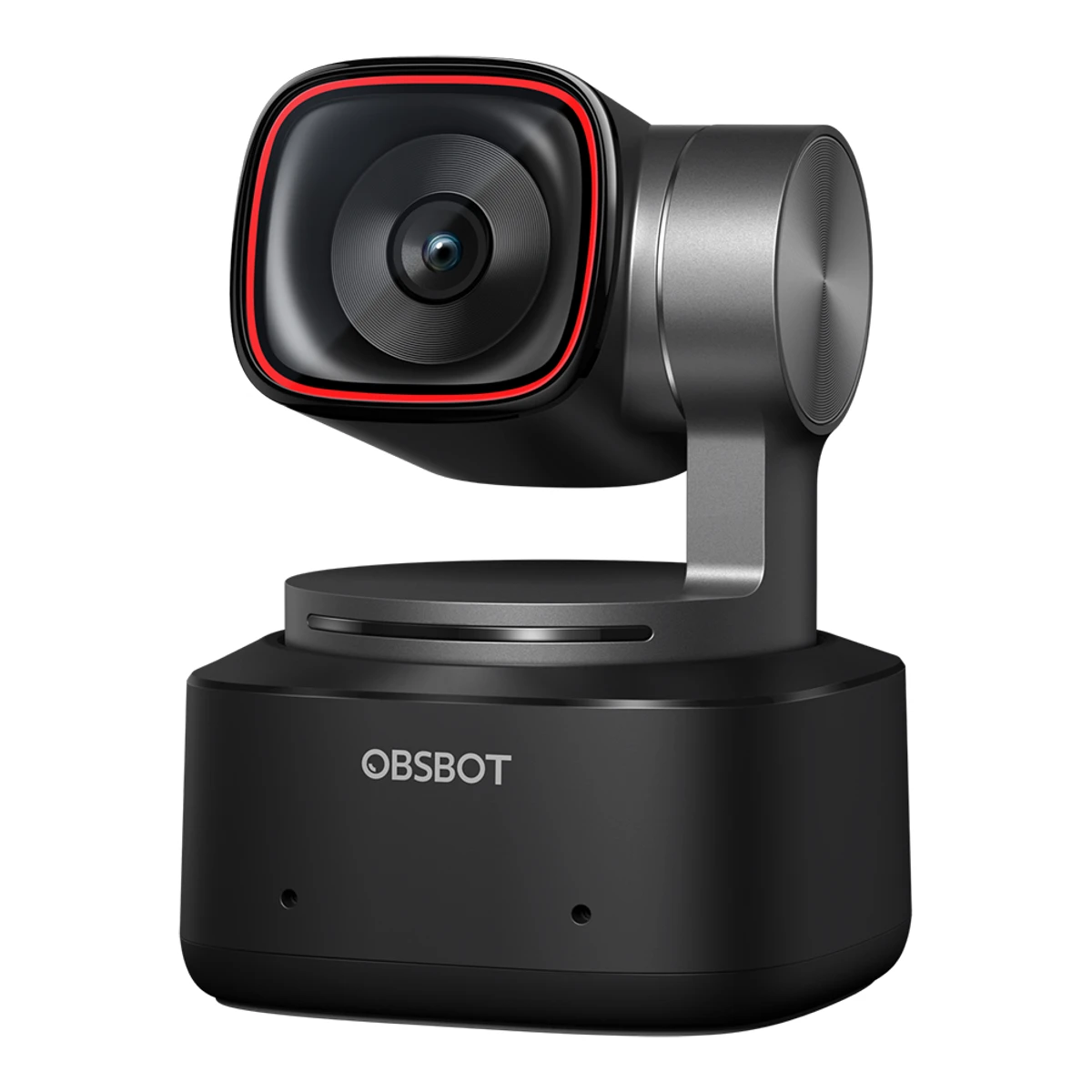
OBSBOTWebcam
Tiny 2
Released June 2023.7Press releaseobsbot.com/news/obsbot-launches-tiny-2Read 16 October 2026Pre-orders opened 2023-03-23. The camera shipped later. See the archived store pages. Last checked 23 October 2026.
- Resolution
- 3840 × 2160
- 1080p frame rate
- 60fps
- Field of view
- Not available
- Focus
- Phase-detect autofocus
50 of 68 fields known.
General
- Model numbers
- OWB-2204-CE12Retailer pagemarkertek.com/product/obs-tiny-2/obsbot-tiny-2-ai-powered-4k-ptz-webcam-with-ai-tracking-auto-zoom-4k-at-30fps-1080p-at-60fps-usb-c-3-0Read 16 October 2026MFG #: OWB-2204-CE
- GTIN / EAN
- 697188923032813Retailer pagemusicredone.com/products/obsbot-tiny-2-ai-powered-ptz-4k-webcamRead 16 October 2026Listed UPC 6971889230328, which is a valid EAN-13
- Announced
- 23 March 20237Press releaseobsbot.com/news/obsbot-launches-tiny-2Read 16 October 2026Press release dated 2023-03-23: the Tiny 2 becomes available for pre-order on the official website
- Status
- Available5Maker product pageobsbot.com/store/products/tiny-2Read 16 October 2026Official store page with add to cart buttons
- Predecessor
- Not available
- Successor
- OBSBOT Tiny 315Press articlepcworld.com/article/3100131/obsbot-tiny-3-webcam-review.htmlRead 23 October 2026PCWorld says the Tiny 3 follows the Tiny 2 as the third iteration of the Obsbot Tiny series.16Reviewtomsguide.com/computing/peripherals/obsbot-tiny-3-reviewRead 23 October 2026Tom's Guide calls the Tiny 2 the predecessor of the Obsbot Tiny 3.
- Launch price (US)
- $3298Maker product pageweb.archive.org/web/20230404040919/https://www.obsbot.com/store/products/tiny-2Read 16 October 2026Archived page: USD $329.00, tax not included. A pre-order deposit of $30 gave another $30 off. No launch euro price is stored, since the maker's EU page of 2023-03-23 shows 309 euro tax not included and the VAT-inclusive launch price is not published.9Press articlexda-developers.com/obsbot-tiny-2-webcam-announcementRead 16 October 2026Announcement: the Tiny 2 costs $329, or 309 euro in Europe10Reviewwindowscentral.com/accessories/obsbot-tiny-2-reviewRead 16 October 2026Spec list: MSRP $329
- Launch price (EU)
- Not available
- Markets
- Not available
Video
- Video modes
Width (px) Height (px) Max frame rate (fps) Format 3840 2160 30 MJPEG 3840 2160 30 H.264 3840 2160 15 YUV (unnamed subformat) 1920 1440 30 YUV (unnamed subformat) 1920 1080 60 MJPEG 1920 1080 60 H.264 1920 1080 30 YUV (unnamed subformat) 1280 960 60 YUV (unnamed subformat) 1280 720 60 MJPEG 1280 720 60 H.264 1280 720 30 YUV (unnamed subformat) 640 480 60 YUV (unnamed subformat) 640 360 60 YUV (unnamed subformat) - Max video resolution
- 3840 × 2160px
- Max frame rate at 4K
- 30fps
- Max frame rate at 1080p
- 60fps
- Max frame rate at any resolution
- 60fps
- HDR video
- Yes1Maker product pageobsbot.com/obsbot-tiny-2-4k-webcam/specsRead 16 October 2026Spec table HDR row: Support3Owner's manualresource-cdn.obsbothk.com/download/obsbot-tiny-2/manual/OBSBOT%20Tiny%202%20User%20Manual_EN.pdfRead 16 October 2026HDR section: off by default, enabled in OBSBOT Center
- Max frame rate with HDR
- Not available
- Portrait video
- Yes2Maker product pageobsbot.com/obsbot-tiny-2-4k-webcamRead 16 October 2026Shoot in the Way You like section: landscape, portrait, downward and up-side-down shooting3Owner's manualresource-cdn.obsbothk.com/download/obsbot-tiny-2/manual/OBSBOT%20Tiny%202%20User%20Manual_EN.pdfRead 16 October 2026Various Shooting Modes, Portrait shooting: placing the camera horizontally through an external accessory enters portrait mode. Automatic rotation works only in software that supports it, such as OBS.
Sensor and lens
- Sensor optical format
- 1/1.5"1Maker product pageobsbot.com/obsbot-tiny-2-4k-webcam/specsRead 16 October 2026Spec table Image sensor: 1/1.5'' CMOS
- Sensor
- Not available
- Pixel size
- Not available
- Aperture (f/)
- 1.91Maker product pageobsbot.com/obsbot-tiny-2-4k-webcam/specsRead 16 October 2026Spec table Aperture: f/1.9
- Focal length (35 mm equivalent)
- 26mm1Maker product pageobsbot.com/obsbot-tiny-2-4k-webcam/specsRead 16 October 2026Spec table Equivalent focal length: 26mm
- Lens material
- Not available
- Field of view (diagonal)
- Not available
- Field of view (horizontal)
- Not available
- Selectable fields of view
- Not available
Focus and zoom
- Focus
- Phase-detect autofocus1Maker product pageobsbot.com/obsbot-tiny-2-4k-webcam/specsRead 16 October 2026Spec table Focus Type: AF (All-Pixel PDAF) / MF
- Manual focus
- Yes1Maker product pageobsbot.com/obsbot-tiny-2-4k-webcam/specsRead 16 October 2026Spec table Focus Type: AF (All-Pixel PDAF) / MF3Owner's manualresource-cdn.obsbothk.com/download/obsbot-tiny-2/manual/OBSBOT%20Tiny%202%20User%20Manual_EN.pdfRead 16 October 2026Focus section: users can disable auto-focus and adjust focus in OBSBOT Center
Features
- Auto framing
- Yes2Maker product pageobsbot.com/obsbot-tiny-2-4k-webcamRead 16 October 2026AI Tracking with Auto Zoom section: tracking can auto-adjust the zoom setting. Needs OBSBOT Center for the full set of modes.3Owner's manualresource-cdn.obsbothk.com/download/obsbot-tiny-2/manual/OBSBOT%20Tiny%202%20User%20Manual_EN.pdfRead 16 October 2026Human Tracking: the camera tracks the person and keeps them in the best composition. Group Mode adjusts the view as people join or leave.
- Gimbal pan range
- 280°1Maker product pageobsbot.com/obsbot-tiny-2-4k-webcam/specsRead 16 October 2026Controllable range pan +/-140 degrees stored as 280. Mechanical range +/-150 degrees is not used.3Owner's manualresource-cdn.obsbothk.com/download/obsbot-tiny-2/manual/OBSBOT%20Tiny%202%20User%20Manual_EN.pdfRead 16 October 2026Gimbal section: controllable pan +/-140 degrees
- Gimbal tilt range
- 100°1Maker product pageobsbot.com/obsbot-tiny-2-4k-webcam/specsRead 16 October 2026Controllable range tilt 30 degrees down to 70 degrees up stored as 100. Mechanical range +/-90 degrees is not used.3Owner's manualresource-cdn.obsbothk.com/download/obsbot-tiny-2/manual/OBSBOT%20Tiny%202%20User%20Manual_EN.pdfRead 16 October 2026Gimbal section: controllable tilt 30 degrees to -70 degrees
- Gesture control
- Yes1Maker product pageobsbot.com/obsbot-tiny-2-4k-webcam/specsRead 16 October 2026Spec table Auxiliary Functions: Gesture Control, Voice Control2Maker product pageobsbot.com/obsbot-tiny-2-4k-webcamRead 16 October 2026Magical Gesture Control 2.0 section: dynamic zoom, select or cancel target, 4x zoom in or out3Owner's manualresource-cdn.obsbothk.com/download/obsbot-tiny-2/manual/OBSBOT%20Tiny%202%20User%20Manual_EN.pdfRead 16 October 2026Gesture Control 2.0 section: turn human tracking on and off and zoom with hand gestures
- IR face login
- No4Maker product pageobsbot.com/obsbot-tiny-2-4k-webcam/faqRead 16 October 2026FAQ: OBSBOT Tiny 2 doesn't support Windows Hello
- Built-in light
- Not available
- Other camera features
- AI Tracking with Auto Zoom, Hand Tracking, Zone Tracking, Group Mode, Preset Positions, Voice Control, Beauty Mode, Desk Mode, Whiteboard Mode, Background Blur, PixGain HDR, Dual Native ISO, All-Pixel Auto Focus, Privacy Mode2Maker product pageobsbot.com/obsbot-tiny-2-4k-webcamRead 16 October 2026Names from the page sections: AI Tracking with Auto Zoom, Hand Tracking, Zone Tracking, Preset positions, Voice Control, Beauty Mode, Desk Mode, Whiteboard Mode, Blurred Background (FAQ), PixGain HDR, Dual Native ISO, All-Pixel Auto Focus, Privacy Mode. Group Mode is from the manual.3Owner's manualresource-cdn.obsbothk.com/download/obsbot-tiny-2/manual/OBSBOT%20Tiny%202%20User%20Manual_EN.pdfRead 16 October 2026Manual sections Group Mode, Hand Tracking, Whiteboard Mode, Desk Mode, Voice Control and zone tracking in Human Tracking4Maker product pageobsbot.com/obsbot-tiny-2-4k-webcam/faqRead 16 October 2026FAQ: supports Blurred Background but not Background Replacement
Audio
- Built-in microphone
- Yes1Maker product pageobsbot.com/obsbot-tiny-2-4k-webcam/specsRead 16 October 2026Spec table Audio input: built-in dual omni-directional mics with noise reduction
- Microphones
- 21Maker product pageobsbot.com/obsbot-tiny-2-4k-webcam/specsRead 16 October 2026Spec table Audio input: dual omni-directional mics. The manual parts list also names Dual Microphones.2Maker product pageobsbot.com/obsbot-tiny-2-4k-webcamRead 16 October 2026Page text: dual omni-directional microphone with noise reduction3Owner's manualresource-cdn.obsbothk.com/download/obsbot-tiny-2/manual/OBSBOT%20Tiny%202%20User%20Manual_EN.pdfRead 16 October 2026Parts Info item 03: Dual Microphones
- Stereo audio
- Not available
- Mic pickup range
- Not available
- Mic noise reduction
- Yes, method not stated1Maker product pageobsbot.com/obsbot-tiny-2-4k-webcam/specsRead 16 October 2026Spec table Audio Modes: Noise-Reduction / Automatic Gain Control. The method is not named. Windows Central calls it AI noise reduction, which the maker does not say.2Maker product pageobsbot.com/obsbot-tiny-2-4k-webcamRead 16 October 2026Page text: microphone system with noise reduction, no method named
- Mic sample rate
- Not available
Connectivity
- USB
- USB 3.01Maker product pageobsbot.com/obsbot-tiny-2-4k-webcam/specsRead 16 October 2026Feature strip on the spec page: USB 3.0. The product page says the camera upgraded to a USB 3.0 port.2Maker product pageobsbot.com/obsbot-tiny-2-4k-webcamRead 16 October 2026Page text: USB 3.0 port with ten times faster transmission, which can transmit 1080p video without compression3Owner's manualresource-cdn.obsbothk.com/download/obsbot-tiny-2/manual/OBSBOT%20Tiny%202%20User%20Manual_EN.pdfRead 16 October 2026Overview, Connecting Suggestions: use a USB 3.0 port. Lag, flashes or resets point to a USB 2.0 port.5Maker product pageobsbot.com/store/products/tiny-2Read 16 October 2026Box list: USB-C 3.0 cable and USB-C to USB-A 3.0 adapter. The page says the USB 3.0 port transmits 1080p without compression.
- Detachable cable
- Yes3Owner's manualresource-cdn.obsbothk.com/download/obsbot-tiny-2/manual/OBSBOT%20Tiny%202%20User%20Manual_EN.pdfRead 16 October 2026Parts Info lists a USB-C port on the camera. The standard data cable connects it to the computer.10Reviewwindowscentral.com/accessories/obsbot-tiny-2-reviewRead 16 October 2026Spec list: detachable USB Type-C cable. The box has a 6 ft Type-C to Type-C 3.2 Gen 1 cable. Macwelt says 1.5 m, so no cable length is stored.
- Cable host plug
- USB-C3Owner's manualresource-cdn.obsbothk.com/download/obsbot-tiny-2/manual/OBSBOT%20Tiny%202%20User%20Manual_EN.pdfRead 16 October 2026Connect to the Computer: standard data cable, with a provided USB-C to USB-A adapter if needed5Maker product pageobsbot.com/store/products/tiny-2Read 16 October 2026Box list: USB-C 3.0 cable and a USB-C to USB-A adapter, so the cable has a USB-C plug
- Cable length
- Not available
Mounting and privacy
- Mounting
- Monitor clip, Magnetic mount, Tripod thread2Maker product pageobsbot.com/obsbot-tiny-2-4k-webcamRead 16 October 2026Various Placement Methods section: a crafted metal mount allows various placements3Owner's manualresource-cdn.obsbothk.com/download/obsbot-tiny-2/manual/OBSBOT%20Tiny%202%20User%20Manual_EN.pdfRead 16 October 2026Placement Instructions: the adjustable stand opens and sits on the monitor, and the camera goes on the stand. A standard UNC 1/4-20 nut connector on the base is for a tripod. The magnet is from the OBSBOT mount page.6Maker product pageobsbot.com/store/products/tiny-2-adjustable-mountRead 16 October 2026Accessory page: with the built-in magnet of the Tiny 2, the camera snaps onto the adjustable mount. The mount is a hinged aluminum stand.10Reviewwindowscentral.com/accessories/obsbot-tiny-2-reviewRead 16 October 2026Review: compact magnetic stand that attaches to any monitor or supported tripod accessory11Reviewdigitalcameraworld.com/reviews/obsbot-tiny-2-reviewRead 16 October 2026Review dated 2023-06-27: the camera is magnetically attracted to the hinge, or it can be placed on a tripod
- Privacy cover
- Lens turns away2Maker product pageobsbot.com/obsbot-tiny-2-4k-webcamRead 16 October 2026Upgraded Privacy Mode: tilting the camera down enters privacy mode and shows a preset video or picture3Owner's manualresource-cdn.obsbothk.com/download/obsbot-tiny-2/manual/OBSBOT%20Tiny%202%20User%20Manual_EN.pdfRead 16 October 2026Sleep Mode, Manual Sleep: point the lens straight down. The indicator light goes off.
Software
- Software
- OBSBOT Center1Maker product pageobsbot.com/obsbot-tiny-2-4k-webcam/specsRead 16 October 2026Spec table Auxiliary App: OBSBOT Center (Formerly OBSBOT WebCam)2Maker product pageobsbot.com/obsbot-tiny-2-4k-webcamRead 16 October 2026OBSBOT Center section: Windows 10 and above, macOS 11 and above3Owner's manualresource-cdn.obsbothk.com/download/obsbot-tiny-2/manual/OBSBOT%20Tiny%202%20User%20Manual_EN.pdfRead 16 October 2026OBSBOT Center software section
Compatibility
- Works with
- Windows, macOS, Linux1Maker product pageobsbot.com/obsbot-tiny-2-4k-webcam/specsRead 16 October 2026Spec table System Requirements: Windows 10 or later, macOS 11 or later. Linux is from the FAQ.2Maker product pageobsbot.com/obsbot-tiny-2-4k-webcamRead 16 October 2026OBSBOT Center section: Windows 10 and above, macOS 11 and above3Owner's manualresource-cdn.obsbothk.com/download/obsbot-tiny-2/manual/OBSBOT%20Tiny%202%20User%20Manual_EN.pdfRead 16 October 2026System Requirements: Windows 10 (64-bit) or later, macOS 11.0 or later4Maker product pageobsbot.com/obsbot-tiny-2-4k-webcam/faqRead 16 October 2026FAQ: besides Windows and macOS the Tiny 2 supports Linux, but the OBSBOT app does not run on Linux. Android works only through an OTG adapter and an app with UVC support, so it is not stored.
Dimensions and weight
Front and side, drawn to scale.
- Camera dimensions
- Width47Height62.02Depth44mm(1.9 × 2.4 × 1.7 in)1Maker product pageobsbot.com/obsbot-tiny-2-4k-webcam/specsRead 16 October 2026Spec table Dimensions: 47*44*62.02mm with no axis names. Windows Central prints 47 x 44 x 62.02mm (1.85 x 1.73 x 2.44in) and describes the camera head standing on a vertical stem over the base, so 62.02 is the height. Width 47 and depth 44 follow the order of the Tiny 2 Lite spec. Musicredone and B&H list 62.0 x 47.0 x 44.0 mm as W x H x D, which is not used.
Certifications
We could not find any of these 2 fields. Show them
- Communication certifications
- Not available
- Other certifications
- Not available
In the box
- In the box
- OBSBOT Tiny 2, OBSBOT Tiny 2 Adjustable Mount, OBSBOT Tiny 2 Storage Case, USB-C 3.0 Cable & USB-C to USB-A 3.0 Adapter5Maker product pageobsbot.com/store/products/tiny-2Read 16 October 2026What's in the box: OBSBOT Tiny 2, OBSBOT Tiny 2 Adjustable Mount, OBSBOT Tiny 2 Storage Case, USB-C 3.0 Cable & USB-C to USB-A 3.0 Adapter. The combos add other accessories and are not stored.
Links
- Product page
- www.obsbot.com/obsbot-tiny-2-4k-webcam2Maker product pageobsbot.com/obsbot-tiny-2-4k-webcamRead 16 October 2026
- Spec sheet
- www.obsbot.com/obsbot-tiny-2-4k-webcam/specs1Maker product pageobsbot.com/obsbot-tiny-2-4k-webcam/specsRead 16 October 2026
- Manual
- resource-cdn.obsbothk.com/download/obsbot-tiny-2/manual/OBSBOT%20Tiny%202%20User%20Manual_EN.pdf3Owner's manualresource-cdn.obsbothk.com/download/obsbot-tiny-2/manual/OBSBOT%20Tiny%202%20User%20Manual_EN.pdfRead 16 October 2026
- EPREL registration number
- Not available
Warranty
- Manufacturer warranty (source market)
- 1year5Maker product pageobsbot.com/store/products/tiny-2Read 16 October 2026Store page badge 1-YEAR WARRANTY. Europe store.
Compare with
Pick a webcam to see both side by side. Differences are marked yellow.
Sources
We read 16 sources for this webcam. The numbers match the markers in the sheet.
- Maker product pageobsbot.com/obsbot-tiny-2-4k-webcam/specs
- Maker product pageobsbot.com/obsbot-tiny-2-4k-webcam
- Maker product pageobsbot.com/obsbot-tiny-2-4k-webcam/faq
- Maker product pageobsbot.com/store/products/tiny-2
- Maker product pageobsbot.com/store/products/tiny-2-adjustable-mount
- Press releaseobsbot.com/news/obsbot-launches-tiny-2
- Press articlexda-developers.com/obsbot-tiny-2-webcam-announcement
See a wrong value? Tell us and name the field.
SuccessorOBSBOT Tiny 3