Monitors / Compare
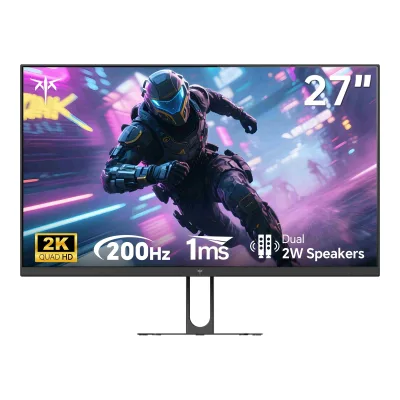
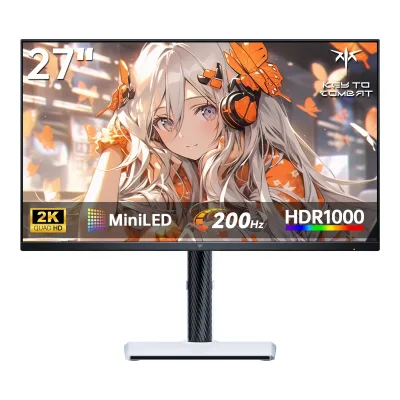
KTC H27T22C-3 vs KTC M27T6S
Product A: KTC
81 of 172 known Dell Alienware AW2725DM
 AOC Q27G41ZE
 ASUS TUF Gaming VG27AQM5A
 Dell Alienware AW2525HM
 Dell 27 240Hz Monitor SE2726HG
 Xiaomi G Pro 27Qi 2026
 Samsung Odyssey G8 G80HF (5K)
 ASUS ROG Strix XG27ACS
 Samsung Odyssey G5 G50D 27"
 Dell 24 240Hz Adjustable Stand Monitor SE2426HGS
 Samsung Odyssey G8 G80HS (6K)
 MSI MAG 274QRF QD E2
Change KTC H27T22C-3
Compare the KTC M27T6S with
Dell Alienware AW2725DMAOC Q27G41ZEASUS TUF Gaming VG27AQM5ADell Alienware AW2525HMDell 27 240Hz Monitor SE2726HGXiaomi G Pro 27Qi 2026Samsung Odyssey G8 G80HF (5K)ASUS ROG Strix XG27ACSSamsung Odyssey G5 G50D 27"Dell 24 240Hz Adjustable Stand Monitor SE2426HGSSamsung Odyssey G8 G80HS (6K)MSI MAG 274QRF QD E2Product B: KTC
102 of 172 knownAOC Q27G41ZEDell Alienware AW2725DMDell Alienware AW2525HMDell 27 240Hz Monitor SE2726HGASUS TUF Gaming VG27AQM5AXiaomi G Pro 27Qi 2026Samsung Odyssey G8 G80HF (5K)Dell 24 240Hz Adjustable Stand Monitor SE2426HGSSamsung Odyssey G8 G80HS (6K)ASUS ROG Strix XG27ACSSamsung Odyssey G5 G50D 27"MSI MAG 274QRF QD E2
Change KTC M27T6S
Compare the KTC H27T22C-3 with
AOC Q27G41ZEDell Alienware AW2725DMDell Alienware AW2525HMDell 27 240Hz Monitor SE2726HGASUS TUF Gaming VG27AQM5AXiaomi G Pro 27Qi 2026Samsung Odyssey G8 G80HF (5K)Dell 24 240Hz Adjustable Stand Monitor SE2426HGSSamsung Odyssey G8 G80HS (6K)ASUS ROG Strix XG27ACSSamsung Odyssey G5 G50D 27"MSI MAG 274QRF QD E261 of 164 fields differ
- 28 different values
- 33 known for one only
- 43 the same
- 60 missing for both
Biggest differences
Each bar uses the scale of all 179 monitors.
- Standby powerLower is betterA: 0.2WB: 0.5WH27T22C-3 is 0.3 W lower.
- Power use (max)Lower is betterA: 48WB: 102WH27T22C-3 is 54 W lower.
Refresh rate per resolution
The best rate over any port. Bars run from 0 to 1200 Hz.
2560 × 1440Native for both
A210Hz
B210Hz
Size, drawn to scale
Front and side. Solid lines show the stand at its lowest. Dashed lines show it at its highest.
- AH27T22C-3: 616 × 364.3 mm
- BM27T6S: 617 × 364 mm
Weight
0 to 15 kg
Weight with stand
A5.1kg
B6.55kg
All 172 fields
Every value links to where we found it.
General
1 of 8 differ
Series
Not available
Not available
Model numbers
GTIN / EAN
Not available
Not available
Announced
Not available
Not available
Status
Predecessor
Not available
Not available
Successor
Not available
Not available
Launch price (US)
Not available
Not available
Launch price (EU)
Not available
Not available
Markets
Colours
Display
2 of 12 differ
Screen size
Viewable screen diagonal
Not available
Not available
Native resolution
Aspect ratio
Pixel density
108.8ppi
108.8ppi
Pixel pitch
Not available
Active display area
Width595.968Height335.232mm(23.5 × 13.2 in)2Owner's manualus.ktcplay.com/cdn/shop/files/H27T22C-3-USE_MANUAL_39abbc85-ae47-4883-a0d4-27270d53757e.pdfRead 8 October 2026Original p1 Product Technical Specifications explicitly visible area 595.968 horizontal by 335.232 vertical mm. Pixel pitch is not inferred by dividing by resolution.
Curved
Curvature radius
Not available
Not available
Screen surface
Matte3Reviewdisplayninja.com/ktc-m27t6s-reviewRead 8 October 2026Exact reviewed USA-1.0.1 unit has a 25% low-haze matte anti-glare surface, corroborating maker haze specification. This does not establish a separate anti-reflection treatment.10Reviewpcgamer.com/hardware/gaming-monitors/ktc-m27t6s-reviewRead 8 October 2026Exact PC Gamer review independently describes matte anti-glare coating.
Anti-reflection coating
Not available
Not available
Touchscreen
Not available
Not available
Panel
13 of 31 differ
Panel type
Panel type (as published)
Backlight
Not available
Local dimming
Not available
Dimming zones
Not available
Panel maker
Not available
Not available
Panel part number
Not available
Not available
Panel generation
Not available
Not available
Subpixel layout
Not available
Colour depth
Colour depth method
Displayable colours
sRGB coverage
DCI-P3 coverage
Adobe RGB coverage
Rec. 2020 coverage
Not available
Not available
NTSC coverage
Not available
Factory calibrated
Claimed Delta E
Not available
Paper calibration report in box
Not available
Hardware calibration support
Not available
Not available
Static contrast ratio
Brightness (typical, SDR)
Brightness (maker minimum)
Not available
Not available
Peak brightness (HDR)
Not available
HDR peak test window
Not available
Not available
Full-screen brightness
Not available
Not available
HDR formats
Not available
HDR103Reviewdisplayninja.com/ktc-m27t6s-reviewRead 8 October 2026Exact HDR10 signal support is independently described by Tom's Hardware. The tested review describes Windows HDR operation and HDR modes. HDR10+ and Dolby Vision are not inferred.5Reviewtomshardware.com/monitors/gaming-monitors/ktc-m27t6s-27-inch-qhd-mini-led-gaming-monitor-reviewRead 8 October 2026Exact M27T6S review explicitly says HDR modes work when an HDR10 signal is present. No other HDR format is inferred.
Viewing angle (horizontal)
Viewing angle (vertical)
Refresh rate and motion
6 of 22 differ
Refresh rate per resolution and port
AKTC H27T22C-3
| Resolution | HDMI 2.0 | DisplayPort 1.4 |
|---|---|---|
| 2560 × 1440Native | 144Hz | 210Hz |
BKTC M27T6S
| Resolution | HDMI 2.0 | DisplayPort 1.4 |
|---|---|---|
| 2560 × 1440Native | 144Hz8-bit | 210Hz |
Source2Owner's manualus.ktcplay.com/cdn/shop/files/M27T6S-USE_MANUAL.pdfRead 8 October 2026Original guide states maximum native 2560x1440 at 144 Hz HDMI and 200 Hz DisplayPort with 210 Hz overclock possible. The stored DP maximum requires OSD overclock. Normal 200 Hz operation remains in the separate native refresh field. Cable and graphics source must support the chosen mode. Bit depth, chroma and DSC for DP maxima remain unknown.4Reviewdisplayninja.com/ktc-m27t6s-reviewRead 8 October 2026Exact review explicitly HDMI 1440p at 144 Hz limited to 8-bit colour. DP 200/210 Hz bit depth is not explicitly scoped in the original guide, so no DP 10-bit rate is inferred.10Reviewpcgamer.com/hardware/gaming-monitors/ktc-m27t6s-reviewRead 8 October 2026Exact review confirms HDMI maximum 144 Hz separately from 210 Hz DP overclock.
Max refresh rate
210Hz
210Hz
Max refresh rate at native resolution
210Hz
210Hz
Max refresh rate over DisplayPort
210Hz
210Hz
Max refresh rate over HDMI
144Hz
144Hz
Max refresh rate over USB-C
Not available
Not available
Max refresh rate at 10-bit
Not available
Not available
Native refresh rate
Overclocked refresh rate
Dual mode
Not available
Not available
Minimum fixed refresh rate
Not available
Not available
Adaptive sync technologies
VRR range per port
Not available
Not available
Low framerate compensation
Not available
Response time (maker GtG claim)
Not available
Not available
Response time (maker MPRT claim)
Overdrive settings
Off, Standard, Advanced, Ultra Fast, Dynamic Overdrive3Reviewdisplayninja.com/ktc-m27t6s-reviewRead 8 October 2026Exact tested menu identifies Off, Standard, Advanced, Ultra Fast and Dynamic Overdrive. Dynamic Overdrive performed like Off in this reviewed firmware and is not presumed to provide effective variable OD.
Motion blur reduction
Not available
Blur-reduction technology
Not available
Blur reduction works with VRR
Not available
Flicker-free (claimed)
Black frame insertion
Not available
Not available
Measured
5 of 12 differ
Input lag at maximum refresh rate
Not available
2.89ms3Reviewdisplayninja.com/ktc-m27t6s-reviewRead 8 October 2026Exact USA-1.0.1 firmware OSRTT display-only mean latency 2.89 ms at native 2560x1440, highest 210 Hz overclock, Adaptive-Sync and Low Input Lag enabled, local dimming disabled. The chart separately identifies On Display Lag, USB Polling Delay, Render Time and Total Input Lag. The stored figure is On Display Lag, including display response, excluding the host polling/render pipeline. Local dimming enabled measures 14.28 ms in the same review and is not mixed into this run. Tom's Hardware LDAT 15.9 ms end-to-end mouse/software result is excluded. The review does not state OSRTT software version or latency calibration procedure. The stored value is explicitly labelled display-only by the reviewer and current chart. Its isolation algorithm was not independently verified. Legacy OSRTT total-system documentation is not treated as defining this separately labelled result.11Maker product pagegithub.com/OSRTT/OSLTTDocs/blob/main/index.mdRead 8 October 2026Current tool maintainer documentation lists On Display Latency separately from total system click-to-photon latency and states the custom DirectX test is the same as OSRTT. This supports interpreting the current review's separately labelled On Display Lag rather than its Total Input Lag column. The exact reviewed software version, calibration and isolation implementation remain unknown.
Input lag at 60 Hz
Not available
11.34ms3Reviewdisplayninja.com/ktc-m27t6s-reviewRead 8 October 2026Same exact USA-1.0.1 OSRTT display-only mean latency 11.34 ms at native 2560x1440 fixed 60 Hz, Adaptive-Sync and Low Input Lag enabled, local dimming disabled. The chart separates On Display Lag from host polling/render pipeline and total input. Local-dimming-on 33.71 ms is a separate condition, not substituted. The review does not state OSRTT software version or latency calibration procedure. The stored value is explicitly labelled display-only by the reviewer and current chart. Its isolation algorithm was not independently verified. Legacy OSRTT total-system documentation is not treated as defining this separately labelled result.11Maker product pagegithub.com/OSRTT/OSLTTDocs/blob/main/index.mdRead 8 October 2026Same current maintainer documentation supports the separately reported On Display Lag category. No reviewer-specific calibration or algorithm validation is claimed.
Overshoot (measured)
Not available
Not available
HDR brightness in a real scene (measured)
Not available
Not available
PWM flicker frequency (measured)
Not available
Not available
VRR range (measured)
Not available
Not available
Colour accuracy (measured Delta E)
Not available
Not available
Gray uniformity (measured)
Not available
Not available
Reflections (measured)
Not available
Not available
Connectivity
6 of 19 differ
Video inputs
AKTC H27T22C-3
| Type | Version | Count |
|---|---|---|
| HDMI | 2.0 | 2 |
| DisplayPort | 1.4 | 2 |
BKTC M27T6S
| Type | Version | Count |
|---|---|---|
| HDMI | 2.0 | 2 |
| DisplayPort | 1.4 | 1 |
Source2Owner's manualus.ktcplay.com/cdn/shop/files/M27T6S-USE_MANUAL.pdfRead 8 October 2026Exact original connection diagram and technical table show two HDMI and one DP input. Current maker and exact rear graphic identify HDMI 2.0 and DP 1.4. USB-A is upgrade only and is not a video input or peripheral hub.4Reviewdisplayninja.com/ktc-m27t6s-reviewRead 8 October 2026
HDMI ports
2
2
DisplayPort ports
2
1
Highest HDMI version
2.0
2.0
Highest DisplayPort version
1.4
1.4
HDMI features
Not available
Not available
USB-C video (DP Alt Mode)
No2Owner's manualus.ktcplay.com/cdn/shop/files/M27T6S-USE_MANUAL.pdfRead 8 October 2026Complete original and current connector inventory has no USB-C socket. The current web package table lists a Type-C cable, which does not establish USB-C video support.10Reviewpcgamer.com/hardware/gaming-monitors/ktc-m27t6s-reviewRead 8 October 2026Exact review explicitly no USB-C and no peripheral hub.
USB-C power delivered
Not available
Not available
Thunderbolt
Not available
Not available
USB upstream ports
Not available
Not available
USB downstream hub ports
Not available
Not available
KVM switch
Not available
Daisy chain (MST)
Not available
Ethernet
3.5 mm headphone output
3.5 mm microphone input
Optical out
Picture in picture
Not available
Picture by picture
Not available
Smart features
None of 4 known
Smart platform
Not available
Not available
Wi-Fi
Not available
Not available
Bluetooth
Not available
Not available
Remote control
Not available
Not available
Audio and camera
3 of 5 differ
Speakers
No5Reviewtomshardware.com/monitors/gaming-monitors/ktc-m27t6s-27-inch-qhd-mini-led-gaming-monitor-reviewRead 8 October 2026Exact physical inspection expressly no internal speakers. Audio passes through the 3.5 mm headphone output.10Reviewpcgamer.com/hardware/gaming-monitors/ktc-m27t6s-reviewRead 8 October 2026
Number of speakers
Not available
Speaker power per channel
Not available
Webcam
Not available
Not available
Microphone
Not available
Not available
Ergonomics and controls
9 of 15 differ
Stand height adjustment
Tilt
Swivel
Pivot
Counterclockwise0°Clockwise0°9Reviewpcgamer.com/hardware/gaming-monitors/ktc-h27t22c-3-gaming-monitor-reviewRead 8 October 2026Exact review explicitly no portrait rotation.
Counterclockwise90°Clockwise90°1Maker product pageus.ktcplay.com/products/27-inch-200hz-hdr1000-miniled-gaming-monitorRead 8 October 2026
Removable stand
VESA mount
VESA adapter needed
Security lock slot
Not available
Not available
On-screen menu controls
Joystick, Software2Owner's manualus.ktcplay.com/cdn/shop/files/M27T6S-USE_MANUAL.pdfRead 8 October 2026Original guide establishes the rear joystick. The software route is established independently by the exact review showing MCC/MMC display controls, not inferred merely from a software download.4Reviewdisplayninja.com/ktc-m27t6s-reviewRead 8 October 2026Exact reviewed MCC/MMC desktop utility adjusts OSD-related display settings and assigns keyboard shortcuts. Reviewed application screenshots prove actual monitor control.
Desktop software
Not available
KTC MCC PC Client1Maker product pageus.ktcplay.com/products/27-inch-200hz-hdr1000-miniled-gaming-monitorRead 8 October 2026Maker exact compatibility says MCC PC Client Support. The reviewed application is also called MMC and is shown operating display settings.4Reviewdisplayninja.com/ktc-m27t6s-reviewRead 8 October 2026Manufacturer calls it MCC PC Client. Exact review calls the application MMC (Monitor Management Center) and documents display-setting control. The spelling difference is preserved rather than treating them as separately supplied applications.
User firmware updates
Yes1Maker product pageus.ktcplay.com/products/27-inch-200hz-hdr1000-miniled-gaming-monitorRead 8 October 2026Exact USB 2.0 Upgrade only specification, corroborated by the reviewed USB Upgrade menu. No available firmware version or update package is inferred.4Reviewdisplayninja.com/ktc-m27t6s-reviewRead 8 October 2026Exact reviewed USB Upgrade menu and USB-A firmware-only connector establish support. No latest firmware number is inferred from reviewed USA-1.0.1.
Ambient light sensor
Not available
Not available
RGB lighting
Not available
Gaming menu features
Black Equalize, Crosshair overlays, Refresh rate tracker, On-screen timer3Reviewdisplayninja.com/ktc-m27t6s-reviewRead 8 October 2026Exact reviewed menu includes these four gaming controls. No numeric shadow enhancement or performance benefit is inferred.
OLED care
None of 3 known
OLED care
Not available
Not available
Burn-in covered by warranty
Not available
Not available
Burn-in warranty length
Not available
Not available
Dimensions and weight
4 of 7 differ
Dimensions with stand
Width616Height (lowest)465Height (highest)465Depth184.9mm(24.3 × 18.3 × 7.3 in)3Maker product pageus.ktcplay.com/cdn/shop/files/H27T22C-32.pngRead 8 October 2026Exact maker gallery dimension image visibly gives assembled width 616 mm, overall height 465 mm and total depth 184.9 mm. The supplied stand has no height adjustment, so both height positions coincide. These are not borrowed from an earlier H27T22C revision. Published tilt position is unstated.
Width617Height (lowest)409Height (highest)541Depth211mm(24.3 × 16.1 to 21.3 × 8.3 in)1Maker product pageus.ktcplay.com/products/27-inch-200hz-hdr1000-miniled-gaming-monitorRead 8 October 2026Maker width 617 mm and depth 211 mm agree with the exact review. Its single overall height 547 mm does not identify the stand position. The review explicitly supplies minimum 409 mm and maximum 541 mm with base, which are stored without inferring what stand position the maker meant. The disagreement is not physically reconciled.5Reviewtomshardware.com/monitors/gaming-monitors/ktc-m27t6s-27-inch-qhd-mini-led-gaming-monitor-reviewRead 8 October 2026Exact technical table expressly dimensions with base 617 x 409–541 x 211 mm. Minimum and maximum stand positions are explicitly identified by the range. Manufacturer single unpositioned 547 mm height differs and is retained as a discrepancy, not an inferred endpoint.
Dimensions without stand
Width617Height364Depth72mm(24.3 × 14.3 × 2.8 in)1Maker product pageus.ktcplay.com/products/27-inch-200hz-hdr1000-miniled-gaming-monitorRead 8 October 2026
Stand footprint
Not available
Not available
Weight with stand
Weight without stand
Not available
Not available
Box dimensions
Not available
Not available
Box weight
Not available
Power
9 of 13 differ
Power supply
Adapter rating
Not available
Not available
Input voltage
Power use (typical)
Not available
Not available
Power use (max)
Power use SDR (EU label)
Not available
Power use HDR (EU label)
Not available
Standby power
Off-mode power
Not available
EU energy class SDR
EU energy class HDR
Energy per 1000 h SDR
Energy per 1000 h HDR
Certifications
1 of 9 differ
VESA ClearMR
Not available
Not available
VESA AdaptiveSync Display
Not available
Not available
TÜV certifications
Not available
Not available
Low blue light
ENERGY STAR
Not available
Not available
TCO Certified
Not available
Not available
EPEAT
Not available
Not available
Colour certifications
Not available
Not available
Other certifications
Not available
Not available
In the box
2 of 2 differ
In the box
LCD monitor, Base, DisplayPort cable, Power cord, Power adapter, User guide with warranty card, Base screws, including spare screw, Screwdriver1Maker product pageus.ktcplay.com/products/27-2k-210hz-gaming-monitorRead 10 October 2026Current exact US maker package table explicitly includes one screwdriver alongside the monitor, base, DP cable, adapter, power cord, guide/warranty and three M4x8 screws. The older original guide inventory does not list the screwdriver. The current exact gallery package graphic independently includes it. Optional mousepad bundle is excluded.2Owner's manualus.ktcplay.com/cdn/shop/files/H27T22C-3-USE_MANUAL_39abbc85-ae47-4883-a0d4-27270d53757e.pdfRead 8 October 2026Original p1 complete package inventory. Optional mousepad bundle is excluded from this base monitor reference. Current maker page separately lists a screwdriver and three M4x8 screws.
Monitor, Stand and base, DisplayPort cable, Power cord, User guide, Warranty card, Factory calibration report2Owner's manualus.ktcplay.com/cdn/shop/files/M27T6S-USE_MANUAL.pdfRead 8 October 2026Original guide lists monitor, base, DP cable and user guide including warranty card, with power cord conditional on the actual package. Exact US review confirms IEC power cord, stand assembly and DisplayPort cable. Exact independently tested USA-1.0.1 review also explicitly lists a physical factory calibration report and quick start guide. Current web table additionally lists Type-C, which neither the original guide nor either reviewed bundle confirms, so it is omitted.4Reviewdisplayninja.com/ktc-m27t6s-reviewRead 8 October 2026
Cables included
AKTC H27T22C-3
| Type | Count |
|---|---|
| DisplayPort | 1 |
| AC power | 1 |
BKTC M27T6S
| Type | Count |
|---|---|
| DisplayPort | 1 |
| Power cord | 1 |
Source2Owner's manualus.ktcplay.com/cdn/shop/files/M27T6S-USE_MANUAL.pdfRead 8 October 2026Original guide establishes one DisplayPort cable. Exact US reviewed bundle confirms an IEC power cord plus DisplayPort. Original guide power-cord regional qualification is preserved. The web Type-C package discrepancy does not establish inclusion for the reviewed US bundle.4Reviewdisplayninja.com/ktc-m27t6s-reviewRead 8 October 2026
Warranty
0 of 2 differ
Manufacturer warranty (source market)
Dead pixel policy
Not available
Not available
Links
Not compared
Product page
Spec sheet
Not available
Not available
Manual
us.ktcplay.com/cdn/shop/files/H27T22C-3-USE_MANUAL_39abbc85-ae47-4883-a0d4-27270d53757e.pdf2Owner's manualus.ktcplay.com/cdn/shop/files/H27T22C-3-USE_MANUAL_39abbc85-ae47-4883-a0d4-27270d53757e.pdfRead 8 October 2026Original KTC H27T22C-3 English guide V1.0, two folding-sheet pages. Exact cover and full technical/connector diagrams were visually read. PDF text extraction only exposes a small part of its raster content.
EPREL registration number
Both are also in the API. Back to all monitors.