Gaming / Mice
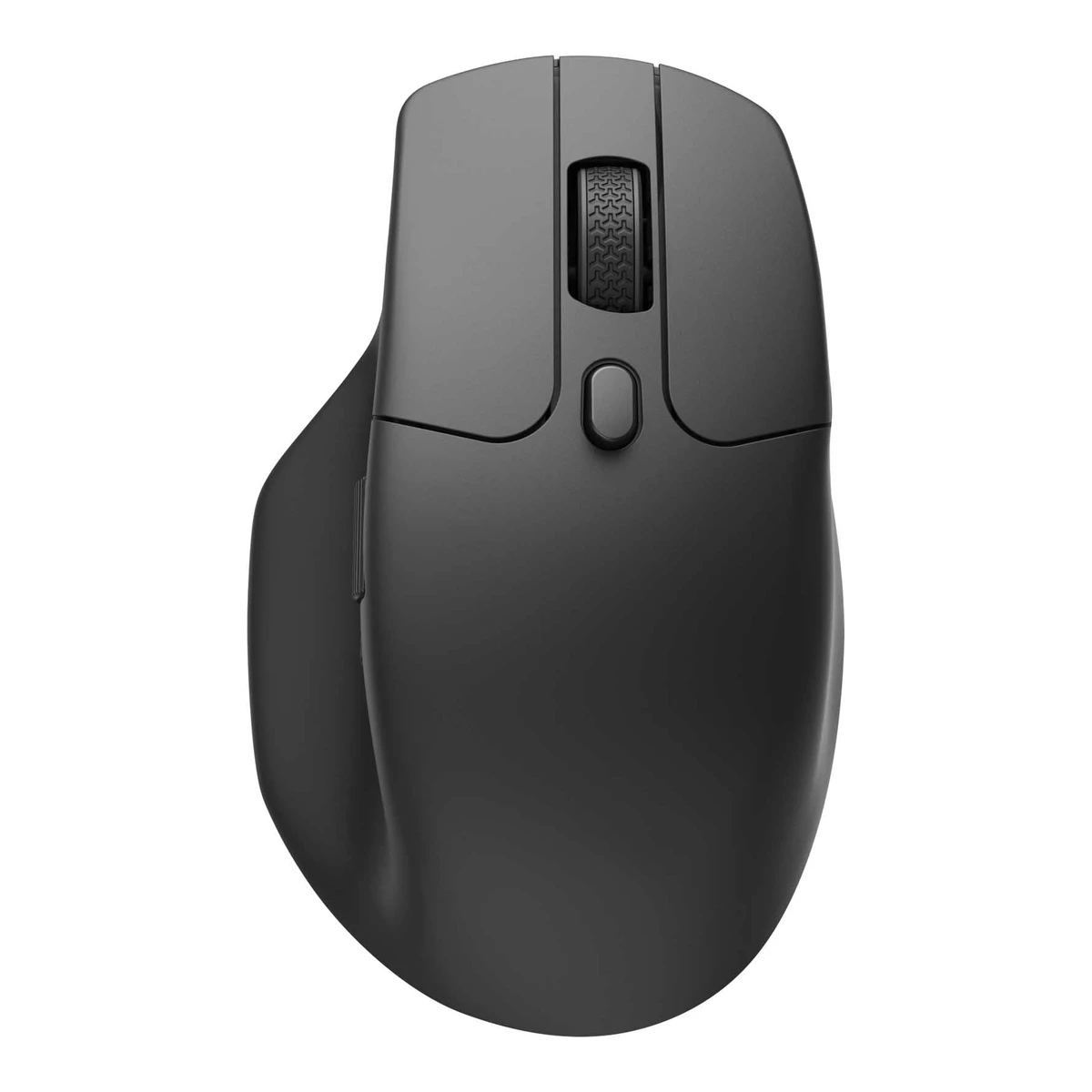
KeychronErgonomic mouse
M6 Wireless Mouse
Released November 2023.2Maker product pagekeychron.com/products/keychron-m6-wireless-mouse.jsonRead 23 October 2026Store product data: created 2023-10-31 and published 2023-11-08 for the M6 family. The metal wheel and All Silent versions stored here came later. The 1K PixArt 3395 metal wheel manual is dated 2025-03-27. The exact month of the M6S SKUs is not stated, so the date is the family launch month. Last checked 23 October 2026.
- Mouse weight (claimed)
- 86g
- Marketed sensor name
- PixArt 3395
- Maximum configurable DPI
- 26,000DPI
- Max polling rate
- 1,000Hz
82 of 154 fields known.
General
- GTIN / EAN
- 4894979048257, 48949790635022Maker product pagekeychron.com/products/keychron-m6-wireless-mouse.jsonRead 23 October 2026Store barcode per SKU: M6S-A1 4894979048257 and M6S-A3 4894979063502.
- Announced
- Not available
- Predecessor
- Not available
- Successor
- Not available
- Launch price (US)
- Not available
- Launch price (EU)
- Not available
- Markets
- Not available
Shape
- Body shape
- Asymmetric, right-handed1Maker product pagekeychron.com/products/keychron-m6-wireless-mouseRead 23 October 2026Page: the M6 has an advanced ergonomic design with a right-handed silhouette.
- Maker size class
- Not available
- Recommended grips
- Not available
- Recommended hand size
- Not available
- Thumb rest
- Yes9Spec databaseeloshapes.com/mouse/compareRead 23 October 2026Same entry: Thumb rest Yes.
- Ring or pinky finger rest
- No9Spec databaseeloshapes.com/mouse/compareRead 23 October 2026Same entry: Ring finger rest No.
- Upper shell
- Not available
- Swappable parts
- Not available
- Adjustable weight
- Not available
- Maximum added weight
- Not available
- Vertical angle
- Not available
- Trackball diameter
- Not available
- Trackball position
- Not available
Dimensions and weight
Front and side, drawn to scale.
- Mouse body dimensions
- Length122.5Maximum width75.4Maximum height50mm(4.8 × 3 × 2 in)3Owner's manualcdn.shopify.com/s/files/1/0059/0630/1017/files/Keychron_M6_1K_PixArt_3395_User_Manual.pdfRead 23 October 2026Mouse specification page lists Size 122.5*75.4*50mm, read as length, width and height.
- Grip width
- Not available
- Mouse weight (claimed)
- 86g(3 oz)1Maker product pagekeychron.com/products/keychron-m6-wireless-mouseRead 23 October 2026Version comparison for 1K (PixArt 3395) with the Metal Wheel: 86g / 0.19lbs. The manual lists 86 +/- 3 g. The Plastic Wheel 1K version is a separate 78 g build.3Owner's manualcdn.shopify.com/s/files/1/0059/0630/1017/files/Keychron_M6_1K_PixArt_3395_User_Manual.pdfRead 23 October 2026Mouse specification page lists Weight 86 +/- 3g.
- Box dimensions
- Not available
- Packed weight
- Not available
Sensor
- Marketed sensor name
- PixArt 33951Maker product pagekeychron.com/products/keychron-m6-wireless-mouseRead 23 October 2026Version comparison names 1K (PixArt 3395). The page alt text names the 'M6 1K 3395 Metal Infinite Wheel' package.
- Published sensor brand
- PixArt1Maker product pagekeychron.com/products/keychron-m6-wireless-mouseRead 23 October 2026Sensor is branded PixArt.
- Physical sensor part number
- PAW33959Spec databaseeloshapes.com/mouse/compareRead 23 October 2026Same entry names the PixArt PAW3395 sensor. ithome and ichip launch reports also name the PAW3395.
- Sensor type
- Optical1Maker product pagekeychron.com/products/keychron-m6-wireless-mouseRead 23 October 2026Page calls the M6 a wireless optical mouse.
- Minimum configurable DPI
- 100DPI1Maker product pagekeychron.com/products/keychron-m6-wireless-mouseRead 23 October 2026Version comparison for 1K (PixArt 3395) with the Metal Wheel: 100 - 26000 DPI (CPI) range.
- DPI adjustment step
- Not available
- Default DPI presets
- 400, 800, 1,600, 3,200, 5,000DPI3Owner's manualcdn.shopify.com/s/files/1/0059/0630/1017/files/Keychron_M6_1K_PixArt_3395_User_Manual.pdfRead 23 October 2026DPI indicator page: white 400, green 800, blue 1600 (default), yellow 3200, red 5000.
- Separate X and Y DPI
- Not available
- Tracking speed (claimed)
- 650IPS1Maker product pagekeychron.com/products/keychron-m6-wireless-mouseRead 23 October 2026Version comparison for 1K (PixArt 3395): up to 650 IPS.
- Tracking acceleration (claimed)
- 50G9Spec databaseeloshapes.com/mouse/compareRead 23 October 2026Same entry: acceleration 50 G. Keychron does not state it. The entry lists the same PixArt PAW3395 sensor and 650 IPS.
- Lift-off distance settings
- 1, 2mm1Maker product pagekeychron.com/products/keychron-m6-wireless-mouseRead 23 October 2026Version comparison for 1K (PixArt 3395): Lift Off Distance 1.0 mm / 2.0 mm.
- Separate lift and landing distance
- Not available
- Surface calibration
- Not available
- Motion Sync
- Not available
- Angle snapping
- Not available
- Ripple control
- Not available
- Tracks on glass
- Not available
Performance
- Documented polling rates by connection
Data connection Polling rate (Hz) Receiver requirement USB (wired) 125 Not available USB (wired) 500 Not available USB (wired) 1,000 Not available 2.4 GHz 125 Included Type-A or Type-C 2.4 GHz receiver 2.4 GHz 500 Included Type-A or Type-C 2.4 GHz receiver 2.4 GHz 1,000 Included Type-A or Type-C 2.4 GHz receiver Bluetooth 125 Not available - Max polling rate
- 1,000Hz
- Polling rate (wired)
- 1,000Hz
- Polling rate (2.4 GHz)
- 1,000Hz
- Polling rate (Bluetooth)
- 125Hz
- Claimed click latency
- Not available
- Adjustable debounce
- Not available
- Minimum debounce
- Not available
Measured
We could not find any of these 7 fields. Show them
- Latency per connection (measured)
- Not available
- DPI deviation (measured)
- Not available
- Lift-off distance (measured)
- Not available
- Main click force (measured)
- Not available
- Weight (measured)
- Not available
- Battery life (measured)
- Not available
- Hand size fit
- Not available
Switches
- Main switch type
- Mechanical3Owner's manualcdn.shopify.com/s/files/1/0059/0630/1017/files/Keychron_M6_1K_PixArt_3395_User_Manual.pdfRead 23 October 2026Mouse specification page lists mouse micro switches, which are mechanical micro switches.
- Published main-switch brand
- Huano1Maker product pagekeychron.com/products/keychron-m6-wireless-mouseRead 23 October 2026Version comparison: All Silent Version uses Huano Silent Micro Switch.
- Main switch model
- Huano Silent Micro Switch1Maker product pagekeychron.com/products/keychron-m6-wireless-mouseRead 23 October 2026Version comparison: All Silent Version uses Huano Silent Micro Switch. The Clicky version uses the standard Huano Micro Switch and is not stored.3Owner's manualcdn.shopify.com/s/files/1/0059/0630/1017/files/Keychron_M6_1K_PixArt_3395_User_Manual.pdfRead 23 October 2026Mouse specification page: Mouse micro switches Huano Silent Micro Switch.
- Main switch rated life
- 20million1Maker product pagekeychron.com/products/keychron-m6-wireless-mouseRead 23 October 2026Version comparison: All Silent Version Huano Silent Micro Switch, 20 million clicks lifetime. The Clicky version is rated 120 million and is not stored. The validate peer-median warning is expected, since silent switches are rated lower.3Owner's manualcdn.shopify.com/s/files/1/0059/0630/1017/files/Keychron_M6_1K_PixArt_3395_User_Manual.pdfRead 23 October 2026Mouse specification page: 20 million clicks lifetime.
- Hot-swap main switches
- Not available
- Adjustable click actuation
- Not available
- Separate main buttons
- Not available
- Side switch model
- Not available
- Middle click switch
- Not available
- Scroll encoder type
- Magnetic1Maker product pagekeychron.com/products/keychron-m6-wireless-mouseRead 23 October 2026Page: the Premium Magnetic Metal Scroll Wheel uses zero-contact Hall-effect sensing.
- Scroll encoder
- Not available
Buttons and scroll wheel
- Programmable buttons
- Not available
- DPI button position
- Bottom3Owner's manualcdn.shopify.com/s/files/1/0059/0630/1017/files/Keychron_M6_1K_PixArt_3395_User_Manual.pdfRead 23 October 2026Parts diagram item 5 sits on the bottom of the mouse.
- Dedicated DPI-shift button
- No3Owner's manualcdn.shopify.com/s/files/1/0059/0630/1017/files/Keychron_M6_1K_PixArt_3395_User_Manual.pdfRead 23 October 2026No dedicated DPI-shift button in the parts diagram.
- Dedicated gesture button
- No3Owner's manualcdn.shopify.com/s/files/1/0059/0630/1017/files/Keychron_M6_1K_PixArt_3395_User_Manual.pdfRead 23 October 2026No gesture button in the parts diagram.
- Scroll wheel
- Notched, Free spin, Tilt1Maker product pagekeychron.com/products/keychron-m6-wireless-mouseRead 23 October 2026Page: the top wheel switches between a standard notched middle wheel and an infinite scroll wheel with the top button. A customer review on the page says the wheel also pushes left and right as two extra programmable inputs.
- Scroll mode switch
- Button1Maker product pagekeychron.com/products/keychron-m6-wireless-mouseRead 23 October 2026Page: switching between the standard and infinite scroll wheel is done with the top button.
Build
We could not find any of these 6 fields. Show them
- Shell material
- Not available
- Surface finish
- Not available
- Installed feet material
- Not available
- Installed skate pieces
- Not available
- Feet shape
- Not available
- Feet thickness
- Not available
Cable
- Cable length
- Not available
Connectivity
- Connections
- USB (wired), 2.4 GHz, Bluetooth3Owner's manualcdn.shopify.com/s/files/1/0059/0630/1017/files/Keychron_M6_1K_PixArt_3395_User_Manual.pdfRead 23 October 2026Three modes of connection: wired, 2.4GHz and Bluetooth. The modes toggle selects G (2.4GHz), the wired position or B (Bluetooth).
- Wireless technology
- Not available
- Saved Bluetooth pairing slots
- 31Maker product pagekeychron.com/products/keychron-m6-wireless-mouseRead 23 October 2026Page: quick swap 3 Bluetooth devices through the bottom button.3Owner's manualcdn.shopify.com/s/files/1/0059/0630/1017/files/Keychron_M6_1K_PixArt_3395_User_Manual.pdfRead 23 October 2026Bluetooth mode has three channels and the mouse can be switched between three devices.
- Receiver host connector
- USB-A3Owner's manualcdn.shopify.com/s/files/1/0059/0630/1017/files/Keychron_M6_1K_PixArt_3395_User_Manual.pdfRead 23 October 2026In the box: Type-C Receiver x1 and Type-A Receiver x1. The Type-A receiver is stored. The Type-C receiver is also included.
- Receiver storage in mouse
- Not available
- Receiver extender included
- Yes1Maker product pagekeychron.com/products/keychron-m6-wireless-mouseRead 23 October 2026Page shows the 2.4 GHz receiver used with an extension adapter for desktops. The manual lists the Extension Adapter in the box.
- Receiver pairing shared
- Not available
- Basic mouse OS support
- Windows, macOS, Linux6Maker product pagekeychron.com/collections/keychron-m-series-miceRead 23 October 2026M Series FAQ: all models are fully compatible with macOS, Windows and Linux.
- Consoles
- Not available
Battery
- Battery type
- Not available
- Disposable battery count
- Not available
- Battery capacity
- 800mAh1Maker product pagekeychron.com/products/keychron-m6-wireless-mouseRead 23 October 2026Page: housed with a large battery of 800 mAh.
- User-replaceable battery
- Not available
- Battery life by mode (claimed)
Polling rate (Hz) Claimed runtime (h) 125 180 1,000 135 Source1Maker product pagekeychron.com/products/keychron-m6-wireless-mouseRead 23 October 2026Page: up to 180 hours at 125 Hz polling rate for the 1K PixArt 3395 silent micro switch version. The 135 hours at 1000 Hz comes from the manual. Neither source names the connection or the lighting, so those keys are left out.3Owner's manualcdn.shopify.com/s/files/1/0059/0630/1017/files/Keychron_M6_1K_PixArt_3395_User_Manual.pdfRead 23 October 2026Specification page: usage duration 180 Hours (125Hz) and 135 Hours (1000Hz). Connection and lighting are not stated.- Battery life (up to)
- Not available
- Battery life (normal use)
- Not available
- Longest battery life
- 180h
- Battery life at 1000 Hz
- Not available
- Battery life on Bluetooth
- Not available
- Full charge time
- 120min3Owner's manualcdn.shopify.com/s/files/1/0059/0630/1017/files/Keychron_M6_1K_PixArt_3395_User_Manual.pdfRead 23 October 2026Specification page: recharge time 2 Hours.
- Quick charge
- Not available
- Charging system compatibility
- Not available
- Charging dock included
- Not available
Lighting
- Decorative lighting zones
- Not available
- Lighting sync
- Not available
Software
- Software
- Keychron Launcher1Maker product pagekeychron.com/products/keychron-m6-wireless-mouseRead 23 October 2026Page: Launcher web app. Keychron Engine is the desktop app, see the buying guide source.
- Configuration software platforms
- Windows, macOS, Web4Maker product pagekeychron.com/blogs/news/keychron-m6-review-guideRead 23 October 2026Maker buying guide of 2026-10-20: Launcher runs in the browser (Chrome, Edge or Opera) and Keychron Engine is the desktop app for Windows and macOS. The same guide lists PixArt 3395 (1K) with the metal wheel in Silent and All Silent and calls it the pick for most desks.
- Onboard memory
- Yes1Maker product pagekeychron.com/products/keychron-m6-wireless-mouseRead 23 October 2026Page: Launcher provides 5 on-board memory profiles.
- Onboard profiles
- 51Maker product pagekeychron.com/products/keychron-m6-wireless-mouseRead 23 October 2026Page: Launcher provides 5 on-board memory profiles.
- Macros stored onboard
- Not available
- Button remapping
- Yes1Maker product pagekeychron.com/products/keychron-m6-wireless-mouseRead 23 October 2026Page: users can modify keys and set shortcuts in the Launcher.
- Per-app profiles
- Not available
In the box
- In the box
- Mouse, Type-C Receiver, Type-A Receiver, Extension Adapter, User Manual, Type-C Cable, Type-A to Type-C Adapter3Owner's manualcdn.shopify.com/s/files/1/0059/0630/1017/files/Keychron_M6_1K_PixArt_3395_User_Manual.pdfRead 23 October 2026In the box page, verbatim: Mouse x1, Type-C Receiver x1, Type-A Receiver x1, Extension Adapter x1, User Manual x1, Type-C Cable x1, Type-A to Type-C Adapter x1.
- Cables included
Type Cable count Type-C cable 1 - Extra skates included
- Not available
- Grip tape
- Not available
Links
- Product page
- www.keychron.com/products/keychron-m6-wireless-mouse1Maker product pagekeychron.com/products/keychron-m6-wireless-mouseRead 23 October 2026
- Spec sheet
- www.keychron.com/products/keychron-m6-wireless-mouse1Maker product pagekeychron.com/products/keychron-m6-wireless-mouseRead 23 October 2026
- Manual
- cdn.shopify.com/s/files/1/0059/0630/1017/files/Keychron_M6_1K_PixArt_3395_User_Manual.pdf3Owner's manualcdn.shopify.com/s/files/1/0059/0630/1017/files/Keychron_M6_1K_PixArt_3395_User_Manual.pdfRead 23 October 2026Keychron M6 1K PixArt 3395 User Manual, 24 pages in several languages. PDF title: M6 1K 3395 metal wheel mouse manual, 20250327.
- EPREL registration number
- Not available
Warranty
Compare with
Pick a mouse to see both side by side. Differences are marked yellow.
Variants
Each variant lists only what differs from the specs above.
| Model number | GTIN | Colours |
|---|---|---|
| M6S-A1 | 4894979048257 | Black |
| M6S-A3 | 4894979063502 | White |
Sources
We read 10 sources for this mouse. The numbers match the markers in the sheet.
- Maker product pagekeychron.com/products/keychron-m6-wireless-mouse
- Maker product pagekeychron.com/products/keychron-m6-wireless-mouse.json
- Maker product pagekeychron.com/blogs/news/keychron-m6-review-guide
- Maker product pagekeychron.com/blogs/news/how-to-set-pointer-and-report-rate-on-launcher
- Maker product pagekeychron.com/collections/keychron-m-series-mice
- Maker product pagekeychron.com/pages/warranty
- Spec databaseeloshapes.com/mouse/compare
See a wrong value? Tell us and name the field.