Gaming / Mice
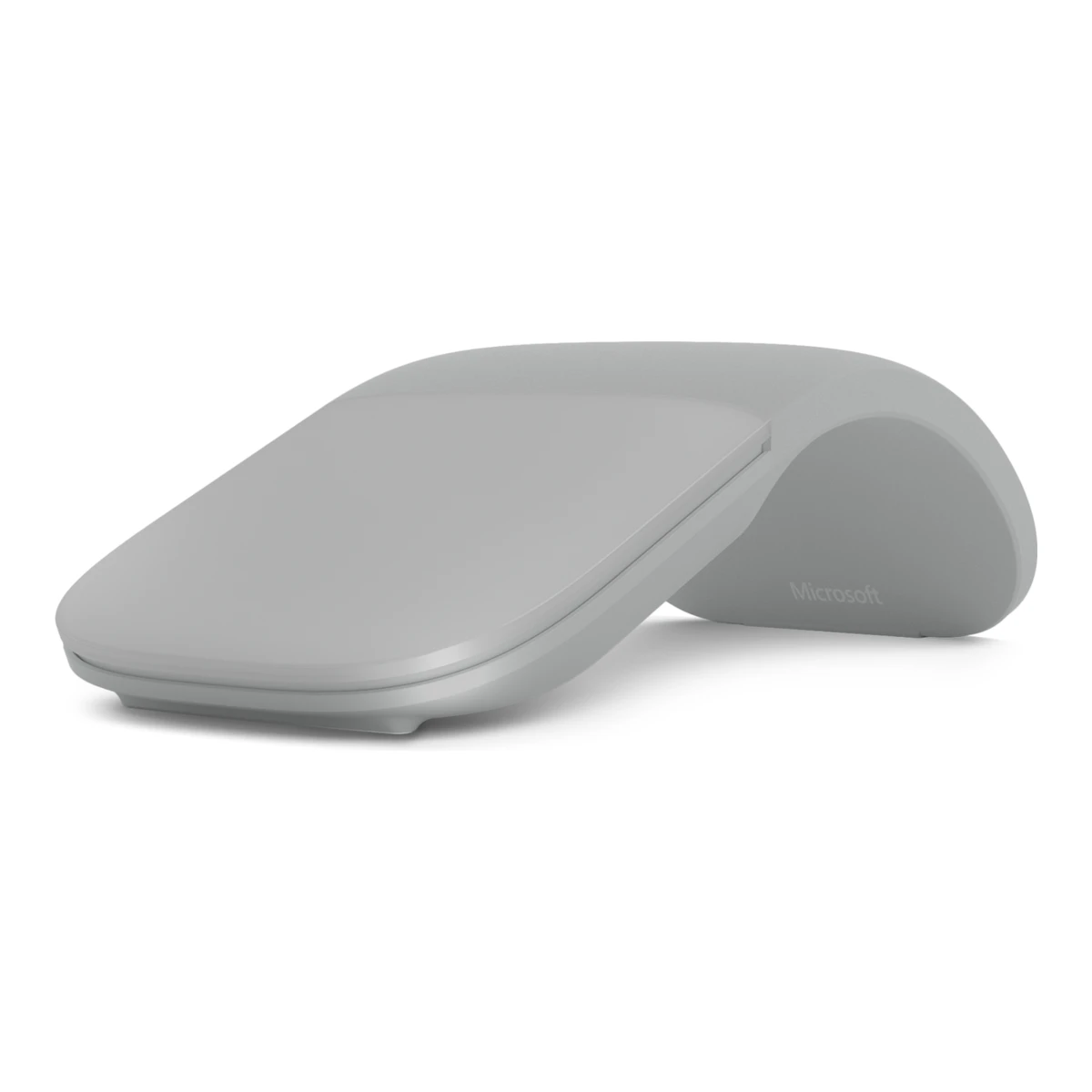
MicrosoftTravel mouse
Surface Arc Mouse
Released June 2017.7Press articlehexus.net/tech/news/peripherals/105256-microsoft-surface-arc-mouse-quietly-launchedRead 23 October 2026Hexus, 3 May 2017: shown at the #MicrosoftEDU event on 2 May, pre-orderable in the US that day and shipping from 15 June 2017 with the Surface Laptop. Neowin later said a 30 June date and the mouse was on sale in early July, so June 2017 is approximate. Last checked 23 October 2026.
- Mouse weight (claimed)
- 82.49g
- Marketed sensor name
- BlueTrack
- Maximum configurable DPI
- Not available
- Max polling rate
- Not available
50 of 154 fields known.
General
- Model numbers
- Not available
- GTIN / EAN
- Not available
- Announced
- 2 May 20177Press articlehexus.net/tech/news/peripherals/105256-microsoft-surface-arc-mouse-quietly-launchedRead 23 October 2026Announced at the Microsoft EDU event on 2 May 2017.8Press articlewccftech.com/microsoft-new-surface-arc-mouse/ampRead 23 October 2026Wccftech article of 2 May 2017.
- Predecessor
- Not available
- Successor
- Not available
- Launch price (US)
- $79.994Reviewwindowscentral.com/surface-arc-mouse-reviewRead 23 October 2026Windows Central review lists the Surface Arc Mouse at $79.99 and says the Microsoft Arc Mouse is the same hardware in matte black without the Surface branding.7Press articlehexus.net/tech/news/peripherals/105256-microsoft-surface-arc-mouse-quietly-launchedRead 23 October 2026Pre-order price $79.99 in the US. US prices exclude sales tax.8Press articlewccftech.com/microsoft-new-surface-arc-mouse/ampRead 23 October 2026Quotes $79.99 on Microsoft's online store.
- Launch price (EU)
- Not available
- Markets
- Not available
- Colours
- Burgundy, Light Gray, Cobalt Blue, Limited Edition Aqua1Maker product pagemicrosoft.com/en-us/d/surface-arc-mouse/8p5sv2rx3rn5Read 23 October 2026Spec table: Burgundy, Light Gray, Cobalt Blue and new Limited Edition Aqua. The page footnote says available colors may vary in some markets.
Shape
- Body shape
- Symmetrical body4Reviewwindowscentral.com/surface-arc-mouse-reviewRead 23 October 2026Windows Central: the Surface Arc Mouse is symmetrical, the left and right click areas sit under one large surface and there are no side buttons.5Measurementrtings.com/mouse/reviews/microsoft/arc-mouseRead 23 October 2026RTINGS header: true ambidextrous.
- Maker size class
- Not available
- Recommended grips
- Not available
- Recommended hand size
- Not available
- Hump position
- Not available
- Thumb rest
- Not available
- Ring or pinky finger rest
- Not available
- Upper shell
- Not available
- Swappable parts
- Not available
- Adjustable weight
- Not available
- Maximum added weight
- Not available
- Vertical angle
- Not available
- Trackball diameter
- Not available
- Trackball position
- Not available
Dimensions and weight
Front and side, drawn to scale.
- Mouse body dimensions
- Length131Maximum width55Maximum height14mm(5.2 × 2.2 × 0.6 in)1Maker product pagemicrosoft.com/en-us/d/surface-arc-mouse/8p5sv2rx3rn5Read 23 October 2026Spec table: 5.17 x 2.17 x 0.56 in (131 mm x 55 mm x 14 mm). The page does not name the body position. Windows Central gives 14 mm as the thickness of the flat mouse at its thickest point, so the 14 mm height is the snapped-flat form. The height in the arched position is not published. The maker's page for the black Microsoft Arc Mouse gives the same body as 131.31 x 55.11 x 14.22 mm.4Reviewwindowscentral.com/surface-arc-mouse-reviewRead 23 October 2026Windows Central: 14 mm thin at its thickest point when flat.
- Grip width
- Not available
- Mouse weight (claimed)
- 82.49g(2.9 oz)1Maker product pagemicrosoft.com/en-us/d/surface-arc-mouse/8p5sv2rx3rn5Read 23 October 2026Spec table: 2.91 oz (82.49 g) including batteries. Battery weight may vary.
- Box dimensions
- Not available
- Packed weight
- Not available
Sensor
- Marketed sensor name
- BlueTrack1Maker product pagemicrosoft.com/en-us/d/surface-arc-mouse/8p5sv2rx3rn5Read 23 October 2026Spec table: Mouse tracking system Microsoft BlueTrack Technology, imaging rate dynamically adaptable to 1200 frames per second. No sensor chip is named.
- Published sensor brand
- Microsoft1Maker product pagemicrosoft.com/en-us/d/surface-arc-mouse/8p5sv2rx3rn5Read 23 October 2026Maker branding for its own tracking technology.
- Physical sensor part number
- Not available
- Maximum configurable DPI
- Not available
- Minimum configurable DPI
- Not available
- DPI adjustment step
- Not available
- Maximum DPI stages
- Not available
- Separate X and Y DPI
- Not available
- Tracking speed (claimed)
- 30IPS1Maker product pagemicrosoft.com/en-us/d/surface-arc-mouse/8p5sv2rx3rn5Read 23 October 2026Spec table: tracking speed up to 30 inches (762 mm) per second. Published as up to.
- Tracking acceleration (claimed)
- Not available
- Lift-off distance settings
- Not available
- Separate lift and landing distance
- Not available
- Surface calibration
- Not available
- Motion Sync
- Not available
- Angle snapping
- Not available
- Ripple control
- Not available
- Tracks on glass
- Not available
- Sensor position
- Not available
Performance
We could not find any of these 8 fields. Show them
- Documented polling rates by connection
- Not available
- Max polling rate
- Not available
- Polling rate (wired)
- Not available
- Polling rate (2.4 GHz)
- Not available
- Polling rate (Bluetooth)
- Not available
- Claimed click latency
- Not available
- Adjustable debounce
- Not available
- Minimum debounce
- Not available
Measured
- Latency per connection (measured)
- Not available
- DPI deviation (measured)
- Not available
- Lift-off distance (measured)
- Not available
- Main click force (measured)
- Not available
- Battery life (measured)
- Not available
- Hand size fit
- Not available
Switches
We could not find any of these 11 fields. Show them
- Main switch type
- Not available
- Published main-switch brand
- Not available
- Main switch model
- Not available
- Main switch rated life
- Not available
- Hot-swap main switches
- Not available
- Adjustable click actuation
- Not available
- Separate main buttons
- Not available
- Side switch model
- Not available
- Middle click switch
- Not available
- Scroll encoder type
- Not available
- Scroll encoder
- Not available
Buttons and scroll wheel
- Side buttons on
- Not available
- DPI button position
- Not available
- Profile button
- No1Maker product pagemicrosoft.com/en-us/d/surface-arc-mouse/8p5sv2rx3rn5Read 23 October 2026Spec table lists only left and right click.
- Dedicated DPI-shift button
- No1Maker product pagemicrosoft.com/en-us/d/surface-arc-mouse/8p5sv2rx3rn5Read 23 October 2026Spec table lists only left and right click.
- Dedicated gesture button
- No1Maker product pagemicrosoft.com/en-us/d/surface-arc-mouse/8p5sv2rx3rn5Read 23 October 2026Spec table lists only left and right click. Windows Central says there is no gesture support.4Reviewwindowscentral.com/surface-arc-mouse-reviewRead 23 October 2026Windows Central: no gesture support.
- Scroll wheel
- Not available
- Scroll mode switch
- Not available
- Separate thumb wheel
- No1Maker product pagemicrosoft.com/en-us/d/surface-arc-mouse/8p5sv2rx3rn5Read 23 October 2026Spec table lists only left and right click and a touch scroll plane.
- Scroll wheel material
- Not available
Build
- Shell material
- Plastic, polymer unspecified, Other6Reviewprofesionalreview.com/2020/03/14/microsoft-surface-arc-mouse-review/ampRead 23 October 2026Profesional Review: the bendable bottom half is light grey silicone and the top piece is a more rigid plastic. Plastic and other (silicone) are stored.
- Surface finish
- Not available
- Installed feet material
- Not available
- Installed skate pieces
- 26Reviewprofesionalreview.com/2020/03/14/microsoft-surface-arc-mouse-review/ampRead 23 October 2026Profesional Review of the light grey unit: the underside has two thin feet.
- Feet shape
- Not available
- Feet thickness
- Not available
Cable
- Cable
- Not available
- Cable length
- Not available
- Detachable cable
- Not available
- Cable host plug
- Not available
Connectivity
- Connections
- Bluetooth1Maker product pagemicrosoft.com/en-us/d/surface-arc-mouse/8p5sv2rx3rn5Read 23 October 2026Spec table: Bluetooth 4.1. No receiver or cable is listed.
- Wireless technology
- Bluetooth1Maker product pagemicrosoft.com/en-us/d/surface-arc-mouse/8p5sv2rx3rn5Read 23 October 2026Spec table: interface Bluetooth.
- Saved Bluetooth pairing slots
- Not available
- Switchable host devices
- 12Maker product pagesupport.microsoft.com/en-us/surface/accessories/mouse-keyboard/use-surface-arc-mouseRead 23 October 2026Support page: pair the mouse to one PC with the pair button. No device switching is described.4Reviewwindowscentral.com/surface-arc-mouse-reviewRead 23 October 2026Windows Central: the mouse can be paired to only one PC at a time.
- Device switching
- Not available
- Receiver host connector
- None1Maker product pagemicrosoft.com/en-us/d/surface-arc-mouse/8p5sv2rx3rn5Read 23 October 2026The spec table lists a Bluetooth interface only and no receiver.
- Receiver storage in mouse
- Not available
- Receiver extender included
- Not available
- Receiver pairing shared
- Not available
- Basic mouse OS support
- Windows1Maker product pagemicrosoft.com/en-us/d/surface-arc-mouse/8p5sv2rx3rn5Read 23 October 2026Spec table: Windows 11 Home/Pro, 10, 8.1 and 8. The host must support Bluetooth 4.0 or higher. macOS is not listed.
- Consoles
- Not available
Battery
- Disposable battery count
- 21Maker product pagemicrosoft.com/en-us/d/surface-arc-mouse/8p5sv2rx3rn5Read 23 October 2026Spec table: 2 AAA alkaline batteries (included).
- Battery capacity
- Not available
- User-replaceable battery
- Yes2Maker product pagesupport.microsoft.com/en-us/surface/accessories/mouse-keyboard/use-surface-arc-mouseRead 23 October 2026Support page: flip the mouse over, press the small tab to open the battery door, then replace the batteries.
- Battery life by mode (claimed)
- Not available
- Battery life (up to)
- Not available
- Battery life (normal use)
- 6months1Maker product pagemicrosoft.com/en-us/d/surface-arc-mouse/8p5sv2rx3rn5Read 23 October 2026Spec table: up to 6 months. Launch coverage by Hexus and mobiFlip said 9 months.
- Longest battery life
- Not available
- Battery life at 1000 Hz
- Not available
- Battery life on Bluetooth
- Not available
- Full charge time
- Not available
- Quick charge
- Not available
- Use while charging
- Not available
- Charging system compatibility
- Not available
- Charging dock included
- Not available
- Battery indicator
- Reported to the OS2Maker product pagesupport.microsoft.com/en-us/surface/accessories/mouse-keyboard/use-surface-arc-mouseRead 23 October 2026Support page: check the battery level in Windows Bluetooth and other devices settings. The battery level appears next to the mouse. The LED light only shows pairing and power.
Lighting
- Decorative lighting zones
- 01Maker product pagemicrosoft.com/en-us/d/surface-arc-mouse/8p5sv2rx3rn5Read 23 October 2026No decorative lighting is listed.
- Lighting sync
- Not available
Software
- Software
- Microsoft Mouse and Keyboard Center2Maker product pagesupport.microsoft.com/en-us/surface/accessories/mouse-keyboard/use-surface-arc-mouseRead 23 October 2026Support page tip: the Microsoft Mouse and Keyboard Center app helps personalize and customize the mouse.3Maker product pagemicrosoft.com/en-us/p/microsoft-arc-mouse-black/8mwhbv8qvskrRead 23 October 2026Store page of the black Microsoft Arc Mouse, the same hardware per Windows Central: compatibility lists Mouse and Keyboard Center software installation. The Surface Arc Mouse page lists no software.
- Configuration software platforms
- Windows3Maker product pagemicrosoft.com/en-us/p/microsoft-arc-mouse-black/8mwhbv8qvskrRead 23 October 2026The black Arc Mouse page lists Windows 11 Home/Pro, 10, 8.1 and 8 as the requirement to download the Mouse and Keyboard Center software.
- Onboard memory
- Not available
- Onboard profiles
- Not available
- Macros
- Not available
- Macros stored onboard
- Not available
- Button remapping
- Yes5Measurementrtings.com/mouse/reviews/microsoft/arc-mouseRead 23 October 2026RTINGS text: dedicated software where you can program one button.
- Per-app profiles
- Not available
- User firmware updates
- Not available
In the box
We could not find any of these 4 fields. Show them
- In the box
- Not available
- Cables included
- Not available
- Extra skates included
- Not available
- Grip tape
- Not available
Links
- Product page
- www.microsoft.com/en-us/d/surface-arc-mouse/8p5sv2rx3rn51Maker product pagemicrosoft.com/en-us/d/surface-arc-mouse/8p5sv2rx3rn5Read 23 October 2026
- Spec sheet
- www.microsoft.com/en-us/d/surface-arc-mouse/8p5sv2rx3rn51Maker product pagemicrosoft.com/en-us/d/surface-arc-mouse/8p5sv2rx3rn5Read 23 October 2026Tech specs tab of the Microsoft Store page.
- Manual
- support.microsoft.com/en-us/surface/accessories/mouse-keyboard/use-surface-arc-mouse2Maker product pagesupport.microsoft.com/en-us/surface/accessories/mouse-keyboard/use-surface-arc-mouseRead 23 October 2026Microsoft support article Use Surface Arc Mouse: pairing, gestures, batteries and settings.
- EPREL registration number
- Not available
Warranty
- Manufacturer warranty (source market)
- 1year1Maker product pagemicrosoft.com/en-us/d/surface-arc-mouse/8p5sv2rx3rn5Read 23 October 2026Spec table: 1 year limited hardware warranty. US store.
Compare with
Pick a mouse to see both side by side. Differences are marked yellow.
Sources
We read 8 sources for this mouse. The numbers match the markers in the sheet.
- Maker product pagemicrosoft.com/en-us/d/surface-arc-mouse/8p5sv2rx3rn5
- Maker product pagemicrosoft.com/en-us/p/microsoft-arc-mouse-black/8mwhbv8qvskr
- Measurementrtings.com/mouse/reviews/microsoft/arc-mouse
- Press articlewccftech.com/microsoft-new-surface-arc-mouse/amp
See a wrong value? Tell us and name the field.