Gaming / Mice
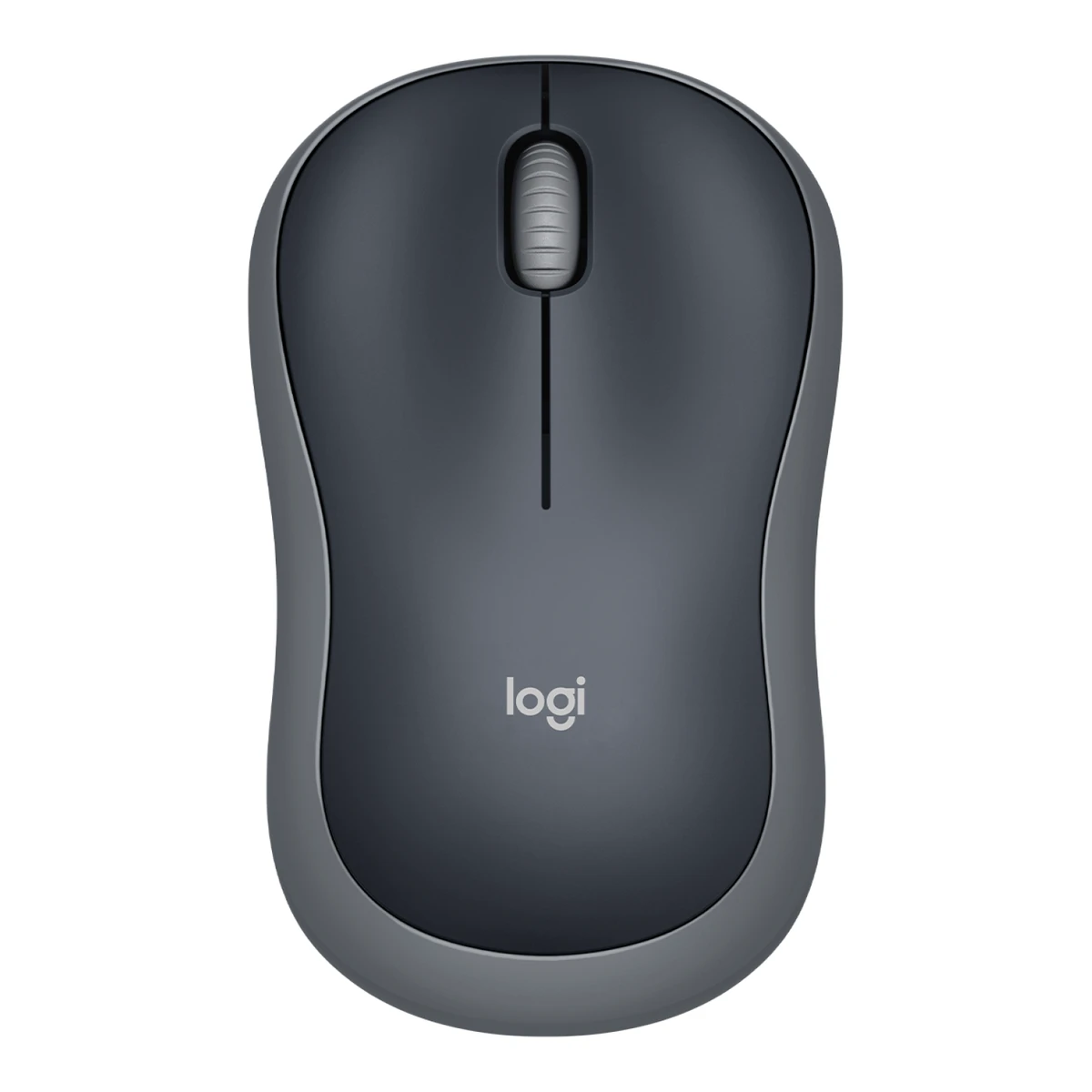
LogitechTravel mouse
Wireless Mouse M185
Released June 2011.4Press releasetechielobang.com/blog/2011/06/28/logitech-wireless-mouse-m185-with-nano-receiver-selling-at-s19-90Read 7 October 2026Reproduced Logitech release dated Singapore 28 June 2011 says M185 is available now. Best supported marketed-model release month. This does not assert the later M-R0078 hardware revision existed in June 2011. Last checked 16 October 2026.
- Mouse weight (claimed)
- 75.2g
- Marketed sensor name
- Logitech Advanced Optical Tracking
- Maximum configurable DPI
- 1,000DPI
- Max polling rate
- Not available
53 of 154 fields known.
General
- Series
- Not available
- GTIN / EAN
- Not available
- Predecessor
- Not available
- Successor
- Not available
- Launch price (US)
- Not available
- Launch price (EU)
- Not available
- Markets
- US, GB, EU, AU3Maker product pagelogitech.com/en-us/products/mice/m185-wireless-mouse.910-002225.htmlRead 10 October 2026US Logitech store lists Wireless Mouse M185, Grey, 910-002225, with add to cart on 2026-10-10.5Maker product pagelogitech.com/en-gb/shop/p/m185-wireless-mouseRead 10 October 2026UK Logitech store sells the M185 with add to cart on 2026-10-10.6Maker product pagelogitech.com/en-eu/shop/p/m185-wireless-mouseRead 10 October 2026EU Logitech store lists the M185 in Grey (910-002238), Blue (910-002239) and Red (910-002240).7Maker product pagelogitech.com/en-au/shop/p/m185-wireless-mouseRead 10 October 2026AU Logitech store lists the M185 in Grey (910-002255), Blue (910-002502) and Red (910-002503).
- Colours
- Grey, Blue, Red3Maker product pagelogitech.com/en-us/products/mice/m185-wireless-mouse.910-002225.htmlRead 10 October 2026US store lists Grey only. UK, EU and AU stores list Grey, Blue and Red. These are current marketed colours of the M185 family, not mapped to the M-R0078 revision.5Maker product pagelogitech.com/en-gb/shop/p/m185-wireless-mouseRead 10 October 2026UK store colour options: Grey (910-002235), Blue (910-002236), Red (910-002237).
Shape
- Maker size class
- Not available
- Recommended grips
- Not available
- Recommended hand size
- Not available
- Hump position
- Not available
- Thumb rest
- Not available
- Ring or pinky finger rest
- Not available
- Upper shell
- Not available
- Swappable parts
- Not available
- Adjustable weight
- Not available
- Maximum added weight
- Not available
- Vertical angle
- Not available
- Trackball diameter
- Not available
- Trackball position
- Not available
Dimensions and weight
Front and side, drawn to scale.
- Mouse body dimensions
- Length99Maximum width60Maximum height39mm(3.9 × 2.4 × 1.5 in)1Maker product pagesupport.logi.com/hc/en-us/articles/360023302074-M185-Technical-SpecificationsRead 10 October 2026M-R0078 product dimensions: Height 39.0 mm, Width 60.0 mm, Depth 99.0 mm. Body front-to-back length is 99 mm, widest width 60 mm and vertical height 39 mm. Product page swaps axis names.
- Grip width
- Not available
- Mouse weight (claimed)
- 75.2g(2.7 oz)1Maker product pagesupport.logi.com/hc/en-us/articles/360023302074-M185-Technical-SpecificationsRead 10 October 2026M-R0078 weight 75.2 g. Maker storefront independently labels its matching 75.2 g mouse mass as with batteries. The 50.5 g 2014 catalog mass is not the required with-battery mass and is excluded.
- Box dimensions
- Not available
- Packed weight
- Not available
Sensor
- Marketed sensor name
- Logitech Advanced Optical Tracking1Maker product pagesupport.logi.com/hc/en-us/articles/360023302074-M185-Technical-SpecificationsRead 10 October 2026Exact M-R0078 section of Logitech M185 Technical Specifications. No other revision is inherited.
- Physical sensor part number
- Not available
- Maximum configurable DPI
- 1,000DPI1Maker product pagesupport.logi.com/hc/en-us/articles/360023302074-M185-Technical-SpecificationsRead 10 October 2026M-R0078 DPI (Min/Max) 1000±. Fixed nominal value, manufacturer tolerance is unspecified.
- Minimum configurable DPI
- 1,000DPI1Maker product pagesupport.logi.com/hc/en-us/articles/360023302074-M185-Technical-SpecificationsRead 10 October 2026M-R0078 DPI (Min/Max) 1000±. Fixed nominal value, manufacturer tolerance is unspecified. No software DPI range or adjustment steps asserted.
- DPI adjustment step
- Not available
- Maximum DPI stages
- Not available
- Default DPI presets
- 1,000DPI1Maker product pagesupport.logi.com/hc/en-us/articles/360023302074-M185-Technical-SpecificationsRead 10 October 2026M-R0078 DPI (Min/Max) 1000±. The only DPI value is 1000. Maker tolerance is unspecified.
- Separate X and Y DPI
- Not available
- Tracking speed (claimed)
- Not available
- Tracking acceleration (claimed)
- Not available
- Lift-off distance settings
- Not available
- Separate lift and landing distance
- Not available
- Surface calibration
- Not available
- Motion Sync
- Not available
- Angle snapping
- Not available
- Ripple control
- Not available
- Tracks on glass
- Not available
- Sensor position
- Not available
Performance
We could not find any of these 8 fields. Show them
- Documented polling rates by connection
- Not available
- Max polling rate
- Not available
- Polling rate (wired)
- Not available
- Polling rate (2.4 GHz)
- Not available
- Polling rate (Bluetooth)
- Not available
- Claimed click latency
- Not available
- Adjustable debounce
- Not available
- Minimum debounce
- Not available
Measured
We could not find any of these 7 fields. Show them
- Latency per connection (measured)
- Not available
- DPI deviation (measured)
- Not available
- Lift-off distance (measured)
- Not available
- Main click force (measured)
- Not available
- Weight (measured)
- Not available
- Battery life (measured)
- Not available
- Hand size fit
- Not available
Switches
- Main switch type
- Not available
- Published main-switch brand
- Not available
- Main switch model
- Not available
- Main switch rated life
- Not available
- Hot-swap main switches
- Not available
- Adjustable click actuation
- Not available
- Separate main buttons
- Not available
- Side switch model
- Not available
- Middle click switch
- Not available
- Scroll encoder type
- Optical1Maker product pagesupport.logi.com/hc/en-us/articles/360023302074-M185-Technical-SpecificationsRead 10 October 2026M-R0078 Scroll Wheel: Yes, 2D, optical. Later M-R0084, M-R0085 and MR0102 mechanical-wheel claims are excluded.
- Scroll encoder
- Not available
Buttons and scroll wheel
- Programmable buttons
- Not available
- Side buttons on
- Not available
- DPI button position
- Not available
- Scroll mode switch
- None2Owner's manuallogitech.com/assets/42356/3/m185-quick-start-guide.pdfRead 10 October 2026Complete feature list has only the wheel and its middle click. No mode-switch button or free-spin mode.
- Scroll wheel material
- Not available
Build
We could not find any of these 6 fields. Show them
- Shell material
- Not available
- Surface finish
- Not available
- Installed feet material
- Not available
- Installed skate pieces
- Not available
- Feet shape
- Not available
- Feet thickness
- Not available
Cable
- Cable
- Not available
- Cable length
- Not available
- Detachable cable
- Not available
- Cable host plug
- Not available
Connectivity
- Wireless technology
- Logitech non-Unifying protocol (2.4GHz)1Maker product pagesupport.logi.com/hc/en-us/articles/360023302074-M185-Technical-SpecificationsRead 10 October 2026Exact M-R0078 section of Logitech M185 Technical Specifications. No other revision is inherited.
- Bluetooth
- Not available
- Saved Bluetooth pairing slots
- Not available
- Switchable host devices
- 12Owner's manuallogitech.com/assets/42356/3/m185-quick-start-guide.pdfRead 10 October 2026Setup uses one nano receiver. The feature list has no host-selection control, so one host is selectable.
- Device switching
- Not available
- Receiver host connector
- USB-A2Owner's manuallogitech.com/assets/42356/3/m185-quick-start-guide.pdfRead 10 October 2026Setup step 3 illustrates the standard USB-A nano receiver being inserted in the computer USB-A port. Exact M-R0078 receiver C-U0019 is USB 2.0.
- Receiver storage in mouse
- Yes2Owner's manuallogitech.com/assets/42356/3/m185-quick-start-guide.pdfRead 10 October 2026Feature 6: USB Nano-receiver storage.
- Receiver extender included
- No2Owner's manuallogitech.com/assets/42356/3/m185-quick-start-guide.pdfRead 10 October 2026Complete package illustration contains mouse, direct USB-A nano receiver and documentation, with preinstalled AA. No extender.
- Basic mouse OS support
- Windows, macOS, ChromeOS, Linux1Maker product pagesupport.logi.com/hc/en-us/articles/360023302074-M185-Technical-SpecificationsRead 10 October 2026Exact M-R0078: Windows 7/8/10 or later, Mac OS X 10.8.x or later, Chrome OS and Linux kernel 2.6.x or later. This is basic input support, not configuration-app support.
- Consoles
- Not available
Battery
- Disposable battery count
- 11Maker product pagesupport.logi.com/hc/en-us/articles/360023302074-M185-Technical-SpecificationsRead 10 October 2026Exact M-R0078 section of Logitech M185 Technical Specifications. No other revision is inherited.
- Battery capacity
- Not available
- User-replaceable battery
- Yes1Maker product pagesupport.logi.com/hc/en-us/articles/360023302074-M185-Technical-SpecificationsRead 10 October 2026Exact M-R0078 section of Logitech M185 Technical Specifications. No other revision is inherited.
- Battery life by mode (claimed)
- Not available
- Battery life (up to)
- Not available
- Battery life (normal use)
- 12months1Maker product pagesupport.logi.com/hc/en-us/articles/360023302074-M185-Technical-SpecificationsRead 10 October 2026Exact M-R0078 section: Battery Life (not rechargeable), 12 months with one AA. Current M185 maker page qualifies the family estimate as up to 12 months using on/off and auto-sleep. This is normal-use calendar life between battery replacements, not continuous operating hours. Daily duty cycle and battery test conditions are unspecified.3Maker product pagelogitech.com/en-us/products/mice/m185-wireless-mouse.910-002225.htmlRead 10 October 2026Current maker page advertises up to 12 months without changing batteries, with on/off and auto-sleep. Exact stored M-R0078 support table independently states 12 months.
- Longest battery life
- Not available
- Battery life at 1000 Hz
- Not available
- Battery life on Bluetooth
- Not available
- Full charge time
- Not available
- Quick charge
- Not available
- Use while charging
- Not available
- Charging system compatibility
- Not available
- Charging dock included
- No2Owner's manuallogitech.com/assets/42356/3/m185-quick-start-guide.pdfRead 10 October 2026Complete package illustration contains no charging dock. It uses a replaceable AA, not an internal charging pack.
- Battery indicator
- Not available
Lighting
- Decorative RGB lighting
- No1Maker product pagesupport.logi.com/hc/en-us/articles/360023302074-M185-Technical-SpecificationsRead 10 October 2026M-R0078 Indicator Lights (LED): N/A. No decorative lighting is present.
- Decorative lighting zones
- 01Maker product pagesupport.logi.com/hc/en-us/articles/360023302074-M185-Technical-SpecificationsRead 10 October 2026M-R0078 Indicator Lights (LED): N/A. No decorative lighting zones.
- Lighting sync
- Not available
Software
- Software
- Not available
- Configuration software platforms
- Not available
- Onboard profiles
- Not available
- Macros
- Not available
- Macros stored onboard
- Not available
- Button remapping
- Not available
- Per-app profiles
- Not available
- User firmware updates
- Not available
In the box
- In the box
- Mouse, Nano receiver, 1 AA battery (pre-installed), User documentation3Maker product pagelogitech.com/en-us/products/mice/m185-wireless-mouse.910-002225.htmlRead 10 October 2026Exact public packageContents data and maker quick-start illustration list these four items. No optional app, extender or accessory counted.
- Cables included
- Not available
Links
- Product page
- www.logitech.com/en-us/products/mice/m185-wireless-mouse.910-002225.html3Maker product pagelogitech.com/en-us/products/mice/m185-wireless-mouse.910-002225.htmlRead 10 October 2026Marketed M185 page. Retail part 910-002225 is not mapped to reference hardware M-R0078. Shared features only are used.
- Spec sheet
- support.logi.com/hc/en-us/articles/360023302074-M185-Technical-Specifications1Maker product pagesupport.logi.com/hc/en-us/articles/360023302074-M185-Technical-SpecificationsRead 10 October 2026Official technical-specifications page with separate exact-model sections. The M-R0078 section is the reference.
- Manual
- www.logitech.com/assets/42356/3/m185-quick-start-guide.pdf2Owner's manuallogitech.com/assets/42356/3/m185-quick-start-guide.pdfRead 10 October 2026Official M185 quick-start guide. Shared three-button controls and removable AA/receiver storage are corroborated by the exact M-R0078 technical table.
- EPREL registration number
- Not available
Warranty
- Manufacturer warranty (source market)
- 3years5Maker product pagelogitech.com/en-gb/shop/p/m185-wireless-mouseRead 10 October 2026Specs and Requirements: 3-year limited hardware warranty. Stated on the UK, EU and AU Logitech stores. The 2011 Singapore launch release says the same. The US store states no warranty term.
Compare with
Pick a mouse to see both side by side. Differences are marked yellow.
Sources
We read 7 sources for this mouse. The numbers match the markers in the sheet.
- Owner's manuallogitech.com/assets/42356/3/m185-quick-start-guide.pdf
- Maker product pagelogitech.com/en-us/products/mice/m185-wireless-mouse.910-002225.html
- Maker product pagelogitech.com/en-gb/shop/p/m185-wireless-mouse
- Maker product pagelogitech.com/en-eu/shop/p/m185-wireless-mouse
- Maker product pagelogitech.com/en-au/shop/p/m185-wireless-mouse
See a wrong value? Tell us and name the field.