Gaming / Monitors
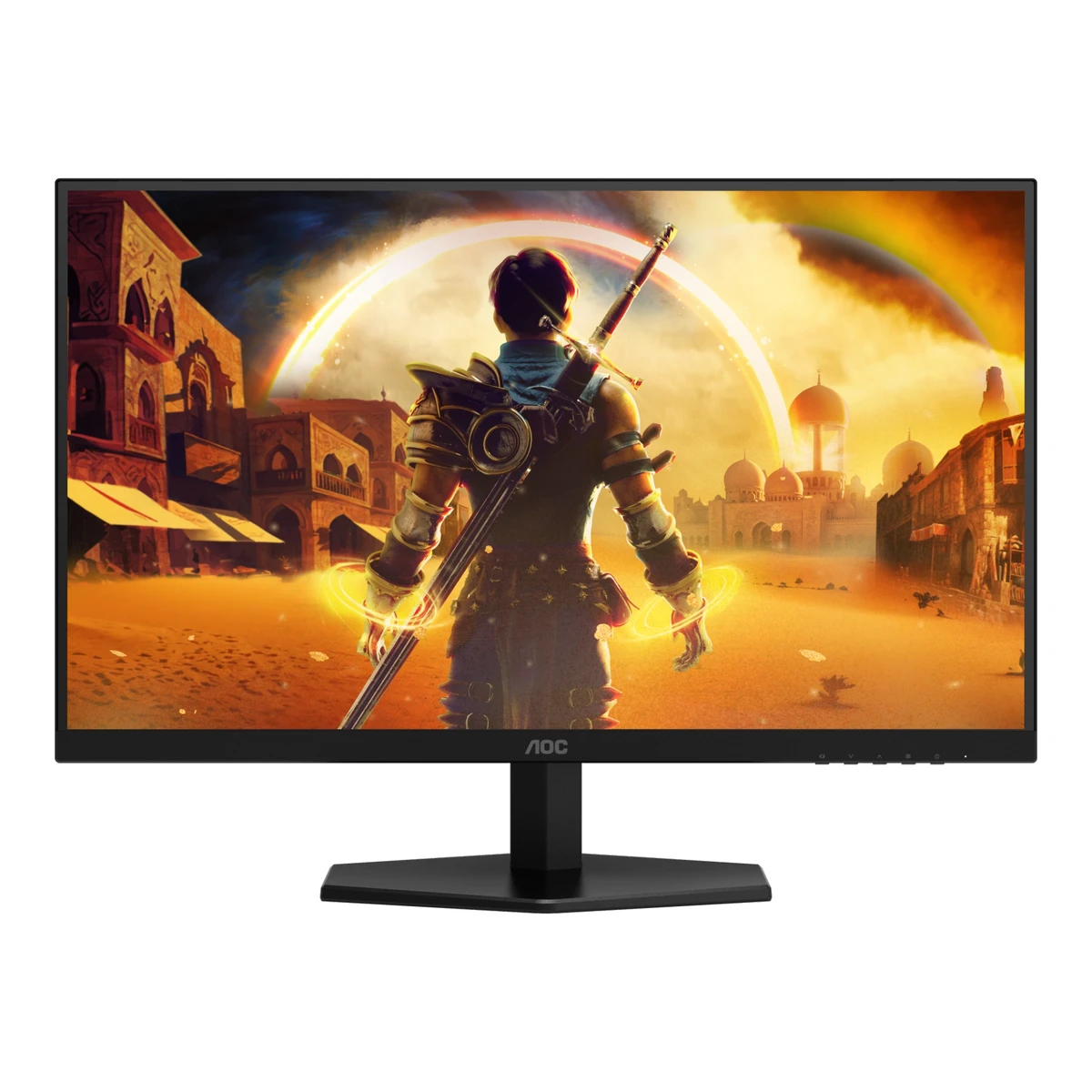
AOCGaming monitor
Q27G41ZE
- Screen size
- 27in
- Resolution
- 2560 × 1440
- Refresh rate
- 260Hz
- Panel
- Fast IPS
80 of 172 fields known.
At a glance
Ports
- HDMI 2.0
- DisplayPort 1.4
- Headphone3.5 mm out
General
- Announced
- Not available
- Predecessor
- Not available
- Successor
- Not available
- Launch price (US)
- Not available
- Launch price (EU)
- Not available
Display
- Screen size
- 27in(68.6 cm)1Maker product pageaoc.com/us/gaming/monitors/q27g41zeRead 15 October 2026Screen size (inch) 27.0.
- Viewable screen diagonal
- Not available
- Native resolution
- 2560 × 1440px1Maker product pageaoc.com/us/gaming/monitors/q27g41zeRead 15 October 2026Panel resolution 2560x1440.
- Aspect ratio
- 16:91Maker product pageaoc.com/us/gaming/monitors/q27g41zeRead 15 October 2026Aspect ratio 16:9.
- Pixel density
- 108.8ppi
- Pixel pitch
- 0.2331mm3Owner's manualaoc.com/api/asset/pi46502Read 15 October 2026General Specification p 27: Pixel pitch 0.2331mm(H) x 0.2331mm(V).
- Active display area
- Width596.736Height335.664mm(23.5 × 13.2 in)3Owner's manualaoc.com/api/asset/pi46502Read 15 October 2026General Specification p 27: Horizontal scan size (maximum) 596.736mm, Vertical scan size (maximum) 335.664mm. This equals 2560 x 1440 at the stated pitch.
- Curved
- No1Maker product pageaoc.com/us/gaming/monitors/q27g41zeRead 15 October 2026Flat / Curved: Flat.
- Curvature radius
- Not available
- Anti-reflection coating
- Antiglare (AG)1Maker product pageaoc.com/us/gaming/monitors/q27g41zeRead 15 October 2026Panel treatment, verbatim.
- Touchscreen
- Not available
Panel
- Panel type (as published)
- Fast IPS1Maker product pageaoc.com/us/gaming/monitors/q27g41zeRead 15 October 2026Headline: Fast IPS.
- Backlight
- Not available
- Local dimming
- Not available
- Dimming zones
- Not available
- Panel maker
- Not available
- Panel part number
- Not available
- Panel generation
- Not available
- Subpixel layout
- Not available
- Colour depth method
- Not available
- Displayable colours
- 16.7 million1Maker product pageaoc.com/us/gaming/monitors/q27g41zeRead 15 October 2026Display colours 16.7M (8bits).
- sRGB coverage
- Not available
- DCI-P3 coverage
- Not available
- Adobe RGB coverage
- Not available
- Rec. 2020 coverage
- Not available
- Factory calibrated
- Not available
- Claimed Delta E
- Not available
- Paper calibration report in box
- Not available
- Hardware calibration support
- Not available
- Brightness (typical, SDR)
- 300nits1Maker product pageaoc.com/us/gaming/monitors/q27g41zeRead 15 October 2026Brightness in nits 300 cd/m2. Window and mode are not stated.
- Brightness (maker minimum)
- Not available
- Peak brightness (HDR)
- Not available
- HDR peak test window
- Not available
- Full-screen brightness
- Not available
- HDR certification
- Not available
- Viewing angle (horizontal)
- 178°1Maker product pageaoc.com/us/gaming/monitors/q27g41zeRead 15 October 2026Viewing angle (CR10) 178/178.
- Viewing angle (vertical)
- 178°1Maker product pageaoc.com/us/gaming/monitors/q27g41zeRead 15 October 2026Viewing angle (CR10) 178/178.
Refresh rate and motion
- Refresh rate per resolution and port
Refresh rate per resolution and port. The top rate is in bold. Resolution HDMI 2.0 DisplayPort 1.4 2560 × 1440Native 144Hz 260Hz Show as source table
Width (px) Height (px) Input Input version Maximum accepted rate (Hz) 2560 1440 DisplayPort 1.4 260 2560 1440 HDMI 2.0 144 - Max refresh rate
- 260Hz
- Max refresh rate at native resolution
- 260Hz
- Max refresh rate over DisplayPort
- 260Hz
- Max refresh rate over HDMI
- 144Hz
- Max refresh rate over USB-C
- Not available
- Max refresh rate at 10-bit
- Not available
- Overclocked refresh rate
- 260Hz3Owner's manualaoc.com/api/asset/pi46502Read 15 October 2026Footnote [1] on p 27: overclocking at 2560x1440@260Hz, DisplayPort only per the vertical scan range. Game Setting p 17 has an OverClock On/Off option.
- Dual mode
- Not available
- Minimum fixed refresh rate
- Not available
- Adaptive sync technologies
- Adaptive-Sync, G-SYNC Compatible1Maker product pageaoc.com/us/gaming/monitors/q27g41zeRead 15 October 2026G-SYNC Compatible feature block. The manual says G-SYNC Compatible works with DisplayPort and Adaptive-Sync works with DisplayPort and HDMI. NVIDIA's validated list was not checked. The maker does not claim FreeSync.
- VRR range per port
- Not available
- Low framerate compensation
- Not available
- Response time (maker GtG claim)
- 1ms1Maker product pageaoc.com/us/gaming/monitors/q27g41zeRead 15 October 2026OD Response (typical) 1 ms GtG. Overdrive setting is not stated.
- Response time (maker MPRT claim)
- 0.3ms1Maker product pageaoc.com/us/gaming/monitors/q27g41zeRead 15 October 2026Response time MPRT 0.3 ms.
- Overdrive settings
- Normal, Fast, Faster, Fastest, Extreme3Owner's manualaoc.com/api/asset/pi46502Read 15 October 2026Game Setting p 17: Overdrive Normal, Fast, Faster, Fastest, Extreme. Extreme is only available with Adaptive-Sync off and at 75 Hz or above.
- Motion blur reduction
- Yes3Owner's manualaoc.com/api/asset/pi46502Read 15 October 2026Game Setting p 16: MBR (Motion Blur Reduction) gives 0-20 levels of adjustment. The manual does not say whether it uses backlight strobing.
- Blur-reduction technology
- MBR3Owner's manualaoc.com/api/asset/pi46502Read 15 October 2026Game Setting p 16-17: MBR and MBR Sync.
- Blur reduction works with VRR
- Yes3Owner's manualaoc.com/api/asset/pi46502Read 15 October 2026Game Setting p 17: MBR Sync can be turned on while G-SYNC/Adaptive-Sync is on, at 75 Hz or above, with a variable-frequency signal. Plain MBR needs Adaptive-Sync off.
- Flicker-free (claimed)
- Yes1Maker product pageaoc.com/us/gaming/monitors/q27g41zeRead 15 October 2026Flicker-Free: Flicker Free. The feature text says a DC backlight panel.
- Black frame insertion
- Not available
Measured
We could not find any of these 12 fields. Show them
- Input lag at maximum refresh rate
- Not available
- Input lag at 60 Hz
- Not available
- Average response time (measured)
- Not available
- Overshoot (measured)
- Not available
- Contrast ratio (measured)
- Not available
- SDR brightness (measured)
- Not available
- HDR brightness in a real scene (measured)
- Not available
- PWM flicker frequency (measured)
- Not available
- VRR range (measured)
- Not available
- Colour accuracy (measured Delta E)
- Not available
- Gray uniformity (measured)
- Not available
- Reflections (measured)
- Not available
Connectivity
- Video inputs
Type Version Count HDCP HDMI 2.0 1 1.4/2.2 DisplayPort 1.4 1 1.4/2.2 - HDMI ports
- 1
- DisplayPort ports
- 1
- Highest HDMI version
- 2.0
- Highest DisplayPort version
- 1.4
- HDMI features
- Not available
- USB-C video (DP Alt Mode)
- No1Maker product pageaoc.com/us/gaming/monitors/q27g41zeRead 15 October 2026PD for USB C/TBT: No. Thunderbolt in 0x. The manual's rear view has no USB-C.
- USB-C power delivered
- Not available
- Thunderbolt
- Not available
- USB upstream ports
- Not available
- USB downstream hub ports
- Not available
- Daisy chain (MST)
- No1Maker product pageaoc.com/us/gaming/monitors/q27g41zeRead 15 October 2026MST / Daisy chain: False. DisplayPort output 0x.
- 3.5 mm headphone output
- Yes1Maker product pageaoc.com/us/gaming/monitors/q27g41zeRead 15 October 2026Audio Output: 1x Audio out. The manual calls it Earphone.
- 3.5 mm microphone input
- No1Maker product pageaoc.com/us/gaming/monitors/q27g41zeRead 15 October 2026Microphone in: False.
Smart features
We could not find any of these 4 fields. Show them
- Smart platform
- Not available
- Wi-Fi
- Not available
- Bluetooth
- Not available
- Remote control
- Not available
Audio and camera
- Speakers
- No1Maker product pageaoc.com/us/gaming/monitors/q27g41zeRead 15 October 2026Speakers: False.
- Number of speakers
- Not available
- Speaker power per channel
- Not available
- Webcam
- Not available
- Microphone
- Not available
Ergonomics and controls
- Stand height adjustment
- 0mm3Owner's manualaoc.com/api/asset/pi46502Read 15 October 2026Adjusting Viewing Angle p 8 shows tilt only. Two reviews say the stand has no height adjustment. Stored as no height travel.8Reviewsyabiz.com/2026/06/aoc-q27g41ze-review-240hz-qhd-gaming.htmlRead 15 October 2026Reviewer text: the included stand has tilt but lacks height, swivel and pivot.9Reviewibisik.com/aoc-q27g41ze-gaming-monitorRead 15 October 2026Reviewer text, dated 2025-11-12: the stand is stable though not height-adjustable.
- Tilt
- Forward3°Backward21°1Maker product pageaoc.com/us/gaming/monitors/q27g41zeRead 15 October 2026Tilt -3 (+/-2) to 21 (+/-2) degrees. The centre values are stored. The manual diagram shows -5 and 23, the limits with tolerance.
- Swivel
- Left0°Right0°1Maker product pageaoc.com/us/gaming/monitors/q27g41zeRead 15 October 2026Swivel: No. Stored as no swivel.
- Pivot
- Counterclockwise0°Clockwise0°1Maker product pageaoc.com/us/gaming/monitors/q27g41zeRead 15 October 2026Pivot: No. Stored as no pivot.
- Removable stand
- Yes1Maker product pageaoc.com/us/gaming/monitors/q27g41zeRead 15 October 2026Quick release function: True. The manual says remove the base before wall mounting.
- VESA adapter needed
- Not available
- Security lock slot
- Not available
- On-screen menu controls
- Buttons3Owner's manualaoc.com/api/asset/pi46502Read 15 October 2026Hotkeys p 14: five buttons for Source/Exit, User Key, Dial Point, Menu/Enter and Power. No joystick.
- Desktop software
- Not available
- User firmware updates
- Not available
- Ambient light sensor
- Not available
- Presence sensor
- Not available
- RGB lighting
- Not available
- Gaming menu features
- Game Mode presets, Shadow Control, Low Input Lag, Game Color, Dial Point, Sniper Scope, Frame Counter3Owner's manualaoc.com/api/asset/pi46502Read 15 October 2026Game Setting p 16-17: Gaming Mode (Standard, FPS, RTS, Racing, Gamer 1-3), Shadow Control, Low Input Lag, Game Color, Dial Point, Sniper Scope, Frame Counter.
OLED care
We could not find any of these 3 fields. Show them
- OLED care
- Not available
- Burn-in covered by warranty
- Not available
- Burn-in warranty length
- Not available
Dimensions and weight
The space it takes on its stand, drawn to scale. The size without the stand is not known yet.
- Dimensions with stand
- Width613.9Height (lowest)449.4Height (highest)449.4Depth189.7mm(24.2 × 17.7 × 7.5 in)1Maker product pageaoc.com/us/gaming/monitors/q27g41zeRead 15 October 2026Product dimensions incl. base (WxHxD) 613.9 x 449.4 x 189.7 mm. The stand has tilt only, so the height has one value. Amazon lists 7.46 x 24.17 x 17.7 in, which agrees. The page also lists Product dimensions excl. base 613.9 x 449.4 x 52.7 mm. Its height repeats the with-stand height and cannot be the bare body, so the without-stand size is not stored.
- Dimensions without stand
- Not available
- Stand footprint
- Not available
- Weight with stand
- 3.84kg(8.5 lb)1Maker product pageaoc.com/us/gaming/monitors/q27g41zeRead 15 October 2026Product with stand 3.84 kg. The AOC UAE page labels the same row Net weight excl. package. Cables are not stated.
- Weight without stand
- 3.45kg(7.6 lb)1Maker product pageaoc.com/us/gaming/monitors/q27g41zeRead 15 October 2026Product without stand 3.45 kg. Cables are not stated.
- Box dimensions
- Not available
- Box weight
- Not available
Power
- Power supply
- Internal3Owner's manualaoc.com/api/asset/pi46502Read 15 October 2026Contents in Box p 6 lists a power cable and no adapter. Power Source 100-240V~ 50/60Hz 1.5A.
- Adapter rating
- Not available
- Input voltage
- 100-240 V AC, 50/60 Hz3Owner's manualaoc.com/api/asset/pi46502Read 15 October 2026General Specification p 27: Power Source 100-240V~ 50/60Hz 1.5A.
- Power use (typical)
- 35W1Maker product pageaoc.com/us/gaming/monitors/q27g41zeRead 15 October 2026Power consumption on (typical) 35.0 W. The manual says 35W at default brightness and contrast.
- Power use SDR (EU label)
- Not available
- Power use HDR (EU label)
- Not available
- Standby power
- Not available
- EU energy class SDR
- Not available
- EU energy class HDR
- Not available
- Energy per 1000 h SDR
- Not available
- Energy per 1000 h HDR
- Not available
Certifications
- VESA ClearMR
- Not available
- VESA AdaptiveSync Display
- Not available
- TÜV certifications
- Not available
- ENERGY STAR
- Not available
- TCO Certified
- Not available
- EPEAT
- Not available
- Colour certifications
- Not available
- Other certifications
- Not available
In the box
- In the box
- Monitor, Quick Start Guide, Warranty Card, Stand, Base, Power Cable, HDMI Cable, DisplayPort Cable3Owner's manualaoc.com/api/asset/pi46502Read 15 October 2026Contents in Box p 6, as published. Quick Start Guide, Warranty Card, Power Cable, HDMI Cable and DisplayPort Cable are starred. The manual says not all signal cables are provided in all countries and regions.
Warranty
- Manufacturer warranty (source market)
- 3years4Maker product pageaoc.com/us/gaming/warranty-informationRead 15 October 2026Limited warranty table: AOC G-Series Monitor three (3) years from the date of purchase. The older statement on the same page says three years except one year for the LED panel. Amazon US lists 3 Year Manufacturer. US and Canada.
- Dead pixel policy
- LED panel pixel defect only if it exceeds ISO 9241-307 Class 1: 1 full bright pixel, 1 full dark pixel, 2 single or double bright or dark sub-pixels, 3 to 5 stuck-on or stuck-off sub-pixels4Maker product pageaoc.com/us/gaming/warranty-informationRead 15 October 2026Covered LED panel pixel defect is one that exceeds ISO 9241-307 Class 1. Class 1 permits 1 full bright pixel, 1 full dark pixel, 2 single or double bright or dark sub-pixels, 3 to 5 stuck-on or stuck-off sub-pixels. Wording shortened. US and Canada. AOC's South Africa site has a different zero bright dot offer, which is not used.
Links
- Product page
- www.aoc.com/us/gaming/monitors/q27g41ze1Maker product pageaoc.com/us/gaming/monitors/q27g41zeRead 15 October 2026AOC US product page, spec tab. The URL in the pick list (aoc.com/us/gaming/products/monitors/q27g41ze) returns 404, this one works.
- Spec sheet
- aocdlw-prd-printservice-web.azurewebsites.net/api/print/monitor/q27g41ze2Maker spec sheet (PDF)aocdlw-prd-printservice-web.azurewebsites.net/api/print/monitor/q27g41zeRead 15 October 2026AOC product leaflet (3 pages), linked as Download product leaflet (PDF). It repeats the page values for display, ergonomics, power, connectivity and weights.
- Manual
- www.aoc.com/api/asset/pi465023Owner's manualaoc.com/api/asset/pi46502Read 15 October 2026Q27G41ZE_Manual_English_20251104, linked from the product page.
- EPREL registration number
- Not available
Compare with
Pick a monitor to see both side by side. Differences are marked yellow.
Sources
We read 9 sources for this monitor. The numbers match the markers in the sheet.
- Maker product pageaoc.com/us/gaming/monitors/q27g41ze
- Maker spec sheet (PDF)aocdlw-prd-printservice-web.azurewebsites.net/api/print/monitor/q27g41ze
- Owner's manualaoc.com/api/asset/pi46502
- Maker product pageaoc.com/us/gaming/warranty-information
- Retailer pageamazon.com/dp/B0FF5HXGJK
See a wrong value? Tell us and name the field.