Gaming / Monitors
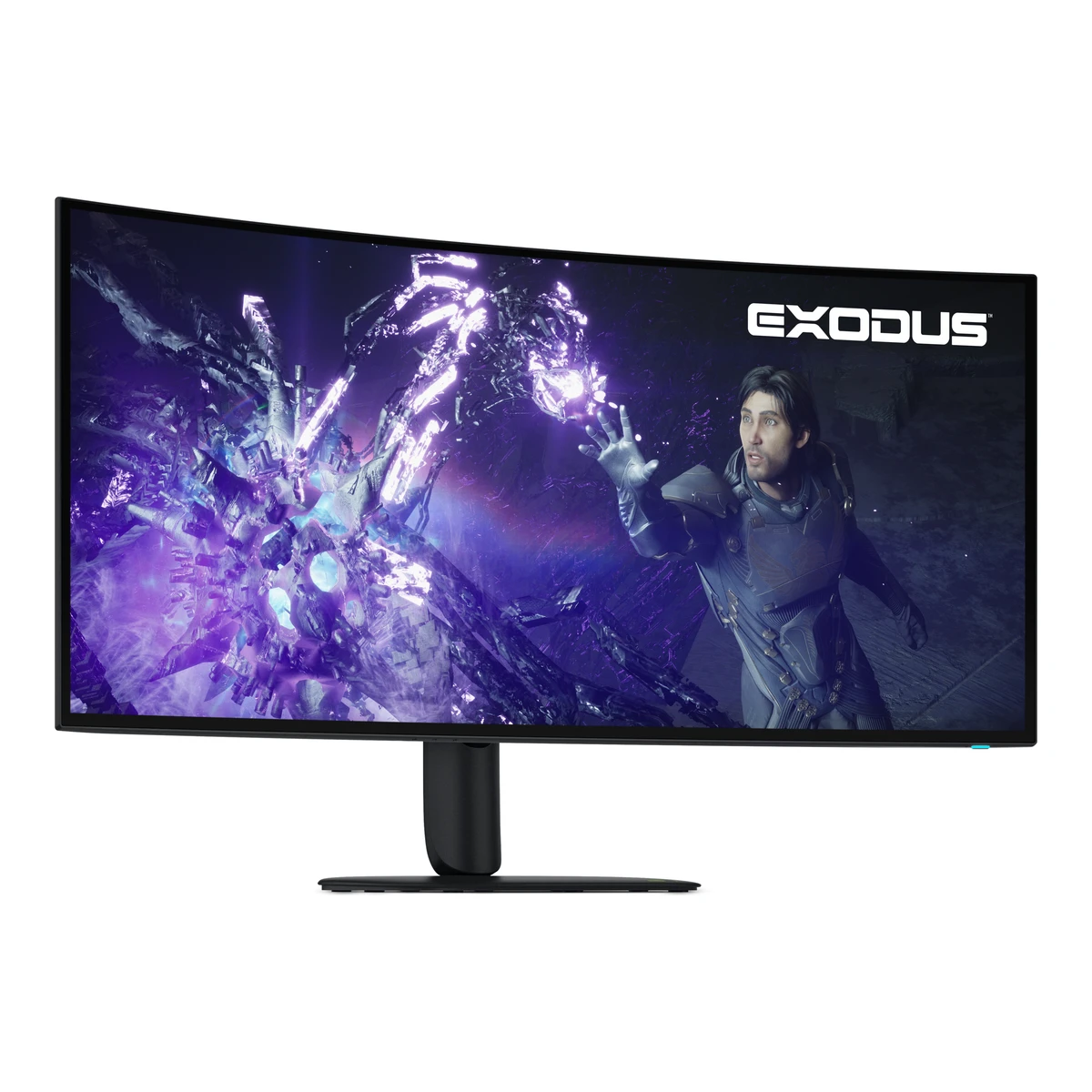
DellGaming monitor
Alienware AW3926QW
- Screen size
- 38.9in
- Resolution
- 5120 × 2160
- Refresh rate
- 165Hz
- Up to 330 Hz at 2560 × 1080
- Panel
- WOLED
110 of 172 fields known.
At a glance
Contrast
Higher than 99% of other monitors.
Ports
- DisplayPort 2.1 UHBR20
- 2 HDMI 2.1
- USB-CVideo in
- USB-B 3.2 Gen 1
- USB-CTo your computer
- 2 USB-A 3.2 Gen 1
- USB-C 3.2 Gen 1
- Headphone3.5 mm out
General
- GTIN / EAN
- 8841167043621Maker product pagedell.com/en-us/shop/monitors/apd/alienware-39-5k-oled-gaming-monitor-aw3926qw/aw3926qw/-Read 14 October 2026UPC in the page's structured product data (gtin). U.S. listing.
- Predecessor
- Not available
- Successor
- Not available
Display
- Screen size
- 38.9in(98.8 cm)2Owner's manualgzhls.at/blob/ldb/2/5/a/5/9115695deef7708dbc9bdfca820e83154d2a.pdfRead 14 October 2026p12 viewable diagonal 38.9 in. The maker markets a 39 in. class monitor.
- Viewable screen diagonal
- 38.9in(98.8 cm)2Owner's manualgzhls.at/blob/ldb/2/5/a/5/9115695deef7708dbc9bdfca820e83154d2a.pdfRead 14 October 2026p12 Viewable image diagonal 987.0 mm (38.9 in.).
- Native resolution
- 5120 × 2160px2Owner's manualgzhls.at/blob/ldb/2/5/a/5/9115695deef7708dbc9bdfca820e83154d2a.pdfRead 14 October 2026p13 Maximum preset resolution 5120 x 2160 at 165 Hz (WUHD mode).
- Aspect ratio
- 21:92Owner's manualgzhls.at/blob/ldb/2/5/a/5/9115695deef7708dbc9bdfca820e83154d2a.pdfRead 14 October 2026p12 Aspect ratio 21:9.
- Pixel density
- 142.9ppi
- Pixel pitch
- 0.1776mm2Owner's manualgzhls.at/blob/ldb/2/5/a/5/9115695deef7708dbc9bdfca820e83154d2a.pdfRead 14 October 2026p12 Pixel pitch horizontal and vertical 0.1776 mm.
- Active display area
- Width909.31Height383.62mm(35.8 × 15.1 in)2Owner's manualgzhls.at/blob/ldb/2/5/a/5/9115695deef7708dbc9bdfca820e83154d2a.pdfRead 14 October 2026p12 Active area horizontal 909.31 mm, vertical 383.62 mm.
- Curvature radius
- 1,500mm2Owner's manualgzhls.at/blob/ldb/2/5/a/5/9115695deef7708dbc9bdfca820e83154d2a.pdfRead 14 October 2026p12 Curvature 1500R.
- Anti-reflection coating
- Anti-Reflectance (AR) with hard-coating 2H1Maker product pagedell.com/en-us/shop/monitors/apd/alienware-39-5k-oled-gaming-monitor-aw3926qw/aw3926qw/-Read 14 October 2026Manual p12 gives the full wording. Page: Surface Treatment Anti-reflectance, Glass Hardness 2H.
- Touchscreen
- Not available
Panel
- Panel type (as published)
- RGB Stripe Tandem OLED2Owner's manualgzhls.at/blob/ldb/2/5/a/5/9115695deef7708dbc9bdfca820e83154d2a.pdfRead 14 October 2026p7 Product features: four stack, three sub-pixel RGB Stripe Tandem OLED panel.
- Backlight
- None (self-emissive)2Owner's manualgzhls.at/blob/ldb/2/5/a/5/9115695deef7708dbc9bdfca820e83154d2a.pdfRead 14 October 2026p12 Panel technology: Organic Light Emitting Diode (OLED). Self-emissive.
- Local dimming
- Not available
- Dimming zones
- Not available
- Panel maker
- LG Display3Press articletftcentral.co.uk/news/dell-release-the-alienware-aw3926qw-with-a-glossy-39-ultrawide-woled-panel-and-rgb-stripeRead 14 October 2026Panel from LG Display.
- Panel part number
- Not available
- Panel generation
- 4th generation Tandem WOLED3Press articletftcentral.co.uk/news/dell-release-the-alienware-aw3926qw-with-a-glossy-39-ultrawide-woled-panel-and-rgb-stripeRead 14 October 20264th Gen Tandem WOLED technology panel.
- Subpixel layout
- RGB stripe2Owner's manualgzhls.at/blob/ldb/2/5/a/5/9115695deef7708dbc9bdfca820e83154d2a.pdfRead 14 October 2026p7 three sub-pixel RGB Stripe Tandem OLED panel.
- Colour depth method
- Not available
- Displayable colours
- 1.07 billion2Owner's manualgzhls.at/blob/ldb/2/5/a/5/9115695deef7708dbc9bdfca820e83154d2a.pdfRead 14 October 2026p12 Color depth: 1.07 billion colors.
- sRGB coverage
- Not available
- Adobe RGB coverage
- Not available
- Rec. 2020 coverage
- Not available
- NTSC coverage
- Not available
- Paper calibration report in box
- No2Owner's manualgzhls.at/blob/ldb/2/5/a/5/9115695deef7708dbc9bdfca820e83154d2a.pdfRead 14 October 2026pp6-7 Package contents list no printed calibration report. The Factory Color Report is shown on screen in the OSD (p65 FACTORY COLOR) and Dell's store package list matches the manual.
- Hardware calibration support
- Not available
- Static contrast ratio
- 1,750,000:12Owner's manualgzhls.at/blob/ldb/2/5/a/5/9115695deef7708dbc9bdfca820e83154d2a.pdfRead 14 October 2026p12 Contrast ratio 1.75 million:1. The Dell store page labels the same 1,750,000:1 figure as dynamic contrast. The manual gives it as the plain contrast ratio.
- Brightness (typical, SDR)
- 300nits2Owner's manualgzhls.at/blob/ldb/2/5/a/5/9115695deef7708dbc9bdfca820e83154d2a.pdfRead 14 October 2026p12 Brightness 300 cd/m2 (typical).
- Brightness (maker minimum)
- Not available
- Peak brightness (HDR)
- 1,300nits2Owner's manualgzhls.at/blob/ldb/2/5/a/5/9115695deef7708dbc9bdfca820e83154d2a.pdfRead 14 October 2026p12 Brightness 1300 cd/m2 (HDR peak at APL 3%).
- Full-screen brightness
- 300nits7Reviewtomshardware.com/monitors/gaming-monitors/alienware-aw3926qw-39-inch-wuhd-oled-gaming-monitor-reviewRead 14 October 2026Specs table page 1: Brightness (mfr) 300 nits full screen. TechRadar spec box says 300 nits full screen, 1,300 nits peak HDR. SDR.
- HDR formats
- HDR10, Dolby Vision3Press articletftcentral.co.uk/news/dell-release-the-alienware-aw3926qw-with-a-glossy-39-ultrawide-woled-panel-and-rgb-stripeRead 14 October 2026Both Dolby Vision HDR and HDR10 formats are supported. The manual p55 states HLG is not supported.
- HDR certification
- DisplayHDR True Black 5002Owner's manualgzhls.at/blob/ldb/2/5/a/5/9115695deef7708dbc9bdfca820e83154d2a.pdfRead 14 October 2026p12 HDR support: VESA DisplayHDR True Black 500.
Refresh rate and motion
- Refresh rate per resolution and port
Refresh rate per resolution and port. The top rate is in bold. Resolution HDMI 2.1 DisplayPort 2.1 USB-C 5120 × 2160Native 165Hz 165Hz 165Hz 2560 × 1080 330Hz 330Hz Not available Show as source table
Width (px) Height (px) Input Input version Maximum accepted rate (Hz) 5120 2160 DisplayPort 2.1 165 5120 2160 HDMI 2.1 165 5120 2160 USB-C Not available 165 2560 1080 DisplayPort 2.1 330 2560 1080 HDMI 2.1 330 - Max refresh rate
- 330Hz
- Max refresh rate at native resolution
- 165Hz
- Max refresh rate over DisplayPort
- 165Hz
- Max refresh rate over HDMI
- 165Hz
- Max refresh rate over USB-C
- 165Hz
- Max refresh rate at 10-bit
- Not available
- Native refresh rate
- 165Hz2Owner's manualgzhls.at/blob/ldb/2/5/a/5/9115695deef7708dbc9bdfca820e83154d2a.pdfRead 14 October 2026p7 and p13: 165 Hz at native 5K.
- Overclocked refresh rate
- Not available
- Minimum fixed refresh rate
- Not available
- Adaptive sync technologies
- VESA AdaptiveSync Display, HDMI VRR, FreeSync Premium Pro, G-SYNC Compatible2Owner's manualgzhls.at/blob/ldb/2/5/a/5/9115695deef7708dbc9bdfca820e83154d2a.pdfRead 14 October 2026p12 VRR support: AMD FreeSync Premium Pro, HDMI 2.1 Variable Refresh Rate (VRR), NVIDIA G-SYNC Compatible, VESA AdaptiveSync Display (dual mode).
- VRR range per port
- Not available
- Low framerate compensation
- Yes9Reviewhothardware.com/reviews/alienware-aw3926qw-oled-gaming-monitor-reviewRead 14 October 2026HotHardware spec table: 48-165 Hz VRR range at native resolution, supports LFC. The review text also mentions LFC engaging. FreeSync Premium Pro requires LFC.
- Response time (maker GtG claim)
- 0.03ms2Owner's manualgzhls.at/blob/ldb/2/5/a/5/9115695deef7708dbc9bdfca820e83154d2a.pdfRead 14 October 2026p12 Response time 0.03 ms (gray to gray). The Dell store page says 0.03 ms GTG (Extreme Mode).
- Response time (maker MPRT claim)
- Not available
- Overdrive settings
- Not available
- Motion blur reduction
- No9Reviewhothardware.com/reviews/alienware-aw3926qw-oled-gaming-monitor-reviewRead 14 October 2026Review: no MPRT-focused or blur reduction mode, no black frame insertion or image strobing.
- Blur-reduction technology
- Not available
- Blur reduction works with VRR
- Not available
Measured
- Input lag at 60 Hz
- Not available
- Average response time (measured)
- Not available
- Overshoot (measured)
- Not available
- Contrast ratio (measured)
- Not available
- HDR brightness in a real scene (measured)
- Not available
- PWM flicker frequency (measured)
- Not available
- VRR range (measured)
- Not available
- Colour accuracy (measured Delta E)
- 0.768Reviewclub386.comRead 14 October 2026Club386 colour test, stock settings before calibration: average Delta E 0.76, maximum 1.65, 48-colour palette. At 100% brightness 0.94 average. Tom's Guide lists 0.24 under its own method and HotHardware 0.09 after profiling with DisplayCAL, which is not stored.
- Gray uniformity (measured)
- Not available
- Reflections (measured)
- Not available
Connectivity
- Video inputs
Type Version Count DSC HDCP DisplayPort 2.1 UHBR20 1 Yes 1.4, 2.3 HDMI 2.1 2 Yes 1.4, 2.3 USB-C Not available 1 Not available Not available - HDMI ports
- 2
- DisplayPort ports
- 1
- Highest HDMI version
- 2.1
- Highest DisplayPort version
- 2.1 UHBR20
- USB-C video (DP Alt Mode)
- Yes2Owner's manualgzhls.at/blob/ldb/2/5/a/5/9115695deef7708dbc9bdfca820e83154d2a.pdfRead 14 October 2026p10 USB-C upstream port enables DisplayPort 2.1 Alternate Mode.
- USB-C power delivered
- 90W1Maker product pagedell.com/en-us/shop/monitors/apd/alienware-39-5k-oled-gaming-monitor-aw3926qw/aw3926qw/-Read 14 October 2026USB Type-C (Power Delivery) Upstream: 90 W. Also manual p10 and p23.
- Thunderbolt
- Not available
- USB upstream ports
Connector USB version Count USB-B 3.2 Gen 1 1 USB-C Not available 1 - USB downstream hub ports
Connector USB version Count USB-A 3.2 Gen 1 2 USB-C 3.2 Gen 1 1 - 3.5 mm headphone output
- Yes1Maker product pagedell.com/en-us/shop/monitors/apd/alienware-39-5k-oled-gaming-monitor-aw3926qw/aw3926qw/-Read 14 October 2026Ports: 3.5 mm audio jack. The manual calls it a headphone port.
- 3.5 mm microphone input
- Not available
- Optical out
- Not available
Smart features
We could not find any of these 4 fields. Show them
- Smart platform
- Not available
- Wi-Fi
- Not available
- Bluetooth
- Not available
- Remote control
- Not available
Audio and camera
- Number of speakers
- Not available
- Speaker power per channel
- Not available
- Webcam
- Not available
- Microphone
- Not available
Ergonomics and controls
- Stand height adjustment
- 110mm2Owner's manualgzhls.at/blob/ldb/2/5/a/5/9115695deef7708dbc9bdfca820e83154d2a.pdfRead 14 October 2026p12 Height adjustable stand 0 mm to 110 mm.
- Tilt
- Forward5°Backward21°2Owner's manualgzhls.at/blob/ldb/2/5/a/5/9115695deef7708dbc9bdfca820e83154d2a.pdfRead 14 October 2026p12 Tilt -5 to 21 degrees.
- Swivel
- Left20°Right20°2Owner's manualgzhls.at/blob/ldb/2/5/a/5/9115695deef7708dbc9bdfca820e83154d2a.pdfRead 14 October 2026p12 Swivel -20 to 20 degrees. The stand also has a slant of -5 to 5 degrees.
- Pivot
- Not available
- Removable stand
- Yes2Owner's manualgzhls.at/blob/ldb/2/5/a/5/9115695deef7708dbc9bdfca820e83154d2a.pdfRead 14 October 2026p7 Removable stand. Stand release button p9.
- VESA mount
- 100 x 1001Maker product pagedell.com/en-us/shop/monitors/apd/alienware-39-5k-oled-gaming-monitor-aw3926qw/aw3926qw/-Read 14 October 2026VESA Mount Standard: 100 x 100.
- VESA adapter needed
- Not available
- Security lock slot
- Yes2Owner's manualgzhls.at/blob/ldb/2/5/a/5/9115695deef7708dbc9bdfca820e83154d2a.pdfRead 14 October 2026p7 and p12 security-lock slot for Kensington locks.
- On-screen menu controls
- Joystick, Software2Owner's manualgzhls.at/blob/ldb/2/5/a/5/9115695deef7708dbc9bdfca820e83154d2a.pdfRead 14 October 2026p9 joystick controls the OSD menu. Alienware Command Center (AWCC) is the desktop software.
- Desktop software
- Alienware Command Center (AWCC)2Owner's manualgzhls.at/blob/ldb/2/5/a/5/9115695deef7708dbc9bdfca820e83154d2a.pdfRead 14 October 2026p12 Alienware Command Center (AWCC): Yes. The Dell Display and Peripheral Manager is not supported.
- Ambient light sensor
- Not available
- Presence sensor
- Not available
- Gaming menu features
- Timer, Frame Rate, Display Alignment, Dark Stabilizer, Console Mode, AlienVision, Esports Mode2Owner's manualgzhls.at/blob/ldb/2/5/a/5/9115695deef7708dbc9bdfca820e83154d2a.pdfRead 14 October 2026p7 TIMER, FRAME RATE, DISPLAY ALIGNMENT. OSD Game menu: DARK STABILIZER, CONSOLE MODE, ALIENVISION, ESPORTS MODE.
OLED care
- OLED care
- Pixel Refresh, Pixel Shift, AI-based pixel usage prediction, Panel Health indicator2Owner's manualgzhls.at/blob/ldb/2/5/a/5/9115695deef7708dbc9bdfca820e83154d2a.pdfRead 14 October 2026p64 OLED PANEL MAINTENANCE with PIXEL REFRESH (manual and automatic after 4 hours). p44 PANEL HEALTH status dot. p84 pixel shift. The usage prediction algorithm is from TFTCentral.3Press articletftcentral.co.uk/news/dell-release-the-alienware-aw3926qw-with-a-glossy-39-ultrawide-woled-panel-and-rgb-stripeRead 14 October 2026AI based personalized algorithm predicts pixel usage, plus pixel refresh and pixel shift.
Dimensions and weight
Front and side, drawn to scale. The dashed outline is the screen at its highest.
- Dimensions with stand
- Width920.49Height (lowest)470.1Height (highest)580.1Depth242.5mm(36.2 × 18.5 to 22.8 × 9.5 in)2Owner's manualgzhls.at/blob/ldb/2/5/a/5/9115695deef7708dbc9bdfca820e83154d2a.pdfRead 14 October 2026p18 Dimensions (with stand): height extended 580.10 mm, compressed 470.10 mm, width 920.49 mm, depth 242.50 mm.
- Dimensions without stand
- Width920.49Height408.24Depth129.65mm(36.2 × 16.1 × 5.1 in)2Owner's manualgzhls.at/blob/ldb/2/5/a/5/9115695deef7708dbc9bdfca820e83154d2a.pdfRead 14 October 2026p18 Dimensions (without stand): 408.24 mm high, 920.49 mm wide, 129.65 mm deep.
- Stand footprint
- Width285Depth242.5mm(11.2 × 9.5 in)2Owner's manualgzhls.at/blob/ldb/2/5/a/5/9115695deef7708dbc9bdfca820e83154d2a.pdfRead 14 October 2026p18 Stand base 285 mm x 242.50 mm.
- Weight with stand
- 11.22kg(24.7 lb)2Owner's manualgzhls.at/blob/ldb/2/5/a/5/9115695deef7708dbc9bdfca820e83154d2a.pdfRead 14 October 2026p18 Weight with stand assembly and cables 11.22 kg. Tom's Hardware and Tom's Guide list 22.6 lb (10.25 kg) with stand. The manual and the Dell store page both say 11.22 kg.
- Weight without stand
- 7.76kg(17.1 lb)2Owner's manualgzhls.at/blob/ldb/2/5/a/5/9115695deef7708dbc9bdfca820e83154d2a.pdfRead 14 October 2026p18 Weight without stand assembly 7.76 kg, no cables.
- Box dimensions
- Not available
Power
- Adapter rating
- Not available
- Input voltage
- 100-240 V AC, 50/60 Hz2Owner's manualgzhls.at/blob/ldb/2/5/a/5/9115695deef7708dbc9bdfca820e83154d2a.pdfRead 14 October 2026p17 100 VAC to 240 VAC, 50 Hz or 60 Hz, 4 A (typical).
- Power use (typical)
- Not available
- Power use SDR (EU label)
- 40.3W2Owner's manualgzhls.at/blob/ldb/2/5/a/5/9115695deef7708dbc9bdfca820e83154d2a.pdfRead 14 October 2026p17 40.3 W (On mode), footnote: as defined in EU 2019/2021 and EU 2019/2013. No EPREL record was found, so the value comes from the manual.
- Power use HDR (EU label)
- Not available
- Standby power
- 0.5W2Owner's manualgzhls.at/blob/ldb/2/5/a/5/9115695deef7708dbc9bdfca820e83154d2a.pdfRead 14 October 2026p17 0.5 W (Standby mode). p8 states 0.5 W or less.
- Off-mode power
- 0.3W2Owner's manualgzhls.at/blob/ldb/2/5/a/5/9115695deef7708dbc9bdfca820e83154d2a.pdfRead 14 October 2026p17 0.3 W (Off mode).
- EU energy class SDR
- Not available
- EU energy class HDR
- Not available
- Energy per 1000 h SDR
- Not available
- Energy per 1000 h HDR
- Not available
Certifications
- VESA ClearMR
- Not available
- VESA AdaptiveSync Display
- 330Hz2Owner's manualgzhls.at/blob/ldb/2/5/a/5/9115695deef7708dbc9bdfca820e83154d2a.pdfRead 14 October 2026p7 Product features: VESA AdaptiveSync 165/330 Display certifications for the 5K mode and the dual mode. The higher number is stored.
- TÜV certifications
- Not available
- Low blue light
- Not available
- ENERGY STAR
- Not available
- TCO Certified
- Not available
- EPEAT
- Not available
- Colour certifications
- Not available
In the box
- In the box
- Display, Stand riser, Stand base, Power cable, HDMI 2.1 FRL cable (1.80 m), DisplayPort to DisplayPort 1.4 cable (1.80 m), USB Type-A to Type-B 5Gbps cable (1.80 m), USB-C to C 10Gbps 100 W cable (1 m), Microfiber cloth, QR card, Safety, Environmental, and Regulatory Information, Alienware sticker1Maker product pagedell.com/en-us/shop/monitors/apd/alienware-39-5k-oled-gaming-monitor-aw3926qw/aw3926qw/-Read 14 October 2026Package Contents.
- Cables included
Type Count Power cable 1 HDMI 2.1 FRL cable (1.80 m) 1 DisplayPort to DisplayPort 1.4 cable (1.80 m) 1 USB Type-A to Type-B 5Gbps cable (1.80 m) 1 USB-C to C 10Gbps 100 W cable (1 m) 1
Warranty
- Manufacturer warranty (source market)
- 3years1Maker product pagedell.com/en-us/shop/monitors/apd/alienware-39-5k-oled-gaming-monitor-aw3926qw/aw3926qw/-Read 14 October 2026Limited Warranty: 3 Year. U.S. listing.
- Dead pixel policy
- Free panel replacement during the Limited Hardware Warranty if one bright pixel is found1Maker product pagedell.com/en-us/shop/monitors/apd/alienware-39-5k-oled-gaming-monitor-aw3926qw/aw3926qw/-Read 14 October 2026Premium Panel Exchange: free panel replacement during the Limited Hardware Warranty period even if only one bright pixel is found.
Links
- Product page
- www.dell.com/en-us/shop/monitors/apd/alienware-39-5k-oled-gaming-monitor-aw3926qw/aw3926qw/-1Maker product pagedell.com/en-us/shop/monitors/apd/alienware-39-5k-oled-gaming-monitor-aw3926qw/aw3926qw/-Read 14 October 2026
- Spec sheet
- Not available
- Manual
- gzhls.at/blob/ldb/2/5/a/5/9115695deef7708dbc9bdfca820e83154d2a.pdf2Owner's manualgzhls.at/blob/ldb/2/5/a/5/9115695deef7708dbc9bdfca820e83154d2a.pdfRead 14 October 2026Dell User's Guide, Rev. A00, June 2026. Public mirror of the Dell document at gzhls.at. Dell-hosted access was not used.
- EPREL registration number
- Not available
Compare with
Pick a monitor to see both side by side. Differences are marked yellow.
Sources
We read 9 sources for this monitor. The numbers match the markers in the sheet.
- Reviewclub386.com
See a wrong value? Tell us and name the field.