Gaming / Monitors
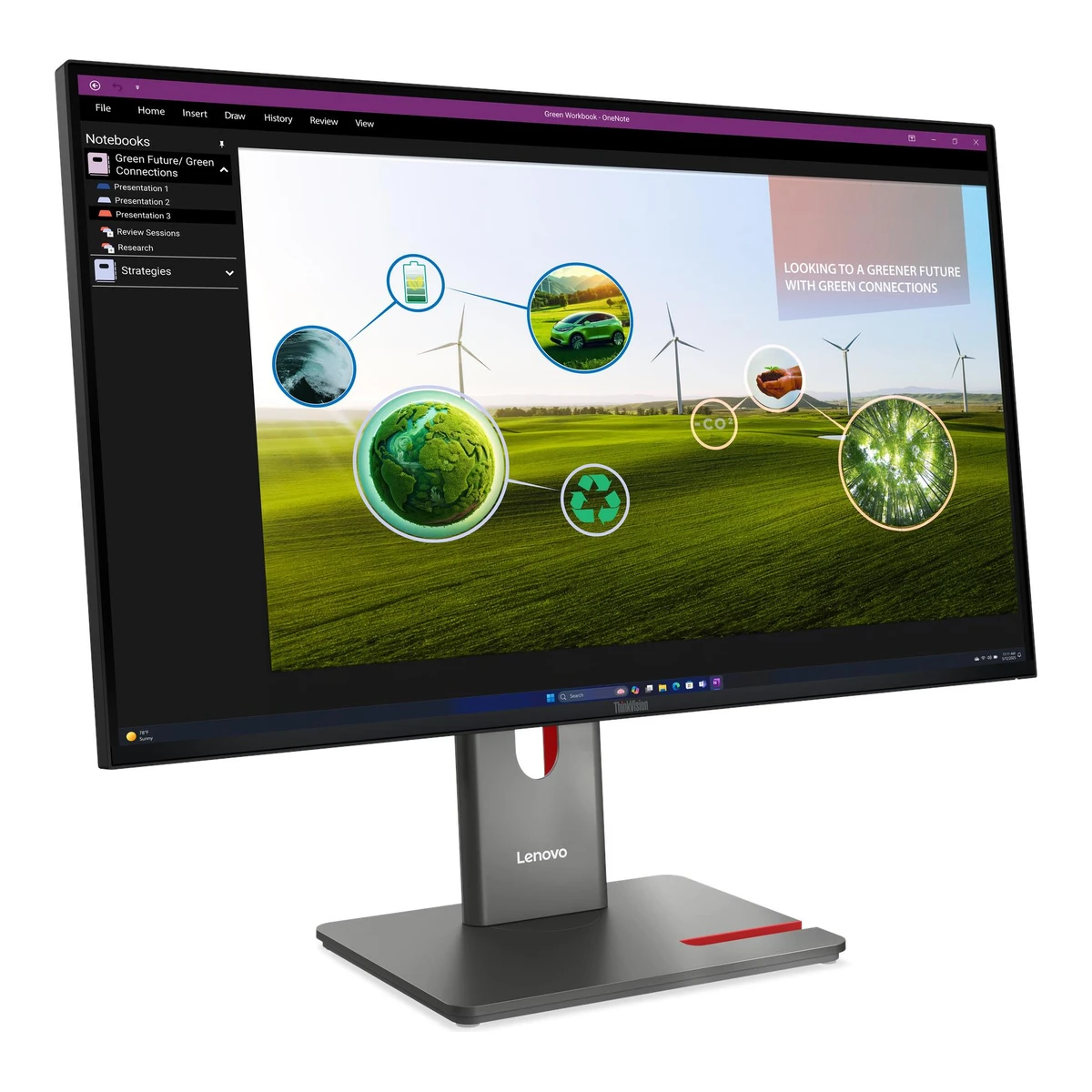
LenovoOffice monitor
ThinkVision P27Q-40
Released March 2025.6EU energy label (EPREL)eprel.ec.europa.eu/screen/product/electronicdisplays/2213054Read 8 October 2026Qualified manufacturer-declared EU market-introduction month from 10 March 2025 in exact registry. CES maker press separately planned US availability starting June 2025. Neither is described as observed retail availability or a proved global first actual sale. Selected hardware and warranty remain US scoped. Last checked 16 October 2026.
- Screen size
- 27in
- Resolution
- 2560 × 1440
- Refresh rate
- 120Hz
- Panel
- IPS
98 of 172 fields known.
At a glance
Power use HDR (EU label)
Lower than 99% of other monitors. Lower is better.
Power use SDR (EU label)
Lower than 93% of other monitors. Lower is better.
Power use (typical)
Lower than 90% of other monitors. Lower is better.
Ports
- HDMI 2.1
- DisplayPort 1.4
- USB-B USB 5Gbps / USB 3.2 Gen 1
- 3 USB-A USB 5Gbps / USB 3.2 Gen 1
- USB-C USB 5Gbps / USB 3.2 Gen 1
General
- Series
- ThinkVision P Series Gen 401Maker product pagelenovo.com/us/en/p/accessories-and-software/monitors/professional/64a7gar6uzRead 8 October 2026
- Model numbers
- P27Q-40, 64A7GAR6UZ, 64A7, D25270QP02Maker product pagepsref.lenovo.com/Detail/ThinkVision_P27Q_40Read 8 October 2026Actual dynamic exact PSREF identifies US/NA reference 64A7GAR6UZ and machine type 64A7. Matching actual guide/support overview names D25270QP0 and global platform 64A7GAR6WW. P27QD-40 is a separate docking model and is excluded.
- GTIN / EAN
- 01992715915982Maker product pagepsref.lenovo.com/Detail/ThinkVision_P27Q_40Read 8 October 2026Exact selected reference publishes EAN 0199271591598 and corresponding UPC 199271591598.
- Predecessor
- Not available
- Successor
- Not available
- Launch price (US)
- Not available
- Launch price (EU)
- Not available
Display
- Screen size
- 27in(68.6 cm)2Maker product pagepsref.lenovo.com/Detail/ThinkVision_P27Q_40Read 8 October 2026
- Viewable screen diagonal
- 27in(68.6 cm)4Owner's manualdownload.lenovo.com/consumer/monitor/thinkvision_p27q_40_english_user_guide_20250214.pdfRead 8 October 2026Guide publishes viewable diagonal 684.7 mm, also 27 in. Rounded 69 cm energy-label value is separate.
- Pixel density
- 108.8ppi
- Pixel pitch
- 0.2331mm2Maker product pagepsref.lenovo.com/Detail/ThinkVision_P27Q_40Read 8 October 2026
- Active display area
- Width596.7Height335.7mm(23.5 × 13.2 in)2Maker product pagepsref.lenovo.com/Detail/ThinkVision_P27Q_40Read 8 October 2026Exact selected view area 596.7x335.7 mm. Actual guide names maximum image width 596.7 mm and height 335.7 mm. Housing and screen-glass sizes are separate.
- Curvature radius
- Not available
- Anti-reflection coating
- Anti-glare2Maker product pagepsref.lenovo.com/Detail/ThinkVision_P27Q_40Read 8 October 2026
- Touchscreen
- Not available
Panel
- Panel type (as published)
- In-Plane Switching2Maker product pagepsref.lenovo.com/Detail/ThinkVision_P27Q_40Read 8 October 2026
- Backlight
- Not available
- Local dimming
- Not available
- Dimming zones
- Not available
- Panel maker
- Not available
- Panel part number
- Not available
- Panel generation
- Not available
- Subpixel layout
- Not available
- Displayable colours
- 1.07 billion2Maker product pagepsref.lenovo.com/Detail/ThinkVision_P27Q_40Read 8 October 2026
- Adobe RGB coverage
- Not available
- Rec. 2020 coverage
- Not available
- NTSC coverage
- Not available
- Factory calibrated
- Yes2Maker product pagepsref.lenovo.com/Detail/ThinkVision_P27Q_40Read 8 October 2026Exact selected special features explicitly say Factory Calibration for sRGB and DCI-P3.
- Paper calibration report in box
- Yes1Maker product pagelenovo.com/us/en/p/accessories-and-software/monitors/professional/64a7gar6uzRead 8 October 2026Exact selected US box explicitly lists Factory Calibration Report. This is corroborated by the maker datasheet, separate from the claimed factory colour-error threshold.
- Hardware calibration support
- Not available
- Static contrast ratio
- 1,500:12Maker product pagepsref.lenovo.com/Detail/ThinkVision_P27Q_40Read 8 October 2026Exact selected 1500:1 contrast, explicitly typical in the datasheet. Separate dynamic 3000000:1 claim is excluded.
- Brightness (maker minimum)
- Not available
- Peak brightness (HDR)
- Not available
- HDR peak test window
- Not available
- Full-screen brightness
- Not available
- HDR certification
- Not available
- Viewing angle (horizontal)
- 178°2Maker product pagepsref.lenovo.com/Detail/ThinkVision_P27Q_40Read 8 October 2026
- Viewing angle (vertical)
- 178°2Maker product pagepsref.lenovo.com/Detail/ThinkVision_P27Q_40Read 8 October 2026
Refresh rate and motion
- Refresh rate per resolution and port
Refresh rate per resolution and port. The top rate is in bold. Resolution HDMI 2.1 2560 × 1440Native 120Hz Show as source table
Width (px) Height (px) Input Input version Maximum accepted rate (Hz) 2560 1440 HDMI 2.1 120 - Max refresh rate
- 120Hz
- Max refresh rate at native resolution
- 120Hz
- Max refresh rate over DisplayPort
- Not available
- Max refresh rate over HDMI
- 120Hz
- Max refresh rate over USB-C
- Not available
- Max refresh rate at 10-bit
- Not available
- Overclocked refresh rate
- Not available
- Dual mode
- Not available
- Minimum fixed refresh rate
- Not available
- VRR range per port
Input Min (Hz) Max (Hz) HDMI 24 120 - Low framerate compensation
- Not available
- Response time (maker GtG claim)
- 4ms2Maker product pagepsref.lenovo.com/Detail/ThinkVision_P27Q_40Read 8 October 2026Exact selected PSREF explicitly states 4 ms GtG Extreme and 6 ms GtG Typical. Datasheet labels 4 Extreme/6 Normal. Stored 4 ms is the fastest maker claim, not measured average response time.
- Response time (maker MPRT claim)
- Not available
- Overdrive settings
- Off, Normal, Extreme4Owner's manualdownload.lenovo.com/consumer/monitor/thinkvision_p27q_40_english_user_guide_20250214.pdfRead 8 October 2026Guide response table names Off 14 ms, Normal 6 ms and Extreme 4 ms. HDR mode can disable overdrive selection. These are claims, not measured response or input latency.
- Motion blur reduction
- Not available
- Blur-reduction technology
- Not available
- Blur reduction works with VRR
- Not available
- Flicker-free (claimed)
- Not available
- Black frame insertion
- Not available
Measured
We could not find any of these 12 fields. Show them
- Input lag at maximum refresh rate
- Not available
- Input lag at 60 Hz
- Not available
- Average response time (measured)
- Not available
- Overshoot (measured)
- Not available
- Contrast ratio (measured)
- Not available
- SDR brightness (measured)
- Not available
- HDR brightness in a real scene (measured)
- Not available
- PWM flicker frequency (measured)
- Not available
- VRR range (measured)
- Not available
- Colour accuracy (measured Delta E)
- Not available
- Gray uniformity (measured)
- Not available
- Reflections (measured)
- Not available
Connectivity
- Video inputs
Type Version Count Max bandwidth (Gbps) HDMI 2.1 1 Not available DisplayPort 1.4 1 21.6 - HDMI ports
- 1
- DisplayPort ports
- 1
- Highest HDMI version
- 2.1
- Highest DisplayPort version
- 1.4
- USB-C video (DP Alt Mode)
- No2Maker product pagepsref.lenovo.com/Detail/ThinkVision_P27Q_40Read 8 October 2026Exact USB-C port is explicitly data transfer only and downstream. It does not accept DisplayPort Alt Mode video.
- Thunderbolt
- Not available
- USB upstream ports
Connector USB version Count USB-B USB 5Gbps / USB 3.2 Gen 1 1 - USB downstream hub ports
Connector USB version Count USB-A USB 5Gbps / USB 3.2 Gen 1 3 USB-C USB 5Gbps / USB 3.2 Gen 1 1 - KVM switch
- Not available
- Ethernet
- Not available
- 3.5 mm headphone output
- Not available
- 3.5 mm microphone input
- Not available
- Optical out
- Not available
- Picture in picture
- Not available
- Picture by picture
- Not available
Smart features
We could not find any of these 4 fields. Show them
- Smart platform
- Not available
- Wi-Fi
- Not available
- Bluetooth
- Not available
- Remote control
- Not available
Audio and camera
- Number of speakers
- Not available
- Speaker power per channel
- Not available
- Webcam
- Not available
Ergonomics and controls
- Stand height adjustment
- 155mm2Maker product pagepsref.lenovo.com/Detail/ThinkVision_P27Q_40Read 8 October 2026
- Tilt
- Forward5°Backward23.5°2Maker product pagepsref.lenovo.com/Detail/ThinkVision_P27Q_40Read 8 October 2026
- Swivel
- Left45°Right45°2Maker product pagepsref.lenovo.com/Detail/ThinkVision_P27Q_40Read 8 October 2026
- Pivot
- Counterclockwise90°Clockwise90°2Maker product pagepsref.lenovo.com/Detail/ThinkVision_P27Q_40Read 8 October 2026
- VESA mount
- 100 x 1004Owner's manualdownload.lenovo.com/consumer/monitor/thinkvision_p27q_40_english_user_guide_20250214.pdfRead 8 October 2026
- Desktop software
- Lenovo ThinkColour (Lenovo Accessories and Display Manager) and Lenovo Display Fleet Manager2Maker product pagepsref.lenovo.com/Detail/ThinkVision_P27Q_40Read 8 October 2026Exact reference identifies ThinkColour/LADM and LDFM. Host functions vary between Windows 10/11 and macOS. These are external host tools, not an embedded Windows smart-monitor OS.
- Ambient light sensor
- Not available
- RGB lighting
- Not available
- Gaming menu features
- Not available
OLED care
We could not find any of these 3 fields. Show them
- OLED care
- Not available
- Burn-in covered by warranty
- Not available
- Burn-in warranty length
- Not available
Dimensions and weight
Front and side, drawn to scale. The dashed outline is the screen at its highest.
- Dimensions with stand
- Width613.6Height (lowest)384.2Height (highest)539.2Depth195mm(24.2 × 15.1 to 21.2 × 7.7 in)2Maker product pagepsref.lenovo.com/Detail/ThinkVision_P27Q_40Read 8 October 2026Current exact reference names WxDxH lowest 613.6x195x384.2 mm and highest 613.6x195x539.2 mm. Older general guide/support table gives 539.25 mm. Current exact claim is used. The small document difference is retained without a hardware-change explanation.
- Dimensions without stand
- Width613.6Height357.1Depth46mm(24.2 × 14.1 × 1.8 in)2Maker product pagepsref.lenovo.com/Detail/ThinkVision_P27Q_40Read 8 October 2026Current exact named Head Only WxDxH 613.6x46x357.1 mm. Stand-component geometry is separate.
- Stand footprint
- Not available
- Weight without stand
- 4.3kg(9.5 lb)2Maker product pagepsref.lenovo.com/Detail/ThinkVision_P27Q_40Read 8 October 2026Current exact reference names Monitor Head Only 4.3 kg, separate from total assembled monitor 6.4 kg.
- Box dimensions
- Width693Height420Depth150mm(27.3 × 16.5 × 5.9 in)2Maker product pagepsref.lenovo.com/Detail/ThinkVision_P27Q_40Read 8 October 2026Current exact named packed WxDxH 693x150x420 mm. Axes are preserved in the stored object.
- Box weight
- 9.2kg(20.3 lb)2Maker product pagepsref.lenovo.com/Detail/ThinkVision_P27Q_40Read 8 October 2026
Power
- Power supply
- Internal2Maker product pagepsref.lenovo.com/Detail/ThinkVision_P27Q_40Read 8 October 2026
- Adapter rating
- Not available
- Input voltage
- Not available
- Power use HDR (EU label)
- 19.2W6EU energy label (EPREL)eprel.ec.europa.eu/screen/product/electronicdisplays/2213054Read 8 October 2026Declared EU On-mode HDR 19.2 W. Rounded label 19 kWh/1000h is separate.
Certifications
- VESA ClearMR
- Not available
- VESA AdaptiveSync Display
- Not available
- TÜV certifications
- TÜV Rheinland Eye Comfort, 5-star, TÜV Rheinland Low Blue Light (Hardware Solution)2Maker product pagepsref.lenovo.com/Detail/ThinkVision_P27Q_40Read 8 October 2026
- Low blue light
- Hardware2Maker product pagepsref.lenovo.com/Detail/ThinkVision_P27Q_40Read 8 October 2026
- TCO Certified
- TCO Certified 10 and TCO Certified Edge 2.12Maker product pagepsref.lenovo.com/Detail/ThinkVision_P27Q_40Read 8 October 2026
- Colour certifications
- Not available
- Other certifications
- Eyesafe Display 2.0, RoHS compliant, Volatile Organic Compound Certification2Maker product pagepsref.lenovo.com/Detail/ThinkVision_P27Q_40Read 8 October 2026
In the box
- In the box
- Monitor with stand, Power cable, DisplayPort 1.4 cable, HDMI 2.0 cable, USB-A to USB-B cable, Factory Calibration Report, Quick setup guide2Maker product pagepsref.lenovo.com/Detail/ThinkVision_P27Q_40Read 8 October 2026Exact US maker box and selected PSREF confirm base monitor, four cables, quick guide, and maker box explicitly adds calibration report. MC60 external webcam is optional and absent from this selected base bundle. No P27QD docking cable or camera/soundbar is transferred.
- Cables included
Type Count Power cable 1 DisplayPort 1.4 cable 1 HDMI 2.0 cable 1 USB-A to USB-B cable 1
Warranty
- Manufacturer warranty (source market)
- 3years2Maker product pagepsref.lenovo.com/Detail/ThinkVision_P27Q_40Read 8 October 2026Exact selected US reference publishes 3-year limited warranty. Optional paid Premier Support upgrade is separate.
- Dead pixel policy
- Pixel Perfect Guarantee: free panel replacement under the ThinkVision monitor warranty when one bright pixel is found, subject to applicable country terms.1Maker product pagelenovo.com/us/en/p/accessories-and-software/monitors/professional/64a7gar6uzRead 8 October 2026Exact US page Pixel Perfect Guarantee gives panel replacement for one bright pixel under the ThinkVision warranty. It identifies P/T Gen 40 and says service can vary by country. No dark-pixel threshold is invented.
Links
- Product page
- www.lenovo.com/us/en/p/accessories-and-software/monitors/professional/64a7gar6uz1Maker product pagelenovo.com/us/en/p/accessories-and-software/monitors/professional/64a7gar6uzRead 8 October 2026Actual selected US product page redirects the office URL to this professional URL and explicitly identifies part 64A7GAR6UZ.
- Spec sheet
- psref.lenovo.com/syspool/Sys/PDF/ThinkVision/ThinkVision_P27Q_40_Monitor/ThinkVision_P27Q_40_Monitor_Spec.pdf3Maker spec sheet (PDF)psref.lenovo.com/syspool/Sys/PDF/ThinkVision/ThinkVision_P27Q_40_Monitor/ThinkVision_P27Q_40_Monitor_Spec.pdfRead 8 October 2026Actual June 17 2026 six-page manufacturer PSREF read alongside exact selected US reference. Regional external-camera bundle options are distinguished.
- Manual
- download.lenovo.com/consumer/monitor/thinkvision_p27q_40_english_user_guide_20250214.pdf4Owner's manualdownload.lenovo.com/consumer/monitor/thinkvision_p27q_40_english_user_guide_20250214.pdfRead 8 October 2026Actual exact P27Q-40 User Guide, First Edition February 2025, machine 64A7/D25270QP0, read setup, ports, daisy chaining, menus, factory modes, mounting and electrical specifications.
Compare with
Pick a monitor to see both side by side. Differences are marked yellow.
Sources
We read 7 sources for this monitor. The numbers match the markers in the sheet.
- Maker product pagepsref.lenovo.com/Detail/ThinkVision_P27Q_40
- Maker spec sheet (PDF)psrefstuff.lenovo.com/syspool/Sys/PDF/datasheet/ThinkVision_P27Q-40_datasheet_EN.pdf
- EU energy label (EPREL)eprel.ec.europa.eu/screen/product/electronicdisplays/2213054
See a wrong value? Tell us and name the field.