Gaming / Monitors
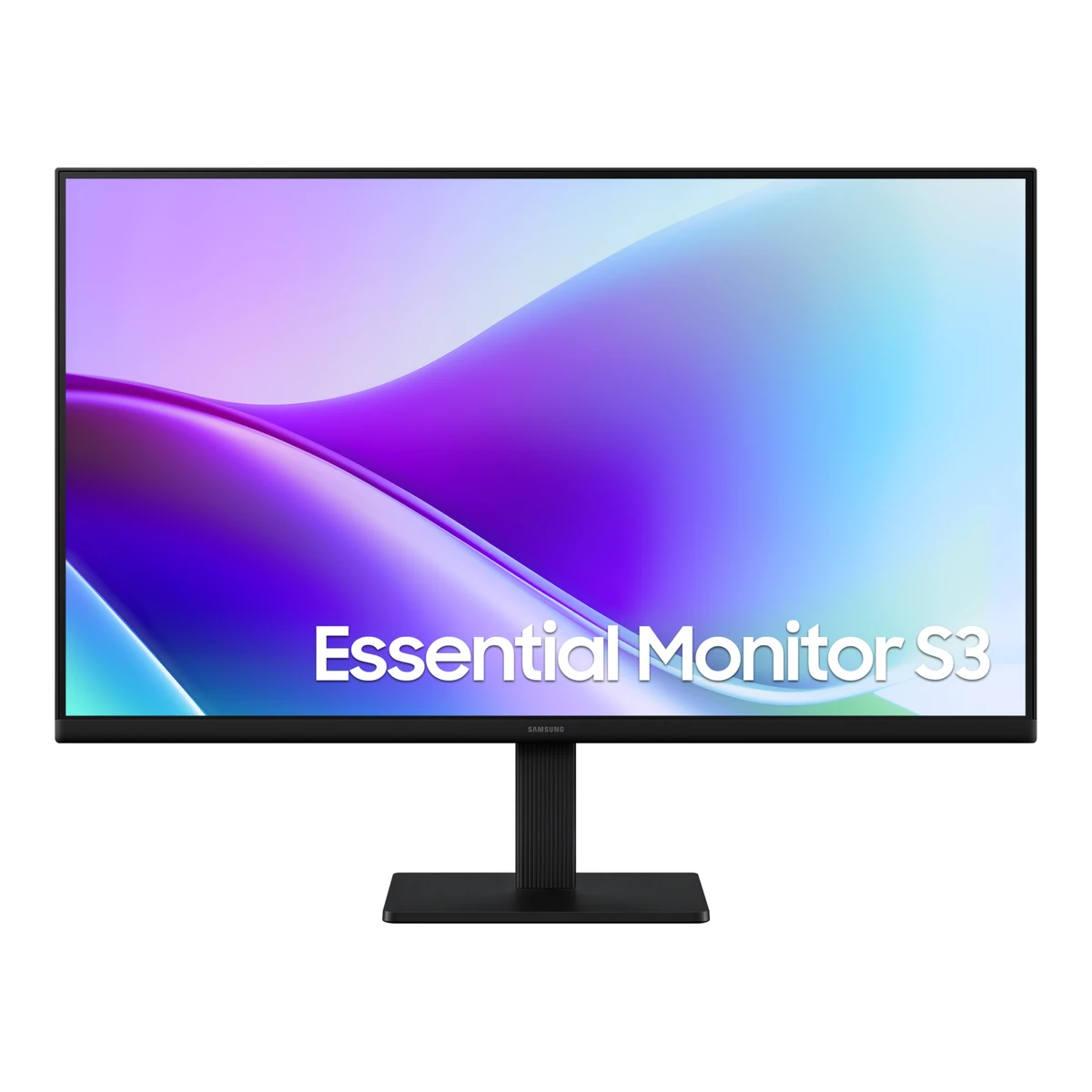
SamsungOffice monitor
Essential Monitor S3 S32GF 27"
Released April 2025.6EU energy label (EPREL)eprel.ec.europa.eu/labels/electronicdisplays/Label_2244033.pdfRead 15 October 2026The EPREL sheet says the EU model was placed on the Union market from 14 May 2025. The US datasheet is dated April 2025, the Samsung support page lists the driver from 7 March 2025 and a user guide dated 27 February 2025, and a Samsung Philippines page links a manual dated 12 April 2025. April 2025 is the best supported month for the family. Last checked 15 October 2026.
- Screen size
- 27in
- Resolution
- 1920 × 1080
- Refresh rate
- 120Hz
- Panel
- IPS
71 of 172 fields known.
At a glance
Power use (max)
25W1Maker product pagesamsung.com/ca/monitors/full-hd-1080p/essential-monitor-s3-s32gf-27-inch-fhd-ips-120hz-ls27f320ganxzaRead 15 October 2026Power Consumption (Max) 25 W. Typical consumption is not published for the North American model.2Maker spec sheet (PDF)m.media-amazon.com/images/I/815oIYWJIDL.pdfRead 15 October 2026
Lower than 94% of other monitors. Lower is better.
Power use SDR (EU label)
Lower than 90% of other monitors. Lower is better.
Ports
- 2 HDMI 1.4
General
- Series
- Essential Monitor S32Maker spec sheet (PDF)m.media-amazon.com/images/I/815oIYWJIDL.pdfRead 15 October 2026Datasheet title S3 (S32GF). Marketed as Essential Monitor S3.
- Model numbers
- LS27F320GANXZA, LS27F320GAUXEN4Maker product pagesamsung.com/pl/monitors/full-hd-1080p/essential-monitor-s3-s32gf-27-inch-fhd-ips-120hz-ls27f320gauxenRead 15 October 2026LS27F320GAUXEN is the EU model. LS27F320GANXZA is the North American model. Other Samsung regional pages use LS27F320GAEXXD, LS27F320GAEXXP, LS27F320GACXXK, LS27F320GAIXCI and LS27F320GAMXUE, which are not stored.
- Announced
- Not available
- Predecessor
- Not available
- Successor
- Not available
- Launch price (US)
- Not available
- Launch price (EU)
- Not available
- Markets
- US, CA, EU1Maker product pagesamsung.com/ca/monitors/full-hd-1080p/essential-monitor-s3-s32gf-27-inch-fhd-ips-120hz-ls27f320ganxzaRead 15 October 2026Samsung Canada page for the North American model LS27F320GANXZA.2Maker spec sheet (PDF)m.media-amazon.com/images/I/815oIYWJIDL.pdfRead 15 October 2026Datasheet issued by Samsung Electronics America for the US model.4Maker product pagesamsung.com/pl/monitors/full-hd-1080p/essential-monitor-s3-s32gf-27-inch-fhd-ips-120hz-ls27f320gauxenRead 15 October 2026Samsung Poland page for the EU model LS27F320GAUXEN. Its spec table shows the same display, port, dimension and weight values as the North American datasheet.
- Colours
- Black1Maker product pagesamsung.com/ca/monitors/full-hd-1080p/essential-monitor-s3-s32gf-27-inch-fhd-ips-120hz-ls27f320ganxzaRead 15 October 2026Front, rear and stand colour are all Black.2Maker spec sheet (PDF)m.media-amazon.com/images/I/815oIYWJIDL.pdfRead 15 October 2026Front colour, rear colour and stand colour are BLACK.
Display
- Screen size
- 27in(68.6 cm)1Maker product pagesamsung.com/ca/monitors/full-hd-1080p/essential-monitor-s3-s32gf-27-inch-fhd-ips-120hz-ls27f320ganxzaRead 15 October 20262Maker spec sheet (PDF)m.media-amazon.com/images/I/815oIYWJIDL.pdfRead 15 October 2026
- Viewable screen diagonal
- 27in(68.6 cm)3Owner's manualorg.downloadcenter.samsung.com/downloadfile/ContentsFile.aspxRead 15 October 2026Specifications page: Size 27 Class (27 Inches / 68.6 cm) for the S27F32*G column.
- Native resolution
- 1920 × 1080px1Maker product pagesamsung.com/ca/monitors/full-hd-1080p/essential-monitor-s3-s32gf-27-inch-fhd-ips-120hz-ls27f320ganxzaRead 15 October 20262Maker spec sheet (PDF)m.media-amazon.com/images/I/815oIYWJIDL.pdfRead 15 October 2026
- Aspect ratio
- 16:91Maker product pagesamsung.com/ca/monitors/full-hd-1080p/essential-monitor-s3-s32gf-27-inch-fhd-ips-120hz-ls27f320ganxzaRead 15 October 20262Maker spec sheet (PDF)m.media-amazon.com/images/I/815oIYWJIDL.pdfRead 15 October 2026
- Pixel density
- 81.6ppi
- Active display area
- Width597.888Height336.312mm(23.5 × 13.2 in)1Maker product pagesamsung.com/ca/monitors/full-hd-1080p/essential-monitor-s3-s32gf-27-inch-fhd-ips-120hz-ls27f320ganxzaRead 15 October 20262Maker spec sheet (PDF)m.media-amazon.com/images/I/815oIYWJIDL.pdfRead 15 October 20263Owner's manualorg.downloadcenter.samsung.com/downloadfile/ContentsFile.aspxRead 15 October 2026Specifications page: Display area 597.888 mm (H) x 336.312 mm (V) for the 27 inch column.
- Curved
- No1Maker product pagesamsung.com/ca/monitors/full-hd-1080p/essential-monitor-s3-s32gf-27-inch-fhd-ips-120hz-ls27f320ganxzaRead 15 October 20262Maker spec sheet (PDF)m.media-amazon.com/images/I/815oIYWJIDL.pdfRead 15 October 2026
- Curvature radius
- Not available
- Screen surface
- Not available
- Anti-reflection coating
- Not available
- Touchscreen
- Not available
Panel
- Panel type
- IPS1Maker product pagesamsung.com/ca/monitors/full-hd-1080p/essential-monitor-s3-s32gf-27-inch-fhd-ips-120hz-ls27f320ganxzaRead 15 October 20262Maker spec sheet (PDF)m.media-amazon.com/images/I/815oIYWJIDL.pdfRead 15 October 2026
- Panel type (as published)
- IPS1Maker product pagesamsung.com/ca/monitors/full-hd-1080p/essential-monitor-s3-s32gf-27-inch-fhd-ips-120hz-ls27f320ganxzaRead 15 October 20262Maker spec sheet (PDF)m.media-amazon.com/images/I/815oIYWJIDL.pdfRead 15 October 2026
- Backlight
- Not available
- Local dimming
- Not available
- Dimming zones
- Not available
- Panel maker
- Not available
- Panel part number
- Not available
- Panel generation
- Not available
- Subpixel layout
- Not available
- Colour depth method
- Not available
- Displayable colours
- 16.7 million1Maker product pagesamsung.com/ca/monitors/full-hd-1080p/essential-monitor-s3-s32gf-27-inch-fhd-ips-120hz-ls27f320ganxzaRead 15 October 20262Maker spec sheet (PDF)m.media-amazon.com/images/I/815oIYWJIDL.pdfRead 15 October 2026
- sRGB coverage
- Not available
- DCI-P3 coverage
- Not available
- Adobe RGB coverage
- Not available
- Rec. 2020 coverage
- Not available
- NTSC coverage
- 72%1Maker product pagesamsung.com/ca/monitors/full-hd-1080p/essential-monitor-s3-s32gf-27-inch-fhd-ips-120hz-ls27f320ganxzaRead 15 October 2026Published as Colour Gamut (NTSC 1976) 72% (CIE 1931). The datasheet states NTSC 72% (CIE 1931). The reference mix of 1976 and 1931 is as published.2Maker spec sheet (PDF)m.media-amazon.com/images/I/815oIYWJIDL.pdfRead 15 October 2026Color Gamut (NTSC) 72% (CIE 1931).
- Factory calibrated
- Not available
- Claimed Delta E
- Not available
- Paper calibration report in box
- Not available
- Hardware calibration support
- Not available
- Static contrast ratio
- 1,000:11Maker product pagesamsung.com/ca/monitors/full-hd-1080p/essential-monitor-s3-s32gf-27-inch-fhd-ips-120hz-ls27f320ganxzaRead 15 October 2026Published as 1000:1 (Typical).2Maker spec sheet (PDF)m.media-amazon.com/images/I/815oIYWJIDL.pdfRead 15 October 2026
- Brightness (typical, SDR)
- 250nits1Maker product pagesamsung.com/ca/monitors/full-hd-1080p/essential-monitor-s3-s32gf-27-inch-fhd-ips-120hz-ls27f320ganxzaRead 15 October 2026Published as 250 cd/m2 (Typical).2Maker spec sheet (PDF)m.media-amazon.com/images/I/815oIYWJIDL.pdfRead 15 October 2026
- Brightness (maker minimum)
- 200nits1Maker product pagesamsung.com/ca/monitors/full-hd-1080p/essential-monitor-s3-s32gf-27-inch-fhd-ips-120hz-ls27f320ganxzaRead 15 October 2026Published as 200 cd/m2 (Min).2Maker spec sheet (PDF)m.media-amazon.com/images/I/815oIYWJIDL.pdfRead 15 October 2026
- Peak brightness (HDR)
- Not available
- HDR peak test window
- Not available
- Full-screen brightness
- Not available
- HDR formats
- Not available
Refresh rate and motion
- Refresh rate per resolution and port
Refresh rate per resolution and port. The top rate is in bold. Resolution HDMI 1.4 1920 × 1080Native 120Hz Show as source table
Width (px) Height (px) Input Input version Maximum accepted rate (Hz) 1920 1080 HDMI 1.4 120 - Max refresh rate
- 120Hz
- Max refresh rate at native resolution
- 120Hz
- Max refresh rate over DisplayPort
- Not available
- Max refresh rate over HDMI
- 120Hz
- Max refresh rate over USB-C
- Not available
- Max refresh rate at 10-bit
- Not available
- Native refresh rate
- 120Hz1Maker product pagesamsung.com/ca/monitors/full-hd-1080p/essential-monitor-s3-s32gf-27-inch-fhd-ips-120hz-ls27f320ganxzaRead 15 October 2026Frame Rate Max 120Hz. A footnote says the default refresh rate is 60 Hz and can be set to 120 Hz in the monitor settings. There is no overclock mode.2Maker spec sheet (PDF)m.media-amazon.com/images/I/815oIYWJIDL.pdfRead 15 October 2026
- Overclocked refresh rate
- Not available
- Dual mode
- Not available
- Minimum fixed refresh rate
- Not available
- Adaptive sync technologies
- Not available
- VRR range per port
- Not available
- Low framerate compensation
- Not available
- Response time (maker GtG claim)
- 5ms1Maker product pagesamsung.com/ca/monitors/full-hd-1080p/essential-monitor-s3-s32gf-27-inch-fhd-ips-120hz-ls27f320ganxzaRead 15 October 2026Published as 5 (GTG). Overdrive setting not stated.2Maker spec sheet (PDF)m.media-amazon.com/images/I/815oIYWJIDL.pdfRead 15 October 2026
- Response time (maker MPRT claim)
- Not available
- Overdrive settings
- Not available
- Motion blur reduction
- Not available
- Blur-reduction technology
- Not available
- Blur reduction works with VRR
- Not available
- Flicker-free (claimed)
- Yes1Maker product pagesamsung.com/ca/monitors/full-hd-1080p/essential-monitor-s3-s32gf-27-inch-fhd-ips-120hz-ls27f320ganxzaRead 15 October 2026General Feature Flicker Free: Yes.2Maker spec sheet (PDF)m.media-amazon.com/images/I/815oIYWJIDL.pdfRead 15 October 2026
- Black frame insertion
- Not available
Measured
We could not find any of these 12 fields. Show them
- Input lag at maximum refresh rate
- Not available
- Input lag at 60 Hz
- Not available
- Average response time (measured)
- Not available
- Overshoot (measured)
- Not available
- Contrast ratio (measured)
- Not available
- SDR brightness (measured)
- Not available
- HDR brightness in a real scene (measured)
- Not available
- PWM flicker frequency (measured)
- Not available
- VRR range (measured)
- Not available
- Colour accuracy (measured Delta E)
- Not available
- Gray uniformity (measured)
- Not available
- Reflections (measured)
- Not available
Connectivity
- Video inputs
Type Version Count HDCP HDMI 1.4 2 1.4 Source1Maker product pagesamsung.com/ca/monitors/full-hd-1080p/essential-monitor-s3-s32gf-27-inch-fhd-ips-120hz-ls27f320ganxzaRead 15 October 2026Interface: HDMI 2 EA, HDMI version 1.4, HDCP version (HDMI) 1.4. There is no DisplayPort, USB or D-Sub input.2Maker spec sheet (PDF)m.media-amazon.com/images/I/815oIYWJIDL.pdfRead 15 October 2026HDMI 2 EA, HDMI version 1.4, HDCP version 1.4.3Owner's manualorg.downloadcenter.samsung.com/downloadfile/ContentsFile.aspxRead 15 October 2026Signal connectors for S22F32*G, S24F32*G and S27F32*G: HDMI. The ports page shows two HDMI inputs and no DisplayPort.- HDMI ports
- 2
- DisplayPort ports
- 0
- Highest HDMI version
- 1.4
- Highest DisplayPort version
- Not available
- HDMI features
- Not available
- USB-C video (DP Alt Mode)
- No1Maker product pagesamsung.com/ca/monitors/full-hd-1080p/essential-monitor-s3-s32gf-27-inch-fhd-ips-120hz-ls27f320ganxzaRead 15 October 2026USB-C: No. USB Ports: No.
- USB-C power delivered
- Not available
- Thunderbolt
- Not available
- USB upstream ports
- Not available
- USB downstream hub ports
- Not available
- KVM switch
- Not available
- Daisy chain (MST)
- Not available
- Ethernet
- Not available
- 3.5 mm headphone output
- No1Maker product pagesamsung.com/ca/monitors/full-hd-1080p/essential-monitor-s3-s32gf-27-inch-fhd-ips-120hz-ls27f320ganxzaRead 15 October 2026Headphone: No.
- 3.5 mm microphone input
- Not available
- Optical out
- Not available
- Picture in picture
- Not available
- Picture by picture
- Not available
Smart features
We could not find any of these 4 fields. Show them
- Smart platform
- Not available
- Wi-Fi
- Not available
- Bluetooth
- Not available
- Remote control
- Not available
Audio and camera
- Number of speakers
- Not available
- Speaker power per channel
- Not available
- Webcam
- Not available
- Microphone
- Not available
Ergonomics and controls
- Stand height adjustment
- 0mm3Owner's manualorg.downloadcenter.samsung.com/downloadfile/ContentsFile.aspxRead 15 October 2026The tilt and height page for S27F32*G shows tilt only. Height adjustment is shown for the D40 models only.
- Tilt
- Forward2°Backward21°1Maker product pagesamsung.com/ca/monitors/full-hd-1080p/essential-monitor-s3-s32gf-27-inch-fhd-ips-120hz-ls27f320ganxzaRead 15 October 2026Published as -2.0 (+/-2.0) to 21.0 (+/-2.0) degrees. Stored as 2 forward and 21 backward. The tolerance applies to both ends.2Maker spec sheet (PDF)m.media-amazon.com/images/I/815oIYWJIDL.pdfRead 15 October 2026-2.0 (+/-2.0) to 21.0 (+/-2.0) degrees.
- Removable stand
- Not available
- VESA mount
- 100 x 1001Maker product pagesamsung.com/ca/monitors/full-hd-1080p/essential-monitor-s3-s32gf-27-inch-fhd-ips-120hz-ls27f320ganxzaRead 15 October 2026Wall Mount 100 x 100.2Maker spec sheet (PDF)m.media-amazon.com/images/I/815oIYWJIDL.pdfRead 15 October 20263Owner's manualorg.downloadcenter.samsung.com/downloadfile/ContentsFile.aspxRead 15 October 2026VESA screw hole specs 100.0 x 100.0 mm, M4, four screws, listed for S27F32*G.
- VESA adapter needed
- Not available
- Security lock slot
- Yes3Owner's manualorg.downloadcenter.samsung.com/downloadfile/ContentsFile.aspxRead 15 October 2026Anti-theft Lock section: slot at the back of the product. The section does not name models.
- On-screen menu controls
- Joystick3Owner's manualorg.downloadcenter.samsung.com/downloadfile/ContentsFile.aspxRead 15 October 2026Control Panel page: a multi-directional button on the rear turns the monitor on and navigates the menu.
- Desktop software
- Easy Setting Box3Owner's manualorg.downloadcenter.samsung.com/downloadfile/ContentsFile.aspxRead 15 October 2026Installing the Software chapter: Easy Setting Box. The Samsung support page for the model also lists Samsung Display Manager downloads.
- User firmware updates
- Not available
- Ambient light sensor
- Not available
- Presence sensor
- Not available
- RGB lighting
- Not available
OLED care
We could not find any of these 3 fields. Show them
- OLED care
- Not available
- Burn-in covered by warranty
- Not available
- Burn-in warranty length
- Not available
Dimensions and weight
Front and side, drawn to scale.
- Dimensions with stand
- Width612.7Height (lowest)470Height (highest)470Depth200.4mm(24.1 × 18.5 × 7.9 in)1Maker product pagesamsung.com/ca/monitors/full-hd-1080p/essential-monitor-s3-s32gf-27-inch-fhd-ips-120hz-ls27f320ganxzaRead 15 October 2026Set Dimension with Stand 612.7 x 470.0 x 200.4 mm. The stand does not adjust in height, so lowest and highest height are the same. The tilt angle at the measurement is not stated.2Maker spec sheet (PDF)m.media-amazon.com/images/I/815oIYWJIDL.pdfRead 15 October 2026
- Dimensions without stand
- Width612.7Height360.9Depth36.2mm(24.1 × 14.2 × 1.4 in)1Maker product pagesamsung.com/ca/monitors/full-hd-1080p/essential-monitor-s3-s32gf-27-inch-fhd-ips-120hz-ls27f320ganxzaRead 15 October 2026Set Dimension without Stand 612.7 x 360.9 x 36.2 mm.2Maker spec sheet (PDF)m.media-amazon.com/images/I/815oIYWJIDL.pdfRead 15 October 2026
- Stand footprint
- Not available
- Weight with stand
- 3kg(6.6 lb)1Maker product pagesamsung.com/ca/monitors/full-hd-1080p/essential-monitor-s3-s32gf-27-inch-fhd-ips-120hz-ls27f320ganxzaRead 15 October 2026Set Weight with Stand 3.0 kg. Cables are not stated.2Maker spec sheet (PDF)m.media-amazon.com/images/I/815oIYWJIDL.pdfRead 15 October 2026
- Weight without stand
- 2.5kg(5.5 lb)1Maker product pagesamsung.com/ca/monitors/full-hd-1080p/essential-monitor-s3-s32gf-27-inch-fhd-ips-120hz-ls27f320ganxzaRead 15 October 2026Set Weight without Stand 2.5 kg.2Maker spec sheet (PDF)m.media-amazon.com/images/I/815oIYWJIDL.pdfRead 15 October 2026
- Box dimensions
- Width710Height100Depth403mm(28 × 3.9 × 15.9 in)1Maker product pagesamsung.com/ca/monitors/full-hd-1080p/essential-monitor-s3-s32gf-27-inch-fhd-ips-120hz-ls27f320ganxzaRead 15 October 2026Package Dimension 710.0 x 100.0 x 403.0 mm as W x H x D.2Maker spec sheet (PDF)m.media-amazon.com/images/I/815oIYWJIDL.pdfRead 15 October 2026
Power
- EU energy class SDRD5EU energy label (EPREL)eprel.ec.europa.eu/fiches/electronicdisplays/Fiche_2244033_EN.pdfRead 15 October 2026Energy efficiency class SDR D.
- Power supply
- External adapter1Maker product pagesamsung.com/ca/monitors/full-hd-1080p/essential-monitor-s3-s32gf-27-inch-fhd-ips-120hz-ls27f320ganxzaRead 15 October 2026Power Type: External Adaptor.2Maker spec sheet (PDF)m.media-amazon.com/images/I/815oIYWJIDL.pdfRead 15 October 2026
- Adapter rating
- Not available
- Input voltage
- 100-240 V AC, 50/60 Hz3Owner's manualorg.downloadcenter.samsung.com/downloadfile/ContentsFile.aspxRead 15 October 2026Power Supply AC100-240V~ 50/60Hz, based on the AC voltage of the adapter.
- Power use (typical)
- Not available
- Power use (max)
- 25W1Maker product pagesamsung.com/ca/monitors/full-hd-1080p/essential-monitor-s3-s32gf-27-inch-fhd-ips-120hz-ls27f320ganxzaRead 15 October 2026Power Consumption (Max) 25 W. Typical consumption is not published for the North American model.2Maker spec sheet (PDF)m.media-amazon.com/images/I/815oIYWJIDL.pdfRead 15 October 2026
- Power use SDR (EU label)
- 16.4W5EU energy label (EPREL)eprel.ec.europa.eu/fiches/electronicdisplays/Fiche_2244033_EN.pdfRead 15 October 2026On mode power demand in SDR 16.4 W for the EU model. HDR is not implemented.
- Power use HDR (EU label)
- Not available
- Standby power
- 0.5W4Maker product pagesamsung.com/pl/monitors/full-hd-1080p/essential-monitor-s3-s32gf-27-inch-fhd-ips-120hz-ls27f320gauxenRead 15 October 2026Power use (DPMS) 0.50 W for the EU model.5EU energy label (EPREL)eprel.ec.europa.eu/fiches/electronicdisplays/Fiche_2244033_EN.pdfRead 15 October 2026Standby mode power demand 0.5 W.
- Off-mode power
- 0.3W4Maker product pagesamsung.com/pl/monitors/full-hd-1080p/essential-monitor-s3-s32gf-27-inch-fhd-ips-120hz-ls27f320gauxenRead 15 October 2026Power use (off mode) 0.30 W for the EU model.5EU energy label (EPREL)eprel.ec.europa.eu/fiches/electronicdisplays/Fiche_2244033_EN.pdfRead 15 October 2026Off mode power demand 0.3 W.
- EU energy class HDR
- Not available
- Energy per 1000 h SDR
- 16kWh6EU energy label (EPREL)eprel.ec.europa.eu/labels/electronicdisplays/Label_2244033.pdfRead 15 October 2026EU energy label for S27F320GAU: 16 kWh per 1000 h.
- Energy per 1000 h HDR
- Not available
Certifications
- VESA ClearMR
- Not available
- VESA AdaptiveSync Display
- Not available
- TÜV certifications
- Not available
- ENERGY STAR
- Not available
- TCO Certified
- Not available
- EPEAT
- Not available
- Colour certifications
- Not available
- Other certifications
- Not available
In the box
- In the box
- Not available
- Cables included
Type Power cable HDMI cable Source1Maker product pagesamsung.com/ca/monitors/full-hd-1080p/essential-monitor-s3-s32gf-27-inch-fhd-ips-120hz-ls27f320ganxzaRead 15 October 2026Accessory table: Power Cable Length 1.5 m and HDMI Cable Yes. Counts are not stated.2Maker spec sheet (PDF)m.media-amazon.com/images/I/815oIYWJIDL.pdfRead 15 October 2026
Warranty
- Manufacturer warranty (source market)
- 2years5EU energy label (EPREL)eprel.ec.europa.eu/fiches/electronicdisplays/Fiche_2244033_EN.pdfRead 15 October 2026Minimum duration of the general guarantee offered by the supplier: 2 years, EU. US retailer listings show a 36 month limited warranty, so the North American term may differ.
- Dead pixel policy
- Approximately 1 pixel per million (1ppm) may be brighter or darker on the LCD panel3Owner's manualorg.downloadcenter.samsung.com/downloadfile/ContentsFile.aspxRead 15 October 2026Specifications page notes on Panel Dots (Pixels).
Links
- Product page
- www.samsung.com/ca/monitors/full-hd-1080p/essential-monitor-s3-s32gf-27-inch-fhd-ips-120hz-ls27f320ganxza1Maker product pagesamsung.com/ca/monitors/full-hd-1080p/essential-monitor-s3-s32gf-27-inch-fhd-ips-120hz-ls27f320ganxzaRead 15 October 2026
- Spec sheet
- m.media-amazon.com/images/I/815oIYWJIDL.pdf2Maker spec sheet (PDF)m.media-amazon.com/images/I/815oIYWJIDL.pdfRead 15 October 2026Samsung Electronics America datasheet 24 inch and 27 inch S3 (S32GF) FHD IPS 120Hz Monitor, document code S32GF-APRIL2025, for LS24F320GANXZA and LS27F320GANXZA. The file is hosted on the Amazon image server.
- Manual
- org.downloadcenter.samsung.com/downloadfile/ContentsFile.aspx3Owner's manualorg.downloadcenter.samsung.com/downloadfile/ContentsFile.aspxRead 15 October 2026Samsung Canada download center, English North America and Latin America user guide BN81-27230B-00 for S30GD, S40GD and S32GF. It covers S22F32*G, S24F32*G and S27F32*G in one document with other S3 models, so only rows marked for S27F32*G are used.
Compare with
Pick a monitor to see both side by side. Differences are marked yellow.
Sources
We read 9 sources for this monitor. The numbers match the markers in the sheet.
- Maker spec sheet (PDF)m.media-amazon.com/images/I/815oIYWJIDL.pdf
- EU energy label (EPREL)eprel.ec.europa.eu/fiches/electronicdisplays/Fiche_2244033_EN.pdf
- EU energy label (EPREL)eprel.ec.europa.eu/labels/electronicdisplays/Label_2244033.pdf
- Maker product pagesamsung.com/ca/support/model/LS27F320GANXZA
- Retailer pagesenetic.co.il/product/LS27F320GAUXEN
- Certification listdisplayhdr.org/certified-products
See a wrong value? Tell us and name the field.