PC parts / Motherboards
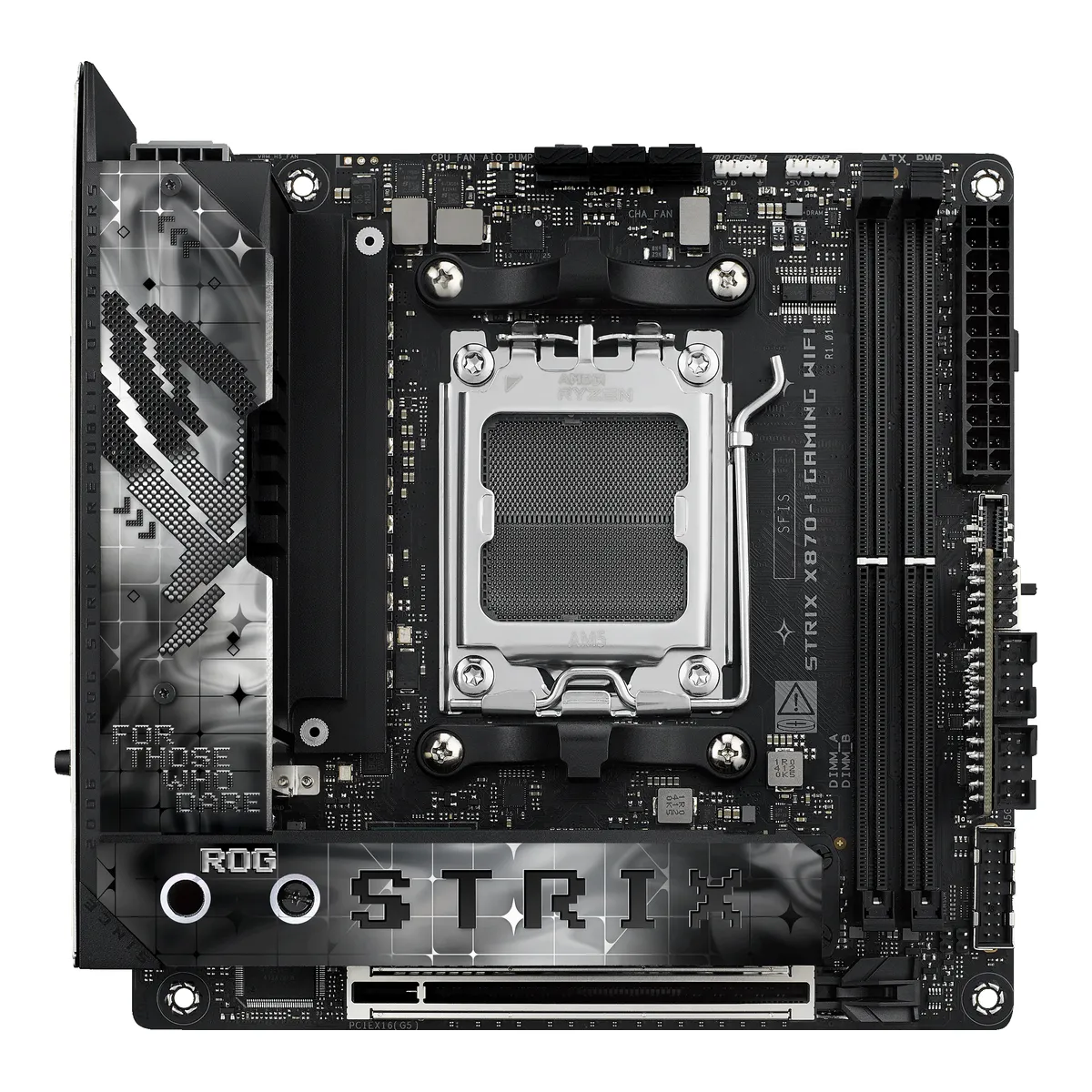
ASUSGaming motherboard
ROG STRIX X870-I GAMING WIFI
Released November 2024.4Press articlegdm.or.jp/crew/2024/1129/565462Read 16 October 2026Hermitage Akihabara, 2024-11-29: the ROG STRIX X870-I GAMING WIFI went on sale in Japan on 2024-11-29 at 69,980 yen including tax. AKIBA PC Hotline said on 2024-09-30 that ASUS had this board ready but not yet on sale. TechPorn's review sample was reviewed on 2024-11-10. Last checked 16 October 2026.
- CPU socket
- AM5
- Chipset
- AMD X870
- Form factor
- Mini-ITX
- M.2 slots
- 2
64 of 78 fields known.
At a glance
Ports
- 2 USB-C USB4
- USB-C USB 3.2 Gen 2
- 4 USB-A USB 3.2 Gen 2
- 3 USB-A USB 2.0
- HDMI 2.1
- Ethernet (RJ45)
- USB-C header
- USB 3 header (19-pin)
General
- Model numbers
- ROG STRIX X870-I GAMING WIFI, 90MB1IW0-M0EAY0, 90MB1IW0-M0AAY01Maker product pagerog.asus.com/motherboards/rog-strix/rog-strix-x870-i-gaming-wifi/specRead 16 October 2026The page names the model ROG STRIX X870-I GAMING WIFI. Part number 90MB1IW0-M0EAY0 is on Arvutitark, Paradigit and Geeknetic. The ASUS US eShop lists 90MB1IW0-M0AAY0.8Retailer pageeshop.asus.com/us/90mb1iw0-m0aay0-rog-strix-x870-i-gaming-wifi.htmlRead 16 October 2026The ASUS US eShop lists part number 90MB1IW0-M0AAY0 for the US market.
- GTIN / EAN
- 47113877403099Spec databasegeeknetic.es/comparador-precios/asus-rog-strix-x870-i-gaming-wifi/comprarRead 16 October 2026Identifiers: EAN 4711387740309 and MPN 90MB1IW0-M0EAY0.
- Announced
- Not available
- Predecessor
- Not available
- Successor
- Not available
- Launch price (US)
- $449.995Reviewlanoc.org/review/motherboards/rog-strix-x870-i-gaming-wifiRead 16 October 2026At the time of the review the board was selling for $449.99, against $439 at launch for the X670E-I. TechPorn also names $449.99. SHI lists MSRP $429.99 and $489.99 on different pages and the ASUS US eShop shows no price, so those are not used. US prices exclude sales tax.6Reviewtechporn.ph/asus-rog-strix-x870-i-gaming-wifi-reviewRead 16 October 2026Review of 2024-11-10: a price point of $449 USD, and $449.99 in the cons list.
- Launch price (EU)
- Not available
- Markets
- Not available
- Colours
- Not available
- Board revision
- Not available
Platform
- CPU socket
- AM51Maker product pagerog.asus.com/motherboards/rog-strix/rog-strix-x870-i-gaming-wifi/specRead 16 October 2026
- Chipset
- AMD X8701Maker product pagerog.asus.com/motherboards/rog-strix/rog-strix-x870-i-gaming-wifi/specRead 16 October 2026
- Supported processors
- AMD Ryzen 9000 Series, AMD Ryzen 8000 Series, AMD Ryzen 7000 Series1Maker product pagerog.asus.com/motherboards/rog-strix/rog-strix-x870-i-gaming-wifi/specRead 16 October 2026AM5 for Ryzen 9000, 8000 and 7000 Series. The page refers to the ASUS download center for the CPU support list. Read on 2026-10-16.
- CPU overclocking
- Yes2Maker product pagerog.asus.com/motherboards/rog-strix/rog-strix-x870-i-gaming-wifiRead 16 October 2026The page lists Dynamic OC Switcher, Core Flex and AI Overclocking for the CPU. AMD's chipset page also says an X870 board is fully overclockable.7Maker product pageamd.com/en/products/processors/chipsets/am5.htmlRead 16 October 2026AMD's chipset page says an AMD X870 motherboard is fully overclockable. This is the chip maker's page, not the board maker's.
Board
Front and side, drawn to scale.
Power delivery
- Power stage layout
- 10+2+12Maker product pagerog.asus.com/motherboards/rog-strix/rog-strix-x870-i-gaming-wifiRead 16 October 202610(110A)+2(110A)+1(80A) power stages: 10 Vcore, 2 SoC and 1 Misc.
- CPU core (Vcore) power stages
- 102Maker product pagerog.asus.com/motherboards/rog-strix/rog-strix-x870-i-gaming-wifiRead 16 October 202610 Vcore power stages (110A).
- Vcore power stage rating
- 110A2Maker product pagerog.asus.com/motherboards/rog-strix/rog-strix-x870-i-gaming-wifiRead 16 October 2026Each Vcore power stage is rated 110 A. The SoC stages are also 110 A and the Misc stage 80 A.
- VRM controller
- Not available
Memory
- Memory type
- DDR51Maker product pagerog.asus.com/motherboards/rog-strix/rog-strix-x870-i-gaming-wifi/specRead 16 October 2026
- Memory slots
- 21Maker product pagerog.asus.com/motherboards/rog-strix/rog-strix-x870-i-gaming-wifi/specRead 16 October 2026
- Max memory
- 128GB1Maker product pagerog.asus.com/motherboards/rog-strix/rog-strix-x870-i-gaming-wifi/specRead 16 October 20262 x DIMM slots, max. 128GB, DDR5. TechPorn's table says 96 GB, which conflicts with the maker and is not used.3Owner's manualdlcdnets.asus.com/pub/ASUS/mb/SocketAM5/ROG_STRIX_X870-I_GAMING_WIFI/E28633_ROG_STRIX_X870-I_GAMING_WIFI_EM_V3_WEB.pdfRead 16 October 2026Specifications summary: 2 x DIMM slots, max. 128GB, DDR5.
- Max memory speed (overclocked)
- 8,400MT/s1Maker product pagerog.asus.com/motherboards/rog-strix/rog-strix-x870-i-gaming-wifi/specRead 16 October 2026Up to 8400+MT/s (OC) with Ryzen 9000, 8600+ with Ryzen 8000 and 8000+ with Ryzen 7000. The Ryzen 9000 value is stored. The page says supported speeds and module counts vary with the CPU and memory configuration.2Maker product pagerog.asus.com/motherboards/rog-strix/rog-strix-x870-i-gaming-wifiRead 16 October 2026The overview page says DDR5 8600+ (OC), which is the Ryzen 8000 figure. The spec page and manual give 8400+ for Ryzen 9000, which is stored.3Owner's manualdlcdnets.asus.com/pub/ASUS/mb/SocketAM5/ROG_STRIX_X870-I_GAMING_WIFI/E28633_ROG_STRIX_X870-I_GAMING_WIFI_EM_V3_WEB.pdfRead 16 October 2026Specifications summary: 8400+MT/s (OC) with Ryzen 9000, 8600+ with Ryzen 8000 and 8000+ with Ryzen 7000.
- CUDIMM support
- Not available
Expansion slots
- Expansion slots
Physical slot Electrical lanes PCIe generation Connected to Count PCIe x16 16 5 CPU 1 - Full-length PCIe slots
- 1
- Fastest PCIe x16 slot generation
- 5
Storage
- M.2 storage slots
Slot PCIe generation PCIe lanes Connected to Longest drive Takes SATA drives Heatsink M.2_1 5 4 CPU M.2 2280 No Yes M.2_2 4 4 Chipset M.2 2280 No Yes Source1Maker product pagerog.asus.com/motherboards/rog-strix/rog-strix-x870-i-gaming-wifi/specRead 16 October 2026Ryzen 9000 and 7000: M.2_1 is Key M, type 2280, PCIe 5.0 x4. Ryzen 8000: M.2_1 runs PCIe 4.0 x4. Chipset: M.2_2 is Key M, type 2242/2260/2280, PCIe 4.0 x4. The page lists only PCIe modes for the slots, so SATA is false.2Maker product pagerog.asus.com/motherboards/rog-strix/rog-strix-x870-i-gaming-wifiRead 16 October 2026M.2 and chipset heatsinks are stacked over the chipset. The page says heatsinks cover every slot.5Reviewlanoc.org/review/motherboards/rog-strix-x870-i-gaming-wifiRead 16 October 2026Two M.2 slots stacked on top of each other, with heatsinks on the bottom, middle and top. A small fan cools both slots and the chipset.- M.2 slots
- 2
- PCIe 5.0 M.2 slots
- 1
- SATA ports
- 01Maker product pagerog.asus.com/motherboards/rog-strix/rog-strix-x870-i-gaming-wifi/specRead 16 October 2026The board's own connector list has no SATA port. The page lists 2 x SATA 6Gb/s ports under the included ROG FPS Card and says to install the card to support them. Stored as 0 on the board, since the field counts connectors on the board.3Owner's manualdlcdnets.asus.com/pub/ASUS/mb/SocketAM5/ROG_STRIX_X870-I_GAMING_WIFI/E28633_ROG_STRIX_X870-I_GAMING_WIFI_EM_V3_WEB.pdfRead 16 October 2026The specifications summary says to install the ROG FPS Card to support 2 x SATA 6Gb/s ports. The card is a separate board that plugs into two USB Type-C style connectors on the motherboard.5Reviewlanoc.org/review/motherboards/rog-strix-x870-i-gaming-wifiRead 16 October 2026The FPS Card has two SATA ports, the front panel header, two USB 2.0 headers, the CPU OV jumper and the alteration mode switch.
Rear ports
- Rear ports
Type Version Count Max link rate (Gbps) Thunderbolt or USB4 DP Alt Mode USB-C USB4 2 40 USB4 Yes USB-C USB 3.2 Gen 2 1 10 Not available Not available USB-A USB 3.2 Gen 2 4 10 Not available Not available USB-A USB 2.0 3 0.48 Not available Not available HDMI HDMI 2.1 1 Not available Not available Not available Ethernet (RJ45) Not available 1 2.5 Not available Not available Source1Maker product pagerog.asus.com/motherboards/rog-strix/rog-strix-x870-i-gaming-wifi/specRead 16 October 2026Back panel list: 2 USB4 (40Gbps) Type-C, 5 USB 10Gbps (4 Type-A and 1 Type-C, which serves the ROG STRIX HIVE II), 3 USB 2.0, 1 HDMI (4K@60Hz as specified in HDMI 2.1), 1 Intel 2.5Gb Ethernet, the Wi-Fi module and the BIOS FlashBack and Clear CMOS buttons. The back panel line says 3 USB 2.0 ports (2 x Type-A), while the rear USB list, the overview page and LanOC say 3 x Type-A, which is stored. ASUS names USB by speed, so 10Gbps is stored as USB 3.2 Gen 2. The USB4 ports support DisplayPort 1.4a output up to 4K@60Hz. There are no audio jacks and no S/PDIF on the rear panel. The footnote with a USB Type-C power delivery output of max. 5V/3A names no port, so it is not stored.5Reviewlanoc.org/review/motherboards/rog-strix-x870-i-gaming-wifiRead 16 October 2026Ten USB ports in all: three Type-C (two USB4 at 40 Gbps and one 10 Gbps) and three black USB 2.0 ports. The two USB4 ports also work as DisplayPort output. No rear audio connections.- Rear USB ports
- 10
- Rear USB-C ports
- 3
- Fastest rear USB port
- 40Gbps
- Thunderbolt
- No
Internal connectors
- Internal USB headers
Header Max data rate (Gbps) Headers Front ports served USB-C header 10 1 1 USB 3 header (19-pin) 5 1 2 Source1Maker product pagerog.asus.com/motherboards/rog-strix/rog-strix-x870-i-gaming-wifi/specRead 16 October 2026Front USB: 1 x USB 10Gbps connector (Type-C) and 1 x USB 5Gbps header for 2 ports. The 2 x USB 2.0 headers (3 ports) sit on the included ROG FPS Card, not on the board, so they are not stored.3Owner's manualdlcdnets.asus.com/pub/ASUS/mb/SocketAM5/ROG_STRIX_X870-I_GAMING_WIFI/E28633_ROG_STRIX_X870-I_GAMING_WIFI_EM_V3_WEB.pdfRead 16 October 2026Specifications summary: 1 x USB 10Gbps connector (Type-C) and 1 x USB 5Gbps header for 2 ports. The 2 USB 2.0 headers are on the ROG FPS Card.- Front USB-C header speed
- 10Gbps
- Fan headers
- 31Maker product pagerog.asus.com/motherboards/rog-strix/rog-strix-x870-i-gaming-wifi/specRead 16 October 2026CPU fan, AIO pump and 1 chassis fan header, 3 in all. LanOC counts the same three headers. All 4-pin.3Owner's manualdlcdnets.asus.com/pub/ASUS/mb/SocketAM5/ROG_STRIX_X870-I_GAMING_WIFI/E28633_ROG_STRIX_X870-I_GAMING_WIFI_EM_V3_WEB.pdfRead 16 October 2026Specifications summary: 1 CPU fan, 1 AIO pump and 1 chassis fan header.5Reviewlanoc.org/review/motherboards/rog-strix-x870-i-gaming-wifiRead 16 October 2026Three 4-pin PWM fan headers cover two fans and one AIO pump. These are all of the fan headers on the board.
Networking
- Ethernet controllers
- Intel I2265Reviewlanoc.org/review/motherboards/rog-strix-x870-i-gaming-wifiRead 16 October 2026Network test chart label: ROG Strix X870-I Gaming Wifi - Intel I226-V 2.5GbE NIC. ASUS writes only Intel 2.5Gb Ethernet. The suffix V is left out.
- Ethernet ports
- 1
- Ethernet speed
- 2.5Gbps
- Wi-Fi included
- Yes1Maker product pagerog.asus.com/motherboards/rog-strix/rog-strix-x870-i-gaming-wifi/specRead 16 October 20261 x Wi-Fi module is listed on the back panel.
- Wi-Fi standard
- Wi-Fi 71Maker product pagerog.asus.com/motherboards/rog-strix/rog-strix-x870-i-gaming-wifi/specRead 16 October 20262x2 Wi-Fi 7 (802.11be).
- Wi-Fi bands
- 2.4 GHz, 5 GHz, 6 GHz1Maker product pagerog.asus.com/motherboards/rog-strix/rog-strix-x870-i-gaming-wifi/specRead 16 October 2026Supports 2.4/5/6GHz. The 6 GHz band and bandwidth vary by country.
Audio
- Audio codec
- Not available
- DAC chip
- ESS ES9260Q1Maker product pagerog.asus.com/motherboards/rog-strix/rog-strix-x870-i-gaming-wifi/specRead 16 October 2026The Audio section lists the ESS SABRE9260Q DAC under ROG Strix Hive II Audio Features. The DAC is in the ROG STRIX HIVE II module that ships in the box and connects by USB Type-C. The board itself has no audio codec, no rear audio jacks and no front audio header. SABRE9260Q is written as the part number ES9260Q.5Reviewlanoc.org/review/motherboards/rog-strix-x870-i-gaming-wifiRead 16 October 2026The board has no audio at all. Audio runs through the included ROG Hive II.6Reviewtechporn.ph/asus-rog-strix-x870-i-gaming-wifi-reviewRead 16 October 2026Spec table: DAC ESS SABRE9260Q. The review says the HIVE II uses the ESS SABRE9260Q chip.
Features
- BIOS flashback
- Yes1Maker product pagerog.asus.com/motherboards/rog-strix/rog-strix-x870-i-gaming-wifi/specRead 16 October 2026BIOS FlashBack button on the back panel.
- Clear CMOS button (rear)
- Yes1Maker product pagerog.asus.com/motherboards/rog-strix/rog-strix-x870-i-gaming-wifi/specRead 16 October 20261 x Clear CMOS button on the back panel list.3Owner's manualdlcdnets.asus.com/pub/ASUS/mb/SocketAM5/ROG_STRIX_X870-I_GAMING_WIFI/E28633_ROG_STRIX_X870-I_GAMING_WIFI_EM_V3_WEB.pdfRead 16 October 2026The specifications summary lists a Clear CMOS button on the back panel.
- POST code display
- No1Maker product pagerog.asus.com/motherboards/rog-strix/rog-strix-x870-i-gaming-wifi/specRead 16 October 2026Special features list Q-LED with four status LEDs (CPU, DRAM, VGA, boot device). No Q-Code display is listed.3Owner's manualdlcdnets.asus.com/pub/ASUS/mb/SocketAM5/ROG_STRIX_X870-I_GAMING_WIFI/E28633_ROG_STRIX_X870-I_GAMING_WIFI_EM_V3_WEB.pdfRead 16 October 2026The specifications summary lists only Q-LED status lights.
- Power button on the board
- No1Maker product pagerog.asus.com/motherboards/rog-strix/rog-strix-x870-i-gaming-wifi/specRead 16 October 2026The board has only a 2-pin Power Button header. The power button is on the ROG STRIX HIVE II, a separate module that connects to the board with a USB Type-C cable, so it is not a button on the board or a fitted module.3Owner's manualdlcdnets.asus.com/pub/ASUS/mb/SocketAM5/ROG_STRIX_X870-I_GAMING_WIFI/E28633_ROG_STRIX_X870-I_GAMING_WIFI_EM_V3_WEB.pdfRead 16 October 2026Miscellaneous connectors list a 2-pin Power Button header. The ROG STRIX HIVE II has the power button.
- Dual BIOS
- No1Maker product pagerog.asus.com/motherboards/rog-strix/rog-strix-x870-i-gaming-wifi/specRead 16 October 2026BIOS is a single 256 Mb flash ROM. Dual BIOS is not stated.3Owner's manualdlcdnets.asus.com/pub/ASUS/mb/SocketAM5/ROG_STRIX_X870-I_GAMING_WIFI/E28633_ROG_STRIX_X870-I_GAMING_WIFI_EM_V3_WEB.pdfRead 16 October 2026Specifications summary: 256 Mb Flash ROM, UEFI AMI BIOS. Dual BIOS is not stated.
- Pre-installed I/O shield
- Yes1Maker product pagerog.asus.com/motherboards/rog-strix/rog-strix-x870-i-gaming-wifi/specRead 16 October 2026Special features list: Pre-mounted I/O shield.
- Tool-free features
- Tool-free M.2 latch, PCIe slot release, Push-on antenna connector1Maker product pagerog.asus.com/motherboards/rog-strix/rog-strix-x870-i-gaming-wifi/specRead 16 October 2026ASUS Q-Design: M.2 Q-Latch, PCIe Slot Q-Release Slim and Q-Antenna. LanOC says the M.2 heatsink cover is held by two screws.5Reviewlanoc.org/review/motherboards/rog-strix-x870-i-gaming-wifiRead 16 October 2026The M.2 sandwich cover is held by two screws. The M.2 Q-Latch is tool-free. PCIe Q-Release Slim and snap-on antenna connectors are described.
Measured
We could not find any of these 3 fields. Show them
- VRM temperature under CPU load
- Not available
- Power draw idle
- Not available
- Power draw CPU stress
- Not available
In the box
- In the box
- 1 x Panel cable, 1 x ROG USB2.0 splitter cable, 2 x SATA 6Gb/s cables, 1 x ROG FPS Card, 1 x ROG STRIX HIVE II, 1 x USB Type-C power connection cable, 1 x ASUS WiFi Q-Antenna, 1 x Cable ties package, 1 x M.2 Q-Latch package, 1 x ROG key chain, 1 x ROG Strix stickers, 1 x M.2 rubber package, 1 x Quick start guide1Maker product pagerog.asus.com/motherboards/rog-strix/rog-strix-x870-i-gaming-wifi/specRead 16 October 2026Accessories list on the specification page, the same as the manual's package contents.3Owner's manualdlcdnets.asus.com/pub/ASUS/mb/SocketAM5/ROG_STRIX_X870-I_GAMING_WIFI/E28633_ROG_STRIX_X870-I_GAMING_WIFI_EM_V3_WEB.pdfRead 16 October 2026Package contents: panel cable, ROG USB2.0 splitter cable, 2 SATA cables, ROG FPS Card, ROG Strix Hive II, USB Type-C power connection cable, WiFi Q-Antenna, cable ties, M.2 Q-Latch package, ROG key chain, ROG Strix stickers, M.2 rubber package, quick start guide.
Links
- Product page
- rog.asus.com/motherboards/rog-strix/rog-strix-x870-i-gaming-wifi2Maker product pagerog.asus.com/motherboards/rog-strix/rog-strix-x870-i-gaming-wifiRead 16 October 2026
- Spec sheet
- rog.asus.com/motherboards/rog-strix/rog-strix-x870-i-gaming-wifi/spec1Maker product pagerog.asus.com/motherboards/rog-strix/rog-strix-x870-i-gaming-wifi/specRead 16 October 2026
- Manual
- dlcdnets.asus.com/pub/ASUS/mb/SocketAM5/ROG_STRIX_X870-I_GAMING_WIFI/E28633_ROG_STRIX_X870-I_GAMING_WIFI_EM_V3_WEB.pdf3Owner's manualdlcdnets.asus.com/pub/ASUS/mb/SocketAM5/ROG_STRIX_X870-I_GAMING_WIFI/E28633_ROG_STRIX_X870-I_GAMING_WIFI_EM_V3_WEB.pdfRead 16 October 2026ASUS user's manual E28633, English edition, Revised Edition V3, August 2026.
- EPREL registration number
- Not available
Warranty
Compare with
Pick a motherboard to see both side by side. Differences are marked yellow.
Sources
We read 10 sources for this motherboard. The numbers match the markers in the sheet.
- Maker product pagerog.asus.com/motherboards/rog-strix/rog-strix-x870-i-gaming-wifi/spec
- Maker product pagerog.asus.com/motherboards/rog-strix/rog-strix-x870-i-gaming-wifi
- Press articlegdm.or.jp/crew/2024/1129/565462
- Maker product pageamd.com/en/products/processors/chipsets/am5.html
See a wrong value? Tell us and name the field.