Monitors / Compare
ASUS ROG Swift OLED PG27UCDM vs ASUS ROG Swift OLED PG32UCDM
Product A: ASUS
118 of 172 known
Change ASUS ROG Swift OLED PG27UCDM
Compare the ASUS ROG Swift OLED PG32UCDM with
Product B: ASUS
122 of 172 known ASUS ROG Strix OLED XG27UCDMG
 Dell Alienware AW2725Q
 MSI MPG 272URX QD-OLED
 BenQ MOBIUZ EX271UZ
 Samsung Odyssey OLED G8 G81SF 27"
 Dell Alienware AW3425DW
 MSI MPG 341CQPX QD-OLED
 Dell Alienware AW3225QF
 MSI MPG 321CURX QD-OLED
 Samsung Odyssey OLED G8 G80SH 27"
 AOC AGON PRO AG276QZD2
 ASUS ROG Swift OLED PG32UCDM Gen3
Change ASUS ROG Swift OLED PG32UCDM
Compare the ASUS ROG Swift OLED PG27UCDM with
ASUS ROG Strix OLED XG27UCDMGDell Alienware AW2725QMSI MPG 272URX QD-OLEDBenQ MOBIUZ EX271UZSamsung Odyssey OLED G8 G81SF 27"Dell Alienware AW3425DWMSI MPG 341CQPX QD-OLEDDell Alienware AW3225QFMSI MPG 321CURX QD-OLEDSamsung Odyssey OLED G8 G80SH 27"AOC AGON PRO AG276QZD2ASUS ROG Swift OLED PG32UCDM Gen355 of 164 fields differ
- 38 different values
- 17 known for one only
- 67 the same
- 42 missing for both
Biggest differences
Each bar uses the scale of all 179 monitors.
- Power use HDR (EU label)Lower is betterA: 36WB: 58.5WROG Swift OLED PG27UCDM is 22.5 W lower.
- Power use SDR (EU label)Lower is betterA: 25.4WB: 33.1WROG Swift OLED PG27UCDM is 7.7 W lower.
- Pixel densityA: 163.2ppiB: 139.9ppiROG Swift OLED PG27UCDM is 23.3 ppi higher.
Refresh rate per resolution
The best rate over any port. Bars run from 0 to 1200 Hz.
3840 × 2160Native for both
A240Hz
B240Hz
Size, drawn to scale
Front and side. Solid lines show the stand at its lowest. Dashed lines show it at its highest.
- AROG Swift OLED PG27UCDM: 610.3 × 369.2 mm
- BROG Swift OLED PG32UCDM: 718 × 430 mm
Weight
0 to 15 kg
Weight with stand
A7.62kg
B8.8kg
Weight without stand
A5kg
B6kg
Box weight
A12.4kg
B15.2kg
All 172 fields
Every value links to where we found it.
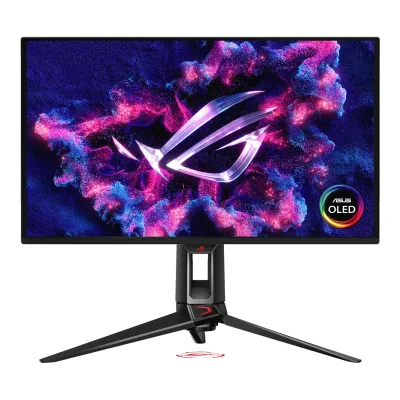
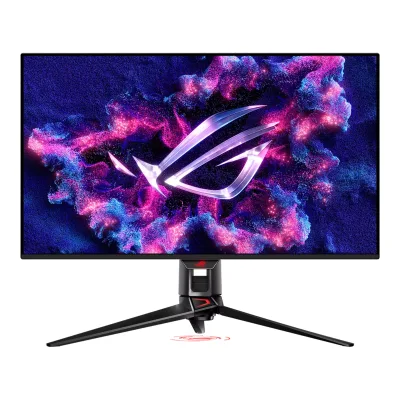
General
3 of 8 differ
Series
Model numbers
PG27UCDM, 90LM0B30-B019711Maker product pagerog.asus.com/monitors/27-to-31-5-inches/rog-swift-oled-pg27ucdm/specRead 5 October 2026Model heading establishes PG27UCDM. Part number comes from the separately cited ASUS datasheet.4Maker spec sheet (PDF)gzhls.at/blob/ldb/8/d/d/9/3249322c8dac04e25c37cdf4197f284bead7.pdfRead 5 October 2026ASUS datasheet page 1: product number 90LM0B30-B01971 for ROG Swift PG27UCDM. No sales region inferred from suffix.
GTIN / EAN
Announced
Not available
Status
Not available
Predecessor
Not available
Not available
Successor
Not available
ASUS ROG Swift OLED PG32UCDMR8Reviewnotebookcheck.net/Asus-reveals-ROG-Swift-OLED-PG32UCDMR-with-three-major-upgrades-over-PG32UCDM-gaming-monitor.1021350.0.htmlRead 23 October 2026Notebookcheck says Asus presented the PG32UCDMR as a replacement for the PG32UCDM.9Reviewtftcentral.co.uk/news/asus-to-refresh-their-popular-32-qd-oled-monitor-with-the-rog-swift-pg32ucdmrRead 23 October 2026TFTCentral calls the PG32UCDMR a refreshed and updated version of the PG32UCDM and calls the PG32UCDM its predecessor.
Launch price (US)
Launch price (EU)
Not available
Not available
Markets
Not available
Not available
Colours
Segment
Display
6 of 12 differ
Screen size
Viewable screen diagonal
Not available
Native resolution
Aspect ratio
Pixel density
163.2ppi
139.9ppi
Active display area
Curved
Curvature radius
Not available
Not available
Screen surface
Anti-reflection coating
Touchscreen
Panel
6 of 31 differ
Panel type
Panel type (as published)
Backlight
Local dimming
Not available
Not available
Dimming zones
Not available
Not available
Panel maker
Panel part number
Not available
Not available
Panel generation
Subpixel layout
Not available
Colour depth
Colour depth method
Displayable colours
sRGB coverage
Not available
Not available
DCI-P3 coverage
Adobe RGB coverage
Not available
Not available
Rec. 2020 coverage
Not available
Not available
NTSC coverage
Not available
Not available
Factory calibrated
Claimed Delta E
Paper calibration report in box
Not available
Hardware calibration support
Not available
Static contrast ratio
Brightness (typical, SDR)
250nits2Owner's manualdlcdnets.asus.com/pub/ASUS/LCD%20Monitors/PG32UCDM/PG32UCDM_English.pdfRead 5 October 2026Printed page 3-13 maker brightness. Launch specifies 250 cd/m² at 100% APL.5Press releasepress.asus.com/news/press-releases/rog-swift-oled-pg32ucdm-gaming-monitor-availabilityRead 5 October 2026Launch specs explicitly 250 nits at 100% APL, distinct from peak 1000 nits.
Brightness (maker minimum)
Not available
Not available
Peak brightness (HDR)
HDR peak test window
Not available
Not available
Full-screen brightness
Not available
HDR formats
HDR certification
Viewing angle (horizontal)
Viewing angle (vertical)
Refresh rate and motion
7 of 22 differ
Refresh rate per resolution and port
AASUS ROG Swift OLED PG27UCDM
| Resolution | HDMI 2.1 | DisplayPort 2.1a UHBR20, 1.4 | USB-C |
|---|---|---|---|
| 3840 × 2160Native | 240Hz | 240Hz | 240Hz |
BASUS ROG Swift OLED PG32UCDM
| Resolution | HDMI 2.1 | DisplayPort 1.4 | USB-C | Port not listed |
|---|---|---|---|---|
| 3840 × 2160Native | 240Hz | 240Hz | 144HzDSC | 120Hz4:2:2 |
Source2Owner's manualdlcdnets.asus.com/pub/ASUS/LCD%20Monitors/PG32UCDM/PG32UCDM_English.pdfRead 5 October 2026Printed page 3-9 Type-C Bandwidth USB 3.2 explicitly supports up to 3840 x 2160 at 144 Hz with DSC enabled. USB 2.0 is selectable but its maximum is not specified. Scan range and preset timings do not establish a maximum.4Reviewtftcentral.co.uk/reviews/asus-rog-swift-pg32ucdmRead 5 October 2026Gaming maximum-refresh table explicitly native DisplayPort 240 Hz and HDMI 240 Hz. Exact bit depth, chroma and DSC conditions for those rows are unstated. DSR/DLDSR test explicitly DSC-off maximum 120 Hz at 4:2:2, with input and bit depth unknown. USB-C 144 Hz row applies only when Type-C Bandwidth is USB 3.2 and DSC enabled, per manual. It is not unconditional USB-C maximum. USB 2.0 higher maximum unproved and omitted. Lower-resolution maxima not inferred from preset timings. Console 4K 120 Hz is platform limit, not input maximum.
Max refresh rate
240Hz
240Hz
Max refresh rate at native resolution
240Hz
240Hz
Max refresh rate over DisplayPort
240Hz
240Hz
Max refresh rate over HDMI
240Hz
240Hz
Max refresh rate over USB-C
240Hz
144Hz
Max refresh rate at 10-bit
120Hz
Not available
Native refresh rate
Overclocked refresh rate
Not available
Not available
Dual mode
Not available
Minimum fixed refresh rate
Not available
Not available
Adaptive sync technologies
FreeSync Premium Pro, G-SYNC Compatible, VESA AdaptiveSync Display, HDMI VRR1Maker product pagerog.asus.com/monitors/27-to-31-5-inches/rog-swift-oled-pg27ucdm/specRead 5 October 2026Features and Certificate name FreeSync Premium Pro, G-SYNC Compatible and VESA AdaptiveSync Display 240Hz. HDMI VRR is separately verified by TFTCentral. Its early review says FreeSync Premium, superseded here by current maker Premium Pro claim.6Measurementtftcentral.co.uk/reviews/asus-rog-swift-pg27ucdmRead 5 October 2026Console Gaming table marks HDMI-VRR supported. Early review names FreeSync Premium. Current maker names Premium Pro, which takes precedence.
FreeSync Premium Pro, G-SYNC Compatible, VESA AdaptiveSync Display4Reviewtftcentral.co.uk/reviews/asus-rog-swift-pg32ucdmRead 5 October 2026VRR capabilities table names FreeSync Premium Pro, G-SYNC Compatible and AdaptiveSync Display 240. HDMI VRR is tested on console separately. No native G-SYNC module claimed.
VRR range per port
AASUS ROG Swift OLED PG27UCDM
| Input | Min (Hz) | Max (Hz) |
|---|---|---|
| HDMI | 48 | 240 |
| DisplayPort | 48 | 240 |
BASUS ROG Swift OLED PG32UCDM
| Min (Hz) | Max (Hz) |
|---|---|
| 48 | 240 |
Low framerate compensation
Not available
Not available
Response time (maker GtG claim)
Response time (maker MPRT claim)
Not available
Not available
Overdrive settings
Not available
Not available
Motion blur reduction
Blur-reduction technology
Blur reduction works with VRR
Flicker-free (claimed)
Black frame insertion
Measured
5 of 12 differ
Input lag at maximum refresh rate
Not available
Input lag at 60 Hz
Not available
Average response time (measured)
Overshoot (measured)
Not available
Not available
Contrast ratio (measured)
Not available
Not available
SDR brightness (measured)
HDR brightness in a real scene (measured)
Not available
Not available
PWM flicker frequency (measured)
Not available
Not available
VRR range (measured)
Not available
Not available
Colour accuracy (measured Delta E)
Gray uniformity (measured)
Not available
Not available
Reflections (measured)
Not available
Not available
Connectivity
6 of 19 differ
Video inputs
AASUS ROG Swift OLED PG27UCDM
| Type | Version | Count | Max bandwidth (Gbps) |
|---|---|---|---|
| DisplayPort | 2.1a UHBR20 | 1 | 80 |
| HDMI | 2.1 | 2 | 48 |
| USB-C | Not available | 1 | Not available |
BASUS ROG Swift OLED PG32UCDM
| Type | Version | Count | Max bandwidth (Gbps) | DSC | HDCP |
|---|---|---|---|---|---|
| DisplayPort | 1.4 | 1 | Not available | Yes | 2.2 |
| HDMI | 2.1 | 2 | 48 | Not available | 2.2 |
| USB-C | Not available | 1 | Not available | Yes | Not available |
Source1Maker product pagerog.asus.com/us/monitors/27-to-31-5-inches/rog-swift-oled-pg32ucdm/specRead 5 October 2026Maker lists DP 1.4 DSC, HDMI 2.1 FRL and global HDCP 2.2. Manual page 3-9 independently proves Type-C DSC capability. Its DisplayPort version remains unknown. TFT expressly identifies HDMI 48 Gbps. HDMI DSC capability is not inferred.2Owner's manualdlcdnets.asus.com/pub/ASUS/LCD%20Monitors/PG32UCDM/PG32UCDM_English.pdfRead 5 October 2026Printed page 1-3 USB-C DisplayPort Alt Mode and page 3-9 native 144 Hz with DSC enabled prove Type-C DSC capability.4Reviewtftcentral.co.uk/reviews/asus-rog-swift-pg32ucdmRead 5 October 2026Console Gaming explicitly identifies two full bandwidth 48 Gbps HDMI 2.1 ports. No PG32UCDMR data borrowed.
HDMI ports
2
2
DisplayPort ports
1
1
Highest HDMI version
2.1
2.1
Highest DisplayPort version
2.1a UHBR20
1.4
HDMI features
CEC, VRR, ALLM3Owner's manualdlcdnets.asus.com/pub/ASUS/LCD%20Monitors/PG27UCDM/ASUS_PG27UCDM_UM-EN.pdfRead 5 October 2026System Setup 3-15: ASUS Power Sync controls CEC source power. TFTCentral Console Gaming verifies HDMI VRR and ALLM.6Measurementtftcentral.co.uk/reviews/asus-rog-swift-pg27ucdmRead 5 October 2026Console Gaming table explicitly marks HDMI-VRR and Auto Low Latency Mode (ALLM) supported. CEC separately sourced to manual.
VRR, CEC2Owner's manualdlcdnets.asus.com/pub/ASUS/LCD%20Monitors/PG32UCDM/PG32UCDM_English.pdfRead 5 October 2026Printed page 3-11 HDMI CEC requires MCM103/303 or newer firmware. TFT confirms HDMI VRR console support. ALLM, QMS and eARC are not inferred.4Reviewtftcentral.co.uk/reviews/asus-rog-swift-pg32ucdmRead 5 October 2026Console Gaming explicitly tests Xbox HDMI VRR. Current manual CEC support requires firmware released after initial February review.
USB-C video (DP Alt Mode)
USB-C power delivered
Thunderbolt
Not available
Not available
USB upstream ports
AASUS ROG Swift OLED PG27UCDM
| Connector | USB version | Count |
|---|---|---|
| USB-B | 3.2 Gen 1 | 1 |
| USB-C | Not available | 1 |
BASUS ROG Swift OLED PG32UCDM
| Connector | USB version | Count |
|---|---|---|
| USB-C | 3.2 Gen 1 | 1 |
| USB-B | 3.2 Gen 1 | 1 |
USB downstream hub ports
AASUS ROG Swift OLED PG27UCDM
| Connector | USB version | Count |
|---|---|---|
| USB-A | 3.2 Gen 1 | 3 |
BASUS ROG Swift OLED PG32UCDM
| Connector | USB version | Count |
|---|---|---|
| USB-A | 3.2 Gen 1 | 3 |
KVM switch
Daisy chain (MST)
Not available
Not available
Ethernet
Not available
3.5 mm headphone output
Yes1Maker product pagerog.asus.com/monitors/27-to-31-5-inches/rog-swift-oled-pg27ucdm/specRead 5 October 2026I/O Ports: Earphone jack Yes. ASUS datasheet specifies 3.5 mm.4Maker spec sheet (PDF)gzhls.at/blob/ldb/8/d/d/9/3249322c8dac04e25c37cdf4197f284bead7.pdfRead 5 October 2026Connectivity page 2: Kopfhörer-Anschluss 3.5 mm.
3.5 mm microphone input
Optical out
Picture in picture
Picture by picture
Smart features
None of 4 known
Smart platform
Not available
Not available
Wi-Fi
Not available
Not available
Bluetooth
Not available
Not available
Remote control
Not available
Not available
Audio and camera
0 of 5 differ
Speakers
Number of speakers
Not available
Not available
Speaker power per channel
Not available
Not available
Webcam
Microphone
Not available
Not available
Ergonomics and controls
5 of 15 differ
Stand height adjustment
Tilt
Swivel
Pivot
Removable stand
VESA mount
VESA adapter needed
Security lock slot
On-screen menu controls
Joystick, Buttons, Software2Owner's manualdlcdnets.asus.com/pub/ASUS/LCD%20Monitors/PG32UCDM/PG32UCDM_English.pdfRead 5 October 2026Printed page 1-2 five-way joystick and two physical buttons. Page 3-3 DisplayWidget Center and producer sheet page 1 confirm software setting controls.3Maker spec sheet (PDF)gzhls.at/blob/ldb/b/f/2/c/eaa919c22476b883717e9bf149455b15651f.pdfRead 5 October 2026Producer sheet page 1 says DisplayWidget Center configures monitor settings by mouse.
Desktop software
User firmware updates
Ambient light sensor
Presence sensor
RGB lighting
Gaming menu features
FPS Counter, Crosshair, Dynamic Crosshair, Sniper, Timer, Stopwatch, Display Alignment, GameVisual, Shadow Boost, Aspect Control3Owner's manualdlcdnets.asus.com/pub/ASUS/LCD%20Monitors/PG27UCDM/ASUS_PG27UCDM_UM-EN.pdfRead 5 October 2026GamePlus 1.3.3 and Gaming 3-2 to 3-3 list these functions. Image 3-5 names Aspect Control.
FPS Counter, Crosshair, Sniper, Sniper Night Vision, Timer, Stopwatch, Display Alignment, Shadow Boost, 24.5-inch Simulation, 27-inch Simulation2Owner's manualdlcdnets.asus.com/pub/ASUS/LCD%20Monitors/PG32UCDM/PG32UCDM_English.pdfRead 5 October 2026Printed pages 1-4 and 1-5 GamePlus, page 3-2 Shadow Boost, and page 3-5 aspect simulation modes. Their preset resolutions do not establish accepted refresh maxima.
OLED care
1 of 3 differ
OLED care
Screen Saver, Pixel Cleaning, Pixel Cleaning Reminder, Screen Move, Auto Logo Brightness, Neo Proximity Sensor, OLED Usage Info3Owner's manualdlcdnets.asus.com/pub/ASUS/LCD%20Monitors/PG27UCDM/ASUS_PG27UCDM_UM-EN.pdfRead 5 October 2026OLED Care 3-8 to 3-9 names these options. Latest manual used rather than older review menu screenshots.
Screen Saver, Pixel Cleaning, Pixel Cleaning Reminder, Screen Move, Auto Logo Brightness, Proximity Sensor2Owner's manualdlcdnets.asus.com/pub/ASUS/LCD%20Monitors/PG32UCDM/PG32UCDM_English.pdfRead 5 October 2026Printed pages 3-10 and 3-11 name OLED protections. Pixel cleaning takes about six minutes. Proximity uses a physical sensor, distinct from ambient light adaptation.
Burn-in covered by warranty
Burn-in warranty length
Dimensions and weight
6 of 7 differ
Dimensions with stand
Width610.3Height (lowest)439.5Height (highest)549.5Depth218.8mm(24 × 17.3 to 21.6 × 8.6 in)3Owner's manualdlcdnets.asus.com/pub/ASUS/LCD%20Monitors/PG27UCDM/ASUS_PG27UCDM_UM-EN.pdfRead 5 October 2026Specifications 3-16 explicitly labels lowest 610.3 x 439.5 x 218.8 mm and highest 610.3 x 549.5 x 218.8 mm.
Width718Height (lowest)499Height (highest)579Depth274mm(28.3 × 19.6 to 22.8 × 10.8 in)2Owner's manualdlcdnets.asus.com/pub/ASUS/LCD%20Monitors/PG32UCDM/PG32UCDM_English.pdfRead 5 October 2026Printed page 3-13 direct minimum and maximum metric dimensions. Estimated maker figures. Height is not derived from stand travel.
Dimensions without stand
Width610.3Height369.2Depth70.5mm(24 × 14.5 × 2.8 in)3Owner's manualdlcdnets.asus.com/pub/ASUS/LCD%20Monitors/PG27UCDM/ASUS_PG27UCDM_UM-EN.pdfRead 5 October 2026Specifications 3-16: 610.3 x 369.2 x 70.5 mm without stand. Matches webpage and ASUS datasheet. Outline 3-18 instead marks 66.5 mm depth and 352.4 mm height, an unresolved drawing conflict.
Width718Height430Depth74mm(28.3 × 16.9 × 2.9 in)2Owner's manualdlcdnets.asus.com/pub/ASUS/LCD%20Monitors/PG32UCDM/PG32UCDM_English.pdfRead 5 October 2026Printed page 3-13 direct metric body dimensions. Estimated specification.
Stand footprint
Not available
Not available
Weight with stand
Weight without stand
Box dimensions
Width490Height894Depth188mm(19.3 × 35.2 × 7.4 in)3Owner's manualdlcdnets.asus.com/pub/ASUS/LCD%20Monitors/PG27UCDM/ASUS_PG27UCDM_UM-EN.pdfRead 5 October 2026Specifications 3-17 explicitly labels 490 x 894 x 188 mm (W x H x D). Webpage and datasheet reverse first two axes and give 896 mm instead of 894 mm. Manual published orientation retained.
Width868Height514Depth238mm(34.2 × 20.2 × 9.4 in)2Owner's manualdlcdnets.asus.com/pub/ASUS/LCD%20Monitors/PG32UCDM/PG32UCDM_English.pdfRead 5 October 2026Printed page 3-13 package width, height and depth in millimetres.
Box weight
Power
7 of 13 differ
Power supply
Adapter rating
Not available
Input voltage
Power use (typical)
Not available
Not available
Power use (max)
Not available
Not available
Power use SDR (EU label)
Power use HDR (EU label)
Standby power
Off-mode power
EU energy class SDR
EU energy class HDR
Energy per 1000 h SDR
Not available
Certifications
1 of 9 differ
VESA ClearMR
Not available
Not available
VESA AdaptiveSync Display
TÜV certifications
TÜV Flicker-free, TÜV Low Blue Light (Hardware Solution)1Maker product pagerog.asus.com/monitors/27-to-31-5-inches/rog-swift-oled-pg27ucdm/specRead 5 October 2026Certificate lists both exact names.
Low blue light
ENERGY STAR
Not available
Not available
TCO Certified
Not available
Not available
EPEAT
Not available
Not available
Colour certifications
Not available
Not available
Other certifications
In the box
2 of 2 differ
In the box
DisplayPort 2.1 (DP80) cable, HDMI Ultra High Speed Cable, Microfiber cloth, Power cord, Quick start guide, ROG pouch, ROG sticker, USB 3.2 cable, USB-C cable, VESA mount kit, Warranty Card1Maker product pagerog.asus.com/monitors/27-to-31-5-inches/rog-swift-oled-pg27ucdm/specRead 5 October 2026Accessories vary by region. Manual 1-1 calls USB-C, HDMI, DP and USB cables optional. No paper color-calibration report is listed.
Monitor, Stand arm, Stand base, Power adapter, Power cord, DisplayPort cable, Quick start guide, ROG pouch, ROG sticker, Warranty card, ROG wall mount kit1Maker product pagerog.asus.com/us/monitors/27-to-31-5-inches/rog-swift-oled-pg32ucdm/specRead 5 October 2026Current US accessories list DisplayPort cable, adapter, power cord, quick start guide, pouch, sticker and warranty card. HDMI and USB cables are not assumed.2Owner's manualdlcdnets.asus.com/pub/ASUS/LCD%20Monitors/PG32UCDM/PG32UCDM_English.pdfRead 5 October 2026Printed pages 1-1 and 3-14 list core contents including wall mount kit. HDMI, USB-C and USB A-to-B cables vary by region and are not stored as included. Current US page expressly lists a DisplayPort cable, despite the generic manual optional label. Welcome card and envelope omitted because package coverage varies.
Cables included
AASUS ROG Swift OLED PG27UCDM
| Type |
|---|
| DisplayPort 2.1 (DP80) cable |
| HDMI Ultra High Speed Cable |
| Power cord |
| USB 3.2 cable |
| USB-C cable |
BASUS ROG Swift OLED PG32UCDM
Not availableWarranty
0 of 2 differ
Manufacturer warranty (source market)
Dead pixel policy
Not available
Not available
Links
Not compared
Product page
Spec sheet
rog.asus.com/monitors/27-to-31-5-inches/rog-swift-oled-pg27ucdm/spec1Maker product pagerog.asus.com/monitors/27-to-31-5-inches/rog-swift-oled-pg27ucdm/specRead 5 October 2026Exact-model technical specifications.
gzhls.at/blob/ldb/b/f/2/c/eaa919c22476b883717e9bf149455b15651f.pdf3Maker spec sheet (PDF)gzhls.at/blob/ldb/b/f/2/c/eaa919c22476b883717e9bf149455b15651f.pdfRead 5 October 2026Public three-page ASUS technical sheet for the exact European SKU. ASUS producer footer checked. Its incorrect USB hub direction, USB version and 11 cm height travel entries are excluded.
Manual
dlcdnets.asus.com/pub/ASUS/LCD%20Monitors/PG27UCDM/ASUS_PG27UCDM_UM-EN.pdf3Owner's manualdlcdnets.asus.com/pub/ASUS/LCD%20Monitors/PG27UCDM/ASUS_PG27UCDM_UM-EN.pdfRead 5 October 2026User Guide, English edition. Correct filename uses UM-EN.
dlcdnets.asus.com/pub/ASUS/LCD%20Monitors/PG32UCDM/PG32UCDM_English.pdf2Owner's manualdlcdnets.asus.com/pub/ASUS/LCD%20Monitors/PG32UCDM/PG32UCDM_English.pdfRead 5 October 2026Current updated official manual fully read. Cover retains First Edition February 2024, but contents include Dolby Vision MCM105/305+ and CEC MCM103/303+. This is the updated file without the ASUS_ prefix.
EPREL registration number
Both are also in the API. Back to all monitors.