Gaming / Mice
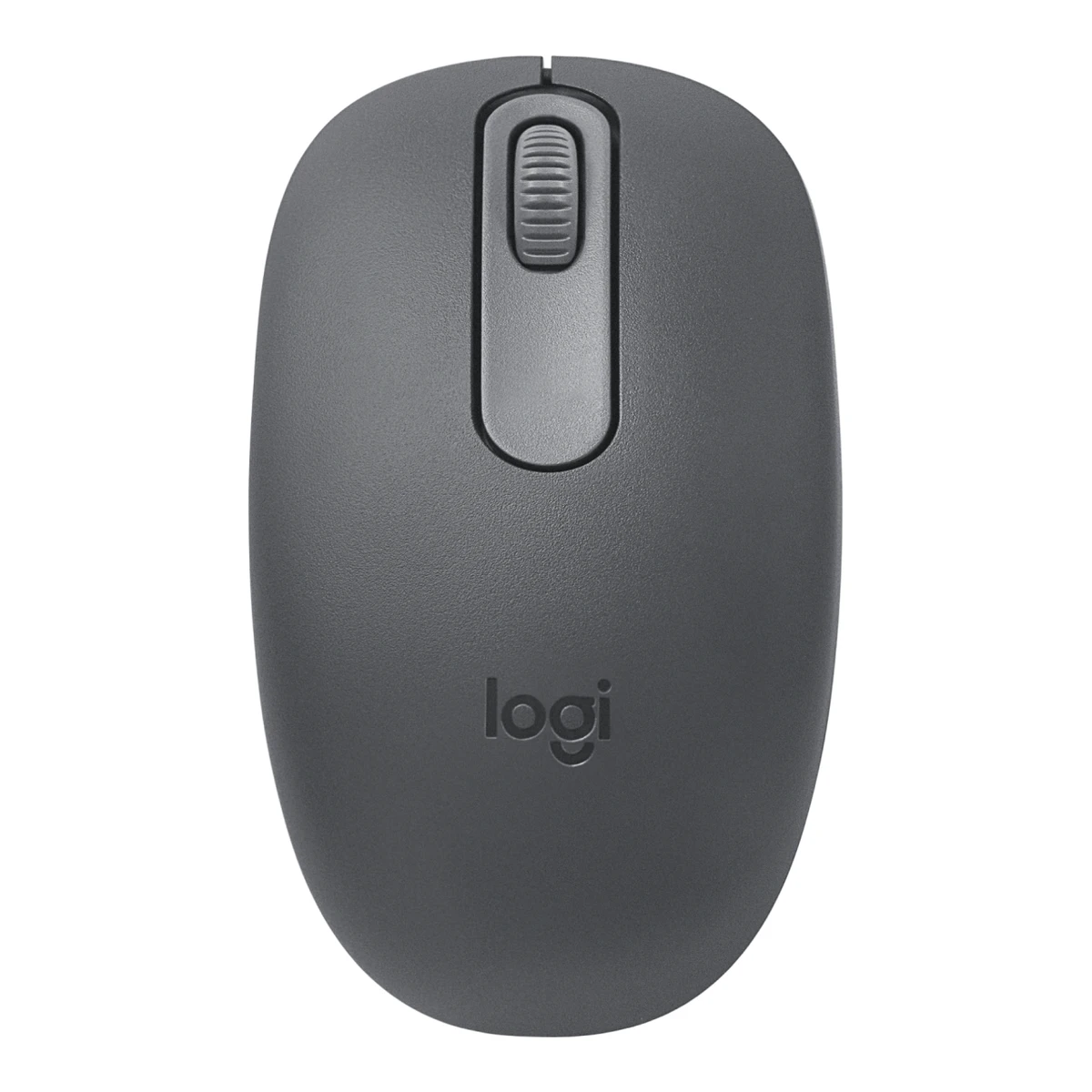
LogitechTravel mouse
M196 Bluetooth Mouse
Released October 2024.7Press articlegizmochina.com/2024/10/24/logitech-expands-wireless-portfolio-with-m196-bluetooth-mouse-in-indiaRead 16 October 2026Gizmochina, 24 Oct 2024: Logitech announced the availability of the M196 in India, priced Rs 1,125. This is the earliest dated launch coverage found. The mouse may have shipped in other regions earlier, so the month is approximate. Last checked 16 October 2026.
- Mouse weight (claimed)
- 75.4g
- Marketed sensor name
- Smooth optical tracking
- Maximum configurable DPI
- 1,000DPI
- Max polling rate
- 133Hz
52 of 154 fields known.
General
- Series
- Not available
- Model numbers
- 910-007456, 910-007457, 910-007458, 910-007459, 910-007460, 910-007461, 910-007462, 910-007463, 910-0074642Maker product pagelogitech.com/en-us/shop/p/m196-bluetooth-mouse.910-007457Read 16 October 2026Store page SKUs for the US and Canada: Graphite 910-007456, Off-White 910-007457, Rose 910-007458. The hardware model is M-R0114 on the label inside the battery bay. The job and store both name 910-007457 as the main US SKU.3Maker product pagelogitech.com/en-eu/shop/p/m196-bluetooth-mouseRead 16 October 2026EU and UK store SKUs: Graphite 910-007459, Off-White 910-007460, Rose 910-007461. The UK store lists the same SKUs.4Maker product pagelogitech.com/en-au/shop/p/m196-bluetooth-mouseRead 16 October 2026Australian store SKUs: Graphite 910-007462, Off-White 910-007463, Rose 910-007464.
- GTIN / EAN
- Not available
- Announced
- Not available
- Predecessor
- Not available
- Successor
- Not available
- Launch price (US)
- Not available
- Launch price (EU)
- Not available
- Markets
- US, CA, GB, EU, AU2Maker product pagelogitech.com/en-us/shop/p/m196-bluetooth-mouse.910-007457Read 16 October 2026US store page. The Canadian, UK, EU and Australian stores list it too.3Maker product pagelogitech.com/en-eu/shop/p/m196-bluetooth-mouseRead 16 October 2026EU store sells it at EUR 10.99 and the UK store at GBP 9.99 on 2026-10-16. These are current prices, not launch prices.4Maker product pagelogitech.com/en-au/shop/p/m196-bluetooth-mouseRead 16 October 2026Australian store lists the mouse at AUD 19.95. The Canadian store lists the US SKUs at CAD 19.99.
Shape
- Maker size class
- Not available
- Recommended grips
- Not available
- Recommended hand size
- Not available
- Hump position
- Not available
- Thumb rest
- Not available
- Ring or pinky finger rest
- Not available
- Upper shell
- Not available
- Swappable parts
- Not available
- Adjustable weight
- Not available
- Maximum added weight
- Not available
- Vertical angle
- Not available
- Trackball diameter
- Not available
- Trackball position
- Not available
Dimensions and weight
Front and side, drawn to scale.
- Mouse body dimensions
- Length100Maximum width60Maximum height38mm(3.9 × 2.4 × 1.5 in)1Maker product pagesupport.logi.com/hc/en-us/articles/21966295454231-Specification-M196Read 16 October 2026Product Dimensions: Height 38 mm, Width 60 mm, Depth 100 mm. The store page swaps the axis names (Height 100, Depth 38). Length is the front-to-rear 100 mm and height is the 38 mm body height.2Maker product pagelogitech.com/en-us/shop/p/m196-bluetooth-mouse.910-007457Read 16 October 2026Dimensions block: Height 100 mm, Width 60 mm, Depth 38 mm. Labels are swapped against the body, see the support page note.
- Grip width
- Not available
- Mouse weight (claimed)
- 75.4g(2.7 oz)1Maker product pagesupport.logi.com/hc/en-us/articles/21966295454231-Specification-M196Read 16 October 202675.4 g (with battery) and 52.3 g (without battery). The with-battery figure is stored. The store pages round this to 76 g (2.68 oz).2Maker product pagelogitech.com/en-us/shop/p/m196-bluetooth-mouse.910-007457Read 16 October 2026Dimensions block: weight 2.68 oz (76 g), labelled with battery. The support specification page gives the more exact 75.4 g.
- Box dimensions
- Not available
- Packed weight
- Not available
Sensor
- Marketed sensor name
- Smooth optical tracking2Maker product pagelogitech.com/en-us/shop/p/m196-bluetooth-mouse.910-007457Read 16 October 2026Technical specifications: Sensor Technology: Smooth optical tracking.
- Published sensor brand
- Not available
- Physical sensor part number
- Not available
- Sensor type
- Optical1Maker product pagesupport.logi.com/hc/en-us/articles/21966295454231-Specification-M196Read 16 October 2026Sensor: Optical IR LED sensor.
- Maximum configurable DPI
- 1,000DPI1Maker product pagesupport.logi.com/hc/en-us/articles/21966295454231-Specification-M196Read 16 October 2026DPI (Min/Max) 1000 +/- 150. The store lists a nominal 1000 DPI. No DPI button or software exists, so 1000 is the only value. The tolerance is kept here.2Maker product pagelogitech.com/en-us/shop/p/m196-bluetooth-mouse.910-007457Read 16 October 2026Technical specifications: Nominal value 1000 DPI.
- Minimum configurable DPI
- 1,000DPI1Maker product pagesupport.logi.com/hc/en-us/articles/21966295454231-Specification-M196Read 16 October 2026Same single nominal value as max_dpi, 1000 +/- 150.2Maker product pagelogitech.com/en-us/shop/p/m196-bluetooth-mouse.910-007457Read 16 October 2026Technical specifications: Nominal value 1000 DPI. Single fixed value.
- DPI adjustment step
- Not available
- Maximum DPI stages
- Not available
- Default DPI presets
- 1,000DPI2Maker product pagelogitech.com/en-us/shop/p/m196-bluetooth-mouse.910-007457Read 16 October 2026The only DPI value is 1000.
- Separate X and Y DPI
- Not available
- Tracking speed (claimed)
- Not available
- Tracking acceleration (claimed)
- Not available
- Lift-off distance settings
- Not available
- Separate lift and landing distance
- Not available
- Surface calibration
- Not available
- Motion Sync
- Not available
- Angle snapping
- Not available
- Ripple control
- Not available
- Tracks on glass
- Not available
- Sensor position
- Not available
Performance
- Documented polling rates by connection
Data connection Polling rate (Hz) Bluetooth 133 - Max polling rate
- 133Hz
- Polling rate (wired)
- Not available
- Polling rate (2.4 GHz)
- Not available
- Polling rate (Bluetooth)
- 133Hz
- Claimed click latency
- Not available
- Adjustable debounce
- Not available
- Minimum debounce
- Not available
Measured
We could not find any of these 7 fields. Show them
- Latency per connection (measured)
- Not available
- DPI deviation (measured)
- Not available
- Lift-off distance (measured)
- Not available
- Main click force (measured)
- Not available
- Weight (measured)
- Not available
- Battery life (measured)
- Not available
- Hand size fit
- Not available
Switches
- Main switch type
- Not available
- Published main-switch brand
- Not available
- Main switch model
- Not available
- Main switch rated life
- Not available
- Hot-swap main switches
- Not available
- Adjustable click actuation
- Not available
- Separate main buttons
- Not available
- Side switch model
- Not available
- Middle click switch
- Not available
- Scroll encoder type
- Mechanical2Maker product pagelogitech.com/en-us/shop/p/m196-bluetooth-mouse.910-007457Read 16 October 2026Technical specifications: Scroll Wheel 2D, mechanical.
- Scroll encoder
- Not available
Buttons and scroll wheel
- Physical button inputs
- 41Maker product pagesupport.logi.com/hc/en-us/articles/21966295454231-Specification-M196Read 16 October 2026Buttons: 3 buttons (Left, Right, Middle). The count here includes the one bottom button that is both power and Bluetooth pairing control, as the field definition counts connection pushbuttons, so it is 4. The maker counts 3.5Owner's manualsupport.logi.com/hc/en-us/articles/21966294479895-Getting-Started-M196Read 16 October 2026Product overview lists the scroll wheel, battery compartment, optical sensor with LED, and one On/Off switch and Bluetooth pairing button on the bottom. A single press switches power and a three-second long press starts pairing.
- Programmable buttons
- Not available
- Side buttons on
- Not available
- DPI button position
- Not available
- Dedicated DPI-shift button
- No5Owner's manualsupport.logi.com/hc/en-us/articles/21966294479895-Getting-Started-M196Read 16 October 2026Complete product overview has no dedicated DPI-shift button.
- Dedicated gesture button
- No5Owner's manualsupport.logi.com/hc/en-us/articles/21966294479895-Getting-Started-M196Read 16 October 2026Complete product overview has no gesture button.
- Scroll mode switch
- None2Maker product pagelogitech.com/en-us/shop/p/m196-bluetooth-mouse.910-007457Read 16 October 2026Only a line-by-line wheel is described and the controls list has no mode switch.
- Separate thumb wheel
- No5Owner's manualsupport.logi.com/hc/en-us/articles/21966294479895-Getting-Started-M196Read 16 October 2026Complete product overview has no separate thumb wheel.
- Scroll wheel material
- Not available
Build
- Shell material
- Plastic, polymer unspecified1Maker product pagesupport.logi.com/hc/en-us/articles/21966295454231-Specification-M196Read 16 October 2026Materials used: PCR (post-consumer recycled plastic). The polymer type is not named, so the generic plastic option is stored.
- Surface finish
- Not available
- Installed feet material
- Not available
- Installed skate pieces
- 46Reviewhi-tech.ua/en/article/logitech-m196-mouse-reviewRead 16 October 2026Review: the bottom has four round legs. The maker bottom-view photo shows four round skates, two at the front and two at the rear.
- Feet thickness
- Not available
Cable
- Cable
- Not available
- Cable length
- Not available
- Detachable cable
- Not available
- Cable host plug
- Not available
Connectivity
- Wireless technology
- Bluetooth Low Energy1Maker product pagesupport.logi.com/hc/en-us/articles/21966295454231-Specification-M196Read 16 October 2026Connection Type: Bluetooth Low Energy 5.0.
- Saved Bluetooth pairing slots
- Not available
- Switchable host devices
- Not available
- Device switching
- Not available
- Receiver host connector
- None2Maker product pagelogitech.com/en-us/shop/p/m196-bluetooth-mouse.910-007457Read 16 October 2026Bluetooth only. The page says no dongle or port is required and the package has no receiver.
- Receiver storage in mouse
- Not available
- Receiver extender included
- Not available
- Receiver pairing shared
- Not available
- Consoles
- Not available
Battery
- Disposable battery count
- 11Maker product pagesupport.logi.com/hc/en-us/articles/21966295454231-Specification-M196Read 16 October 2026Battery Details: AA x1.
- Battery capacity
- Not available
- User-replaceable battery
- Yes1Maker product pagesupport.logi.com/hc/en-us/articles/21966295454231-Specification-M196Read 16 October 2026Battery user-replaceable? Yes.
- Battery life by mode (claimed)
- Not available
- Battery life (up to)
- Not available
- Battery life (normal use)
- 12months1Maker product pagesupport.logi.com/hc/en-us/articles/21966295454231-Specification-M196Read 16 October 2026Battery Life (not rechargeable): 12 months. The store page adds that battery life varies with use conditions. The Getting Started guide says up to 12 months.2Maker product pagelogitech.com/en-us/shop/p/m196-bluetooth-mouse.910-007457Read 16 October 2026Page: 12-month battery life and auto sleep with one AA battery. Battery life varies with use conditions.
- Longest battery life
- Not available
- Battery life at 1000 Hz
- Not available
- Battery life on Bluetooth
- Not available
- Full charge time
- Not available
- Quick charge
- Not available
- Use while charging
- Not available
- Charging system compatibility
- Not available
- Charging dock included
- No2Maker product pagelogitech.com/en-us/shop/p/m196-bluetooth-mouse.910-007457Read 16 October 2026Complete package list has no dock. The mouse uses a replaceable AA battery.
- Battery indicator
- Not available
Lighting
- Decorative RGB lighting
- No1Maker product pagesupport.logi.com/hc/en-us/articles/21966295454231-Specification-M196Read 16 October 2026Indicator Lights (LED): LED on the sensor for on/off and pairing indication. No decorative lighting.
- Decorative lighting zones
- Not available
- Lighting sync
- Not available
Software
We could not find any of these 9 fields. Show them
- Software
- Not available
- Configuration software platforms
- Not available
- Onboard memory
- Not available
- Onboard profiles
- Not available
- Macros
- Not available
- Macros stored onboard
- Not available
- Button remapping
- Not available
- Per-app profiles
- Not available
- User firmware updates
- Not available
In the box
- In the box
- Mouse, 1 AA battery (pre-installed), User documentation2Maker product pagelogitech.com/en-us/shop/p/m196-bluetooth-mouse.910-007457Read 16 October 2026Package contents: Mouse, 1 AA battery (pre-installed), User documentation.
- Cables included
- Not available
Links
- Product page
- www.logitech.com/en-us/shop/p/m196-bluetooth-mouse.910-0074572Maker product pagelogitech.com/en-us/shop/p/m196-bluetooth-mouse.910-007457Read 16 October 2026
- Spec sheet
- support.logi.com/hc/en-us/articles/21966295454231-Specification-M1961Maker product pagesupport.logi.com/hc/en-us/articles/21966295454231-Specification-M196Read 16 October 2026
- Manual
- support.logi.com/hc/en-us/articles/21966294479895-Getting-Started-M1965Owner's manualsupport.logi.com/hc/en-us/articles/21966294479895-Getting-Started-M196Read 16 October 2026Official Getting Started article for the M196.
- EPREL registration number
- Not available
Warranty
Compare with
Pick a mouse to see both side by side. Differences are marked yellow.
Variants
Each variant lists only what differs from the specs above.
| Model number | Markets | Colours |
|---|---|---|
| 910-007456 | US, CA | Graphite |
| 910-007457 | US, CA | Off-White |
| 910-007458 | US, CA | Rose |
| 910-007459 | GB, EU | Graphite |
| 910-007460 | GB, EU | Off-White |
| 910-007461 | GB, EU | Rose |
| 910-007462 | AU | Graphite |
| 910-007463 | AU | Off-White |
| 910-007464 | AU | Rose |
Sources
We read 7 sources for this mouse. The numbers match the markers in the sheet.
- Maker product pagesupport.logi.com/hc/en-us/articles/21966295454231-Specification-M196
- Maker product pagelogitech.com/en-us/shop/p/m196-bluetooth-mouse.910-007457
- Maker product pagelogitech.com/en-eu/shop/p/m196-bluetooth-mouse
- Maker product pagelogitech.com/en-au/shop/p/m196-bluetooth-mouse
See a wrong value? Tell us and name the field.