Gaming / Monitors
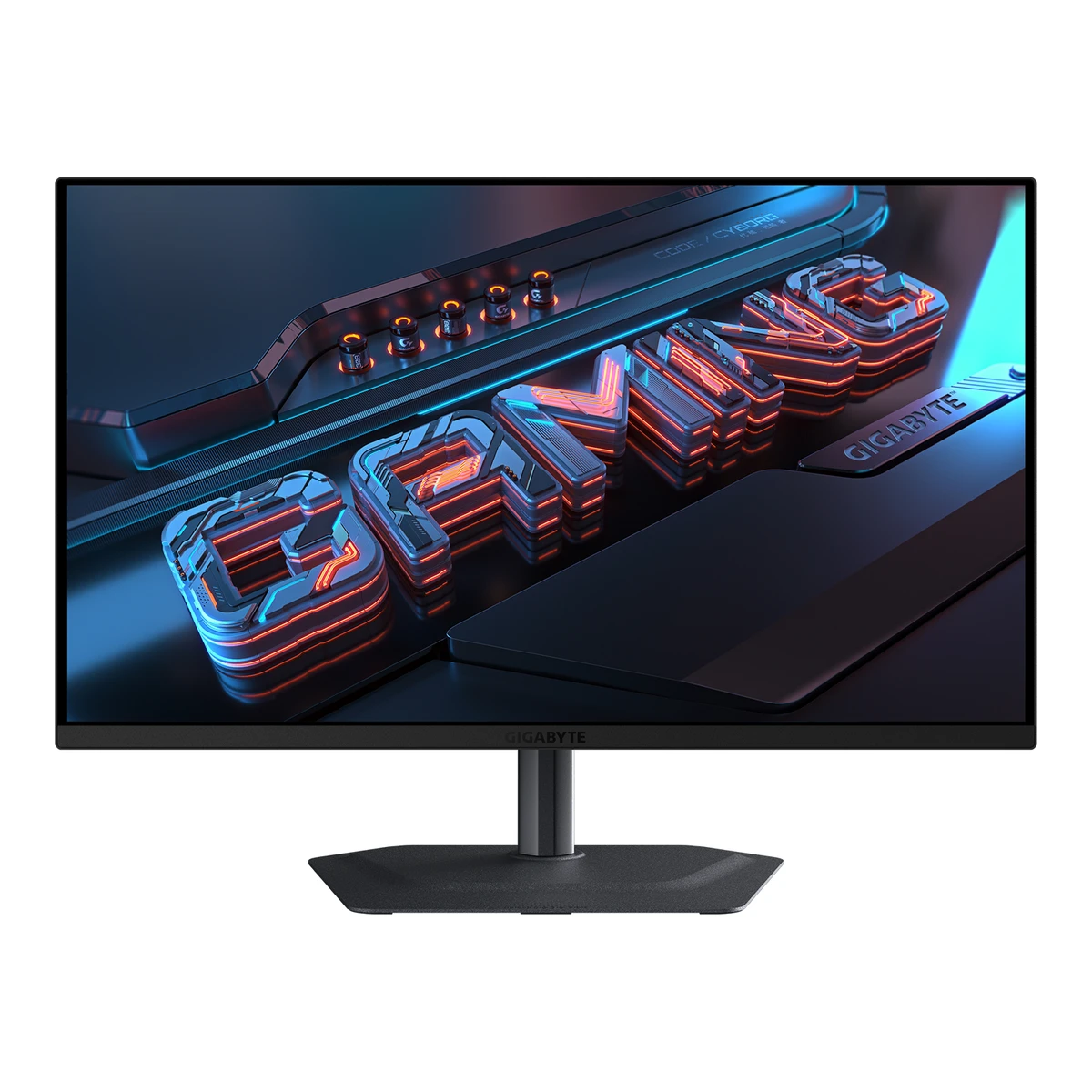
GIGABYTEGaming monitor
MO27Q2A
Released June 2025.4Press releasegigabyte.com/eu/press/news/2296Read 5 October 2026Maker June 17, 2025 availability release announces availability of exact MO27Q2A. It does not forecast a future ship date. Earliest verified retail month June 2025. Earliest global day is unstated. Last checked 16 October 2026.
- Screen size
- 27in
- Resolution
- 2560 × 1440
- Refresh rate
- Not available
- Panel
- QD-OLED
92 of 172 fields known.
At a glance
Power use HDR (EU label)
Lower than 81% of other monitors. Lower is better.
Ports
- 2 HDMI 2.1
- DisplayPort 1.4
- USB-C
- USB-B 3.2
- USB-C 3.2
- 2 USB-A 3.2
- Headphone3.5 mm out
General
- Series
- Not available
- Model numbers
- Not available
- GTIN / EAN
- Not available
- Announced
- Not available
- Status
- Not available
- Predecessor
- Not available
- Successor
- Not available
- Launch price (US)
- Not available
- Launch price (EU)
- Not available
- Markets
- Not available
- Colours
- Not available
Display
- Screen size
- 27in(68.6 cm)1Maker product pagegigabyte.com/Monitor/MO27Q2A/spRead 5 October 2026
- Viewable screen diagonal
- Not available
- Native resolution
- 2560 × 1440px1Maker product pagegigabyte.com/Monitor/MO27Q2A/spRead 5 October 2026
- Aspect ratio
- 16:92Owner's manualmanualslib.com/manual/4135118/Gigabyte-Mo27q2a.htmlRead 5 October 2026
- Pixel density
- 108.8ppi
- Pixel pitch
- Not available
- Active display area
- Width590.42Height333.72mm(23.2 × 13.1 in)1Maker product pagegigabyte.com/Monitor/MO27Q2A/spRead 5 October 2026Published display area 590.42 x 333.72 mm conflicts with native resolution multiplied by published pitch 0.2292 mm. The cause is unstated, so pitch is omitted.
- Curved
- Not available
- Curvature radius
- Not available
- Screen surface
- Semi-glossy6Reviewchip.pl/2026/09/gigabyte-mo27q2a-test-recenzja-opiniaRead 5 October 2026Exact-model review explicitly describes semi-glossy surface with anti-reflective coating.
- Anti-reflection coating
- Anti-Reflection1Maker product pagegigabyte.com/Monitor/MO27Q2A/spRead 5 October 2026
- Touchscreen
- Not available
Panel
- Panel type (as published)
- QD-OLED1Maker product pagegigabyte.com/Monitor/MO27Q2A/spRead 5 October 2026
- Backlight
- None (self-emissive)3Maker product pagegigabyte.com/Monitor/MO27Q2ARead 5 October 2026
- Local dimming
- Not available
- Dimming zones
- Not available
- Panel maker
- Samsung Display3Maker product pagegigabyte.com/Monitor/MO27Q2ARead 5 October 2026Exact-model QD-OLED paragraph says powered by Samsung. Panel generation is not inferred.
- Panel part number
- Not available
- Panel generation
- Not available
- Subpixel layout
- Not available
- Colour depth
- 10bits1Maker product pagegigabyte.com/Monitor/MO27Q2A/spRead 5 October 2026Published 10 bit (1.07B). Native panel implementation is not inferred from input depth.
- Colour depth method
- Not available
- Displayable colours
- 1.07 billion1Maker product pagegigabyte.com/Monitor/MO27Q2A/spRead 5 October 2026
- sRGB coverage
- Not available
- DCI-P3 coverage
- 99%1Maker product pagegigabyte.com/Monitor/MO27Q2A/spRead 5 October 2026Exact-model maker Color Saturation row states 99% DCI-P3. The review quotes the same manufacturer coverage claim. Coordinate basis is unstated.6Reviewchip.pl/2026/09/gigabyte-mo27q2a-test-recenzja-opiniaRead 5 October 2026Introduction explicitly quotes maker 99% DCI-P3 coverage. Measured 98% Standard-mode result is separate and is not written into a maker claim field.
- Adobe RGB coverage
- Not available
- Rec. 2020 coverage
- Not available
- NTSC coverage
- Not available
- Factory calibrated
- Yes1Maker product pagegigabyte.com/Monitor/MO27Q2A/spRead 5 October 2026
- Paper calibration report in box
- Yes1Maker product pagegigabyte.com/Monitor/MO27Q2A/spRead 5 October 2026Maker Accessories list includes a Color Calibration Test Report. Manual Package Contents p4 shows the physical report.
- Hardware calibration support
- Not available
- Static contrast ratio
- 1,500,000:11Maker product pagegigabyte.com/Monitor/MO27Q2A/spRead 5 October 2026
- Brightness (typical, SDR)
- 250nits1Maker product pagegigabyte.com/Monitor/MO27Q2A/spRead 5 October 2026Typical SDR 250 cd/m2 at 100% APL.
- Brightness (maker minimum)
- Not available
- Peak brightness (HDR)
- 1,000nits1Maker product pagegigabyte.com/Monitor/MO27Q2A/spRead 5 October 2026Typical HDR 1000 cd/m2 at 3% APL.
- HDR peak test window
- 3%1Maker product pagegigabyte.com/Monitor/MO27Q2A/spRead 5 October 2026Published 3% average picture level. It is not a separately defined window area.
- Full-screen brightness
- 250nits1Maker product pagegigabyte.com/Monitor/MO27Q2A/spRead 5 October 2026Typical SDR 250 cd/m2 at 100% APL.
- HDR formats
- Not available
- HDR certification
- DisplayHDR True Black 4001Maker product pagegigabyte.com/Monitor/MO27Q2A/spRead 5 October 2026
- Viewing angle (horizontal)
- 178°1Maker product pagegigabyte.com/Monitor/MO27Q2A/spRead 5 October 2026
- Viewing angle (vertical)
- 178°1Maker product pagegigabyte.com/Monitor/MO27Q2A/spRead 5 October 2026
Refresh rate and motion
- Refresh rate per resolution and port
- Not available
- Max refresh rate
- Not available
- Max refresh rate at native resolution
- Not available
- Max refresh rate over DisplayPort
- Not available
- Max refresh rate over HDMI
- Not available
- Max refresh rate over USB-C
- Not available
- Max refresh rate at 10-bit
- Not available
- Native refresh rate
- 280Hz1Maker product pagegigabyte.com/Monitor/MO27Q2A/spRead 5 October 2026Published 280 Hz without a stated overclock mode. Input-specific maxima remain unproved because the manual only gives a supported-timing list.
- Overclocked refresh rate
- Not available
- Dual mode
- Not available
- Minimum fixed refresh rate
- Not available
- Adaptive sync technologies
- G-SYNC Compatible, FreeSync Premium Pro4Press releasegigabyte.com/eu/press/news/2296Read 5 October 2026
- VRR range per port
- Not available
- Low framerate compensation
- Not available
- Response time (maker GtG claim)
- 0.03ms1Maker product pagegigabyte.com/Monitor/MO27Q2A/spRead 5 October 2026
- Response time (maker MPRT claim)
- Not available
- Overdrive settings
- Not available
- Motion blur reduction
- Yes4Press releasegigabyte.com/eu/press/news/2296Read 5 October 2026Exact June 17, 2025 maker release names Ultra Clear powered by BFI. This is self-emissive OLED black-frame insertion, rather than backlight strobing.
- Blur-reduction technology
- Ultra Clear4Press releasegigabyte.com/eu/press/news/2296Read 5 October 2026
- Blur reduction works with VRR
- No6Reviewchip.pl/2026/09/gigabyte-mo27q2a-test-recenzja-opiniaRead 5 October 2026Ultra Clear section explicitly says black-frame insertion at 120/280 Hz cannot operate simultaneously with VRR. It requires current firmware. Exact test firmware is unstated.
- Flicker-free (claimed)
- Yes1Maker product pagegigabyte.com/Monitor/MO27Q2A/spRead 5 October 2026
Measured
- Input lag at maximum refresh rate
- Not available
- Input lag at 60 Hz
- Not available
- Average response time (measured)
- Not available
- Overshoot (measured)
- Not available
- Contrast ratio (measured)
- Not available
- SDR brightness (measured)
- 258.5nits6Reviewchip.pl/2026/09/gigabyte-mo27q2a-test-recenzja-opiniaRead 5 October 2026Own Spyder colorimeter test reports maximum SDR 258.5 cd/m2 in Standard mode. Exact Spyder model, firmware, input and stimulus window are unstated.
- HDR brightness in a real scene (measured)
- Not available
- PWM flicker frequency (measured)
- Not available
- VRR range (measured)
- Not available
- Colour accuracy (measured Delta E)
- 0.566Reviewchip.pl/2026/09/gigabyte-mo27q2a-test-recenzja-opiniaRead 5 October 2026Standard mode without additional calibration: own Spyder measurement average Delta E 0.56, maximum 1.08. Stores average. Delta E formula, exact reference space, firmware and input are unstated. Separate sRGB mode 1.10 is not substituted.
- Gray uniformity (measured)
- Not available
- Reflections (measured)
- Not available
Connectivity
- Video inputs
Type Version Count HDMI 2.1 2 DisplayPort 1.4 1 USB-C Not available 1 - HDMI ports
- 2
- DisplayPort ports
- 1
- Highest HDMI version
- 2.1
- Highest DisplayPort version
- 1.4
- HDMI features
- CEC2Owner's manualmanualslib.com/manual/4135118/Gigabyte-Mo27q2a.htmlRead 5 October 2026System p18 explicitly enables HDMI-CEC power coordination.
- USB-C video (DP Alt Mode)
- Yes1Maker product pagegigabyte.com/Monitor/MO27Q2A/spRead 5 October 2026
- Thunderbolt
- Not available
- USB upstream ports
Connector USB version Count USB-B 3.2 1 USB-C 3.2 1 Source1Maker product pagegigabyte.com/Monitor/MO27Q2A/spRead 5 October 2026Maker specifies one USB 3.2 upstream port separately from the Type-C upstream row. No generation number is inferred.2Owner's manualmanualslib.com/manual/4135118/Gigabyte-Mo27q2a.htmlRead 5 October 2026Manual p6 identifies that physical port as USB-B. Manual p19 USB 3.2 Support enables Type-C USB 3.2, with USB 2.0 when disabled. No generation number is inferred.- USB downstream hub ports
Connector USB version Count USB-A 3.2 2 - Daisy chain (MST)
- Not available
- 3.5 mm headphone output
- Yes2Owner's manualmanualslib.com/manual/4135118/Gigabyte-Mo27q2a.htmlRead 5 October 2026
- 3.5 mm microphone input
- No2Owner's manualmanualslib.com/manual/4135118/Gigabyte-Mo27q2a.htmlRead 5 October 2026Exhaustive I/O diagram p6 and specifications p21 contain headphone output only.
Smart features
We could not find any of these 4 fields. Show them
- Smart platform
- Not available
- Wi-Fi
- Not available
- Bluetooth
- Not available
- Remote control
- Not available
Audio and camera
- Number of speakers
- 21Maker product pagegigabyte.com/Monitor/MO27Q2A/spRead 5 October 2026
- Speaker power per channel
- 5W1Maker product pagegigabyte.com/Monitor/MO27Q2A/spRead 5 October 2026
- Webcam
- Not available
- Microphone
- Not available
Ergonomics and controls
- Stand height adjustment
- 130mm1Maker product pagegigabyte.com/Monitor/MO27Q2A/spRead 5 October 2026
- Tilt
- Forward5°Backward21°1Maker product pagegigabyte.com/Monitor/MO27Q2A/spRead 5 October 2026
- Swivel
- Left15°Right15°1Maker product pagegigabyte.com/Monitor/MO27Q2A/spRead 5 October 2026
- Pivot
- Not available
- Removable stand
- Yes2Owner's manualmanualslib.com/manual/4135118/Gigabyte-Mo27q2a.htmlRead 5 October 2026Wall-mount section p7 removes the stand for 100x100 mm VESA mounting.
- VESA mount
- 100 x 1001Maker product pagegigabyte.com/Monitor/MO27Q2A/spRead 5 October 2026
- VESA adapter needed
- Not available
- Security lock slot
- Yes1Maker product pagegigabyte.com/Monitor/MO27Q2A/spRead 5 October 2026
- On-screen menu controls
- Joystick, Buttons, Software2Owner's manualmanualslib.com/manual/4135118/Gigabyte-Mo27q2a.htmlRead 5 October 2026Overview p6 and function guide p10 identify joystick, KVM switch and Tactical Switch. A power-only button is excluded.6Reviewchip.pl/2026/09/gigabyte-mo27q2a-test-recenzja-opiniaRead 5 October 2026Exact-model review OSD section explicitly operates picture profiles, brightness, contrast, gamma, colour temperature, game aids and joystick mappings through GIGABYTE Control Center and OSD Sidekick.
- Desktop software
- GIGABYTE Control Center3Maker product pagegigabyte.com/Monitor/MO27Q2ARead 5 October 2026Exact maker page names GIGABYTE Control Center. Desktop OSD adjustment is not inferred from a generic software description.6Reviewchip.pl/2026/09/gigabyte-mo27q2a-test-recenzja-opiniaRead 5 October 2026The reviewer directly operates this monitor through GIGABYTE Control Center and OSD Sidekick. Physical control and software control are both supported.
- Ambient light sensor
- Not available
- Presence sensor
- Not available
- RGB lighting
- Not available
- Gaming menu features
- Black Equalizer 2.0, Super Resolution, Gaming Timer, Gaming Counter, Refresh Rate, Crosshair, Night Vision, Eagle Eye, Flash Dimming2Owner's manualmanualslib.com/manual/4135118/Gigabyte-Mo27q2a.htmlRead 5 October 2026Game Assist p12 and Gaming p14 name these aids. Tactical Switch is a control and is excluded.
OLED care
- OLED care
- Pixel Clean, Static Control, Pixel Shift, APL Stabilize, Sub-Logo Dim, Corner Dim2Owner's manualmanualslib.com/manual/4135118/Gigabyte-Mo27q2a.htmlRead 5 October 2026Exact-model manual OLED Care p11 names Pixel Clean, Static Control, Pixel Shift, APL Stabilize, Sub-Logo Dim and Corner Dim. These are not inherited from MO27Q2.3Maker product pagegigabyte.com/Monitor/MO27Q2ARead 5 October 2026Exact-model manual OLED Care p11 names Pixel Clean, Static Control, Pixel Shift, APL Stabilize, Sub-Logo Dim and Corner Dim. These are not inherited from MO27Q2.
- Burn-in covered by warranty
- Yes3Maker product pagegigabyte.com/Monitor/MO27Q2ARead 5 October 2026Exact-model 3 YEAR WARRANTY paragraph includes panel burn-in. Maker states that terms vary by region.
- Burn-in warranty length
- 3years3Maker product pagegigabyte.com/Monitor/MO27Q2ARead 5 October 2026
Dimensions and weight
Front and side, drawn to scale.
- Dimensions with stand
- Width610Depth190mm(24 × 7.5 in)2Owner's manualmanualslib.com/manual/4135118/Gigabyte-Mo27q2a.htmlRead 5 October 2026Manual p21 W x H x D: 610 x 499 x 190 mm. Stand-height position is unstated, so height endpoints are omitted. Webpage width 610.3 mm differs. Manual 610 mm takes precedence.
- Dimensions without stand
- Width610Height358Depth65mm(24 × 14.1 × 2.6 in)2Owner's manualmanualslib.com/manual/4135118/Gigabyte-Mo27q2a.htmlRead 5 October 2026Manual p21 W x H x D: 610 x 358 x 65 mm. Webpage width 610.3 mm differs. Manual 610 mm takes precedence.
- Stand footprint
- Not available
- Weight with stand
- 6.09kg(13.4 lb)2Owner's manualmanualslib.com/manual/4135118/Gigabyte-Mo27q2a.htmlRead 5 October 2026Manual Specifications p21: 6.09 kg with stand, tolerance +/-0.5 kg.
- Weight without stand
- 4.59kg(10.1 lb)2Owner's manualmanualslib.com/manual/4135118/Gigabyte-Mo27q2a.htmlRead 5 October 2026Manual Specifications p21: 4.59 kg without stand, tolerance +/-0.5 kg.
- Box dimensions
- Width860Height470Depth160mm(33.9 × 18.5 × 6.3 in)1Maker product pagegigabyte.com/Monitor/MO27Q2A/spRead 5 October 2026
Power
- EU energy class SDRF5EU energy label (EPREL)eprel.ec.europa.eu/api/products/electronicdisplays/2267378Read 5 October 2026
- EU energy class HDRG5EU energy label (EPREL)eprel.ec.europa.eu/api/products/electronicdisplays/2267378Read 5 October 2026
- Power supply
- Internal1Maker product pagegigabyte.com/Monitor/MO27Q2A/spRead 5 October 2026
- Adapter rating
- Not available
- Input voltage
- 100-240 V AC, 50/60 Hz2Owner's manualmanualslib.com/manual/4135118/Gigabyte-Mo27q2a.htmlRead 5 October 2026
- Power use (typical)
- Not available
- Power use (max)
- Not available
- Power use SDR (EU label)
- 25W5EU energy label (EPREL)eprel.ec.europa.eu/api/products/electronicdisplays/2267378Read 5 October 2026Current EU SDR on-mode power 25 W. Maker 35 W under CEC lacks typical/max labels, so it is omitted from those claim fields.
- Power use HDR (EU label)
- 28W5EU energy label (EPREL)eprel.ec.europa.eu/api/products/electronicdisplays/2267378Read 5 October 2026Current EU HDR on-mode power 28 W.
- Standby power
- 0.5W5EU energy label (EPREL)eprel.ec.europa.eu/api/products/electronicdisplays/2267378Read 5 October 2026Current EU standby power 0.5 W. Maker bound <0.5 W.
- Off-mode power
- 0.3W5EU energy label (EPREL)eprel.ec.europa.eu/api/products/electronicdisplays/2267378Read 5 October 2026Current EU off-mode power 0.3 W. Maker bound <0.3 W.
- Energy per 1000 h SDR
- Not available
- Energy per 1000 h HDR
- Not available
Certifications
- VESA ClearMR
- 15,0001Maker product pagegigabyte.com/Monitor/MO27Q2A/spRead 5 October 2026
- VESA AdaptiveSync Display
- Not available
- TÜV certifications
- Low Blue Light Hardware Solution2Owner's manualmanualslib.com/manual/4135118/Gigabyte-Mo27q2a.htmlRead 5 October 2026Explicit hardware low-blue-light certification in manual p15. No unstated Flicker Free certification is inferred.
- ENERGY STAR
- Not available
- TCO Certified
- Not available
- EPEAT
- Not available
- Colour certifications
- Not available
- Other certifications
- Not available
In the box
- In the box
- Monitor, Monitor Base, Stand, Power Cable, HDMI Cable, DisplayPort Cable, USB Cable, Cable Clip, Warranty Card, Quick Start Guide, Color Calibration Report2Owner's manualmanualslib.com/manual/4135118/Gigabyte-Mo27q2a.htmlRead 5 October 2026Package Contents p4 identifies all listed physical items.
- Cables included
Type Power Cable HDMI Cable DisplayPort Cable USB Cable
Warranty
- Manufacturer warranty (source market)
- 3years3Maker product pagegigabyte.com/Monitor/MO27Q2ARead 5 October 2026Global exact-model policy is three years. Regional legal terms may vary.
- Dead pixel policy
- Not available
Links
- Product page
- www.gigabyte.com/Monitor/MO27Q2A1Maker product pagegigabyte.com/Monitor/MO27Q2A/spRead 5 October 2026
- Spec sheet
- Not available
- Manual
- www.manualslib.com/manual/4135118/Gigabyte-Mo27q2a.html2Owner's manualmanualslib.com/manual/4135118/Gigabyte-Mo27q2a.htmlRead 5 October 2026Public mirror of exact GIGABYTE MO27Q2A / MO27Q2A ICE maker user guide. Original English maker filename was not found, so no guessed URL is stored. Only the black MO27Q2A hardware is represented.
Compare with
Pick a monitor to see both side by side. Differences are marked yellow.
Sources
We read 6 sources for this monitor. The numbers match the markers in the sheet.
- Maker product pagegigabyte.com/Monitor/MO27Q2A/sp
- Owner's manualmanualslib.com/manual/4135118/Gigabyte-Mo27q2a.html
- Maker product pagegigabyte.com/Monitor/MO27Q2A
- Press releasegigabyte.com/eu/press/news/2296
- EU energy label (EPREL)eprel.ec.europa.eu/api/products/electronicdisplays/2267378
See a wrong value? Tell us and name the field.