PC parts / Motherboards
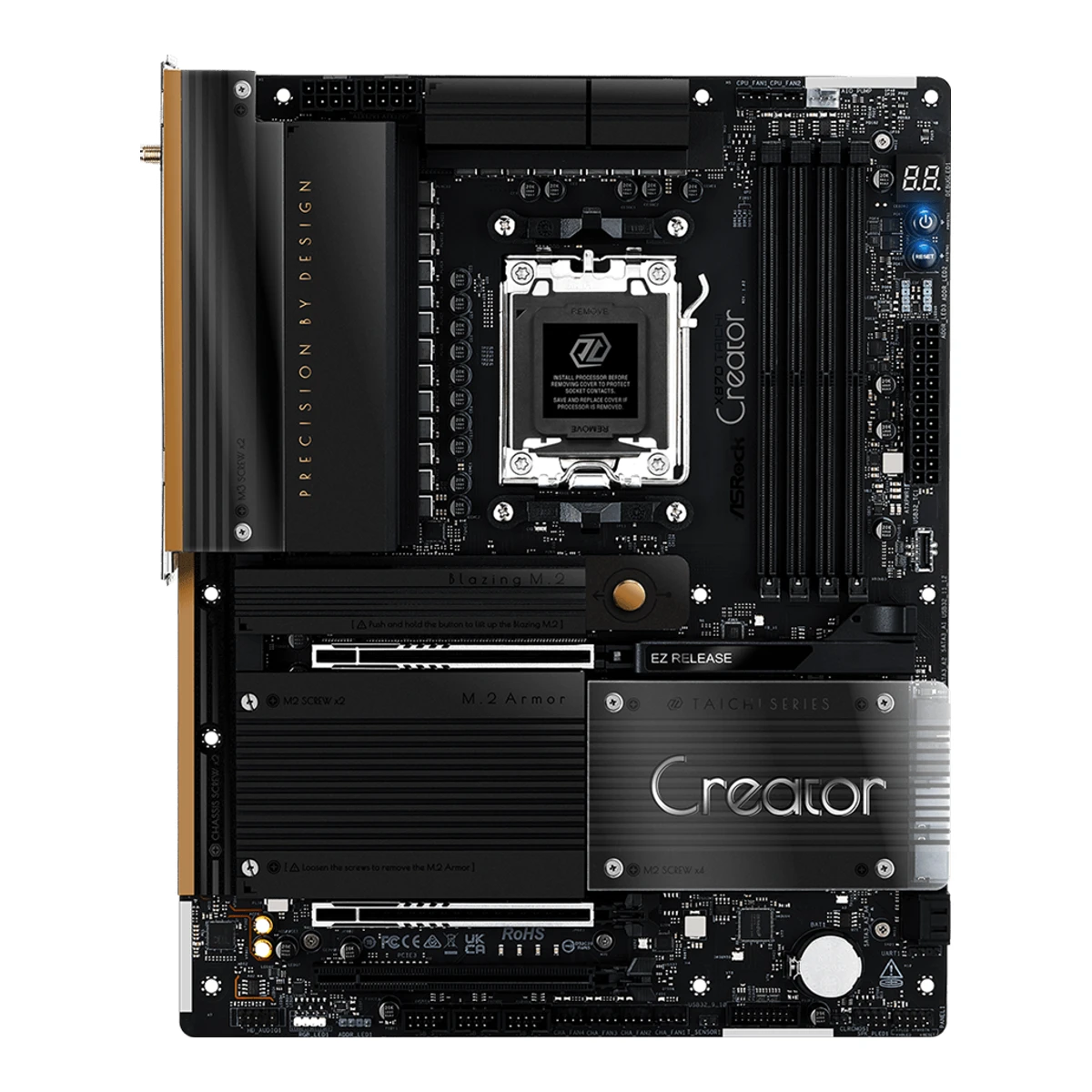
ASRockCreator motherboard
X870 Taichi Creator
Released October 2025.7Reviewhwbusters.com/mainboards/asrock-x870-taichi-creator-mainboard-review/2Read 15 October 2026The Hardware Busters review of 2025-11-06 covers a retail board. It says the second PCIe 5.0 slot is x8. Japan sales started 2025-10-03. Last checked 15 October 2026.
- CPU socket
- AM5
- Chipset
- AMD X870
- Form factor
- ATX
- M.2 slots
- 4
66 of 78 fields known.
At a glance
CPU core power stages
Higher than 78% of other motherboards.
Ports
- 2 USB-C USB4
- 2 USB-A USB 3.2 Gen 2
- 6 USB-A USB 3.2 Gen 1
- 2 USB-A USB 2.0
- HDMI 2.1
- 2 Ethernet (RJ45)
- 2 3.5 mm audio
- Optical S/PDIF
- USB-C header
- 2 USB 3 header (19-pin)
- 3 USB 2.0 header (9-pin)
General
- Model numbers
- X870 Taichi Creator, 90-MXBTE0-A0UAYZ10Retailer pageshop.mnetworks.dk/asrock-x870-taichi-creator-bundkort/cat-p/c/p1006294598Read 15 October 2026mnetworks.dk lists Varenr. 90-MXBTE0-A0UAYZ. The maker's model name X870 Taichi Creator is from the manual.11Retailer pagegeeknetic.es/comparador-precios/placa-base-asrock-x870-taichi-creator-amd-x870-am5-ddr5-atx-wifi-7-10gbe-rgb/comprarRead 15 October 2026Geeknetic lists MPN 90-MXBTE0-A0UAYZ, the same as mnetworks.dk.
- GTIN / EAN
- 471158149206610Retailer pageshop.mnetworks.dk/asrock-x870-taichi-creator-bundkort/cat-p/c/p1006294598Read 15 October 2026mnetworks.dk lists EAN 4711581492066.11Retailer pagegeeknetic.es/comparador-precios/placa-base-asrock-x870-taichi-creator-amd-x870-am5-ddr5-atx-wifi-7-10gbe-rgb/comprarRead 15 October 2026Geeknetic's price comparison lists EAN 4711581492066.
- Predecessor
- Not available
- Successor
- Not available
- Launch price (US)
- Not available
- Launch price (EU)
- Not available
- Markets
- Not available
- Colours
- Not available
- Board revision
- Not available
Platform
- Chipset
- AMD X8701Owner's manualdownload.asrock.com/Manual/X870%20Taichi%20Creator.pdfRead 15 October 2026
- Supported processors
- AMD Ryzen 9000 Series, AMD Ryzen 8000 Series, AMD Ryzen 7000 Series1Owner's manualdownload.asrock.com/Manual/X870%20Taichi%20Creator.pdfRead 15 October 2026Section 1.2: AM5 Ryzen 9000, 8000 and 7000 Series. The manual refers to ASRock's CPU support list, which was not read. Read on 2026-10-15.
Board
Front and side, drawn to scale.
- Form factor
- ATX1Owner's manualdownload.asrock.com/Manual/X870%20Taichi%20Creator.pdfRead 15 October 2026Section 1.1 and 1.2: ATX Form Factor.
- Board dimensions
- Width244Height305mm(9.6 × 12 in)3Reviewfunkykit.com/reviews/motherboards/asrock-x870-taichi-creator-motherboard-review/3Read 15 October 2026The review's specification page copies ASRock's list: ATX Form Factor 12.0-in x 9.6-in, 30.5 cm x 24.4 cm.
- PCB layers
- 81Owner's manualdownload.asrock.com/Manual/X870%20Taichi%20Creator.pdfRead 15 October 2026Section 1.2, Platform: 8 Layer PCB. No copper weight is given.3Reviewfunkykit.com/reviews/motherboards/asrock-x870-taichi-creator-motherboard-review/3Read 15 October 2026ASRock's specification as copied by Funky Kit lists an 8 Layer PCB.
Power delivery
- CPU core (Vcore) power stages
- 183Reviewfunkykit.com/reviews/motherboards/asrock-x870-taichi-creator-motherboard-review/3Read 15 October 202618 Vcore stages in the 18+2+1 layout. Tom's Hardware counts 18 x 80A stages for Vcore.
- Vcore power stage rating
- 80A3Reviewfunkykit.com/reviews/motherboards/asrock-x870-taichi-creator-motherboard-review/3Read 15 October 202680A SPS for Vcore+SOC in ASRock's specification as copied by Funky Kit. Tom's Hardware reads 80A MPS2425 stages.
Memory
- Memory type
- DDR51Owner's manualdownload.asrock.com/Manual/X870%20Taichi%20Creator.pdfRead 15 October 2026
- Memory slots
- 41Owner's manualdownload.asrock.com/Manual/X870%20Taichi%20Creator.pdfRead 15 October 2026
- Max memory speed (overclocked)
- 8,000MT/s1Owner's manualdownload.asrock.com/Manual/X870%20Taichi%20Creator.pdfRead 15 October 2026Section 1.2: DDR5 ECC/non-ECC, un-buffered memory up to 8000+(OC). The manual names no CPU family or module setup.
- CUDIMM support
- Not available
Expansion slots
- Expansion slots
Physical slot Electrical lanes PCIe generation Connected to Count PCIe x16 16 5 CPU 1 PCIe x16 8 5 CPU 1 PCIe x16 4 3 Chipset 1 - Full-length PCIe slots
- 3
- Fastest PCIe x16 slot generation
- 5
Storage
- M.2 storage slots
Slot PCIe generation PCIe lanes Connected to Longest drive Takes SATA drives Heatsink Shares lanes with M2_1 5 4 CPU M.2 2280 No Yes Not available M2_2 5 4 CPU M.2 2280 No Yes M2_2 and both rear USB4 ports run at x2 when M2_2 is used. A BIOS setting gives M2_2 x4 and turns off both USB4 ports M2_3 4 4 Chipset M.2 2280 No Yes Not available M2_4 3 4 Chipset M.2 2280 No Yes M2_4 and the PCIE3 slot run at x2 when M2_4 is used - M.2 slots
- 4
- PCIe 5.0 M.2 slots
- 2
Rear ports
- Rear ports
Type Version Count Max link rate (Gbps) Thunderbolt or USB4 Power out (W) DP Alt Mode USB-C USB4 2 40 USB4 15 Yes USB-A USB 3.2 Gen 2 2 10 Not available Not available Not available USB-A USB 3.2 Gen 1 6 5 Not available Not available Not available USB-A USB 2.0 2 0.48 Not available Not available Not available HDMI HDMI 2.1 1 Not available Not available Not available Not available Ethernet (RJ45) Not available 1 10 Not available Not available Not available Ethernet (RJ45) Not available 1 5 Not available Not available Not available 3.5 mm audio Not available 2 Not available Not available Not available Not available Optical S/PDIF Not available 1 Not available Not available Not available Not available - Rear USB ports
- 12
- Rear USB-C ports
- 2
- Fastest rear USB port
- 40Gbps
- Thunderbolt
- No
Internal connectors
- Internal USB headers
Header Max data rate (Gbps) Headers Front ports served Power out (W) USB-C header 20 1 1 36 USB 3 header (19-pin) 5 2 4 Not available USB 2.0 header (9-pin) 0.48 3 6 Not available - Front USB-C header speed
- 20Gbps
Networking
- Ethernet controllers
- Marvell AQC113, Realtek RTL81261Owner's manualdownload.asrock.com/Manual/X870%20Taichi%20Creator.pdfRead 15 October 202610 Gigabit LAN: Marvell (Aquantia) AQC113. 5 Gigabit LAN: Realtek RTL8126. Both are named in section 1.2.
- Ethernet ports
- 2
- Ethernet speed
- 10Gbps
- Wi-Fi standard
- Wi-Fi 71Owner's manualdownload.asrock.com/Manual/X870%20Taichi%20Creator.pdfRead 15 October 2026802.11be 2x2 Wi-Fi 7. Windows 11 only.
- Wi-Fi bands
- 2.4 GHz, 5 GHz, 6 GHz1Owner's manualdownload.asrock.com/Manual/X870%20Taichi%20Creator.pdfRead 15 October 2026Supports 2.4GHz/5GHz/6GHz frequency band. The 6 GHz band depends on each country's regulation.
Audio
- Audio codec
- Realtek ALC40821Owner's manualdownload.asrock.com/Manual/X870%20Taichi%20Creator.pdfRead 15 October 20267.1 CH HD Audio with Content Protection (Realtek ALC4082 Audio Codec).
- DAC chip
- Not available
Features
- BIOS flashback
- Yes1Owner's manualdownload.asrock.com/Manual/X870%20Taichi%20Creator.pdfRead 15 October 20261 x BIOS Flashback Button on the rear panel (I/O panel item 1).
- Clear CMOS button (rear)
- Yes1Owner's manualdownload.asrock.com/Manual/X870%20Taichi%20Creator.pdfRead 15 October 20261 x Clear CMOS Button on the rear panel (I/O panel item 16). The board also has a Clear CMOS jumper.
- Power button on the board
- Yes1Owner's manualdownload.asrock.com/Manual/X870%20Taichi%20Creator.pdfRead 15 October 20261 x Power Button with LED and 1 x Reset Button with LED (layout items 8 and 9).
- Dual BIOS
- Not available
- Tool-free features
- Tool-free M.2 latch, Tool-free M.2 heatsink, PCIe slot release1Owner's manualdownload.asrock.com/Manual/X870%20Taichi%20Creator.pdfRead 15 October 2026Chapter 2.15 shows the M2_1 heatsink coming off with a button and the SSD held by a hand-turned nut lock. The page 'Removing a Graphics Card from PCIE1 Slot' shows the EZ Release latch that frees the graphics card.4Reviewfunkykit.com/reviews/motherboards/asrock-x870-taichi-creator-motherboard-review/2Read 15 October 2026Copy of ASRock's feature text: Graphics Card EZ Release, M.2 Heatsink Toolless Design and an M.2 SSD toolless design. The manual shows the same.
Measured
In the box
- In the box
- 4 x Serial ATA (SATA) data cables, 1 x ASRock WiFi 2.4/5/6 GHz antenna, 1 x ARGB splitter cable, 1 x Thermistor cable1Owner's manualdownload.asrock.com/Manual/X870%20Taichi%20Creator.pdfRead 15 October 2026Section 1.1 package contents, without the board. The manual marks every accessory as optional. Tom's Hardware and HWBusters list the same items.
Links
- Product page
- www.asrock.com/mb/AMD/X870%20Taichi%20Creator/index.asp2Maker product pageasrock.com/mb/AMD/X870%20Taichi%20Creator/index.aspRead 15 October 2026ASRock's product page from the picked list. It returned an empty page to agents, so it could not be read. The link is stored as given.
- Spec sheet
- Not available
- Manual
- download.asrock.com/Manual/X870%20Taichi%20Creator.pdf1Owner's manualdownload.asrock.com/Manual/X870%20Taichi%20Creator.pdfRead 15 October 2026ASRock user manual X870 Taichi Creator from download.asrock.com, 81 pages. It has no version or date on the pages read. ASRock's own product page answers agents with an empty page.
- EPREL registration number
- Not available
Warranty
Compare with
Pick a motherboard to see both side by side. Differences are marked yellow.
Sources
We read 13 sources for this motherboard. The numbers match the markers in the sheet.
- Owner's manualdownload.asrock.com/Manual/X870%20Taichi%20Creator.pdf
- Maker product pageasrock.com/mb/AMD/X870%20Taichi%20Creator/index.asp
- Press articlegdm.or.jp/pressrelease/2025/0926/605842
- Maker product pageamd.com/en/products/processors/chipsets/am5.html
See a wrong value? Tell us and name the field.