PC parts / Motherboards
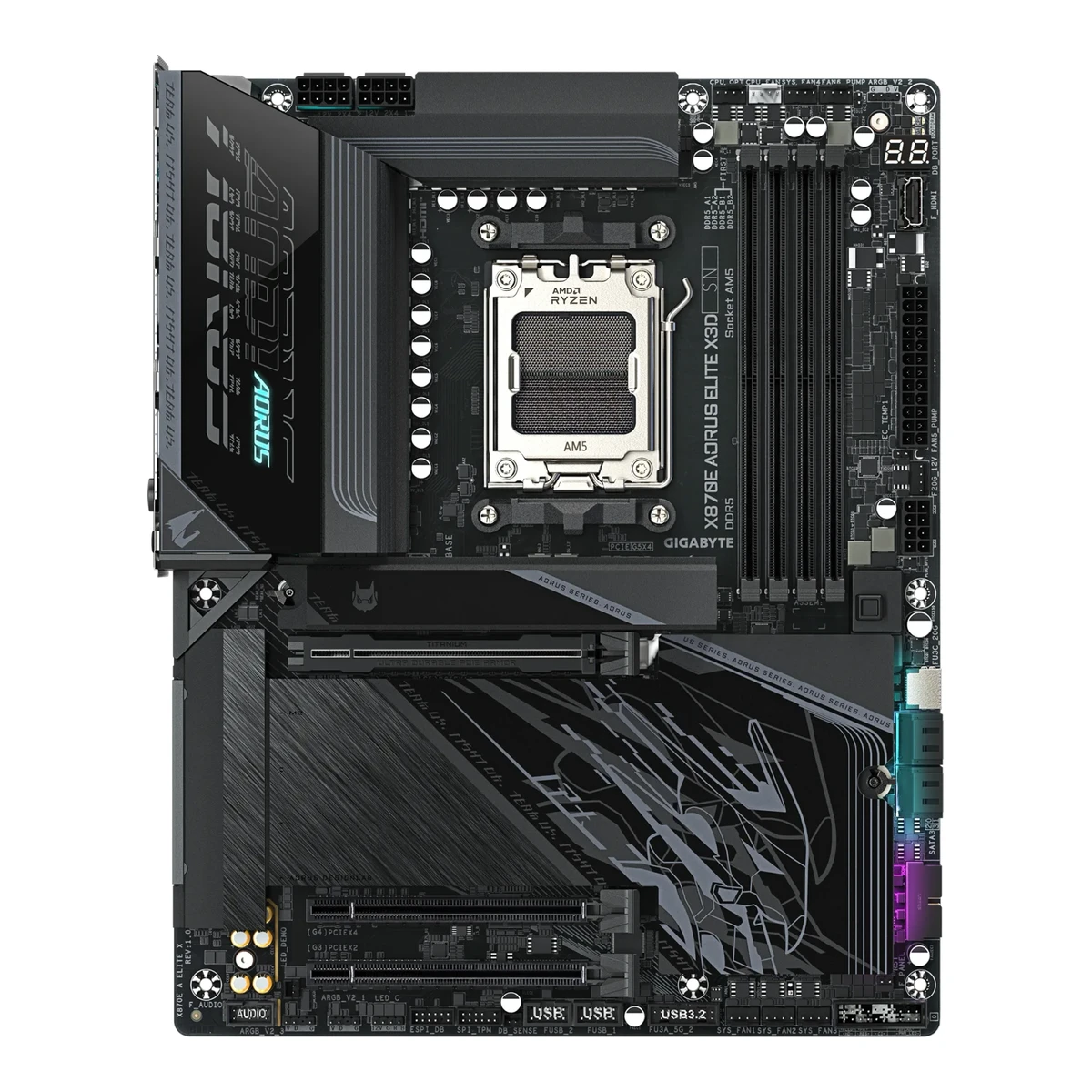
GIGABYTEGaming motherboard
X870E AORUS ELITE X3D
Released September 2025.2Spec databasegeizhals.eu/gigabyte-x870e-aorus-elite-x3d-a3592728.htmlRead 15 October 2026Listed since 2025-09-16. GIGABYTE's press release says the AORUS X870E X3D series became available on 2025-09-17. Last checked 15 October 2026.
- CPU socket
- AM5
- Chipset
- AMD X870E
- Form factor
- ATX
- M.2 slots
- 4
63 of 78 fields known.
At a glance
Ports
- 2 USB-C USB4
- USB-C USB 3.2 Gen 2
- 5 USB-A USB 3.2 Gen 2
- 3 USB-A USB 3.2 Gen 1
- HDMI 2.1
- Ethernet (RJ45)
- 2 3.5 mm audio
- Optical S/PDIF
- USB-C header
- 2 USB 3 header (19-pin)
- 2 USB 2.0 header (9-pin)
General
- Model numbers
- X870E AORUS ELITE X3D1Owner's manualgzhls.at/blob/ldb/a/0/3/5/cc57cbc381cd6bae3ad75c6af8adbcf1b4aa.pdfRead 15 October 2026Cover names X870E AORUS ELITE X3D with the short name X870E A ELITE X. The short name is stored as an alias.
- GTIN / EAN
- 47193318764705Retailer pagejimms.fi/fi/Product/Show/213340/x870e-a-elite-x/gigabyte-x870e-aorus-elite-x3d-atx-emolevyRead 15 October 2026EAN 4719331876470. Komputronik and alltron.ch list the same EAN. No UPC was found.
- Announced
- Not available
- Status
- Available2Spec databasegeizhals.eu/gigabyte-x870e-aorus-elite-x3d-a3592728.htmlRead 15 October 202660 offers on 2026-10-15, some in stock.
- Predecessor
- Not available
- Successor
- Not available
- Launch price (US)
- Not available
- Launch price (EU)
- Not available
- Markets
- Not available
- Colours
- Not available
- Board revision
- Not available
Platform
- CPU socket
- AM51Owner's manualgzhls.at/blob/ldb/a/0/3/5/cc57cbc381cd6bae3ad75c6af8adbcf1b4aa.pdfRead 15 October 2026
- Chipset
- AMD X870E1Owner's manualgzhls.at/blob/ldb/a/0/3/5/cc57cbc381cd6bae3ad75c6af8adbcf1b4aa.pdfRead 15 October 2026Section 2-2 (page 8): AMD X870E.
- Supported processors
- AMD Ryzen 9000 Series, AMD Ryzen 8000 Series, AMD Ryzen 7000 Series1Owner's manualgzhls.at/blob/ldb/a/0/3/5/cc57cbc381cd6bae3ad75c6af8adbcf1b4aa.pdfRead 15 October 2026Section 2-2 (page 8): AMD Ryzen 9000, 8000 and 7000 Series. The manual refers to GIGABYTE's website for the latest CPU list. Read on 2026-10-15.
Board
Front and side, drawn to scale.
- Board dimensions
- Width244Height305mm(9.6 × 12 in)1Owner's manualgzhls.at/blob/ldb/a/0/3/5/cc57cbc381cd6bae3ad75c6af8adbcf1b4aa.pdfRead 15 October 2026Section 2-2 (page 11): 30.5 cm x 24.4 cm, stored as 244 mm wide and 305 mm high.
- RGB lighting on the board
- Yes2Spec databasegeizhals.eu/gigabyte-x870e-aorus-elite-x3d-a3592728.htmlRead 15 October 2026Lighting row: RGB, 2 zones (chipset cooler, I/O cover). Club386 and Geeknetic also see lighting on the I/O cover heatsink and the chipset area.7Reviewclub386.com/gigabyte-x870e-aorus-elite-x3d-reviewRead 15 October 2026The heatsink nearest the rear I/O has a small splash of ARGB, but the LEDs are small. The reviewer does not say whether GIGABYTE lists it.8Reviewgeeknetic.es/Review/3367/Gigabyte-X870E-AORUS-ELITE-X3D-Review.htmlRead 15 October 2026LED accents on the rear I/O cover, the chipset area and the MOSFET heatsink.
Power delivery
- Power stage layout
- 16+2+22Spec databasegeizhals.eu/gigabyte-x870e-aorus-elite-x3d-a3592728.htmlRead 15 October 2026VRM design row: 16+2+2, 18 virtual CPU phases (2x8+2), 10 real CPU phases (8+2).
- CPU core (Vcore) power stages
- 162Spec databasegeizhals.eu/gigabyte-x870e-aorus-elite-x3d-a3592728.htmlRead 15 October 2026MOSFETs VCORE row: 16 x 80A PMC41410 (SPS).4Retailer pagenetcodex.ph/product/gigabyte-x870e-aorus-elite-x3d-amd-am5-atx-motherboard-ga-x870e-a-elite-xRead 15 October 2026Shop copy: Digital Twin 16+2+2 Phases VRM Solution, 16 VCORE phases (SPS 80A).8Reviewgeeknetic.es/Review/3367/Gigabyte-X870E-AORUS-ELITE-X3D-Review.htmlRead 15 October 202620 phases in a fully digital design: 16 power phases (8 doubled), 2 for the SoC and 2 extra.
- Vcore power stage rating
- 80A2Spec databasegeizhals.eu/gigabyte-x870e-aorus-elite-x3d-a3592728.htmlRead 15 October 2026MOSFETs VCORE row: 16 x 80A. The SoC rail also uses 2 x 80A and the 2 misc stages are 60 A.3Retailer pagejib.co.th/web/product/readProduct/82855/MAINBOARD--%E0%B9%80%E0%B8%A1%E0%B8%99%E0%B8%9A%E0%B8%AD%E0%B8%A3%E0%B9%8C%E0%B8%94--GIGABYTE-X870E-AORUS-ELITE-X3D---AMD-SOCKET-AM5-DDR5-ATXRead 15 October 2026Shop copy of GIGABYTE's text: 16 VCORE phases SPS 80A, 2 SOC phases SPS 80A and 2 MISC phases DrMOS 60A, in a Digital Twin 16+2+2 design.7Reviewclub386.com/gigabyte-x870e-aorus-elite-x3d-reviewRead 15 October 2026Spec table: VRM 16+2+2, 80A. Text: 80A Smart Power Stages across VCore and SoC.
Memory
- Memory type
- DDR51Owner's manualgzhls.at/blob/ldb/a/0/3/5/cc57cbc381cd6bae3ad75c6af8adbcf1b4aa.pdfRead 15 October 2026Section 2-2 (page 8): DDR5.
- Max memory speed (overclocked)
- 9,000MT/s2Spec databasegeizhals.eu/gigabyte-x870e-aorus-elite-x3d-a3592728.htmlRead 15 October 2026RAM data rate row: DDR5-5200 (Ryzen 7000 and 8000G), DDR5-5600 (Ryzen 9000), max. DDR5-9000 OC.3Retailer pagejib.co.th/web/product/readProduct/82855/MAINBOARD--%E0%B9%80%E0%B8%A1%E0%B8%99%E0%B8%9A%E0%B8%AD%E0%B8%A3%E0%B9%8C%E0%B8%94--GIGABYTE-X870E-AORUS-ELITE-X3D---AMD-SOCKET-AM5-DDR5-ATXRead 15 October 2026Shop copy of GIGABYTE's memory list: 4800, 5200 and then OC speeds up to 9000 (OC) MT/s. The press release says 9000+ MT/s across the series. 9000 is stored for Ryzen 9000, the newest CPU family. The speed for two modules per channel is lower and is not stated here.9Press releaseaap.com.au/aapreleases/cision20250917ae65500Read 15 October 2026DDR5 speeds of up to 9000+ MT/s across the whole lineup.
- ECC memory
- No1Owner's manualgzhls.at/blob/ldb/a/0/3/5/cc57cbc381cd6bae3ad75c6af8adbcf1b4aa.pdfRead 15 October 2026Section 2-2: non-ECC un-buffered DIMM modules only. Geizhals also says no ECC support.2Spec databasegeizhals.eu/gigabyte-x870e-aorus-elite-x3d-a3592728.htmlRead 15 October 2026ECC support row: nein (no).
- CUDIMM support
- Not available
Expansion slots
- Expansion slots
Physical slot Electrical lanes PCIe generation Connected to Count PCIe x16 16 5 CPU 1 PCIe x16 4 4 Chipset 1 PCIe x16 2 3 Chipset 1 - Full-length PCIe slots
- 3
- Fastest PCIe x16 slot generation
- 5
Storage
- M.2 storage slots
Slot PCIe generation PCIe lanes Connected to Longest drive Takes SATA drives Heatsink Shares lanes with M2A_CPU 5 4 CPU M.2 22110 No Yes Not available M2B_CPU 5 4 CPU M.2 22110 No Yes The USB4 ports on the ASMedia controller and M2B_CPU both run at up to x2 bandwidth when M2B_CPU is used M2C_SB 4 4 Chipset M.2 22110 No Yes Not available M2D_SB 4 4 Chipset M.2 22110 No Yes Not available - M.2 slots
- 4
- PCIe 5.0 M.2 slots
- 2
Rear ports
- Rear ports
Type Version Count Max link rate (Gbps) Thunderbolt or USB4 DP Alt Mode USB-C USB4 2 40 USB4 Yes USB-C USB 3.2 Gen 2 1 10 Not available Not available USB-A USB 3.2 Gen 2 5 10 Not available Not available USB-A USB 3.2 Gen 1 3 5 Not available Not available HDMI HDMI 2.1 1 Not available Not available Not available Ethernet (RJ45) Not available 1 5 Not available Not available 3.5 mm audio Not available 2 Not available Not available Not available Optical S/PDIF Not available 1 Not available Not available Not available - Rear USB ports
- 11
- Rear USB-C ports
- 3
- Fastest rear USB port
- 40Gbps
- Thunderbolt
- No
Internal connectors
- Internal USB headers
Header Max data rate (Gbps) Headers Front ports served Power out (W) USB-C header 20 1 1 65 USB 3 header (19-pin) 5 2 4 Not available USB 2.0 header (9-pin) 0.48 2 4 Not available - Front USB-C header speed
- 20Gbps
Networking
- Ethernet ports
- 1
- Ethernet speed
- 5Gbps
- Wi-Fi standard
- Wi-Fi 71Owner's manualgzhls.at/blob/ldb/a/0/3/5/cc57cbc381cd6bae3ad75c6af8adbcf1b4aa.pdfRead 15 October 2026Section 2-2: 802.11a, b, g, n, ac, ax, be.
- Wi-Fi bands
- 2.4 GHz, 5 GHz, 6 GHz1Owner's manualgzhls.at/blob/ldb/a/0/3/5/cc57cbc381cd6bae3ad75c6af8adbcf1b4aa.pdfRead 15 October 2026Section 2-2: 2.4, 5 and 6 GHz. The manual says 6 GHz channel availability depends on country regulations.
- Max Wi-Fi channel width
- 320MHz1Owner's manualgzhls.at/blob/ldb/a/0/3/5/cc57cbc381cd6bae3ad75c6af8adbcf1b4aa.pdfRead 15 October 2026Section 2-2: support for the 11be 320MHz wireless standard.
- Wi-Fi module
- Qualcomm QCNCM8651Owner's manualgzhls.at/blob/ldb/a/0/3/5/cc57cbc381cd6bae3ad75c6af8adbcf1b4aa.pdfRead 15 October 2026Section 2-2: Qualcomm Wi-Fi 7 QCNCM865.3Retailer pagejib.co.th/web/product/readProduct/82855/MAINBOARD--%E0%B9%80%E0%B8%A1%E0%B8%99%E0%B8%9A%E0%B8%AD%E0%B8%A3%E0%B9%8C%E0%B8%94--GIGABYTE-X870E-AORUS-ELITE-X3D---AMD-SOCKET-AM5-DDR5-ATXRead 15 October 2026Spec table: Qualcomm Wi-Fi 7 QCNCM865, 802.11be 320MHz, Bluetooth 5.4.8Reviewgeeknetic.es/Review/3367/Gigabyte-X870E-AORUS-ELITE-X3D-Review.htmlRead 15 October 2026Qualcomm Wi-Fi 7 QCNCM865 with Bluetooth 5.4.
Audio
- Audio codec
- Realtek ALC12201Owner's manualgzhls.at/blob/ldb/a/0/3/5/cc57cbc381cd6bae3ad75c6af8adbcf1b4aa.pdfRead 15 October 2026Section 2-2: Realtek ALC1220 CODEC, 2/4/5.1/7.1-channel. The manual names no DAC chip.8Reviewgeeknetic.es/Review/3367/Gigabyte-X870E-AORUS-ELITE-X3D-Review.htmlRead 15 October 2026Realtek ALC1220 with no separate DAC.
- DAC chip
- Not available
Features
- Clear CMOS button (rear)
- Yes1Owner's manualgzhls.at/blob/ldb/a/0/3/5/cc57cbc381cd6bae3ad75c6af8adbcf1b4aa.pdfRead 15 October 2026Section 2-2 and 2-6: Clear CMOS button on the back panel. The board also has a CLR_CMOS jumper.2Spec databasegeizhals.eu/gigabyte-x870e-aorus-elite-x3d-a3592728.htmlRead 15 October 2026Buttons row: Clear CMOS button (external).
- POST code display
- Yes1Owner's manualgzhls.at/blob/ldb/a/0/3/5/cc57cbc381cd6bae3ad75c6af8adbcf1b4aa.pdfRead 15 October 2026Section 1-1 layout shows DB_PORT with the note that debug code information is on the Debug LED Codes pages (section 5-2), which list two-character codes. Section 2-7 also lists four status LEDs (CPU, DRAM, VGA, BOOT). Geeknetic and Geizhals confirm a two-digit display.2Spec databasegeizhals.eu/gigabyte-x870e-aorus-elite-x3d-a3592728.htmlRead 15 October 2026Features row: Diagnostic LED (segment display) and Diagnostic LED (LED indicators).7Reviewclub386.com/gigabyte-x870e-aorus-elite-x3d-reviewRead 15 October 2026The reviewer is glad to see status LEDs and a debug code display on the board.8Reviewgeeknetic.es/Review/3367/Gigabyte-X870E-AORUS-ELITE-X3D-Review.htmlRead 15 October 2026A two-digit POST display.
- Power button on the board
- Yes1Owner's manualgzhls.at/blob/ldb/a/0/3/5/cc57cbc381cd6bae3ad75c6af8adbcf1b4aa.pdfRead 15 October 2026Section 2-2 and 2-6: back panel power button and reset button for use in an open case. The reset button can be remapped.2Spec databasegeizhals.eu/gigabyte-x870e-aorus-elite-x3d-a3592728.htmlRead 15 October 2026Buttons row: Power button (external) and Reset button (external).7Reviewclub386.com/gigabyte-x870e-aorus-elite-x3d-reviewRead 15 October 2026The board includes Power and Reset buttons, with Clear CMOS and Flash BIOS functions.8Reviewgeeknetic.es/Review/3367/Gigabyte-X870E-AORUS-ELITE-X3D-Review.htmlRead 15 October 2026The rear panel has a power button and a reset button, plus Clear CMOS and Q-Flash Plus buttons.
- Pre-installed I/O shield
- Yes2Spec databasegeizhals.eu/gigabyte-x870e-aorus-elite-x3d-a3592728.htmlRead 15 October 2026Features row: I/O-Blende integriert (I/O shield integrated).7Reviewclub386.com/gigabyte-x870e-aorus-elite-x3d-reviewRead 15 October 2026The text describes a lit rear I/O cover on the board. It does not use the words I/O shield.
- Tool-free features
- Tool-free M.2 latch, Tool-free M.2 heatsink, PCIe slot release, Push-on antenna connector1Owner's manualgzhls.at/blob/ldb/a/0/3/5/cc57cbc381cd6bae3ad75c6af8adbcf1b4aa.pdfRead 15 October 2026Section 2-5 and 2-7: PCIe EZ-Latch Plus for the graphics card slot, M.2 EZ-Latch Plus (screwless M.2 SSD clip) and M.2 EZ-Latch Click (screwless heatsink).2Spec databasegeizhals.eu/gigabyte-x870e-aorus-elite-x3d-a3592728.htmlRead 15 October 2026External connectors row: 2 x antenna connector Quick Connect, which is GIGABYTE's WIFI EZ-Plug.3Retailer pagejib.co.th/web/product/readProduct/82855/MAINBOARD--%E0%B9%80%E0%B8%A1%E0%B8%99%E0%B8%9A%E0%B8%AD%E0%B8%A3%E0%B9%8C%E0%B8%94--GIGABYTE-X870E-AORUS-ELITE-X3D---AMD-SOCKET-AM5-DDR5-ATXRead 15 October 2026Shop copy of GIGABYTE's feature list: M.2 EZ-Flex, WIFI EZ-Plug (quick Wi-Fi antenna installation) and M.2 EZ-Latch Click and Plus (tool-free M.2 slot and heatsink).9Press releaseaap.com.au/aapreleases/cision20250917ae65500Read 15 October 2026EZ-DIY features such as M.2 EZ-Flex and PCIe EZ-Latch+ Duo for tool-free installation.
Measured
We could not find any of these 3 fields. Show them
- VRM temperature under CPU load
- Not available
- Power draw idle
- Not available
- Power draw CPU stress
- Not available
In the box
- In the box
- User's Manual, Quick Installation Guide, One antenna, Two SATA cables, One G Connector, Two packs of M.2 thick/thin rubber pads1Owner's manualgzhls.at/blob/ldb/a/0/3/5/cc57cbc381cd6bae3ad75c6af8adbcf1b4aa.pdfRead 15 October 2026Section 1-3 box contents, without the board itself. The ICE and plain boards share one list. The 'One antenna' item is as the manual writes it.
Links
- Product page
- www.gigabyte.com/Motherboard/X870E-AORUS-ELITE-X3D11Maker product pagegigabyte.com/Motherboard/X870E-AORUS-ELITE-X3DRead 15 October 2026gigabyte.com blocks agents, so the page was not opened. Its address is the one in the job brief and in search results. No value comes from it.
- Spec sheet
- Not available
- Manual
- gzhls.at/blob/ldb/a/0/3/5/cc57cbc381cd6bae3ad75c6af8adbcf1b4aa.pdf1Owner's manualgzhls.at/blob/ldb/a/0/3/5/cc57cbc381cd6bae3ad75c6af8adbcf1b4aa.pdfRead 15 October 2026GIGABYTE User's Manual Rev. 1001 for the X870E AORUS ELITE X3D ICE (X870E A ELITE X ICE) and the X870E AORUS ELITE X3D (X870E A ELITE X), 47 pages, PDF created 2025-08-19. The file is the copy listed as a document on Geizhals. A copy with a retailer cover page is on trovaprezzi.it. gigabyte.com blocks agents, so the maker's own download page was not opened.
- EPREL registration number
- Not available
Warranty
- Manufacturer warranty (source market)
- 3years2Spec databasegeizhals.eu/gigabyte-x870e-aorus-elite-x3d-a3592728.htmlRead 15 October 2026Warranty row: 3 years.3Retailer pagejib.co.th/web/product/readProduct/82855/MAINBOARD--%E0%B9%80%E0%B8%A1%E0%B8%99%E0%B8%9A%E0%B8%AD%E0%B8%A3%E0%B9%8C%E0%B8%94--GIGABYTE-X870E-AORUS-ELITE-X3D---AMD-SOCKET-AM5-DDR5-ATXRead 15 October 2026Listing shows a 3 year warranty.5Retailer pagejimms.fi/fi/Product/Show/213340/x870e-a-elite-x/gigabyte-x870e-aorus-elite-x3d-atx-emolevyRead 15 October 2026Warranty listed as 3 years (takuuaika 3 vuotta).
Compare with
Pick a motherboard to see both side by side. Differences are marked yellow.
Sources
We read 11 sources for this motherboard. The numbers match the markers in the sheet.
- Press releaseaap.com.au/aapreleases/cision20250917ae65500
- Maker product pageamd.com/en/products/processors/chipsets/am5.html
- Maker product pagegigabyte.com/Motherboard/X870E-AORUS-ELITE-X3D
See a wrong value? Tell us and name the field.