PC parts / Motherboards
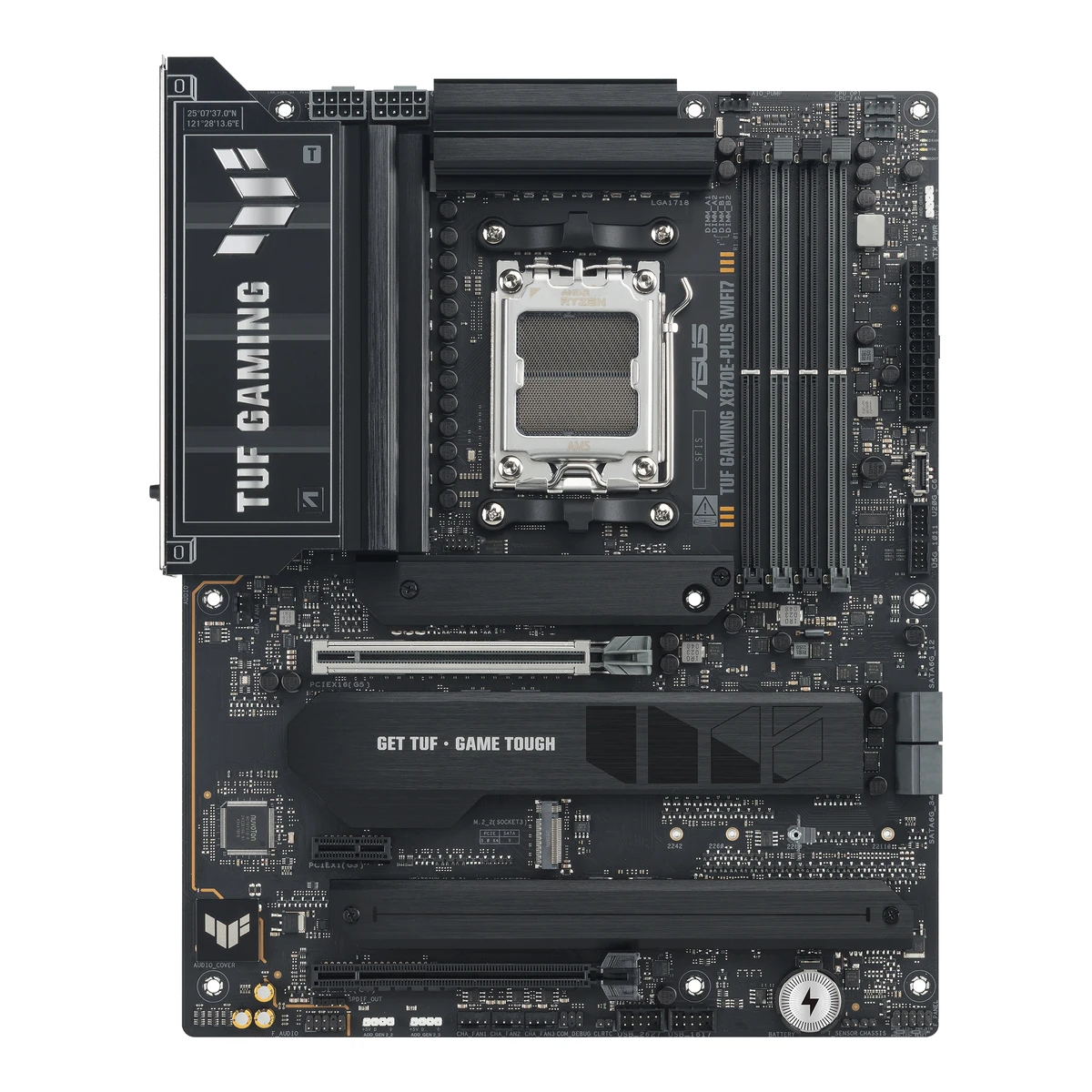
ASUSGaming motherboard
TUF GAMING X870E-PLUS WIFI7
Released August 2025.9Reviewgame2gether.de/os_hardware/das-asus-tuf-gaming-x870e-plus-wifi7-im-testRead 14 October 2026Review of 2025-08-14 with a retail price of 358.92 EUR on 2025-08-13, so the board was on sale in August 2025. The manual is dated June 2025. Last checked 16 October 2026.
- CPU socket
- AM5
- Chipset
- AMD X870E
- Form factor
- ATX
- M.2 slots
- 4
61 of 78 fields known.
At a glance
Rear USB ports
13
Higher than 87% of other motherboards.
Ports
- 2 USB-C USB4
- 3 USB-A USB 3.2 Gen 2
- 4 USB-A USB 3.2 Gen 1
- 4 USB-A USB 2.0
- HDMI 2.1
- Ethernet (RJ45)
- 3 3.5 mm audio
- USB-C header
- USB 3 header (19-pin)
- 2 USB 2.0 header (9-pin)
General
- Model numbers
- TUF GAMING X870E-PLUS WIFI7, 90MB1M70-M0EAY04Spec databaseik.imagekit.io/pimberly/65707b38e31f5a94719d7ba0/0a1fcf3c/68c4817a823de51db50f51a9/product-pdfRead 14 October 2026Aggregator data sheet of 2025-09-12 (product code 90MB1M70-M0EAY0), based on maker data.
- GTIN / EAN
- 47116361003424Spec databaseik.imagekit.io/pimberly/65707b38e31f5a94719d7ba0/0a1fcf3c/68c4817a823de51db50f51a9/product-pdfRead 14 October 2026The data sheet lists EAN 4711636100342.5Retailer pagecustompc.com.cy/components/motherboards/amd-motherboards/asus-tuf-gaming-x870e-plus-wifi-mainboard-amd-x870-socket-am5-ddr5Read 14 October 2026The listing title has EAN 4711636100342 and model 90MB1M70-M0EAY0.
- Announced
- Not available
- Predecessor
- Not available
- Successor
- Not available
- Launch price (US)
- Not available
- Launch price (EU)
- Not available
- Markets
- Not available
- Colours
- Not available
- Board revision
- Not available
Platform
- Chipset
- AMD X870E1Maker product pageasus.com/motherboards-components/motherboards/tuf-gaming/tuf-gaming-x870e-plus-wifi7/techspecRead 14 October 2026
- Supported processors
- AMD Ryzen 9000 Series, AMD Ryzen 8000 Series, AMD Ryzen 7000 Series1Maker product pageasus.com/motherboards-components/motherboards/tuf-gaming/tuf-gaming-x870e-plus-wifi7/techspecRead 14 October 2026AM5 for Ryzen 9000, 8000 and 7000 Series. The page refers to the ASUS download center for the CPU support list. Read on 2026-10-14.
Board
Front and side, drawn to scale.
- Board dimensions
- Width244Height305mm(9.6 × 12 in)1Maker product pageasus.com/motherboards-components/motherboards/tuf-gaming/tuf-gaming-x870e-plus-wifi7/techspecRead 14 October 2026ATX form factor, 12 inch x 9.6 inch (30.5 cm x 24.4 cm).
- RGB lighting on the board
- Not available
Power delivery
- CPU core (Vcore) power stages
- 162Maker product pageasus.com/motherboards-components/motherboards/tuf-gaming/tuf-gaming-x870e-plus-wifi7Read 14 October 2026Power design section: 16 Vcore power stages.
- Vcore power stage rating
- 80A2Maker product pageasus.com/motherboards-components/motherboards/tuf-gaming/tuf-gaming-x870e-plus-wifi7Read 14 October 2026Each Vcore power stage is rated 80 A (SPS).
- VRM controller
- Not available
Memory
- Memory type
- DDR51Maker product pageasus.com/motherboards-components/motherboards/tuf-gaming/tuf-gaming-x870e-plus-wifi7/techspecRead 14 October 2026
- Max memory speed (overclocked)
- 8,000MT/s1Maker product pageasus.com/motherboards-components/motherboards/tuf-gaming/tuf-gaming-x870e-plus-wifi7/techspecRead 14 October 20268000+ MT/s (OC) with Ryzen 9000, 8000 and 7000 Series. The same value for all three families.
- CUDIMM support
- Not available
Expansion slots
- Expansion slots
Physical slot Electrical lanes PCIe generation Connected to Count PCIe x16 16 5 CPU 1 PCIe x16 4 4 Chipset 1 PCIe x1 1 3 Chipset 1 - Full-length PCIe slots
- 2
- Fastest PCIe x16 slot generation
- 5
Storage
- M.2 storage slots
Slot PCIe generation PCIe lanes Connected to Longest drive Takes SATA drives Heatsink Shares lanes with M.2_1 5 4 CPU M.2 2280 No Yes Not available M.2_2 5 4 CPU M.2 22110 No Not available PCIEX16(G5) slot runs at x8 when M.2_2 is used at x4. Not supported with Ryzen 8000 processors M.2_3 4 4 Chipset M.2 2280 No Yes Not available M.2_4 4 4 Chipset M.2 2280 No Yes Not available Source1Maker product pageasus.com/motherboards-components/motherboards/tuf-gaming/tuf-gaming-x870e-plus-wifi7/techspecRead 14 October 2026M.2_1 takes 2280, M.2_2 takes 2242/2260/2280/22110, M.2_3 and M.2_4 take 2280. M.2_1 and M.2_2 are PCIe 5.0 x4 with Ryzen 9000 and 7000. With Ryzen 8000, M.2_1 runs PCIe 4.0 x4 and M.2_2 is not supported. M.2_3 and M.2_4 are on the chipset at PCIe 4.0 x4. The page lists no M.2 SATA support, so sata is false for every slot. The overview page lists two M.2 heatsinks for three of the four slots. Reviews disagree on which slot has none, so the M.2_2 heatsink value is left out. The manual's shared bandwidth page also pairs M.2_4 with the PCIEX16(G4) slot, but its table shows no usable second configuration, so no sharing is stored for M.2_4.2Maker product pageasus.com/motherboards-components/motherboards/tuf-gaming/tuf-gaming-x870e-plus-wifi7Read 14 October 2026Cooling overview: Two M.2 Heatsinks for Three M.2 Slots.3Owner's manualgzhls.at/blob/ldb/9/d/5/4/96832f248c2aec02ee024bf5037c041eacab.pdfRead 14 October 2026The page 'Connectors with shared bandwidth': PCIEX16(G5) runs x8 with M.2_2 at x4 (default) or x16 with M.2_2 off. With Ryzen 8000, PCIEX16(G5) runs x8/x4 and M.2_2 is off.9Reviewgame2gether.de/os_hardware/das-asus-tuf-gaming-x870e-plus-wifi7-im-testRead 14 October 2026The review says all four M.2 slots have heatsinks with thermal pads. HardZone says M.2_2 has no heatsink, so M.2_2 is not stored.10Reviewhardzone.es/reviews/placas-base/asus-tuf-gaming-x870e-plus-wifi7Read 14 October 2026HardZone review of 2026-03-02: M.2_3 and M.2_4 sit under a heatsink and M.2_2 is uncovered.- M.2 slots
- 4
- PCIe 5.0 M.2 slots
- 2
Rear ports
- Rear ports
Type Version Count Max link rate (Gbps) Thunderbolt or USB4 Power out (W) DP Alt Mode USB-C USB4 2 40 USB4 15 Yes USB-A USB 3.2 Gen 2 3 10 Not available Not available Not available USB-A USB 3.2 Gen 1 4 5 Not available Not available Not available USB-A USB 2.0 4 0.48 Not available Not available Not available HDMI HDMI 2.1 1 Not available Not available Not available Not available Ethernet (RJ45) Not available 1 2.5 Not available Not available Not available 3.5 mm audio Not available 3 Not available Not available Not available Not available - Rear USB ports
- 13
- Rear USB-C ports
- 2
- Fastest rear USB port
- 40Gbps
- Thunderbolt
- No
Internal connectors
- Internal USB headers
Header Max data rate (Gbps) Headers Front ports served Power out (W) USB-C header 20 1 1 30 USB 3 header (19-pin) 5 1 2 Not available USB 2.0 header (9-pin) 0.48 2 4 Not available - Front USB-C header speed
- 20Gbps
Networking
- Ethernet controllers
- Realtek RTL81256Retailer pageparadigit.ie/asus-tuf-gaming-x870e-plus-wifi7/21815261/productRead 14 October 2026LAN controller: Realtek RTL8125BG, stored as the chip family RTL8125. ASUS names only Realtek 2.5Gb Ethernet.7Spec databasethefpsreview.comRead 14 October 2026Database entry: 1x Realtek 8125 - 2.5Gbps.
- Ethernet ports
- 1
- Ethernet speed
- 2.5Gbps
- Wi-Fi standard
- Wi-Fi 71Maker product pageasus.com/motherboards-components/motherboards/tuf-gaming/tuf-gaming-x870e-plus-wifi7/techspecRead 14 October 20262x2 Wi-Fi 7 (802.11be).
- Wi-Fi bands
- 2.4 GHz, 5 GHz, 6 GHz1Maker product pageasus.com/motherboards-components/motherboards/tuf-gaming/tuf-gaming-x870e-plus-wifi7/techspecRead 14 October 2026
- Max Wi-Fi channel width
- 160MHz1Maker product pageasus.com/motherboards-components/motherboards/tuf-gaming/tuf-gaming-x870e-plus-wifi7/techspecRead 14 October 2026Wi-Fi 7 160 MHz bandwidth, up to 2.9 Gbps.
- Wi-Fi module
- Not available
Audio
Features
- Clear CMOS button (rear)
- No3Owner's manualgzhls.at/blob/ldb/9/d/5/4/96832f248c2aec02ee024bf5037c041eacab.pdfRead 14 October 2026Clear CMOS is a header (CLRTC). The back panel list has only a BIOS FlashBack button.
- Power button on the board
- No3Owner's manualgzhls.at/blob/ldb/9/d/5/4/96832f248c2aec02ee024bf5037c041eacab.pdfRead 14 October 2026The 19 layout items have no Start button, which other ASUS manuals list.
- Pre-installed I/O shield
- Yes1Maker product pageasus.com/motherboards-components/motherboards/tuf-gaming/tuf-gaming-x870e-plus-wifi7/techspecRead 14 October 2026ASUS EZ DIY list: Pre-mounted I/O shield, and a stainless-steel back I/O.
- Tool-free features
- Tool-free M.2 latch, PCIe slot release, Push-on antenna connector1Maker product pageasus.com/motherboards-components/motherboards/tuf-gaming/tuf-gaming-x870e-plus-wifi7/techspecRead 14 October 2026ASUS Q-Design: M.2 Q-Latch (tool-free M.2 SSD latch), Q-Release Slim PCIe slot (the card tilts out of the slot) and Q-Antenna (the Wi-Fi antenna snaps into place). There is no M.2 heatsink release in the list.2Maker product pageasus.com/motherboards-components/motherboards/tuf-gaming/tuf-gaming-x870e-plus-wifi7Read 14 October 2026Q-Release Slim, Q-Antenna and M.2 Q-Latch are described with images.
Measured
We could not find any of these 3 fields. Show them
- VRM temperature under CPU load
- Not available
- Power draw idle
- Not available
- Power draw CPU stress
- Not available
In the box
- In the box
- 2 x SATA 6Gb/s cables, 1 x ASUS WiFi Q-Antenna, 2 x M.2 rubber packages, 1 x Screw package for M.2 SSD, 1 x TUF GAMING sticker, 1 x Quick Start Guide1Maker product pageasus.com/motherboards-components/motherboards/tuf-gaming/tuf-gaming-x870e-plus-wifi7/techspecRead 14 October 2026Accessories list on the specification page, the same as the manual's package contents.
Links
- Product page
- www.asus.com/motherboards-components/motherboards/tuf-gaming/tuf-gaming-x870e-plus-wifi72Maker product pageasus.com/motherboards-components/motherboards/tuf-gaming/tuf-gaming-x870e-plus-wifi7Read 14 October 2026
- Spec sheet
- www.asus.com/motherboards-components/motherboards/tuf-gaming/tuf-gaming-x870e-plus-wifi7/techspec1Maker product pageasus.com/motherboards-components/motherboards/tuf-gaming/tuf-gaming-x870e-plus-wifi7/techspecRead 14 October 2026
- Manual
- gzhls.at/blob/ldb/9/d/5/4/96832f248c2aec02ee024bf5037c041eacab.pdf3Owner's manualgzhls.at/blob/ldb/9/d/5/4/96832f248c2aec02ee024bf5037c041eacab.pdfRead 14 October 2026ASUS user guide E26142, first edition June 2025, hosted by Geizhals (gzhls.at).
- EPREL registration number
- Not available
Warranty
Compare with
Pick a motherboard to see both side by side. Differences are marked yellow.
Sources
We read 10 sources for this motherboard. The numbers match the markers in the sheet.
- Spec databasethefpsreview.com
See a wrong value? Tell us and name the field.