PC parts / Motherboards
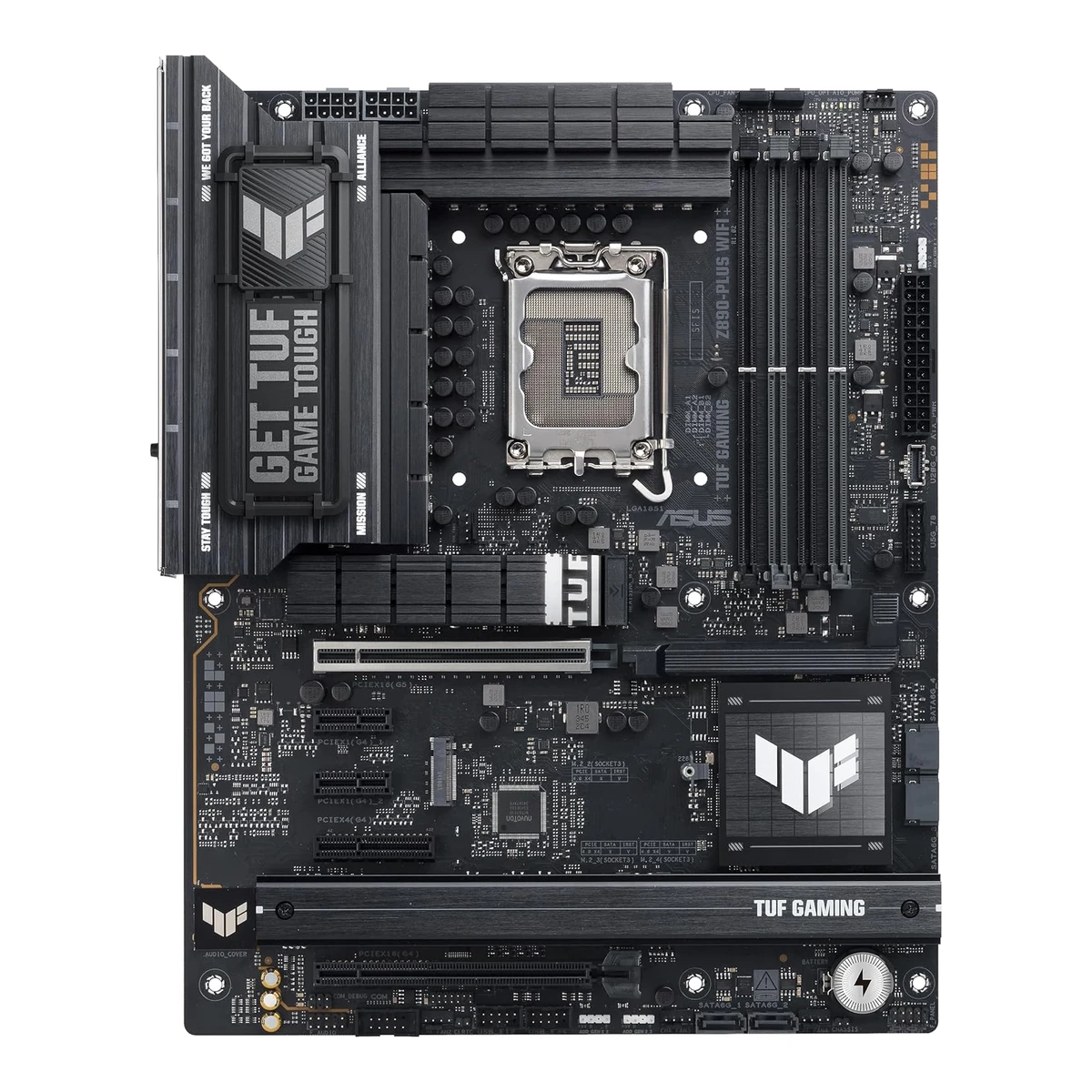
ASUSGaming motherboard
TUF GAMING Z890-PLUS WIFI
Released October 2024.5Reviewmezha.ua/en/reviews/asus-tuf-gaming-z890-plus-wifi-motherboard-review-getting-to-know-intel-core-ultra-5-245kRead 16 October 2026Review dated 2024-10-24, the Intel Core Ultra 200S launch day, with a retail board and a Ukrainian price. It supports October 2024 availability. Last checked 16 October 2026.
- CPU socket
- LGA1851
- Chipset
- Intel Z890
- Form factor
- ATX
- M.2 slots
- 4
67 of 78 fields known.
At a glance
Max memory speed (overclocked)
Higher than 76% of other motherboards.
Ports
- USB-C USB4
- USB-C USB 3.2 Gen 2x2
- 3 USB-A USB 3.2 Gen 2
- 3 USB-A USB 3.2 Gen 1
- HDMI 2.1
- DisplayPort 1.4
- Ethernet (RJ45)
- 5 3.5 mm audio
- Optical S/PDIF
- USB-C header
- USB 3 header (19-pin)
- 2 USB 2.0 header (9-pin)
General
- Model numbers
- TUF GAMING Z890-PLUS WIFI, 90MB1IQ0-M0EAY0, 90MB1IQ0-MVAAY01Maker product pageasus.com/us/motherboards-components/motherboards/tuf-gaming/tuf-gaming-z890-plus-wifi/techspecRead 16 October 2026The ASUS spec page names the model TUF GAMING Z890-PLUS WIFI. Part number 90MB1IQ0-M0EAY0 is from octo24 and Amazon, 90MB1IQ0-MVAAY0 is from ASUS eShop US.12Retailer pageamazon.com/dp/B0DGWNVCHLRead 16 October 2026Mfr Part Number TUF GAMING Z890-PLUS WIFI. Another Amazon listing (ASIN B0DJDFKV2J) gives part number 90MB1IQ0-M0EAY0.13Retailer pageocto24.com/en/ASUS-90MB1IQ0-M0EAY0-ASUS-TUF-GAMING-Z890-PLUS-WIFI-Intel::790156.htmlRead 16 October 2026Product no. 90MB1IQ0-M0EAY0 for TUF GAMING Z890-PLUS WIFI. LDLC lists the same part number.14Retailer pageeshop.asus.com/us/90mb1iq0-mvaay0-tuf-gaming-z890-plus-wifi.htmlRead 16 October 2026ASUS eShop US part number 90MB1IQ0-MVAAY0.
- GTIN / EAN
- 4711387763926, 19710576392012Retailer pageamazon.com/dp/B0DGWNVCHLRead 16 October 2026Amazon US listing for ASIN B0DGWNVCHL gives UPC 197105763920 and Mfr Part Number TUF GAMING Z890-PLUS WIFI. The EAN 4711387763926 is from octo24 for part number 90MB1IQ0-M0EAY0.13Retailer pageocto24.com/en/ASUS-90MB1IQ0-M0EAY0-ASUS-TUF-GAMING-Z890-PLUS-WIFI-Intel::790156.htmlRead 16 October 2026Product no. 90MB1IQ0-M0EAY0, GTIN/EAN 4711387763926.
- Predecessor
- Not available
- Successor
- Not available
- Launch price (EU)
- Not available
- Markets
- Not available
- Colours
- Not available
- Board revision
- Not available
Platform
- CPU socket
- LGA18511Maker product pageasus.com/us/motherboards-components/motherboards/tuf-gaming/tuf-gaming-z890-plus-wifi/techspecRead 16 October 2026
- Chipset
- Intel Z8901Maker product pageasus.com/us/motherboards-components/motherboards/tuf-gaming/tuf-gaming-z890-plus-wifi/techspecRead 16 October 2026
- Supported processors
- Intel Core Ultra (Series 2)1Maker product pageasus.com/us/motherboards-components/motherboards/tuf-gaming/tuf-gaming-z890-plus-wifi/techspecRead 16 October 2026Intel Core Ultra Processors (Series 2), LGA1851. The page refers to the ASUS download center for the CPU support list, which was not read. Read on 2026-10-16.
Board
Front and side, drawn to scale.
- Board dimensions
- Width244Height305mm(9.6 × 12 in)1Maker product pageasus.com/us/motherboards-components/motherboards/tuf-gaming/tuf-gaming-z890-plus-wifi/techspecRead 16 October 202612 inch x 9.6 inch (30.5 cm x 24.4 cm).
- Back-connect design
- No2Maker product pageasus.com/us/motherboards-components/motherboards/tuf-gaming/tuf-gaming-z890-plus-wifiRead 16 October 2026The ASUS spec lists the usual 24-pin, 8-pin and system panel connectors and the manual layout shows them at the usual board edges. No back-connect design is named.3Owner's manualdlcdnets.asus.com/pub/ASUS/mb/LGA1851/TUF_GAMING_Z890-PLUS_WIFI/E24160_TUF_GAMING_Z890-PLUS_WIFI_EM_WEB.pdfRead 16 October 2026The layout in chapter 1 shows the usual front-side power, fan and USB connectors. The board is not a back-connect design.
Power delivery
- CPU core (Vcore) power stages
- 162Maker product pageasus.com/us/motherboards-components/motherboards/tuf-gaming/tuf-gaming-z890-plus-wifiRead 16 October 202616 stages for VCCCORE. The first number is the Vcore count.
- Vcore power stage rating
- 80A2Maker product pageasus.com/us/motherboards-components/motherboards/tuf-gaming/tuf-gaming-z890-plus-wifiRead 16 October 2026Each stage is DrMOS rated for up to 80A.
- CPU power connectors
- 8+8 pin1Maker product pageasus.com/us/motherboards-components/motherboards/tuf-gaming/tuf-gaming-z890-plus-wifi/techspecRead 16 October 2026Power related list: 1 x 24-pin main power and 2 x 8-pin +12V CPU power connectors.2Maker product pageasus.com/us/motherboards-components/motherboards/tuf-gaming/tuf-gaming-z890-plus-wifiRead 16 October 2026ProCool power connectors: proprietary 8+8 pin connectors.
Memory
- Memory type
- DDR51Maker product pageasus.com/us/motherboards-components/motherboards/tuf-gaming/tuf-gaming-z890-plus-wifi/techspecRead 16 October 2026
- Max memory speed (overclocked)
- 9,066MT/s1Maker product pageasus.com/us/motherboards-components/motherboards/tuf-gaming/tuf-gaming-z890-plus-wifi/techspecRead 16 October 2026Support up to 9066+ MT/s (OC), Non-ECC, Un-buffered, Clocked Unbuffered DIMM (CUDIMM). The page names no CPU family or module setup. The footnote says supported speeds vary by CPU and memory configuration.
Expansion slots
- Expansion slots
Physical slot Electrical lanes PCIe generation Connected to Count PCIe x16 16 5 CPU 1 PCIe x16 4 4 Chipset 1 PCIe x4 4 4 Chipset 1 PCIe x1 1 4 Chipset 2 - Full-length PCIe slots
- 2
- Fastest PCIe x16 slot generation
- 5
Storage
- M.2 storage slots
Slot PCIe generation PCIe lanes Connected to Longest drive Takes SATA drives Heatsink M.2_1 5 4 CPU M.2 2280 No Yes M.2_2 4 4 CPU M.2 2280 No No M.2_3 4 4 Chipset M.2 22110 No Yes M.2_4 4 4 Chipset M.2 2280 Yes Yes Source1Maker product pageasus.com/us/motherboards-components/motherboards/tuf-gaming/tuf-gaming-z890-plus-wifi/techspecRead 16 October 2026Total 4 x M.2 slots (Key M). Series 2 CPU: M.2_1 type 2242/2260/2280 PCIe 5.0 x4 and M.2_2 type 2280 PCIe 4.0 x4. Z890 chipset: M.2_3 type 2280/22110 PCIe 4.0 x4 and M.2_4 type 2242/2260/2280 PCIe 4.0 x4 and SATA modes. Only M.2_4 lists a SATA mode. The page lists no lane sharing between M.2 slots and other ports. Heatsinks are noted under the overview page and the reviews.2Maker product pageasus.com/us/motherboards-components/motherboards/tuf-gaming/tuf-gaming-z890-plus-wifiRead 16 October 2026Overview: 4 M.2 slots, and Two M.2 Heatsinks for Three M.2 Slots. The Amazon product photo shows M.2_1 under its own TUF heatsink, M.2_3 and M.2_4 under the long lower heatsink and M.2_2 as an open slot, so M.2_2 is stored with no heatsink. Mezha and FPS Review also describe one cooler for M.2_1 and a common plate for M.2_3 and M.2_4.5Reviewmezha.ua/en/reviews/asus-tuf-gaming-z890-plus-wifi-motherboard-review-getting-to-know-intel-core-ultra-5-245kRead 16 October 2026M.2_1 has a large cooler with a complex profile. M.2_3 and M.2_4 share a solid aluminium plate. For M.2_2 the review says it either needs no extra cooling or has its own block, so the Amazon product photo decides.6Reviewthefpsreview.com/2025/02/11/asus-tuf-gaming-z890-plus-wifi-motherboard-reviewRead 16 October 2026M.2_1 has a cooler with the TUF logo and the M.2 Q-Release system. M.2_3 and M.2_4 sit under the lower M.2 cooler. The review does not say whether M.2_2 has a heatsink.12Retailer pageamazon.com/dp/B0DGWNVCHLRead 16 October 2026The gallery top-view photo of the board shows M.2_1 under its own TUF heatsink, M.2_3 and M.2_4 under the long lower heatsink and M.2_2 as an open slot with no heatsink.- M.2 slots
- 4
- PCIe 5.0 M.2 slots
- 1
Rear ports
- Rear ports
Type Version Count Max link rate (Gbps) Thunderbolt or USB4 DP Alt Mode USB-C USB4 1 40 Thunderbolt 4 Yes USB-C USB 3.2 Gen 2x2 1 20 Not available Yes USB-A USB 3.2 Gen 2 3 10 Not available Not available USB-A USB 3.2 Gen 1 3 5 Not available Not available HDMI HDMI 2.1 1 Not available Not available Not available DisplayPort DisplayPort 1.4 1 Not available Not available Not available Ethernet (RJ45) Not available 1 2.5 Not available Not available 3.5 mm audio Not available 5 Not available Not available Not available Optical S/PDIF Not available 1 Not available Not available Not available Source1Maker product pageasus.com/us/motherboards-components/motherboards/tuf-gaming/tuf-gaming-z890-plus-wifi/techspecRead 16 October 2026Back panel: 1 x Thunderbolt 4 USB Type-C, 1 x USB 20Gbps (Type-C with DP Alt mode), 3 x USB 10Gbps (Type-A), 3 x USB 5Gbps (Type-A), 1 x DisplayPort (max. 4K@60Hz as specified in DisplayPort 1.4), 1 x HDMI (4K@60Hz as specified in HDMI 2.1), 1 x Wi-Fi module, 1 x Intel 2.5Gb Ethernet port, 5 x audio jacks, 1 x optical S/PDIF out and 1 x BIOS FlashBack button. The Thunderbolt 4 port is written USB4 at 40 Gbps. The footnote USB Type-C power delivery output: max. 5V/3A ends the USB list and names no port, so no port power is stored.2Maker product pageasus.com/us/motherboards-components/motherboards/tuf-gaming/tuf-gaming-z890-plus-wifiRead 16 October 2026Connectivity section: each Thunderbolt 4 port delivers up to 40Gbps of bi-directional bandwidth. The overview lists the same rear ports as the spec page: Thunderbolt 4, 1 x USB 20Gbps with DP Alt mode, 3 x USB 10Gbps and 3 x USB 5Gbps, DisplayPort, HDMI, Intel 2.5Gb Ethernet, 5 audio jacks and an optical S/PDIF out.- Rear USB ports
- 8
- Rear USB-C ports
- 2
- Fastest rear USB port
- 40Gbps
- Thunderbolt
- Yes
Internal connectors
- Internal USB headers
Header Max data rate (Gbps) Headers Front ports served USB-C header 20 1 1 USB 3 header (19-pin) 5 1 2 USB 2.0 header (9-pin) 0.48 2 4 - Front USB-C header speed
- 20Gbps
Networking
- Ethernet controllers
- Intel I2268Revieweinfoldtech.com/2026/01/asus-tuf-gaming-z890-plus-wifi-reviewRead 16 October 2026The spec table lists 1x Intel i226-V Ethernet 2.5Gbps. The suffix letter is dropped. The page also names an Intel S3243L12 in its component text, so Station-Drivers is used as a second source. The same review lists an Intel BE200 Wi-Fi module, which conflicts with the MediaTek MT7925 of ASUS support, Mezha and FPS Review and is not stored. It also lists an 8 layer PCB.9Spec databasestation-drivers.com/index.php/en-us/bios-news/12-asus-bios-drivers/343-intel-z890-serie-800/4406-tuf-gaming-z890-plus-wifiRead 16 October 2026The driver page for this board lists the network chip as Intel I226-V (2.5Gb). It lists the wireless chip only as Intel BE2xx Wi-Fi 7, which conflicts with the MediaTek MT7925 of ASUS support and two reviews and is not stored.10Maker product pageasus.com/motherboards-components/motherboards/tuf-gaming/tuf-gaming-z890-plus-wifi/helpdesk_downloadRead 16 October 2026ASUS support download page: Intel I225/I226 LAN driver. The I226 family fits the Intel 2.5Gb Ethernet on the spec page. The I226-V name is from Einfoldtech and Station-Drivers.
- Ethernet ports
- 1
- Ethernet speed
- 2.5Gbps
- Wi-Fi standard
- Wi-Fi 71Maker product pageasus.com/us/motherboards-components/motherboards/tuf-gaming/tuf-gaming-z890-plus-wifi/techspecRead 16 October 20262x2 Wi-Fi 7 (802.11be).
- Wi-Fi bands
- 2.4 GHz, 5 GHz, 6 GHz1Maker product pageasus.com/us/motherboards-components/motherboards/tuf-gaming/tuf-gaming-z890-plus-wifi/techspecRead 16 October 2026Supports 2.4/5/6GHz frequency band. The 6 GHz band and bandwidth vary by country.
- Max Wi-Fi channel width
- 160MHz1Maker product pageasus.com/us/motherboards-components/motherboards/tuf-gaming/tuf-gaming-z890-plus-wifi/techspecRead 16 October 2026Supports Wi-Fi 7 160MHz bandwidth, up to 2.9Gbps transfer rate.
- Wi-Fi module
- MediaTek MT79255Reviewmezha.ua/en/reviews/asus-tuf-gaming-z890-plus-wifi-motherboard-review-getting-to-know-intel-core-ultra-5-245kRead 16 October 2026Spec table: 1x Wi-Fi 7 (MediaTek MT7925, 802.11be, Bluetooth 5.4). ASUS does not name the module on its spec page.6Reviewthefpsreview.com/2025/02/11/asus-tuf-gaming-z890-plus-wifi-motherboard-reviewRead 16 October 2026Spec table: Wi-Fi 7 from a MediaTek MT7925.10Maker product pageasus.com/motherboards-components/motherboards/tuf-gaming/tuf-gaming-z890-plus-wifi/helpdesk_downloadRead 16 October 2026ASUS support download page for this board: the Wi-Fi and Bluetooth drivers are MediaTek MT7925/7927 WiFi and Bluetooth drivers and no Intel Wi-Fi driver is offered. The driver names cover MT7925 and MT7927, so the module name is taken from Mezha and FPS Review.
Audio
Features
- Clear CMOS button (rear)
- No1Maker product pageasus.com/us/motherboards-components/motherboards/tuf-gaming/tuf-gaming-z890-plus-wifi/techspecRead 16 October 2026The back panel list has a BIOS FlashBack button and no Clear CMOS button. Clear CMOS is a header on the board.3Owner's manualdlcdnets.asus.com/pub/ASUS/mb/LGA1851/TUF_GAMING_Z890-PLUS_WIFI/E24160_TUF_GAMING_Z890-PLUS_WIFI_EM_WEB.pdfRead 16 October 2026Layout item 13 is a Clear CMOS header, and the rear panel connectors list no button.
- POST code display
- No1Maker product pageasus.com/us/motherboards-components/motherboards/tuf-gaming/tuf-gaming-z890-plus-wifi/techspecRead 16 October 2026The Special Features list ASUS Q-LED (CPU, DRAM, VGA and boot device). No two-digit display is listed.3Owner's manualdlcdnets.asus.com/pub/ASUS/mb/LGA1851/TUF_GAMING_Z890-PLUS_WIFI/E24160_TUF_GAMING_Z890-PLUS_WIFI_EM_WEB.pdfRead 16 October 2026The layout contents list Q-LEDs and a BIOS FlashBack LED. No two-digit display is listed. The manual never states that it is absent.
- Power button on the board
- No1Maker product pageasus.com/us/motherboards-components/motherboards/tuf-gaming/tuf-gaming-z890-plus-wifi/techspecRead 16 October 2026The internal connector list and the special features list name no power or start button on the board.3Owner's manualdlcdnets.asus.com/pub/ASUS/mb/LGA1851/TUF_GAMING_Z890-PLUS_WIFI/E24160_TUF_GAMING_Z890-PLUS_WIFI_EM_WEB.pdfRead 16 October 2026Layout contents list only a PWR_BTN header for a case button. No power or start button is listed on the board.
- Dual BIOS
- Not available
- Pre-installed I/O shield
- Yes1Maker product pageasus.com/us/motherboards-components/motherboards/tuf-gaming/tuf-gaming-z890-plus-wifi/techspecRead 16 October 2026ASUS EZ DIY list: Pre-mounted I/O shield.
- Tool-free features
- Tool-free M.2 latch, Tool-free M.2 heatsink, PCIe slot release, Push-on antenna connector1Maker product pageasus.com/us/motherboards-components/motherboards/tuf-gaming/tuf-gaming-z890-plus-wifi/techspecRead 16 October 2026ASUS Q-Design: M.2 Q-Latch, M.2 Q-Release, M.2 Q-Slide, PCIe Slot Q-Release and Q-Antenna. The overview page says M.2 Q-Release is a switch that removes the M.2 heatsink without screws.2Maker product pageasus.com/us/motherboards-components/motherboards/tuf-gaming/tuf-gaming-z890-plus-wifiRead 16 October 2026Easy PC DIY: PCIe Slot Q-Release is a physical button on the first PCIe slot, M.2 Q-Release is a switch that removes the M.2 heatsink without screws, M.2 Q-Latch holds a drive without screws and Q-Antenna snaps the Wi-Fi antenna on.
Measured
- Power draw idle
- Not available
- Power draw CPU stress
- Not available
In the box
- In the box
- 2 x SATA 6Gb/s cables, 1 x ASUS WiFi Q-Antenna, 1 x M.2 Q-Slide package, 2 x M.2 rubber packages, 1 x Screw package for M.2 SSD, 1 x TUF GAMING sticker, 1 x TUF GAMING removable nameplate, 1 x Quick start guide1Maker product pageasus.com/us/motherboards-components/motherboards/tuf-gaming/tuf-gaming-z890-plus-wifi/techspecRead 16 October 2026Accessories list on the specification page, the same as the manual's package contents.
Links
- Product page
- www.asus.com/us/motherboards-components/motherboards/tuf-gaming/tuf-gaming-z890-plus-wifi2Maker product pageasus.com/us/motherboards-components/motherboards/tuf-gaming/tuf-gaming-z890-plus-wifiRead 16 October 2026
- Spec sheet
- www.asus.com/us/motherboards-components/motherboards/tuf-gaming/tuf-gaming-z890-plus-wifi/techspec1Maker product pageasus.com/us/motherboards-components/motherboards/tuf-gaming/tuf-gaming-z890-plus-wifi/techspecRead 16 October 2026
- Manual
- dlcdnets.asus.com/pub/ASUS/mb/LGA1851/TUF_GAMING_Z890-PLUS_WIFI/E24160_TUF_GAMING_Z890-PLUS_WIFI_EM_WEB.pdf3Owner's manualdlcdnets.asus.com/pub/ASUS/mb/LGA1851/TUF_GAMING_Z890-PLUS_WIFI/E24160_TUF_GAMING_Z890-PLUS_WIFI_EM_WEB.pdfRead 16 October 2026ASUS user manual E24160, First Edition, September 2024, from dlcdnets.asus.com. It lists max. 192GB of memory, while the newer product page lists 256GB.
- EPREL registration number
- Not available
Warranty
- Manufacturer warranty (source market)
- 3years12Retailer pageamazon.com/dp/B0DGWNVCHLRead 16 October 2026Warranty Description: 3 year (US listing). ASUS eShop US also says 3-year manufacturer warranty.14Retailer pageeshop.asus.com/us/90mb1iq0-mvaay0-tuf-gaming-z890-plus-wifi.htmlRead 16 October 20263-year manufacturer warranty.
Compare with
Pick a motherboard to see both side by side. Differences are marked yellow.
Sources
We read 14 sources for this motherboard. The numbers match the markers in the sheet.
- Press articlepugetsystems.com/labs/articles/z890-vs-b860-vs-h810
- Retailer pageamazon.com/dp/B0DGWNVCHL
See a wrong value? Tell us and name the field.