Monitors / Compare
ASUS ROG Swift OLED PG27UCDM vs GIGABYTE AORUS FO32U2P
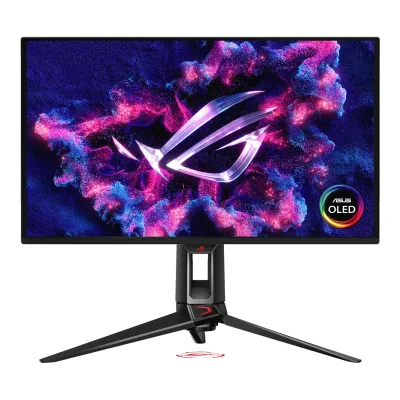
Product A: ASUS
118 of 172 known
Change ASUS ROG Swift OLED PG27UCDM
Compare the GIGABYTE AORUS FO32U2P with
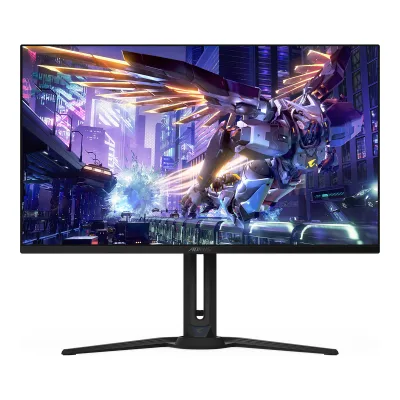
Product B: GIGABYTE
112 of 172 known ASUS ROG Strix OLED XG27UCDMG
 Dell Alienware AW2725Q
 MSI MPG 272URX QD-OLED
 BenQ MOBIUZ EX271UZ
 Samsung Odyssey OLED G8 G81SF 27"
 Dell Alienware AW3425DW
 MSI MPG 341CQPX QD-OLED
 Dell Alienware AW3225QF
 MSI MPG 321CURX QD-OLED
 Samsung Odyssey OLED G8 G80SH 27"
 AOC AGON PRO AG276QZD2
 ASUS ROG Swift OLED PG32UCDM
Change GIGABYTE AORUS FO32U2P
Compare the ASUS ROG Swift OLED PG27UCDM with
ASUS ROG Strix OLED XG27UCDMGDell Alienware AW2725QMSI MPG 272URX QD-OLEDBenQ MOBIUZ EX271UZSamsung Odyssey OLED G8 G81SF 27"Dell Alienware AW3425DWMSI MPG 341CQPX QD-OLEDDell Alienware AW3225QFMSI MPG 321CURX QD-OLEDSamsung Odyssey OLED G8 G80SH 27"AOC AGON PRO AG276QZD2ASUS ROG Swift OLED PG32UCDM73 of 164 fields differ
- 42 different values
- 31 known for one only
- 52 the same
- 39 missing for both
Biggest differences
Each bar uses the scale of all 179 monitors.
- Power use SDR (EU label)Lower is betterA: 25.4WB: 44WASUS is 18.6 W lower.
- Power use HDR (EU label)Lower is betterA: 36WB: 50WASUS is 14 W lower.
- Pixel densityA: 163.2ppiB: 139.9ppiASUS is 23.3 ppi higher.
Refresh rate per resolution
The best rate over any port. Bars run from 0 to 1200 Hz.
3840 × 2160Native for both
A240Hz
B240Hz
Size, drawn to scale
Front and side. Solid lines show the stand at its lowest. Dashed lines show it at its highest.
- AASUS: 610.3 × 369.2 mm
- BGIGABYTE: 718.3 × 417.5 mm
We have no stand height for GIGABYTE, so it is drawn without its stand.
Weight
0 to 15 kg
Weight with stand
A7.62kg
B8.53kg
Weight without stand
A5kg
B6.2kg
Box weight
A12.4kg
B13.2kg
All 172 fields
Every value links to where we found it.
General
5 of 8 differ
Series
Model numbers
PG27UCDM, 90LM0B30-B019711Maker product pagerog.asus.com/monitors/27-to-31-5-inches/rog-swift-oled-pg27ucdm/specRead 5 October 2026Model heading establishes PG27UCDM. Part number comes from the separately cited ASUS datasheet.4Maker spec sheet (PDF)gzhls.at/blob/ldb/8/d/d/9/3249322c8dac04e25c37cdf4197f284bead7.pdfRead 5 October 2026ASUS datasheet page 1: product number 90LM0B30-B01971 for ROG Swift PG27UCDM. No sales region inferred from suffix.
GTIN / EAN
Not available
Announced
Not available
Status
Not available
Predecessor
Not available
Not available
Successor
Not available
Not available
Launch price (US)
Not available
Launch price (EU)
Not available
Not available
Markets
Not available
Not available
Colours
Not available
Display
6 of 12 differ
Screen size
Viewable screen diagonal
Not available
Native resolution
Aspect ratio
Pixel density
163.2ppi
139.9ppi
Active display area
Width589.97Height332.93mm(23.2 × 13.1 in)1Maker product pagerog.asus.com/monitors/27-to-31-5-inches/rog-swift-oled-pg27ucdm/specRead 5 October 2026Display Viewing Area (HxV): 589.97 x 332.93 mm. Published area is retained, not calculated from pitch. ASUS datasheet rounds this to 590 x 333 mm.
Width699.48Height394.73mm(27.5 × 15.5 in)1Maker product pagegigabyte.com/Monitor/AORUS-FO32U2P/spRead 5 October 2026Maker area 699.48 x 394.73 mm does not match native resolution multiplied by either web 0.181 mm pitch or manual 0.1814 mm pitch. Cause is not published. Pixel pitch is omitted rather than assuming a shift-reserve area.
Curved
Curvature radius
Not available
Not available
Screen surface
Anti-reflection coating
Panel
7 of 31 differ
Panel type
Panel type (as published)
Backlight
None (self-emissive)3Maker product pagegigabyte.com/Monitor/AORUS-FO32U2PRead 5 October 2026
Local dimming
Not available
Not available
Dimming zones
Not available
Not available
Panel maker
Panel part number
Not available
Not available
Panel generation
3rd generation QD-OLED5Reviewtftcentral.co.uk/reviews/gigabyte-aorus-fo32u2pRead 5 October 2026
Subpixel layout
Not available
Colour depth
Colour depth method
Displayable colours
sRGB coverage
Not available
Not available
DCI-P3 coverage
99%1Maker product pagegigabyte.com/Monitor/AORUS-FO32U2P/spRead 5 October 2026Maker 99% DCI-P3 claim. TFTCentral explicitly describes this as coverage. CIE coordinate basis and minimum/typical scope are unstated.5Reviewtftcentral.co.uk/reviews/gigabyte-aorus-fo32u2pRead 5 October 2026Review introductory features explicitly describes coverage of 99% DCI-P3. Measured relative sRGB volume 138.6% is not stored as coverage.
Adobe RGB coverage
Not available
Not available
Rec. 2020 coverage
Not available
Not available
NTSC coverage
Not available
Not available
Factory calibrated
Claimed Delta E
Paper calibration report in box
Not available
Hardware calibration support
Not available
Not available
Static contrast ratio
Brightness (typical, SDR)
Brightness (maker minimum)
Not available
Not available
Peak brightness (HDR)
HDR peak test window
Not available
Full-screen brightness
Not available
250nits1Maker product pagegigabyte.com/Monitor/AORUS-FO32U2P/spRead 5 October 2026The maker explicitly states SDR brightness at 100% APL. This is separate from HDR and small-window SDR results.2Owner's manualdownload.gigabyte.com/FileList/Manual/AORUS_FO32U2P_FO32U2_FO27Q3_FO32U_FO27Q2_UM_English_20240417.pdfRead 5 October 2026Exact p20 explicitly SDR 250 nits at 100% APL.
HDR formats
HDR certification
DisplayHDR True Black 4001Maker product pagerog.asus.com/monitors/27-to-31-5-inches/rog-swift-oled-pg27ucdm/specRead 5 October 2026Certificate: VESA DisplayHDR 400 True Black.
DisplayHDR True Black 4001Maker product pagegigabyte.com/Monitor/AORUS-FO32U2P/spRead 5 October 2026
Viewing angle (horizontal)
Refresh rate and motion
10 of 22 differ
Refresh rate per resolution and port
AASUS ROG Swift OLED PG27UCDM
| Resolution | HDMI 2.1 | DisplayPort 2.1a UHBR20, 1.4 | USB-C |
|---|---|---|---|
| 3840 × 2160Native | 240Hz | 240Hz | 240Hz |
BGIGABYTE AORUS FO32U2P
| Resolution | HDMI 2.1 | DisplayPort 2.1, 1.4 | USB-C |
|---|---|---|---|
| 3840 × 2160Native | 240Hz | 240Hz | 240Hz |
Source3Maker product pagegigabyte.com/Monitor/AORUS-FO32U2PRead 5 October 2026Maker expressly supports uncompressed native 4K 240 Hz through DP 2.1 UHBR20. Bit depth and chroma are not separately stated for this claim. The 8K 60 Hz text describes link capability and is not stored as a native panel mode.5Reviewtftcentral.co.uk/reviews/gigabyte-aorus-fo32u2pRead 5 October 2026Gaming table explicitly maximum at native resolution is 240 Hz for DP, HDMI and USB-C. Normal test system used RTX 3090 over DP 1.4 with DSC. Maker main explicitly establishes uncompressed DP 2.1 UHBR20 native 4K 240. Bit depth and chroma are not inferred from theoretical bandwidth. MiniDP-specific maximum is not separately tested. The 24.5-inch 1080p crop mode reaches 240 Hz but input-specific maxima are unstated, so no crop row is inferred.
Max refresh rate
240Hz
240Hz
Max refresh rate at native resolution
240Hz
240Hz
Max refresh rate over DisplayPort
240Hz
240Hz
Max refresh rate over HDMI
240Hz
240Hz
Max refresh rate over USB-C
240Hz
240Hz
Max refresh rate at 10-bit
120Hz
Not available
Native refresh rate
Overclocked refresh rate
Not available
Not available
Dual mode
Not available
Minimum fixed refresh rate
Not available
Not available
Adaptive sync technologies
FreeSync Premium Pro, G-SYNC Compatible, VESA AdaptiveSync Display, HDMI VRR1Maker product pagerog.asus.com/monitors/27-to-31-5-inches/rog-swift-oled-pg27ucdm/specRead 5 October 2026Features and Certificate name FreeSync Premium Pro, G-SYNC Compatible and VESA AdaptiveSync Display 240Hz. HDMI VRR is separately verified by TFTCentral. Its early review says FreeSync Premium, superseded here by current maker Premium Pro claim.6Measurementtftcentral.co.uk/reviews/asus-rog-swift-pg27ucdmRead 5 October 2026Console Gaming table marks HDMI-VRR supported. Early review names FreeSync Premium. Current maker names Premium Pro, which takes precedence.
FreeSync Premium Pro, Adaptive-Sync, HDMI VRR5Reviewtftcentral.co.uk/reviews/gigabyte-aorus-fo32u2pRead 5 October 2026Review explicitly FreeSync Premium Pro certification and generic Adaptive-Sync. Console table and Xbox Series X test support HDMI VRR. Working with NVIDIA was expressly uncertified in this test and is not stored as a G-SYNC Compatible certification. Unscoped 48-240 Hz is not assigned to individual inputs or a measured-range field.
VRR range per port
AASUS ROG Swift OLED PG27UCDM
| Input | Min (Hz) | Max (Hz) |
|---|---|---|
| HDMI | 48 | 240 |
| DisplayPort | 48 | 240 |
BGIGABYTE AORUS FO32U2P
Not availableResponse time (maker GtG claim)
Response time (maker MPRT claim)
Not available
Not available
Overdrive settings
Not available
Not available
Motion blur reduction
Blur-reduction technology
Not available
Blur reduction works with VRR
Not available
Flicker-free (claimed)
Black frame insertion
Measured
3 of 12 differ
Input lag at maximum refresh rate
Not available
Not available
Input lag at 60 Hz
Not available
Not available
Average response time (measured)
Overshoot (measured)
Not available
Not available
Contrast ratio (measured)
Not available
Not available
SDR brightness (measured)
HDR brightness in a real scene (measured)
Not available
Not available
PWM flicker frequency (measured)
Not available
Not available
VRR range (measured)
Not available
Not available
Colour accuracy (measured Delta E)
Gray uniformity (measured)
Not available
Not available
Reflections (measured)
Not available
Not available
Connectivity
10 of 19 differ
Video inputs
AASUS ROG Swift OLED PG27UCDM
| Type | Version | Count | Max bandwidth (Gbps) |
|---|---|---|---|
| DisplayPort | 2.1a UHBR20 | 1 | 80 |
| HDMI | 2.1 | 2 | 48 |
| USB-C | Not available | 1 | Not available |
BGIGABYTE AORUS FO32U2P
| Type | Version | Count | Max bandwidth (Gbps) | DSC |
|---|---|---|---|---|
| HDMI | 2.1 | 2 | 48 | Not available |
| DisplayPort | 2.1 | 1 | 80 | Yes |
| Mini DisplayPort | 2.1 | 1 | 80 | Not available |
| USB-C | Not available | 1 | Not available | Not available |
Source1Maker product pagegigabyte.com/Monitor/AORUS-FO32U2P/spRead 5 October 2026Full-size and MiniDP 2.1 UHBR20 are inputs. Full-size DP 1.4 HBR3 is an output and is excluded. Maker main page supplies raw 80 Gbps for UHBR20. TFTCentral supplies HDMI raw 48 Gbps and tested DP 1.4 DSC fallback. MiniDP/HDMI/USB-C DSC capability is not inferred.2Owner's manualdownload.gigabyte.com/FileList/Manual/AORUS_FO32U2P_FO32U2_FO27Q3_FO32U_FO27Q2_UM_English_20240417.pdfRead 5 October 2026Exact p20 identifies full-size and MiniDP UHBR20 inputs, separate DP output and two HDMI inputs.3Maker product pagegigabyte.com/Monitor/AORUS-FO32U2PRead 5 October 2026UHBR20 section explicitly supplies raw 80 Gbps. Diagram distinguishes input and output sockets.5Reviewtftcentral.co.uk/reviews/gigabyte-aorus-fo32u2pRead 5 October 2026Console table explicitly full HDMI 2.1 48 Gbps. DP 1.4 DSC fallback is actually exercised by the reviewer RTX 3090 setup. Raw DP 2.1 80 Gbps is separately direct maker evidence.
HDMI ports
2
2
DisplayPort ports
1
2
Highest HDMI version
2.1
2.1
Highest DisplayPort version
2.1a UHBR20
2.1
HDMI features
CEC, VRR, ALLM3Owner's manualdlcdnets.asus.com/pub/ASUS/LCD%20Monitors/PG27UCDM/ASUS_PG27UCDM_UM-EN.pdfRead 5 October 2026System Setup 3-15: ASUS Power Sync controls CEC source power. TFTCentral Console Gaming verifies HDMI VRR and ALLM.6Measurementtftcentral.co.uk/reviews/asus-rog-swift-pg27ucdmRead 5 October 2026Console Gaming table explicitly marks HDMI-VRR and Auto Low Latency Mode (ALLM) supported. CEC separately sourced to manual.
USB-C video (DP Alt Mode)
USB-C power delivered
65W1Maker product pagegigabyte.com/Monitor/AORUS-FO32U2P/spRead 5 October 2026Maker supplies up to 65 W. Exact FO32U2P manual profiles include 20 V / 3.25 A. Lower-power FO32U2/FO27 columns are excluded.2Owner's manualdownload.gigabyte.com/FileList/Manual/AORUS_FO32U2P_FO32U2_FO27Q3_FO32U_FO27Q2_UM_English_20240417.pdfRead 5 October 2026Exact FO32U2P p20 profiles 5 V/3 A, 9 V/3 A, 15 V/3 A and 20 V/3.25 A establish up to 65 W.
Thunderbolt
Not available
Not available
USB upstream ports
AASUS ROG Swift OLED PG27UCDM
| Connector | USB version | Count |
|---|---|---|
| USB-B | 3.2 Gen 1 | 1 |
| USB-C | Not available | 1 |
BGIGABYTE AORUS FO32U2P
| Connector | USB version | Count |
|---|---|---|
| USB-B | 3.2 | 1 |
| USB-C | Not available | 1 |
USB downstream hub ports
AASUS ROG Swift OLED PG27UCDM
| Connector | USB version | Count |
|---|---|---|
| USB-A | 3.2 Gen 1 | 3 |
BGIGABYTE AORUS FO32U2P
| Connector | USB version | Count |
|---|---|---|
| USB-A | 3.2 | 2 |
KVM switch
Daisy chain (MST)
Not available
Yes2Owner's manualdownload.gigabyte.com/FileList/Manual/AORUS_FO32U2P_FO32U2_FO27Q3_FO32U_FO27Q2_UM_English_20240417.pdfRead 5 October 2026Display p16 specifies Daisy Chain. Maker main and SP distinguish the DP 1.4 HBR3 output from video inputs.3Maker product pagegigabyte.com/Monitor/AORUS-FO32U2PRead 5 October 2026Maker explicitly describes transporting multiple video signals through a sequence of monitors.
3.5 mm headphone output
Yes1Maker product pagerog.asus.com/monitors/27-to-31-5-inches/rog-swift-oled-pg27ucdm/specRead 5 October 2026I/O Ports: Earphone jack Yes. ASUS datasheet specifies 3.5 mm.4Maker spec sheet (PDF)gzhls.at/blob/ldb/8/d/d/9/3249322c8dac04e25c37cdf4197f284bead7.pdfRead 5 October 2026Connectivity page 2: Kopfhörer-Anschluss 3.5 mm.
3.5 mm microphone input
Yes1Maker product pagegigabyte.com/Monitor/AORUS-FO32U2P/spRead 5 October 2026Separate analogue microphone socket is explicit. Manual p18 requires Headphone+Mic (USB) in ESS Headset options to activate its microphone function.2Owner's manualdownload.gigabyte.com/FileList/Manual/AORUS_FO32U2P_FO32U2_FO27Q3_FO32U_FO27Q2_UM_English_20240417.pdfRead 5 October 2026p6 separate microphone jack. System p18 describes USB headset routing selection.
Optical out
Picture in picture
Picture by picture
Smart features
None of 4 known
Smart platform
Not available
Not available
Wi-Fi
Not available
Not available
Bluetooth
Not available
Not available
Remote control
Not available
Not available
Audio and camera
4 of 5 differ
Speakers
Number of speakers
Not available
Speaker power per channel
Not available
Webcam
Not available
Microphone
Not available
Not available
Ergonomics and controls
8 of 15 differ
Stand height adjustment
Tilt
Forward5°Backward20°1Maker product pagegigabyte.com/Monitor/AORUS-FO32U2P/spRead 5 October 2026
Swivel
Pivot
Counterclockwise90°Clockwise90°3Owner's manualdlcdnets.asus.com/pub/ASUS/LCD%20Monitors/PG27UCDM/ASUS_PG27UCDM_UM-EN.pdfRead 5 October 2026Specifications 3-16: pivot +/-90 degrees.
Counterclockwise0°Clockwise90°1Maker product pagegigabyte.com/Monitor/AORUS-FO32U2P/spRead 5 October 2026Maker specifies 0 to +90 degrees. Main page explicitly identifies clockwise rotation.3Maker product pagegigabyte.com/Monitor/AORUS-FO32U2PRead 5 October 2026Ergonomic section explicitly +90 degrees clockwise.
Removable stand
VESA mount
VESA adapter needed
Not available
Security lock slot
On-screen menu controls
Joystick, Buttons, Software2Owner's manualdownload.gigabyte.com/FileList/Manual/AORUS_FO32U2P_FO32U2_FO27Q3_FO32U_FO27Q2_UM_English_20240417.pdfRead 5 October 2026Control button is a joystick. Physical KVM and Tactical buttons operate display settings. Desktop OSD control is not inferred from generic Control Center support.9Review4gamers.com.tw/news/detail/65977/aorus-fo32u2p-dp21-32-4k-240hz-qd-oled-reviewRead 8 October 2026The exact tested FO32U2P review describes mouse control through GCC and expressly says its Sidekick feature adjusts most monitor settings and tactical functions. Its GCC screenshots show monitor controls. This establishes desktop display control beyond generic software support or window-layout tools.
Desktop software
User firmware updates
Ambient light sensor
Not available
Presence sensor
Not available
RGB lighting
Gaming menu features
FPS Counter, Crosshair, Dynamic Crosshair, Sniper, Timer, Stopwatch, Display Alignment, GameVisual, Shadow Boost, Aspect Control3Owner's manualdlcdnets.asus.com/pub/ASUS/LCD%20Monitors/PG27UCDM/ASUS_PG27UCDM_UM-EN.pdfRead 5 October 2026GamePlus 1.3.3 and Gaming 3-2 to 3-3 list these functions. Image 3-5 names Aspect Control.
Black Equalizer 2.0, Dashboard, Crosshair, Timer, Counter, Night Vision, Eagle Eye1Maker product pagegigabyte.com/Monitor/AORUS-FO32U2P/spRead 5 October 2026
OLED care
1 of 3 differ
OLED care
Screen Saver, Pixel Cleaning, Pixel Cleaning Reminder, Screen Move, Auto Logo Brightness, Neo Proximity Sensor, OLED Usage Info3Owner's manualdlcdnets.asus.com/pub/ASUS/LCD%20Monitors/PG27UCDM/ASUS_PG27UCDM_UM-EN.pdfRead 5 October 2026OLED Care 3-8 to 3-9 names these options. Latest manual used rather than older review menu screenshots.
Pixel Clean, Static Control, Pixel Shift, APL Stabilize, Sub-Logo Dim, Corner Dim2Owner's manualdownload.gigabyte.com/FileList/Manual/AORUS_FO32U2P_FO32U2_FO27Q3_FO32U_FO27Q2_UM_English_20240417.pdfRead 5 October 2026OLED Care p11 names these six functions. No timing or modes are transferred from later Gigabyte guides.
Burn-in covered by warranty
Dimensions and weight
6 of 7 differ
Dimensions with stand
Width610.3Height (lowest)439.5Height (highest)549.5Depth218.8mm(24 × 17.3 to 21.6 × 8.6 in)3Owner's manualdlcdnets.asus.com/pub/ASUS/LCD%20Monitors/PG27UCDM/ASUS_PG27UCDM_UM-EN.pdfRead 5 October 2026Specifications 3-16 explicitly labels lowest 610.3 x 439.5 x 218.8 mm and highest 610.3 x 549.5 x 218.8 mm.
Dimensions without stand
Width610.3Height369.2Depth70.5mm(24 × 14.5 × 2.8 in)3Owner's manualdlcdnets.asus.com/pub/ASUS/LCD%20Monitors/PG27UCDM/ASUS_PG27UCDM_UM-EN.pdfRead 5 October 2026Specifications 3-16: 610.3 x 369.2 x 70.5 mm without stand. Matches webpage and ASUS datasheet. Outline 3-18 instead marks 66.5 mm depth and 352.4 mm height, an unresolved drawing conflict.
Width718.3Height417.5Depth57.2mm(28.3 × 16.4 × 2.3 in)2Owner's manualdownload.gigabyte.com/FileList/Manual/AORUS_FO32U2P_FO32U2_FO27Q3_FO32U_FO27Q2_UM_English_20240417.pdfRead 5 October 2026
Stand footprint
Not available
Not available
Weight with stand
Weight without stand
Box dimensions
Width490Height894Depth188mm(19.3 × 35.2 × 7.4 in)3Owner's manualdlcdnets.asus.com/pub/ASUS/LCD%20Monitors/PG27UCDM/ASUS_PG27UCDM_UM-EN.pdfRead 5 October 2026Specifications 3-17 explicitly labels 490 x 894 x 188 mm (W x H x D). Webpage and datasheet reverse first two axes and give 896 mm instead of 894 mm. Manual published orientation retained.
Width980Height580Depth190mm(38.6 × 22.8 × 7.5 in)1Maker product pagegigabyte.com/Monitor/AORUS-FO32U2P/spRead 5 October 2026
Box weight
Power
7 of 13 differ
Power supply
Adapter rating
Not available
280W8Reviewitc.ua/ua/blogs/oglyad-ta-testuvannya-qd-oled-monitora-gigabyte-aorus-fo32u2p-ne-tilky-dlya-gejmerivRead 8 October 2026The exact FO32U2P assembly section identifies the included Chicony A22-280P1A external adapter and explicitly states output power up to 280 W. This is the supplied adapter output rating, not the monitor draw. The model identity also matches the exact supplier fiche.9Review4gamers.com.tw/news/detail/65977/aorus-fo32u2p-dp21-32-4k-240hz-qd-oled-reviewRead 8 October 2026The exact tested FO32U2P review explicitly describes the supplied external Chicony 280 W power adapter. This independently corroborates the adapter output rating.
Input voltage
100-240 V AC, 50/60 Hz3Owner's manualdlcdnets.asus.com/pub/ASUS/LCD%20Monitors/PG27UCDM/ASUS_PG27UCDM_UM-EN.pdfRead 5 October 2026Specifications 3-16: AC 100-240V, 50/60Hz.
100-240 V AC, 50/60 Hz1Maker product pagegigabyte.com/Monitor/AORUS-FO32U2P/spRead 5 October 2026
Power use (typical)
Not available
Not available
Power use (max)
Not available
Not available
Power use SDR (EU label)
Power use HDR (EU label)
Standby power
Off-mode power
EU energy class SDR
EU energy class HDR
Energy per 1000 h SDR
Not available
Energy per 1000 h HDR
Not available
Certifications
4 of 9 differ
VESA ClearMR
Not available
VESA AdaptiveSync Display
Not available
TÜV certifications
TÜV Flicker-free, TÜV Low Blue Light (Hardware Solution)1Maker product pagerog.asus.com/monitors/27-to-31-5-inches/rog-swift-oled-pg27ucdm/specRead 5 October 2026Certificate lists both exact names.
Low Blue Light Hardware Solution, Flicker Free2Owner's manualdownload.gigabyte.com/FileList/Manual/AORUS_FO32U2P_FO32U2_FO27Q3_FO32U_FO27Q2_UM_English_20240417.pdfRead 5 October 2026Picture p15 identifies the hardware solution. Safety section also states Flicker Free and Low Blue Light verification.
Low blue light
ENERGY STAR
Not available
Not available
TCO Certified
Not available
Not available
EPEAT
Not available
Not available
Colour certifications
Not available
Not available
Other certifications
Not available
In the box
2 of 2 differ
In the box
DisplayPort 2.1 (DP80) cable, HDMI Ultra High Speed Cable, Microfiber cloth, Power cord, Quick start guide, ROG pouch, ROG sticker, USB 3.2 cable, USB-C cable, VESA mount kit, Warranty Card1Maker product pagerog.asus.com/monitors/27-to-31-5-inches/rog-swift-oled-pg27ucdm/specRead 5 October 2026Accessories vary by region. Manual 1-1 calls USB-C, HDMI, DP and USB cables optional. No paper color-calibration report is listed.
Monitor, Monitor Base, Stand, Power Cable, Power Adapter, DP to Mini DP Cable, HDMI Cable, Type-C Cable, USB Cable, Quick Start Guide, Warranty Card, Color Calibration Report2Owner's manualdownload.gigabyte.com/FileList/Manual/AORUS_FO32U2P_FO32U2_FO27Q3_FO32U_FO27Q2_UM_English_20240417.pdfRead 5 October 2026Package Contents p4 assigns DP to Mini DP and Type-C cables to FO32U2P. Ordinary DP cable is explicitly assigned to other models. Web accessories generically call the cable DP 2.1. The exact manual connector description takes priority.
Cables included
AASUS ROG Swift OLED PG27UCDM
| Type |
|---|
| DisplayPort 2.1 (DP80) cable |
| HDMI Ultra High Speed Cable |
| Power cord |
| USB 3.2 cable |
| USB-C cable |
BGIGABYTE AORUS FO32U2P
| Type |
|---|
| Power Cable |
| DP to Mini DP |
| HDMI 2.1 |
| USB Type-C |
| USB Upstream |
Warranty
0 of 2 differ
Manufacturer warranty (source market)
Dead pixel policy
Not available
Not available
Links
Not compared
Product page
Spec sheet
Manual
dlcdnets.asus.com/pub/ASUS/LCD%20Monitors/PG27UCDM/ASUS_PG27UCDM_UM-EN.pdf3Owner's manualdlcdnets.asus.com/pub/ASUS/LCD%20Monitors/PG27UCDM/ASUS_PG27UCDM_UM-EN.pdfRead 5 October 2026User Guide, English edition. Correct filename uses UM-EN.
download.gigabyte.com/FileList/Manual/AORUS_FO32U2P_FO32U2_FO27Q3_FO32U_FO27Q2_UM_English_20240417.pdf2Owner's manualdownload.gigabyte.com/FileList/Manual/AORUS_FO32U2P_FO32U2_FO27Q3_FO32U_FO27Q2_UM_English_20240417.pdfRead 5 October 2026Original April 17, 2024 five-model guide. Specifications p20 use the exact FO32U2P column. Sibling port and charging columns are not transferred.
EPREL registration number
Both are also in the API. Back to all monitors.